
BreakTime
BreakTime: A focused Apple-device break timer with enforcement and activity-aware rescheduling. Ranked #33 of 34 in Time Management Apps by our editors (6.0/10); pricing: Paid; best for scheduled breaks on Apple devices.
At a glance
- Editor score6.0 / 10
- PricingPaid
- Best forScheduled breaks on Apple devices
- Free planNo
- Facts checked23 Sep 2026
Where it wins
- Optional enforced breaks can restrict access to other applications
- Magic Rescheduling adjusts timing using keyboard and mouse activity
- AppleScript support and status-bar controls on Mac
Where it doesn't
- Supports only macOS and iOS
- No free plan is offered
- The Mac listing shows version 2.5.2 from 2015
Our verdict on BreakTime
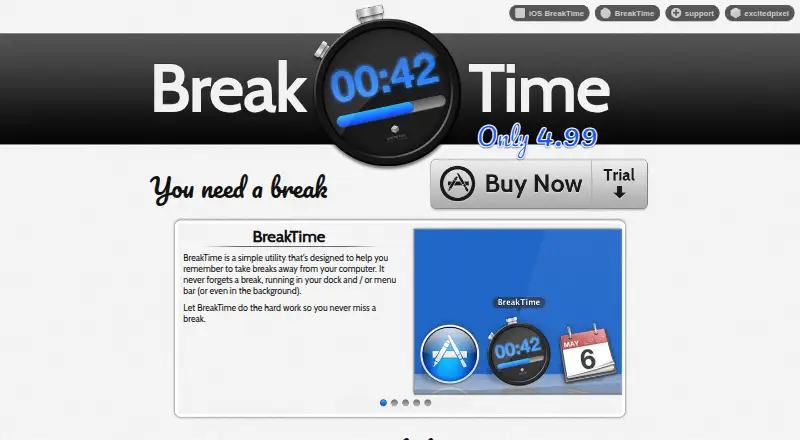
BreakTime is a break-reminder utility for Mac and iOS. It is designed for people who spend extended periods working, studying, reading, gaming, or otherwise using a computer or mobile device. The app schedules interruptions, provides a 10-second warning before breaks, and allows users to postpone or reschedule them. Its focus is narrower than a general time-management app: it helps structure pauses rather than manage tasks, calendars, or broader workflows.
The published plans show separate Mac and iOS offerings, with a starting price of 2.99 and no free plan. The Mac plan includes break reminders, postponement and rescheduling, optional enforced breaks, Magic Rescheduling, and status-bar access. The iOS plan includes reminders, postponement and rescheduling, plus Pie Control for touch-based changes. The standout feature is the choice between flexible reminders and optional enforcement: Mac users can restrict access to other applications during a break. Magic Rescheduling can also adjust break timing based on keyboard and mouse activity, making the schedule responsive to how the device is being used.
BreakTime fits users who want a dedicated break utility within the Apple ecosystem. Mac users also get AppleScript support and status-bar controls, while iOS users get touch-based rescheduling through Pie Control. The platform coverage is limited to macOS and iOS, so it is not suited to people who need a cross-platform break system. The Mac listing shows version 2.5.2 from 2015 and requires macOS 10.7 or later, which is an important consideration when evaluating current compatibility. Choose BreakTime for scheduled or enforced breaks on Apple devices; choose a broader time-management app if you need task planning, calendar coordination, or wider platform support.
Your product? Our editors can test BreakTime in depth and publish a review, labelled as paid · from $149/mo →
BreakTime pricing
All 2 BreakTime plans and prices →
BreakTime fact sheet
| Free plan | No |
|---|---|
| Paid from | Not verified |
| Time blocking | Not verified |
| Calendar sync | Not verified |
| Recurring tasks | Not verified |
| Task views | Not verified |
| Workload planning | Not verified |
| Review reports | Not verified |
| Supported platforms | macOS, iOS |
| Deployment | Desktop, Mobile |
| Platforms | macOS, iOS |
| Support | Email, Docs |
| Built for | Solo (editorial estimate) |
| Integrations | 1 integrations: AppleScript |
| Pricing | Paid (source) |
| Website | breaktimeapp.com |
| Facts checked | 23 Sep 2026 |
BreakTime integrations
BreakTime lists 1 integrations on its own site.
- AppleScript
Alternatives to BreakTime
- FlowSavvyA focused planner for turning deadlines and priorities into calendar time.9.3
- RoutineA cross-platform planner that combines time blocking, calendars, tasks, notes, and AI.9.2
- Reclaim AIA flexible AI scheduler with a free plan, team booking, and web-only access.9.1



See all BreakTime alternatives →
Used BreakTime? Be the first to review it
The editor score above is our own research. What this page doesn't have yet is a reader's view — what you used BreakTime for, what worked and what didn't. No stars are seeded and no review is paid for; an editor reads every one before it appears.
Write a reviewTwo minutes · verified accounts only · read by an editor before it appears
Featured on iTechGuides

BreakTime is listed in our Time Management Apps directory. Add the badge to your site — it links back to this page.
<a href="https://www.itechguides.com/products/breaktime/"><img src="https://www.itechguides.com/best/badge/breaktime.svg" alt="Featured on iTechGuides" width="230" height="46"></a>
Reviewed by iTechGuides Editors · Editorial team · Updated Oct 2026
Advertiser disclosure: iTechGuides is reader-supported. Vendors can pay for top positions in our rankings and for a place on other products' pages, and we may earn a commission when you click some links. Bought places stand at the number bought; this page and our disclosure say so. Paying vendors may get a fuller, more detailed review from our editors, and that review can change their score. How we rank.
Last updated · How we research and update