
BoardQ
BoardQ: A low-cost, web-based option for teams that need live rankings and sales contests. Ranked #16 of 42 in Sales Gamification Software by our editors (6.7/10); pricing: Free plan; best for small teams wanting low-cost leaderboard software.
At a glance
- Editor score6.7 / 10
- PricingFree plan
- Best forSmall teams wanting low-cost leaderboard software
- Free planYes
- Paid from$8.99/mo
- Sales contestsYes
- Facts checked21 Sep 2026
Where it wins
- Free plan includes real-time boards, themes, embeds, and exports
- Premium adds API access, Google Sheets, branding, and collaborators
- Supports contests, SPIFF tracking, custom KPIs, and CRM webhooks
Where it doesn't
- No native mobile app
- Feature scope is narrower than leading sales gamification suites
- Custom branding, API access, and Google Sheets start on paid tiers
Our verdict on BoardQ
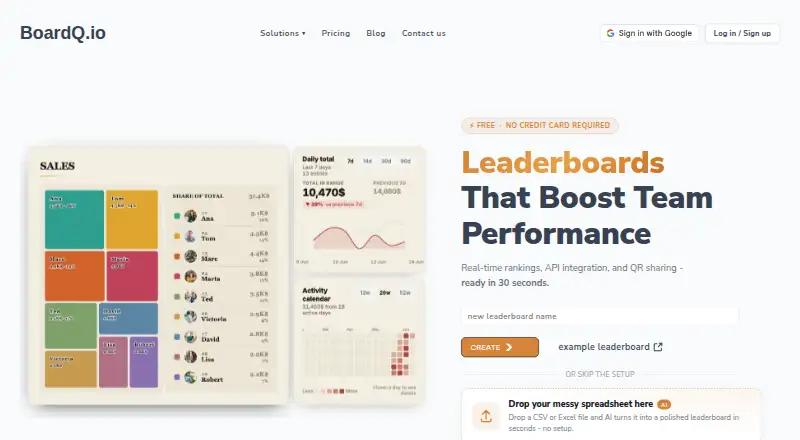
BoardQ is a web-based sales gamification product for sales managers, support teams, event organizers, educators, and other groups running competitions. Its core tools include real-time sales and KPI leaderboards, sales contests, SPIFF tracking, custom KPIs, QR-code sharing, password-protected boards, and displays for offices or multiple screens. Teams can track numeric measures such as revenue, deals, calls, and meetings without installing software or maintaining a manual spreadsheet. It is particularly suited to small teams that want a focused leaderboard product at a low monthly cost.
Pricing follows a freemium model. The Basic plan costs $0 per month and includes real-time updates, all themes, website embedding, CSV and Excel export, and email support. Premium costs $8.99 per month and adds custom branding, photo and camera uploads, REST API access, Google Sheets integration, and multiple collaborators. Enterprise costs $89 per month and includes the Premium feature set plus priority support 24/7. The paid tiers make BoardQ more suitable when teams need branded boards, shared administration, or automated score posting and reading.
BoardQ connects with HubSpot, Zendesk, Google Sheets, Salesforce, Pipedrive, Zapier, Make, Slack, Microsoft Teams, Notion, OpenAI, and Claude. CRM and help-desk webhook integrations, REST API access, and JSON-capable systems support flexible data flows, while website and intranet embedding, QR codes, and Office-TV displays help distribute rankings. The trade-off is a narrower feature set than leading suites and no native mobile app. Teams seeking straightforward, browser-based contests and rankings should consider BoardQ; organizations needing broader suite coverage or mobile apps should look elsewhere.
Questions about BoardQ
Does BoardQ have a free plan? Yes: the Basic plan is free; paid plans start at $8.99/mo (Premium).
How much does BoardQ cost? BoardQ lists 2 paid plans; the lowest is Premium at $8.99/mo.
What does BoardQ run on? Web. It runs in the cloud and as a browser extension.
What does BoardQ integrate with? 12 integrations, including HubSpot, Zendesk, Google Sheets, Salesforce and Pipedrive.
Who is BoardQ built for? Small businesses, mid-market companies and enterprises (our editorial estimate).
Your product? Our editors can test BoardQ in depth and publish a review, labelled as paid · from $149/mo →
BoardQ pricing
All 3 BoardQ plans and prices →
BoardQ fact sheet
| Free plan | Yes |
|---|---|
| Paid from | $8.99/mo |
| CRM integration | Yes |
| Sales contests | Yes |
| Leaderboards | Yes |
| Rewards and incentives | Yes |
| Leaderboard scope | Both |
| Mobile app | No |
| Deployment | Cloud, Browser extension |
| Platforms | Web |
| Support | Email, Docs · 24/7 |
| Built for | Small business, Mid-market, Enterprise (editorial estimate) |
| Integrations | 12 integrations: HubSpot, Zendesk, Google Sheets, Salesforce, Pipedrive, Zapier … See all → |
| Pricing | Free plan (source) |
| Website | boardq.io |
| Facts checked | 21 Sep 2026 |
BoardQ integrations
BoardQ lists 12 integrations on its own site.
- HubSpot
- Zendesk
- Google Sheets
- Salesforce
- Pipedrive
- Zapier
- Make
- Slack
- Microsoft Teams
- Notion
- OpenAI
- Claude
Alternatives to BoardQ
- SpinifyAdvanced competitions, coaching and reporting for enterprise sales teams.8.9
- SalesScreenA broad sales performance suite for teams pairing competitions with structured coaching.8.8
- Play2sell SalesOSA broad sales gamification suite for teams that want CRM workflows and incentive management together.8.6



Also Ranked In
BoardQ is ranked in 3 of our directories.
Used BoardQ? Be the first to review it
The editor score above is our own research. What this page doesn't have yet is a reader's view — what you used BoardQ for, what worked and what didn't. No stars are seeded and no review is paid for; an editor reads every one before it appears.
Write a reviewTwo minutes · verified accounts only · read by an editor before it appears
Featured on iTechGuides

BoardQ is listed in our Sales Gamification Software directory. Add the badge to your site — it links back to this page.
<a href="https://www.itechguides.com/products/boardq/"><img src="https://www.itechguides.com/best/badge/boardq.svg" alt="Featured on iTechGuides" width="230" height="46"></a>
Reviewed by iTechGuides Editors · Editorial team · Updated Nov 2026
Advertiser disclosure: iTechGuides is reader-supported. Vendors can pay for top positions in our rankings and for a place on other products' pages, and we may earn a commission when you click some links. Bought places stand at the number bought; this page and our disclosure say so. Paying vendors may get a fuller, more detailed review from our editors, and that review can change their score. How we rank.
Last updated · How we research and update