BatteryCare
BatteryCare: A focused free tool for tracking laptop battery health and Windows power behavior. Ranked #26 of 59 in Hardware Monitoring Software by our editors (6.3/10); pricing: Free plan; best for basic Windows laptop battery monitoring.
At a glance
- Editor score6.3 / 10
- PricingFree plan
- Best forBasic Windows laptop battery monitoring
- Free planYes
- Paid fromFree
- Facts checked22 Sep 2026
Where it wins
- Tracks battery cycles, wear, capacity, consumption, and remaining time
- Reads CPU and hard-drive temperatures alongside battery data
- Automates power-plan changes and battery calibration reminders
Where it doesn't
- Windows desktop software with compatibility through Windows 10
- Alerts are limited to notification balloons
- Focuses on laptop batteries rather than broader hardware monitoring
Our verdict on BatteryCare
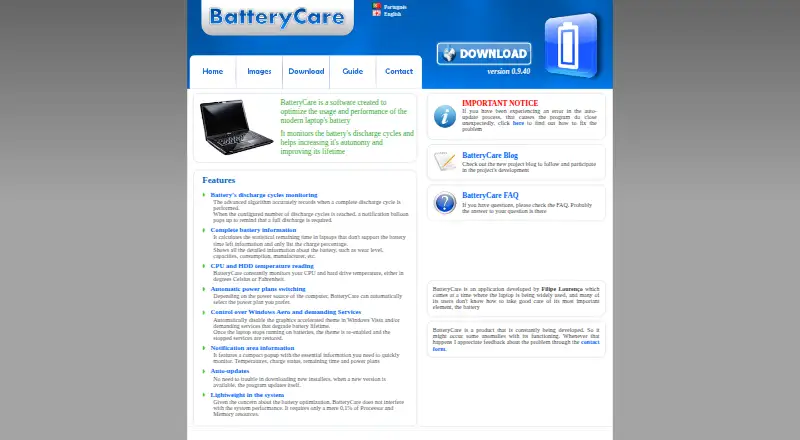
BatteryCare is a free Windows desktop application for laptop users who want clearer visibility into battery condition and power usage. It monitors discharge cycles, battery capacity, wear level, manufacturer, charge percentage, consumption, and estimated remaining time. It also shows battery status, temperatures, and active power plans in the notification area. Solo users and small teams managing individual Windows laptops are the clearest fit, particularly when battery health matters more than centralized device oversight.
The product’s strongest area is battery-focused monitoring. It provides calibration reminders, calculates statistical remaining battery time, and reads CPU and hard-drive temperatures. Its Windows integration goes beyond reporting: BatteryCare can automatically switch power plans according to the power source, disable Windows Aero, and disable selected demanding services while the device runs on battery power. Automatic updates, a downloadable installer, and a portable version support straightforward desktop distribution.
BatteryCare is free, with no paid tier described. That keeps the decision simple, but its scope is narrow. The supported environment is Windows desktop software, with compatibility listed through Windows 10, and alerts use notification balloons. The product is better suited to individual laptop maintenance than organizations seeking remote monitoring, centralized administration, sensor-history retention, device controls, or wider hardware coverage. Choose BatteryCare when battery cycles, wear, temperatures, and power-plan behavior are the main priorities; choose a broader hardware monitoring product when oversight across multiple devices or components is required.
Your product? Our editors can test BatteryCare in depth and publish a review, labelled as paid · from $149/mo →
BatteryCare pricing
BatteryCare fact sheet
| Free plan | Yes |
|---|---|
| Paid from | Free |
| Supported platforms | Windows XP, Vista, 7, 8, 10 |
| Remote monitoring | Not verified |
| Monitored device limit | Not verified |
| Sensor history | Not verified |
| Alert channels | notification balloon |
| Custom sensor support | Not verified |
| Deployment | Desktop |
| Platforms | Windows |
| Support | Docs |
| Built for | Solo, Small business (editorial estimate) |
| Pricing | Free plan |
| Website | batterycare.net |
| Facts checked | 22 Sep 2026 |
Alternatives to BatteryCare
- GlassmkrFree monitoring for Linux hardware, with hosted simplicity or self-hosted control.9.3
- Supermicro SuperDoctor 5A free, focused monitor for Supermicro server health, alerts, logs, and remote power control.9.2
- HWiNFOA deep Windows diagnostics suite for users who need detailed sensors, reports, and alerts.9.1

See all BatteryCare alternatives →
Used BatteryCare? Be the first to review it
The editor score above is our own research. What this page doesn't have yet is a reader's view — what you used BatteryCare for, what worked and what didn't. No stars are seeded and no review is paid for; an editor reads every one before it appears.
Write a reviewTwo minutes · verified accounts only · read by an editor before it appears
Featured on iTechGuides

BatteryCare is listed in our Hardware Monitoring Software directory. Add the badge to your site — it links back to this page.
<a href="https://www.itechguides.com/products/batterycare/"><img src="https://www.itechguides.com/best/badge/batterycare.svg" alt="Featured on iTechGuides" width="230" height="46"></a>
Reviewed by iTechGuides Editors · Editorial team · Updated Oct 2026
Advertiser disclosure: iTechGuides is reader-supported. Vendors can pay for top positions in our rankings and for a place on other products' pages, and we may earn a commission when you click some links. Bought places stand at the number bought; this page and our disclosure say so. Paying vendors may get a fuller, more detailed review from our editors, and that review can change their score. How we rank.
Last updated · How we research and update