
Batch File Renamer
Batch File Renamer: A local browser tool for building, validating, and exporting multi-step rename workflows. Ranked #24 of 31 in File Renaming Software by our editors (5.8/10); pricing: Open source; best for browser-based rename pipelines.
At a glance
- Editor score5.8 / 10
- PricingOpen source
- Best forBrowser-based rename pipelines
- Paid fromFree
- Regex renamingYes
- Facts checked22 Sep 2026
Where it wins
- Ordered pipelines combine regex, numbering, dates, and case changes.
- Live previews show proposed names and validation status before export.
- ZIP export preserves originals while delivering renamed copies.
Where it doesn't
- It exports renamed copies instead of modifying files directly.
- Undo and redo cover operation changes, not completed renames.
- Browser-based workflows may not suit direct filesystem renaming needs.
Our verdict on Batch File Renamer
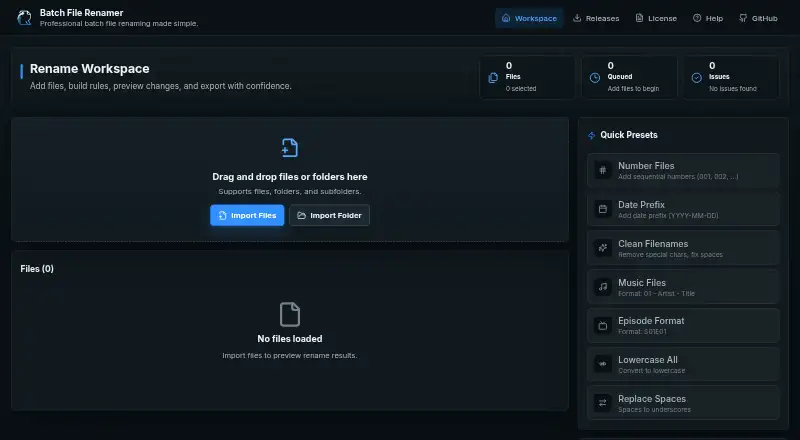
Batch File Renamer is an open-source, client-side web application for renaming multiple files in a browser. It is aimed at people who need repeatable rename workflows without directly changing their original files. Users can import individual files or folders, arrange rename operations by drag and drop, review proposed names, and export selected renamed copies as a ZIP archive. The feature set covers regular-expression replacement, numbering, date and time insertion, case conversion, extension changes, presets, and operation history.
Its standout capability is the ordered rename pipeline. Multiple operations can be combined and reordered, allowing a workflow to apply transformations in a defined sequence rather than relying on one broad rename action. Live preview and validation status provide a checkpoint before export, while built-in and custom presets support recurring naming patterns. Undo and redo apply to changes made to the operation pipeline, which helps refine a workflow before producing the output archive.
The local browser model keeps original files unchanged and makes the output model clear: Batch File Renamer creates renamed copies and packages selected results as a ZIP. That suits users who want a reviewable, reversible preparation step or need to share a completed archive. It is less suitable for workflows that require direct renaming on the filesystem, completed-rename undo, or a desktop-native process. Choose it for browser-based, pipeline-oriented batch renaming; choose another tool when direct file operations are central to the workflow.
Your product? Our editors can test Batch File Renamer in depth and publish a review, labelled as paid · from $149/mo →
Batch File Renamer pricing
Batch File Renamer fact sheet
| Free plan | Not verified |
|---|---|
| Paid from | Free |
| Platform coverage | Windows_only |
| Regex renaming | Yes |
| Metadata-based renaming | Yes |
| Rename preview | Yes |
| Folder renaming | No |
| Undo changes | No |
| Deployment | Cloud, Self-hosted |
| Platforms | Web |
| Support | Community, Docs |
| Built for | Solo, Small business (editorial estimate) |
| Pricing | Open source |
| Website | berndhagen.github.io |
| Facts checked | 22 Sep 2026 |
Alternatives to Batch File Renamer
- KRenameA capable free Linux renamer for expressions, metadata, folders, and undo.9.0
- Bulk Rename UtilityA feature-rich Windows renamer for precise batch operations, scripting, and metadata rules.8.9
- Name ManglerA focused Mac renamer with advanced rules, previews, reversal, and Dropbox or Box support.8.4



See all Batch File Renamer alternatives →
Used Batch File Renamer? Be the first to review it
The editor score above is our own research. What this page doesn't have yet is a reader's view — what you used Batch File Renamer for, what worked and what didn't. No stars are seeded and no review is paid for; an editor reads every one before it appears.
Write a reviewTwo minutes · verified accounts only · read by an editor before it appears
Featured on iTechGuides

Batch File Renamer is listed in our File Renaming Software directory. Add the badge to your site — it links back to this page.
<a href="https://www.itechguides.com/products/batch-file-renamer/"><img src="https://www.itechguides.com/best/badge/batch-file-renamer.svg" alt="Featured on iTechGuides" width="230" height="46"></a>
Reviewed by iTechGuides Editors · Editorial team · Updated Oct 2026
Advertiser disclosure: iTechGuides is reader-supported. Vendors can pay for top positions in our rankings and for a place on other products' pages, and we may earn a commission when you click some links. Bought places stand at the number bought; this page and our disclosure say so. Paying vendors may get a fuller, more detailed review from our editors, and that review can change their score. How we rank.
Last updated · How we research and update