
Backuptrans Android iPhone Data Transfer+
Backuptrans Android iPhone Data Transfer+: A Windows utility for phone transfers, computer backups, and message or contact exports. Ranked #26 of 44 in Phone Transfer Software by our editors (6.8/10); pricing: Paid; best for computer-based Android-iPhone data archiving.
At a glance
- Editor score6.8 / 10
- PricingPaid
- Best forComputer-based Android-iPhone data archiving
- Free planNo
- Paid from$79.95/yr
- Mobile OS supportBoth
- Facts checked21 Sep 2026
Where it wins
- Direct Android-to-iPhone and iPhone-to-Android transfers
- Computer backup, restore, and iTunes backup transfer
- Exports and prints messages and contacts in multiple formats
Where it doesn't
- Windows-only desktop software
- No free plan
- Personal license does not include verified app transfer
Our verdict on Backuptrans Android iPhone Data Transfer+
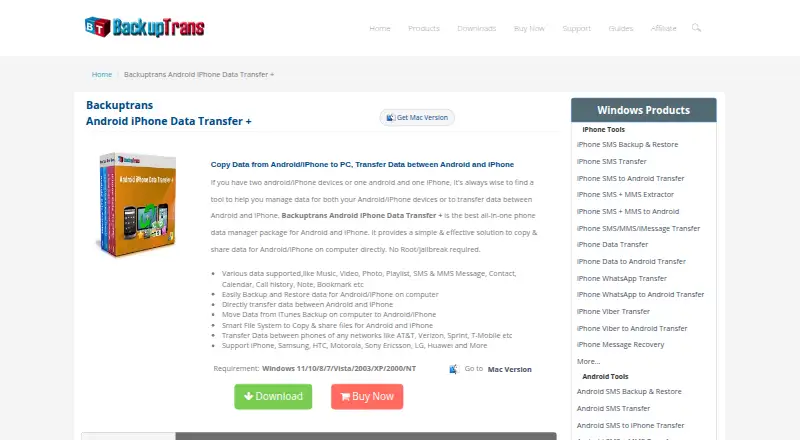
Backuptrans Android iPhone Data Transfer+ is a Windows desktop utility for moving data between Android phones, iPhones, and a computer. It is suited to people who want direct phone-to-phone transfers alongside computer-based backup, restore, archiving, contact management, and document output. Supported data types include photos, music, videos, messages, contacts, calendars, call history, bookmarks, and other listed phone data. A wireless Android-to-computer connection is also available.
Pricing is license-based rather than subscription-based for the Personal and Family editions. The Personal Edition costs $39.95 one time and includes a lifetime license. The Family Edition costs $59.95 one time, includes a lifetime license, and can be installed on family Windows computers. The Business Edition costs $79.95 per year and includes a one-year license for company Windows computers. The paid plans provide a clear choice between individual, family, and company installation, while the Personal Edition does not include verified app transfer.
Its strongest fit is archival and records work: users can back up and restore phone data on a computer, transfer data from iTunes backups, copy and share file-system data, and export messages or contacts to TXT, CSV, DOC, VCF, HTML, or PDF. Contacts can also be added, edited, or deleted on a PC, and messages and contacts can be printed. Choose it if Windows-based transfer and documentation matter more than mobile or cross-platform access. Choose an alternative if you need software for another desktop operating system or require verified app transfer in the personal license.
Backuptrans Android iPhone Data Transfer+ pricing
All 3 Backuptrans Android iPhone Data Transfer+ plans and prices →
Backuptrans Android iPhone Data Transfer+ fact sheet
| Free plan | No |
|---|---|
| Paid from | $79.95/yr |
| Mobile OS support | Both |
| Phone-to-phone transfer | Yes |
| Phone-to-computer transfer | Yes |
| App transfer | Not verified |
| Computer backup | Yes |
| Devices per license | 3 devices |
| Money-back guarantee | 30 days |
| Deployment | Desktop |
| Platforms | Windows |
| Support | Email · 24/7 |
| Built for | Solo, Small business, Mid-market (editorial estimate) |
| Integrations | 1 integrations: iTunes |
| Pricing | Paid (source) |
| Website | backuptrans.com |
| Facts checked | 21 Sep 2026 |
Backuptrans Android iPhone Data Transfer+ integrations
Backuptrans Android iPhone Data Transfer+ lists 1 integrations on its own site.
- iTunes
Alternatives to Backuptrans Android iPhone Data Transfer+
- Samsung Smart SwitchA free transfer and backup utility for moving data into Samsung Galaxy devices.9.4
- vivo EasyShareA free migration tool for moving phone data across Android, iOS, Windows, and macOS.9.3
- Wondershare MobileTransA paid transfer suite for phones, computers, backups, apps, and messaging data.9.2


See all Backuptrans Android iPhone Data Transfer+ alternatives →
Used Backuptrans Android iPhone Data Transfer+? Be the first to review it
The editor score above is our own research. What this page doesn't have yet is a reader's view — what you used Backuptrans Android iPhone Data Transfer+ for, what worked and what didn't. No stars are seeded and no review is paid for; an editor reads every one before it appears.
Write a reviewTwo minutes · verified accounts only · read by an editor before it appears
Featured on iTechGuides

Backuptrans Android iPhone Data Transfer+ is listed in our Phone Transfer Software directory. Add the badge to your site — it links back to this page.
<a href="https://www.itechguides.com/products/backuptrans-android-iphone-data-transfer/"><img src="https://www.itechguides.com/best/badge/backuptrans-android-iphone-data-transfer.svg" alt="Featured on iTechGuides" width="230" height="46"></a>
Reviewed by iTechGuides Editors · Editorial team · Updated Oct 2026
Advertiser disclosure: iTechGuides is reader-supported. Vendors can pay for top positions in our rankings and for a place on other products' pages, and we may earn a commission when you click some links. Bought places stand at the number bought; this page and our disclosure say so. Paying vendors may get a fuller, more detailed review from our editors, and that review can change their score. How we rank.
Last updated · How we research and update