
Audiograbber
Audiograbber: A focused Windows tool for CD extraction and recording vinyl or cassettes. Ranked #24 of 36 in Audio Converter Software by our editors (7.0/10); pricing: Free plan; best for windows CD extraction and analog recording.
At a glance
- Editor score7.0 / 10
- PricingFree plan
- Best forWindows CD extraction and analog recording
- Free planYes
- Facts checked22 Sep 2026
Where it wins
- Extracts CD audio and converts to MP3 or Ogg Vorbis
- Records analog sources such as vinyl records and cassettes
- Adds ID3 tags and retrieves CD data through GnuDB
Where it doesn't
- Windows-only desktop software
- Batch conversion is not listed
- The free edition is ad-supported
Our verdict on Audiograbber
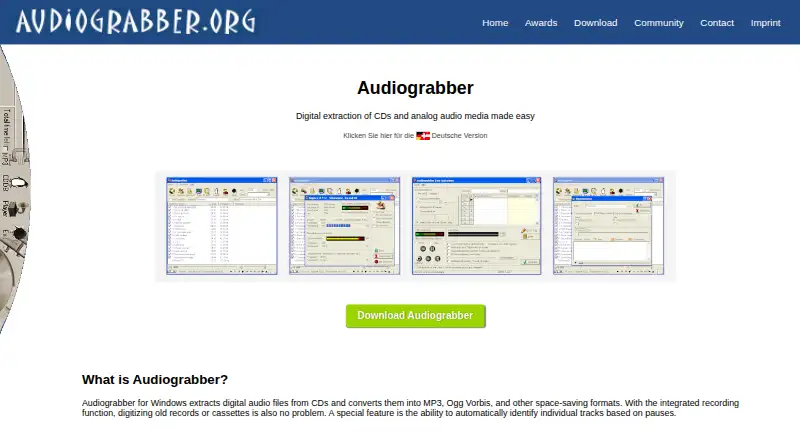
Audiograbber is Windows desktop software for extracting audio from CDs, converting audio, and recording analog sources such as vinyl records and cassettes. It suits listeners digitizing physical collections or managing straightforward audio transfers on a Windows computer. The software supports MP3 and Ogg Vorbis conversion, with WAV, WMA, and PCM also included among its supported formats. Its feature set centers on local audio work rather than cloud conversion, with controls for MP3 bitrate, variable bitrate, and Ogg Vorbis quality.
For CD workflows, Audiograbber combines automatic track detection based on pauses with automatic ID3 tagging and GnuDB lookup for CD information. That gives it a practical focus on turning discs into organized digital files without making metadata entry the main task. Analog recording extends the use case beyond CD extraction, covering cassette and vinyl transfers. The published features emphasize individual source handling and format-quality controls, while batch conversion is not listed, so users with large conversion queues may prefer a broader tool.
Audiograbber uses a freemium model. The Audiograbber edition is a free download with advertising, while Audiograbber Pro costs €9.90 as a one-time purchase and adds an ad-free experience. Both editions are positioned around the same Windows-based workflow, with Pro's stated difference focused on removing ads rather than expanding the listed audio features. Choose Audiograbber for focused CD ripping, analog recording, tagging, and encoder controls on Windows. Look elsewhere if you need cloud conversion, a wider verified conversion workflow, or listed batch-processing capabilities.
Your product? Our editors can test Audiograbber in depth and publish a review, labelled as paid · from $99/mo →
Audiograbber pricing
All 2 Audiograbber plans and prices →
Audiograbber fact sheet
| Free plan | Yes |
|---|---|
| Paid from | Not verified |
| Batch conversion | Not verified |
| Supported formats | MP3, Ogg Vorbis, WAV, WMA, PCM |
| Quality controls | Yes |
| Metadata editing | Yes |
| CD ripping | Yes |
| Cloud conversion | No |
| Deployment | Desktop |
| Platforms | Windows |
| Support | Email, Community, Docs |
| Built for | Solo, Small business (editorial estimate) |
| Integrations | 1 integrations: GnuDB |
| Pricing | Free plan (source) |
| Website | audiograbber.org |
| Facts checked | 22 Sep 2026 |
Audiograbber integrations
Audiograbber lists 1 integrations on its own site.
- GnuDB
Alternatives to Audiograbber
- fre:acA capable free desktop converter for cross-platform library management and CD ripping.9.4
- MediaHuman Audio ConverterA capable free converter for batch jobs, metadata handling, and everyday library exports.9.2
- X Lossless DecoderA free macOS tool for accurate lossless conversion, ripping, tagging, and batch processing.9.1

See all Audiograbber alternatives →
Also Ranked In
Audiograbber is ranked in 2 of our directories.
Used Audiograbber? Be the first to review it
The editor score above is our own research. What this page doesn't have yet is a reader's view — what you used Audiograbber for, what worked and what didn't. No stars are seeded and no review is paid for; an editor reads every one before it appears.
Write a reviewTwo minutes · verified accounts only · read by an editor before it appears
Featured on iTechGuides

Audiograbber is listed in our Audio Converter Software directory. Add the badge to your site — it links back to this page.
<a href="https://www.itechguides.com/products/audiograbber/"><img src="https://www.itechguides.com/best/badge/audiograbber.svg" alt="Featured on iTechGuides" width="230" height="46"></a>
Guides on audio converter software
- 12 Best Free Audio Converter Software for Windows 11Aug 2026
- 10 Best Free Audio Converter Tools (Online & Offline)Aug 2026
- 7 Best Free Audio Converter Software Programs in 2026Aug 2026
Reviewed by iTechGuides Editors · Editorial team · Updated Oct 2026
Advertiser disclosure: iTechGuides is reader-supported. Vendors can pay for top positions in our rankings and for a place on other products' pages, and we may earn a commission when you click some links. Bought places stand at the number bought; this page and our disclosure say so. Paying vendors may get a fuller, more detailed review from our editors, and that review can change their score. How we rank.
Last updated · How we research and update