
fre:ac
fre:ac: A capable free desktop converter for cross-platform library management and CD ripping. Ranked #1 of 36 in Audio Converter Software by our editors (9.4/10); pricing: Free plan; best for free cross-platform library conversion.
At a glance
- Editor score9.4 / 10
- PricingFree plan
- Best forFree cross-platform library conversion
- Free planYes
- Paid fromFree
- Batch conversionYes
- Facts checked21 Sep 2026
Where it wins
- Free, open-source access on Windows, macOS and Linux
- Batch and whole-library conversion with folder and filename preservation
- CD ripping with GNUdb metadata lookup and tag editing
Where it doesn't
- Desktop software without cloud conversion
- GNUdb is the listed external integration
- Focused on conversion and ripping rather than wider audio production
Our verdict on fre:ac
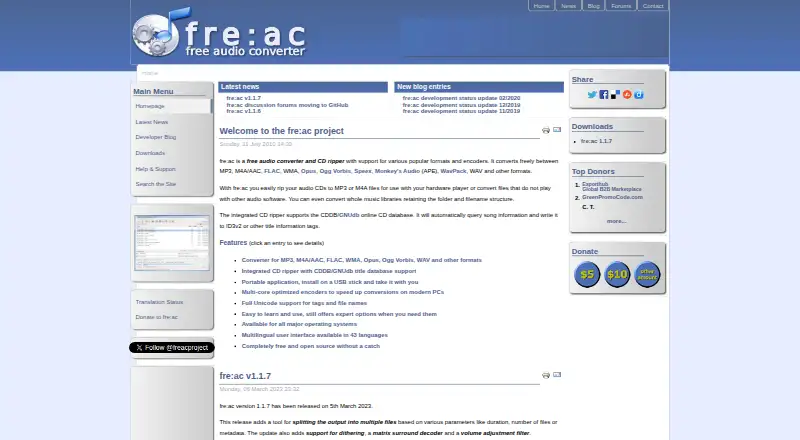
fre:ac is a free, open-source desktop application for converting audio files between supported formats and ripping audio CDs. It is suited to people managing music libraries across Windows, macOS and Linux, especially those who want batch processing, metadata tools and control over output files without a paid tier. Supported formats include MP3, M4A/AAC, FLAC, WMA, Opus, Ogg Vorbis, Speex, Monkey’s Audio, WavPack and WAV. Additional FreeBSD and Haiku builds are also described for the application.
Library conversion is a central strength. fre:ac can process an entire collection while preserving folder and filename structures, edit tags and metadata, and split output by duration, file count or metadata. Multi-core encoding and parallel processing support larger conversion jobs, while dithering and volume-adjustment processing add control over output handling. Quality controls are part of the category feature set, making the application suitable for users who need more than a basic one-file format change.
CD workflows are another clear focus. Integrated ripping can query GNUdb for metadata during the process, and users can then edit tags before or after conversion. The application remains a desktop tool rather than a cloud conversion service, and GNUdb is the listed external integration. Choose fre:ac for free, cross-platform conversion, whole-library processing and CD ripping. It is less suited to buyers seeking a cloud-based workflow or a broader audio production environment.
Your product? Our editors can test fre:ac in depth and publish a review, labelled as paid · from $149/mo →
fre:ac pricing
fre:ac fact sheet
| Free plan | Yes |
|---|---|
| Paid from | Free |
| Batch conversion | Yes |
| Supported formats | MP3, M4A/AAC, FLAC, WMA, Opus, Ogg Vorbis, Speex, Monkey's Audio (APE), WavPack, WAV |
| Quality controls | Yes |
| Metadata editing | Yes |
| CD ripping | Yes |
| Cloud conversion | No |
| Deployment | Desktop |
| Platforms | Windows, macOS, Linux |
| Support | Email, Community, Docs |
| Built for | Solo, Small business (editorial estimate) |
| Integrations | 1 integrations: GNUdb |
| Pricing | Free plan |
| Website | freac.org |
| Facts checked | 21 Sep 2026 |
fre:ac integrations
fre:ac lists 1 integrations on its own site.
- GNUdb
Alternatives to fre:ac
- MediaHuman Audio ConverterA capable free converter for batch jobs, metadata handling, and everyday library exports.9.2
- X Lossless DecoderA free macOS tool for accurate lossless conversion, ripping, tagging, and batch processing.9.1
- CUEToolsA free, open-source choice for verified lossless conversion and archival workflows.9.0

fre:ac vs the competition
- fre:ac vs MediaHuman Audio Converter
- fre:ac vs X Lossless Decoder
- fre:ac vs CUETools
- fre:ac vs dBpoweramp Music Converter
- fre:ac vs XRECODE3
- fre:ac vs EZ CD Audio Converter

Compare fre:ac with any tool side by side →
Also Ranked In
fre:ac is ranked in 2 of our directories.
Used fre:ac? Be the first to review it
The editor score above is our own research. What this page doesn't have yet is a reader's view — what you used fre:ac for, what worked and what didn't. No stars are seeded and no review is paid for; an editor reads every one before it appears.
Write a reviewTwo minutes · verified accounts only · read by an editor before it appears
Featured on iTechGuides

fre:ac is listed in our Audio Converter Software directory. Add the badge to your site — it links back to this page.
<a href="https://www.itechguides.com/products/fre-ac/"><img src="https://www.itechguides.com/best/badge/fre-ac.svg" alt="Featured on iTechGuides" width="230" height="46"></a>
Reviewed by iTechGuides Editors · Editorial team · Updated Oct 2026
Advertiser disclosure: iTechGuides is reader-supported. Vendors can pay for top positions in our rankings and for a place on other products' pages, and we may earn a commission when you click some links. Bought places stand at the number bought; this page and our disclosure say so. Paying vendors may get a fuller, more detailed review from our editors, and that review can change their score. How we rank.
Last updated · How we research and update