
Ariolic Disk Scanner
Ariolic Disk Scanner: A focused, portable scanner for locating and visualizing bad sectors. Ranked #15 of 26 in Disk Diagnostic Software by our editors (7.3/10); pricing: Free plan; best for simple free bad-sector scanning.
At a glance
- Editor score7.3 / 10
- PricingFree plan
- Best forSimple free bad-sector scanning
- Free planYes
- Paid fromFree
- PlatformWindows
- Facts checked20 Sep 2026
Where it wins
- Scans every sector without writing to the disk
- Visualizes bad sectors and identifies affected files
- Portable support for FAT, NTFS, and external media
Where it doesn't
- Windows only
- Read-only scanning does not perform write tests
- Focused on scanning rather than ongoing disk monitoring
Our verdict on Ariolic Disk Scanner
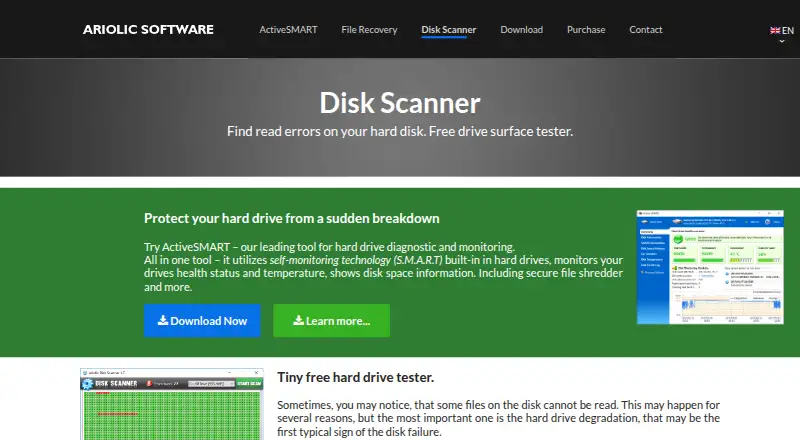
Ariolic Disk Scanner is a free, portable Windows utility for checking internal and external storage media for read errors. It is intended for everyday users who want to inspect hard drives, USB devices, memory cards, or optical discs without installing software. The tool scans every disk sector, marks unreadable or bad sectors visually, and identifies affected files or file parts. FAT and NTFS file systems are supported, making it suitable for straightforward checks across commonly used Windows storage media.
The Free plan includes read-only disk scanning, bad-sector visualization, affected-file identification, and portable operation. Its standout capability is the combination of sector-by-sector scanning and file impact information: users can see where read errors occur and which files or file parts may be affected. Because the scan does not write to the disk, it is focused on detecting read problems rather than changing or repairing storage contents. That narrow scope keeps the product centered on diagnosis.
Portable operation without installation reduces setup effort, particularly when checking removable media or running a scan from a Windows environment where installing utilities is undesirable. The main limitation is coverage: Ariolic Disk Scanner is Windows-only and does not provide a read-write test or ongoing monitoring. Choose it when the priority is a simple, free surface scan for possible bad sectors and related file impact. Consider a broader disk diagnostic tool instead when you need write testing, continuous health monitoring, or capabilities beyond read-error detection.
Your product? Our editors can test Ariolic Disk Scanner in depth and publish a review, labelled as paid · from $149/mo →
Ariolic Disk Scanner pricing
All 1 Ariolic Disk Scanner plans and prices →
Ariolic Disk Scanner fact sheet
| Free plan | Yes |
|---|---|
| Paid from | Free |
| Bad-sector scan | Yes |
| Read/write testing | No |
| Surface scan | Yes |
| Bootable media | Not verified |
| Platform | Windows |
| SMART tests | Not verified |
| Maximum drive size | Not verified |
| Deployment | Desktop |
| Platforms | Windows |
| Built for | Solo, Small business (editorial estimate) |
| Pricing | Free plan (source) |
| Website | ariolic.com |
| Facts checked | 20 Sep 2026 |
Alternatives to Ariolic Disk Scanner
- DiskMasterA free, open-source diagnostic suite for monitoring and investigating drive health.9.4
- Hard Disk SentinelA broad disk-monitoring suite with free access and paid features for deeper diagnostics and management.9.2
- smartmontoolsA free, cross-platform SMART toolkit for technically proficient administrators.9.0

See all Ariolic Disk Scanner alternatives →
Used Ariolic Disk Scanner? Be the first to review it
The editor score above is our own research. What this page doesn't have yet is a reader's view — what you used Ariolic Disk Scanner for, what worked and what didn't. No stars are seeded and no review is paid for; an editor reads every one before it appears.
Write a reviewTwo minutes · verified accounts only · read by an editor before it appears
Featured on iTechGuides

Ariolic Disk Scanner is listed in our Disk Diagnostic Software directory. Add the badge to your site — it links back to this page.
<a href="https://www.itechguides.com/products/ariolic-disk-scanner/"><img src="https://www.itechguides.com/best/badge/ariolic-disk-scanner.svg" alt="Featured on iTechGuides" width="230" height="46"></a>
Reviewed by iTechGuides Editors · Editorial team · Updated Oct 2026
Advertiser disclosure: iTechGuides is reader-supported. Vendors can pay for top positions in our rankings and for a place on other products' pages, and we may earn a commission when you click some links. Bought places stand at the number bought; this page and our disclosure say so. Paying vendors may get a fuller, more detailed review from our editors, and that review can change their score. How we rank.
Last updated · How we research and update