
Anchor
Anchor: A private, focused iPhone planner for flexible time blocking and offline use. Ranked #31 of 31 in Time Blocking Apps by our editors (6.1/10); pricing: Freemium; best for private offline iPhone time blocking.
At a glance
- Editor score6.1 / 10
- PricingFreemium
- Best forPrivate offline iPhone time blocking
- Facts checked21 Sep 2026
Where it wins
- Flexible focus blocks can move when plans change
- Offline operation with on-device data storage
- Apple Calendar, Reminders, Siri, widgets, and Live Activity support
Where it doesn't
- Available for iOS rather than desktop platforms
- Focused on Apple ecosystem integrations
- Paid plan pricing varies by region
Our verdict on Anchor
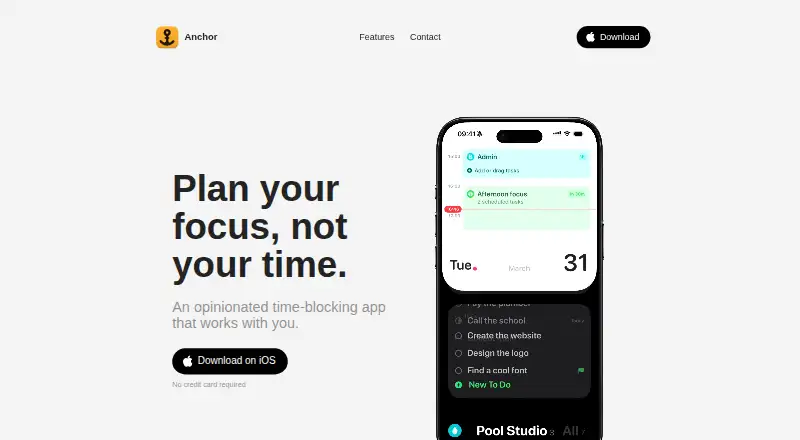
Anchor is a time-blocking and daily-planning app for people who prefer organizing work around flexible focus blocks instead of assigning every task an exact time. It supports task capture, Smart Dates, repeating time blocks, calendar and reminder synchronization, and tools for carrying unfinished work forward when plans change. The product is positioned for freelancers, founders, parents, and students who want an iPhone-based planning system with offline operation and on-device data storage.
Its strongest fit is the Apple ecosystem. Anchor connects with Apple Calendar and Apple Reminders, while Siri shortcuts support hands-free task capture or planning workflows. Widgets and Live Activity keep scheduled information visible from the iPhone interface, and Focus mode adds distraction shielding during planned work periods. These features make Anchor more suitable for users already relying on Apple’s calendar, reminders, and voice-assistant tools than for people seeking broad third-party integrations.
Anchor’s scope is deliberately narrow: flexible time blocking, daily planning, and focus support on iPhone. The published offering includes a freemium model with Super Anchor Monthly, Super Anchor Yearly, and Super Anchor Lifetime plans; the listed starting price is 2.99, with regional variation possible. It should appeal to buyers who value privacy-oriented offline planning, repeating blocks, and a focused mobile workflow. Choose an alternative if desktop coverage, cross-platform access, or a wider integration ecosystem is essential.
Your product? Our editors can test Anchor in depth and publish a review, labelled as paid · from $149/mo →
Anchor pricing
All 3 Anchor plans and prices →
Anchor fact sheet
| Free plan | Not verified |
|---|---|
| Paid from | Not verified |
| Calendar sync | Yes |
| Task management | Yes |
| Recurring time blocks | Yes |
| Automatic scheduling | Not verified |
| Desktop apps | No |
| Mobile apps | Yes |
| Deployment | Cloud, Mobile |
| Platforms | iOS |
| Built for | Solo, Small business (editorial estimate) |
| Integrations | 3 integrations: Apple Calendar, Apple Reminders, Siri |
| Pricing | Freemium (source) |
| Website | tryanchor.app |
| Facts checked | 21 Sep 2026 |
Anchor integrations
Anchor lists 3 integrations on its own site.
- Apple Calendar
- Apple Reminders
- Siri
Alternatives to Anchor
- FlowSavvyA flexible time-blocking app for automatic planning across major calendars.9.4
- RoutineA paid cross-platform planner that combines time blocking with calendars, tasks, and notes.9.2
- Trevor AIA focused time-blocking planner with AI scheduling, calendar sync, and a free tier.9.0



Used Anchor? Be the first to review it
The editor score above is our own research. What this page doesn't have yet is a reader's view — what you used Anchor for, what worked and what didn't. No stars are seeded and no review is paid for; an editor reads every one before it appears.
Write a reviewTwo minutes · verified accounts only · read by an editor before it appears
Featured on iTechGuides

Anchor is listed in our Time Blocking Apps directory. Add the badge to your site — it links back to this page.
<a href="https://www.itechguides.com/products/anchor-time-blocking-app/"><img src="https://www.itechguides.com/best/badge/anchor-time-blocking-app.svg" alt="Featured on iTechGuides" width="230" height="46"></a>
Reviewed by iTechGuides Editors · Editorial team · Updated Oct 2026
Advertiser disclosure: iTechGuides is reader-supported. Vendors can pay for top positions in our rankings and for a place on other products' pages, and we may earn a commission when you click some links. Bought places stand at the number bought; this page and our disclosure say so. Paying vendors may get a fuller, more detailed review from our editors, and that review can change their score. How we rank.
Last updated · How we research and update