
AlterCam
AlterCam: A feature-rich Windows virtual webcam suite with paid plans and broad scene controls. Ranked #19 of 34 in Virtual Camera Software by our editors (7.0/10); pricing: Paid; best for windows users wanting a traditional virtual webcam suite.
At a glance
- Editor score7.0 / 10
- PricingPaid
- Best forWindows users wanting a traditional virtual webcam suite
- Free planNo
- Paid from$29.95/yr
- Scene compositionYes
- Founded2003 · Seattle, Washington, USA
- Facts checked20 Sep 2026
Where it wins
- Kernel-mode virtual webcam supports many webcam-enabled applications
- Scenes combine video sources, effects, backgrounds, overlays, and text
- Audio tools include voice changing, noise suppression, and normalization
Where it doesn't
- Windows-only coverage limits platform flexibility
- No free plan is available
- Business pricing is substantially higher than Single licensing
Our verdict on AlterCam
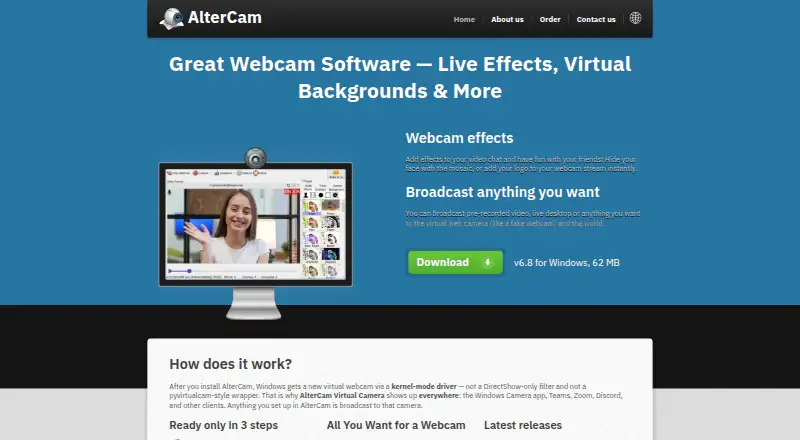
AlterCam is Windows desktop software that creates a virtual webcam for Camera, Microsoft Teams, Zoom, Discord, OBS, Skype, web browsers, and other webcam-enabled clients. It is aimed at users who want more than a basic camera feed, including virtual backgrounds, live effects, scene switching, overlays, desktop broadcasting, recording, and audio processing. Its traditional virtual webcam approach suits Windows users who want to compose and route camera content across multiple applications.
Pricing is divided into Single and Business licensing. Single · 1 year costs $29.95 per year and includes a Home license, free updates, and activation on up to 2 computers. Single · Forever costs $59.95 as a one-time purchase with the same Home license, free updates, and activation on up to 2 computers. Business · 1 year costs $480 per year and adds Commercial use, Unlimited activations, and Priority support. Business · Forever costs $980 as a one-time purchase and includes Commercial use and Unlimited activations. The structure gives home users a lower-cost entry point, while commercial teams pay for business rights and broader activation terms.
AlterCam’s standout strength is breadth within the virtual-camera workflow. It can broadcast live camera feeds, video files, desktop content, windows, IP-camera content, images, and text overlays, then combine them into switchable scenes. It also supports chroma key, automatic background detection, snapshots, recording, voice changing, noise suppression, and volume normalization. One camera feed can be shared with multiple applications, which fits users moving between conferencing, streaming, and browser-based tools. Choose AlterCam if you need a Windows-focused suite with composition and audio controls; choose another option if cross-platform coverage or a free plan is essential.
Your product? Our editors can test AlterCam in depth and publish a review, labelled as paid · from $149/mo →
AlterCam pricing
All 4 AlterCam plans and prices →
AlterCam fact sheet
| Free plan | No |
|---|---|
| Paid from | $29.95/yr |
| Supported platforms | Windows |
| Camera inputs | Not verified |
| Scene composition | Yes |
| Background effects | Yes |
| Virtual camera outputs | Not verified |
| Audio routing | Yes |
| Money-back guarantee | 30 days |
| Deployment | Desktop |
| Platforms | Windows |
| Support | Email, Docs |
| Built for | Solo, Small business, Mid-market (editorial estimate) |
| Integrations | 7 integrations: Windows Camera, Microsoft Teams, Zoom, Discord, OBS, Skype … |
| Pricing | Paid (source) |
| Website | altercam.com |
| Facts checked | 20 Sep 2026 |
AlterCam integrations
AlterCam lists 7 integrations on its own site.
- Windows Camera
- Microsoft Teams
- Zoom
- Discord
- OBS
- Skype
- Web browsers
Alternatives to AlterCam
- NVIDIA BroadcastA free RTX-powered virtual camera suite for cleaner calls, streams, and recordings.9.3
- ManyCamA broad virtual camera toolkit for teams mixing video, audio, scenes, and streaming.8.8
- OBS StudioA flexible free production tool for creators who want extensible desktop scenes.8.7



See all AlterCam alternatives →
Also Ranked In
AlterCam is ranked in 3 of our directories.
Used AlterCam? Be the first to review it
The editor score above is our own research. What this page doesn't have yet is a reader's view — what you used AlterCam for, what worked and what didn't. No stars are seeded and no review is paid for; an editor reads every one before it appears.
Write a reviewTwo minutes · verified accounts only · read by an editor before it appears
Featured on iTechGuides

AlterCam is listed in our Virtual Camera Software directory. Add the badge to your site — it links back to this page.
<a href="https://www.itechguides.com/products/altercam/"><img src="https://www.itechguides.com/best/badge/altercam.svg" alt="Featured on iTechGuides" width="230" height="46"></a>
Reviewed by iTechGuides Editors · Editorial team · Updated Oct 2026
Advertiser disclosure: iTechGuides is reader-supported. Vendors can pay for top positions in our rankings and for a place on other products' pages, and we may earn a commission when you click some links. Bought places stand at the number bought; this page and our disclosure say so. Paying vendors may get a fuller, more detailed review from our editors, and that review can change their score. How we rank.
Last updated · How we research and update