
AltDisplay
AltDisplay: A focused browser meeting tool for small groups that need annotation and recording. Ranked #26 of 30 in Screen Sharing Software by our editors (6.3/10); pricing: Paid; best for small browser meetings with annotation.
At a glance
- Editor score6.3 / 10
- PricingPaid
- Best forSmall browser meetings with annotation
- Paid from$9.99/mo
- Maximum participants5 participants
- Facts checked20 Sep 2026
Where it wins
- Share an entire screen, window, or browser tab
- Whiteboard drawing and annotation support
- Email, SMS, and direct-link invitations
Where it doesn't
- Basic meetings are limited to 30 minutes
- Mobile browsers can join but cannot host sessions
- Professional plan pricing is not shown
Our verdict on AltDisplay
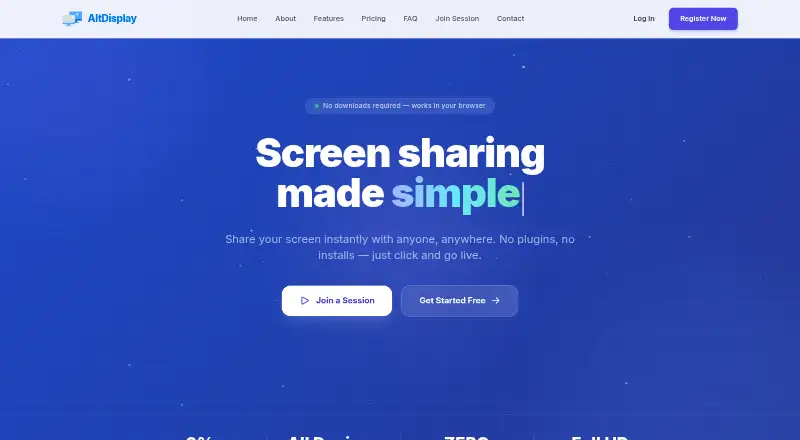
AltDisplay is a browser-based screen-sharing and video-meeting application for individuals and companies. It supports sharing an entire screen, a window, or a browser tab, alongside HD voice chat, video meetings, whiteboard annotation, invitations, file sharing on Professional, and session recording or capture. The service is aimed at presentations, demos, remote work, education, medical services, retail, and customer support. It runs on web and iOS, with mobile browsers able to join sessions while hosting remains limited to desktop browsers.
The published plans are structured around meeting size, duration, and media quality. Basic costs $9.99 per license per month and includes unlimited meetings, up to 5 participants, 30-minute meetings, and Standard (VGA) quality. Premium costs $14.99 per license per month and raises capacity to 15 participants, meeting length to 120 minutes, and video quality to HD; it also adds Whiteboard. Professional supports up to 25 participants, 240-minute meetings, Full HD video quality, Whiteboard, and File sharing. All plans include unlimited meetings, while recording or capture is available as a product feature.
AltDisplay’s main advantage is a narrow, browser-first workflow that combines screen sharing with annotation, voice, invitations, and recording without downloads or plugins. That makes it a practical fit for small meetings where participants need to mark up shared content or join through a link. The five-person Basic limit and 30-minute cap may suit short sessions, while Premium or Professional are better aligned with larger or longer meetings. Teams that need mobile hosting, broader platform coverage, or meeting capacity beyond 25 participants should choose an alternative. AltDisplay is best for small browser meetings where annotation matters more than an extensive collaboration ecosystem.
Your product? Our editors can test AltDisplay in depth and publish a review, labelled as paid · from $149/mo →
AltDisplay pricing
All 3 AltDisplay plans and prices →
AltDisplay fact sheet
| Free plan | Not verified |
|---|---|
| Paid from | $9.99/mo |
| Maximum participants | 5 participants |
| Session duration limit | Not verified |
| Screen recording | Yes |
| Annotation tools | Yes |
| Mobile screen sharing | No |
| Sharing mode | Browser |
| Deployment | Cloud, Browser extension |
| Platforms | Web, iOS |
| Built for | Solo, Small business, Mid-market (editorial estimate) |
| Pricing | Paid (source) |
| Website | altdisplay.app |
| Facts checked | 20 Sep 2026 |
Alternatives to AltDisplay
- ScreenleapA flexible browser-first meeting tool with useful paid upgrades and clear free-plan limits.9.4
- AirDroid CastA budget-friendly choice for mirroring phones and computers across many device types.9.2
- CrankWheelA sales-focused screen-sharing platform with engagement tracking, recording, and CRM integrations.8.9



See all AltDisplay alternatives →
Used AltDisplay? Be the first to review it
The editor score above is our own research. What this page doesn't have yet is a reader's view — what you used AltDisplay for, what worked and what didn't. No stars are seeded and no review is paid for; an editor reads every one before it appears.
Write a reviewTwo minutes · verified accounts only · read by an editor before it appears
Featured on iTechGuides

AltDisplay is listed in our Screen Sharing Software directory. Add the badge to your site — it links back to this page.
<a href="https://www.itechguides.com/products/altdisplay/"><img src="https://www.itechguides.com/best/badge/altdisplay.svg" alt="Featured on iTechGuides" width="230" height="46"></a>
Reviewed by iTechGuides Editors · Editorial team · Updated Oct 2026
Advertiser disclosure: iTechGuides is reader-supported. Vendors can pay for top positions in our rankings and for a place on other products' pages, and we may earn a commission when you click some links. Bought places stand at the number bought; this page and our disclosure say so. Paying vendors may get a fuller, more detailed review from our editors, and that review can change their score. How we rank.
Last updated · How we research and update