Akregator
Akregator: A focused open-source desktop reader for organizing and following RSS and Atom feeds. Ranked #26 of 33 in RSS Reader Software by our editors (6.5/10); pricing: Open source; best for linux and Windows users wanting basic feed reading.
At a glance
- Editor score6.5 / 10
- PricingOpen source
- Best forLinux and Windows users wanting basic feed reading
- Paid fromFree
- Facts checked22 Sep 2026
Where it wins
- Supports RSS and Atom subscriptions with configurable automatic fetching
- Combines search, archiving, notifications, folders, and article viewing
- Imports and exports feeds and folders through OPML
Where it doesn't
- Desktop-focused platform coverage limits reading to Linux and Windows
- Its scope centers on feed reading rather than broader ecosystem connections
- Article viewing is built in, but the product remains focused on RSS and Atom
Our verdict on Akregator
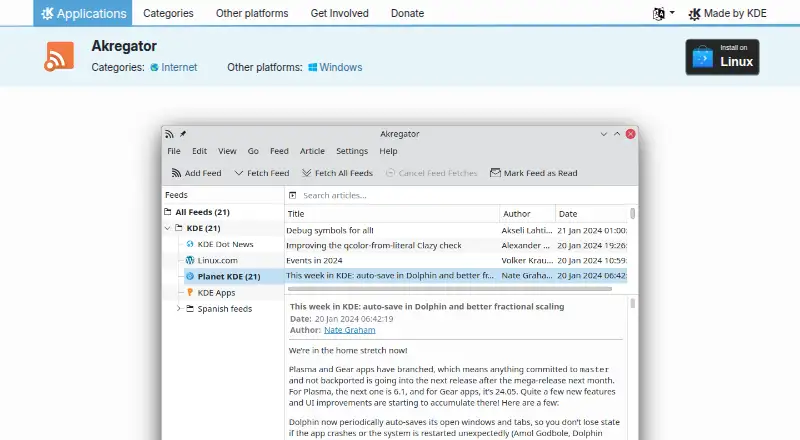
Akregator is a desktop news-feed reader for following RSS and Atom-enabled websites, including news sites and blogs. It is suited to Linux and Windows users who want a focused way to subscribe to feeds, organize them into folders, receive unread-article notifications, and read articles in one application. Automatic fetching runs at configurable intervals, while the integrated browser and article viewer keep feed browsing and article reading together. The application also supports reading hundreds of news sources.
Akregator’s open-source distribution model keeps the product straightforward for users seeking a free desktop reader rather than a subscription service. It is distributed under the GPL-2.0-or-later license. The published feature set covers the core workflow in useful depth: RSS and Atom subscription, fast article search, article archiving with retention controls, notifications, feed organization, and OPML import and export. Those controls make it a practical choice for maintaining a personal feed collection over time, particularly when archiving and retrieval matter as much as simply checking new items.
The trade-off is its desktop focus. Official downloads are provided for Linux and Windows, so Akregator is best suited to readers whose primary workflow is on those platforms. Its stated focus is feed reading, article viewing, search, organization, and archiving, making it a clear fit for basic RSS and Atom use rather than a broader content platform. Choose Akregator if you want an open-source desktop application with folders, notifications, OPML support, and retention controls. Consider a different type of reader if mobile access or a wider service ecosystem is central to your workflow.
Your product? Our editors can test Akregator in depth and publish a review, labelled as paid · from $149/mo →
Akregator pricing
Akregator fact sheet
| Free plan | Not verified |
|---|---|
| Paid from | Free |
| Feed limit | Not verified |
| Full-text extraction | Not verified |
| Filter rules | Not verified |
| Offline reading | Not verified |
| Mobile apps | Not verified |
| Team sharing | Not verified |
| Deployment | Desktop |
| Platforms | Linux, Windows |
| Support | Email, Community, Docs |
| Built for | Solo, Small business (editorial estimate) |
| Pricing | Open source |
| Website | apps.kde.org |
| Facts checked | 22 Sep 2026 |
Alternatives to Akregator
- InoreaderA broad RSS monitoring workspace with aggregation, automation, AI summaries, and offline mobile reading.9.4
- FeedlyA flexible RSS workspace for research, team feeds, filtering, and AI-assisted analysis.9.2
- NewsBlurA flexible RSS reader for intelligence features, mobile reading, and self-hosted control.9.0



See all Akregator alternatives →
Used Akregator? Be the first to review it
The editor score above is our own research. What this page doesn't have yet is a reader's view — what you used Akregator for, what worked and what didn't. No stars are seeded and no review is paid for; an editor reads every one before it appears.
Write a reviewTwo minutes · verified accounts only · read by an editor before it appears
Featured on iTechGuides

Akregator is listed in our RSS Reader Software directory. Add the badge to your site — it links back to this page.
<a href="https://www.itechguides.com/products/akregator/"><img src="https://www.itechguides.com/best/badge/akregator.svg" alt="Featured on iTechGuides" width="230" height="46"></a>
Reviewed by iTechGuides Editors · Editorial team · Updated Oct 2026
Advertiser disclosure: iTechGuides is reader-supported. Vendors can pay for top positions in our rankings and for a place on other products' pages, and we may earn a commission when you click some links. Bought places stand at the number bought; this page and our disclosure say so. Paying vendors may get a fuller, more detailed review from our editors, and that review can change their score. How we rank.
Last updated · How we research and update