Akiflow
Akiflow: A broad time-blocking workspace for professionals who want tasks and calendars together. Ranked #24 of 193 in Calendar Apps by our editors (6.9/10); pricing: 7-day trial; best for task-driven professionals using time blocking.
At a glance
- Editor score6.9 / 10
- Pricing7-day trial
- Best forTask-driven professionals using time blocking
- Free planNo
- Paid from$19/user/mo
- Facts checked20 Sep 2026
Where it wins
- Combines tasks, subtasks, calendars, and time blocking
- Universal inbox, scheduling links, and shared team availability
- Google, Outlook, Zoom, Slack, and productivity app integrations
Where it doesn't
- No free plan is available
- The regular monthly price is $34
- Its broad feature set may exceed simple calendar needs
Our verdict on Akiflow
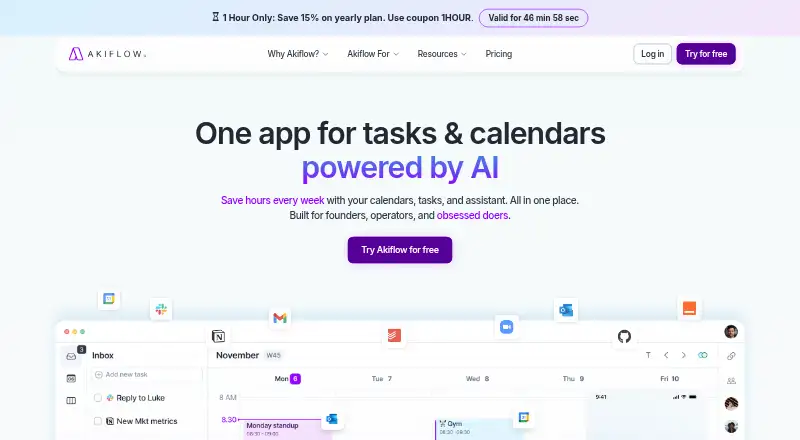
Akiflow combines calendar management, task and subtask planning, time blocking, scheduling links, shared availability, and team calendar coordination in one workspace. It is designed for founders, operators, professionals, and teams that want to turn incoming work into scheduled calendar time. A universal inbox collects imported tasks, while recurring tasks and events support ongoing planning. Web, iOS, and Android access extend the workflow across desktop and mobile use.
The published plan structure is straightforward: Pro Monthly costs $34 per month and includes tasks, subtasks, meetings, integrations, Aki AI assistant, MCP Connector, and all power features. There is no free plan, while the trial period is 7 days. This makes Akiflow a focused paid choice rather than a low-commitment calendar utility. The value is strongest for users who will regularly combine task management, calendar planning, and time blocking instead of using only basic event scheduling.
Akiflow also fits workplaces with varied tools. It supports Google Calendar and two-way Outlook Calendar synchronization, plus Gmail, Slack, Microsoft Teams, Zoom, Notion, Asana, Linear, Jira, GitHub, Trello, Zapier, IFTTT, and Todoist. Zoom meeting creation and conference links cover a common scheduling need, while shared availability and team calendar visibility support coordination. Aki AI assistant and AI workflows add another planning layer. Pick Akiflow if your work depends on converting tasks into calendar blocks across multiple platforms. Choose a simpler calendar app if you do not need task intake, time blocking, integrations, or team visibility at a $34 monthly price.
Your product? Our editors can test Akiflow in depth and publish a review, labelled as paid · from $149/mo →
Akiflow pricing
All 2 Akiflow plans and prices →
Akiflow fact sheet
| Free plan | No |
|---|---|
| Paid from | $19/user/mo |
| Shared calendars | Yes |
| Time blocking | Yes |
| Scheduling links | Yes |
| Calendar sync | Two_way |
| Mobile apps | Ios and android |
| Video meeting support | Yes |
| Free trial | 7 days |
| Deployment | Cloud, Desktop, Mobile |
| Platforms | Web, Windows, macOS, iOS, Android |
| Support | |
| Built for | Solo, Small business, Mid-market (editorial estimate) |
| Integrations | 3,000+ integrations: Google Calendar, Outlook Calendar, Gmail, Slack, Trello, Zapier … |
| Pricing | 7-day trial (source) |
| Website | akiflow.com |
| Facts checked | 20 Sep 2026 |
Akiflow integrations
Akiflow lists 3,000+ integrations on its own site — the 8 named here are the ones its pages call out.
- Google Calendar
- Outlook Calendar
- Gmail
- Slack
- Trello
- Zapier
- IFTTT
- Zoom
Alternatives to Akiflow
- Google CalendarA versatile calendar for personal schedules and Google Workspace collaboration.9.4
- Microsoft OutlookA flexible calendar choice for people and teams already working in Microsoft’s ecosystem.9.2
- Zoho CalendarA low-cost calendar with booking, sync, room reservations, and broad integrations.9.1


See all Akiflow alternatives →
Also Ranked In
Akiflow is ranked in 7 of our directories.
Used Akiflow? Be the first to review it
The editor score above is our own research. What this page doesn't have yet is a reader's view — what you used Akiflow for, what worked and what didn't. No stars are seeded and no review is paid for; an editor reads every one before it appears.
Write a reviewTwo minutes · verified accounts only · read by an editor before it appears
Featured on iTechGuides

Akiflow is listed in our Calendar Apps directory. Add the badge to your site — it links back to this page.
<a href="https://www.itechguides.com/products/akiflow/"><img src="https://www.itechguides.com/best/badge/akiflow.svg" alt="Featured on iTechGuides" width="230" height="46"></a>
Reviewed by iTechGuides Editors · Editorial team · Updated Oct 2026
Advertiser disclosure: iTechGuides is reader-supported. Vendors can pay for top positions in our rankings and for a place on other products' pages, and we may earn a commission when you click some links. Bought places stand at the number bought; this page and our disclosure say so. Paying vendors may get a fuller, more detailed review from our editors, and that review can change their score. How we rank.
Last updated · How we research and update