4Card Recovery
4Card Recovery: A Windows recovery tool with deep scans, file previews, and batch recovery. Ranked #49 of 54 in SD Card Recovery Software by our editors (4.5/10); pricing: Free plan; best for basic Windows card recovery with batch processing.
At a glance
- Editor score4.5 / 10
- PricingFree plan
- Best forBasic Windows card recovery with batch processing
- Free planYes
- Scan modesDeep
- Facts checked25 Sep 2026
Where it wins
- Scans memory cards, USB drives, and hard disks for lost files.
- Deep scanning and file previews help locate and assess recoverable files.
- Batch recovery supports photos, videos, audio, documents, and other files.
Where it doesn't
- The listed Windows support stops at Windows 8.
- The website gives no current price or free-recovery quota.
- Its feature set focuses on file recovery rather than broader storage tools.
Our verdict on 4Card Recovery
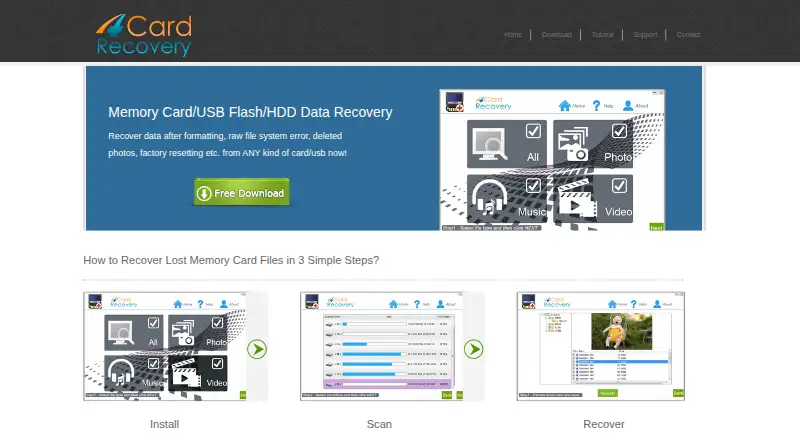
4Card Recovery is Windows desktop software for restoring deleted or formatted files from memory cards, USB flash drives, and hard disks. It is aimed at solo users and small teams who need a focused way to look for photos, videos, audio, office documents, and other files after deletion, formatting, RAW file-system errors, or other access problems. The workflow centers on scanning a storage device, previewing found files, selecting items, and recovering them in batches.
Its strongest fit is breadth across common storage media and file types, combined with a deep scan of device sectors. Preview lets users inspect found files before recovery, and batch recovery avoids selecting files one at a time. The software is also described for SD, microSD, SDHC, CF, and MMC cards. These capabilities make it relevant when a recovery task involves more than one file or a card that no longer opens normally. It remains a recovery utility, not a wider toolkit for managing or protecting storage.
The commercial model has a free download and paid registration, but the published site does not provide a current price or a free-recovery quota, so buyers should check the vendor's current terms before relying on a particular amount of free recovery. Platform fit is a more immediate constraint: the site lists Windows XP through Windows 8, without verifying newer Windows versions. Email is the listed support channel. Choose 4Card Recovery if a basic Windows card-recovery workflow with previews and batch processing suits your needs and your system matches the listed range; consider an alternative if you need verified support for newer Windows versions or clearer published purchase terms.
Your product? Our editors can test 4Card Recovery in depth and publish a review, labelled as paid · from $149/mo →
4Card Recovery pricing
4Card Recovery fact sheet
| Free plan | Yes |
|---|---|
| Paid from | Not verified |
| Free recovery limit | Not verified |
| Supported platforms | Windows |
| Scan modes | Deep |
| File preview | Yes |
| Raw file recovery | Yes |
| Bootable recovery media | Not verified |
| Deployment | Desktop |
| Platforms | Windows |
| Support | |
| Built for | Solo, Small business (editorial estimate) |
| Pricing | Free plan |
| Website | 4cardrecovery.com |
| Facts checked | 25 Sep 2026 |
Alternatives to 4Card Recovery
- PhotoRecA free, open-source choice for advanced memory-card recovery across major desktop platforms.9.3
- R-StudioA paid, cross-platform recovery suite for SD cards, disks, images, and RAID work.9.2
- EaseUS Data Recovery WizardBroad Windows recovery coverage, but the free allowance does not apply to SD-card recovery.9.1


See all 4Card Recovery alternatives →
Used 4Card Recovery? Be the first to review it
The editor score above is our own research. What this page doesn't have yet is a reader's view — what you used 4Card Recovery for, what worked and what didn't. No stars are seeded and no review is paid for; an editor reads every one before it appears.
Write a reviewTwo minutes · verified accounts only · read by an editor before it appears
Featured on iTechGuides

4Card Recovery is listed in our SD Card Recovery Software directory. Add the badge to your site — it links back to this page.
<a href="https://www.itechguides.com/products/4card-recovery/"><img src="https://www.itechguides.com/best/badge/4card-recovery.svg" alt="Featured on iTechGuides" width="230" height="46"></a>
Reviewed by iTechGuides Editors · Editorial team · Updated Sep 2026
Advertiser disclosure: iTechGuides is reader-supported. Vendors can pay for top positions in our rankings and for a place on other products' pages, and we may earn a commission when you click some links. Bought places stand at the number bought; this page and our disclosure say so. Paying vendors may get a fuller, more detailed review from our editors, and that review can change their score. How we rank.
Last updated · How we research and update