
The Celeron 433 MHz is the more likely winner at stock settings for general desktop use. Its 433 MHz core runs about 30% faster than the Pentium II 333 MHz, while its 128 KB of on-die L2 cache operates at core speed. The Pentium II 333 has a larger 512 KB L2 cache, but that cache is off-die and runs at half core speed (166.5 MHz). This is an architecture-based conclusion, not a controlled benchmark of these exact two processors.
Core specifications compared
| Attribute | Pentium II 333 MHz | Celeron 433 MHz |
|---|---|---|
| Core clock | 333 MHz | 433 MHz |
| Bus | 66 MHz | 66 MHz family generation; verify the exact variant |
| L2 cache capacity | 512 KB | 128 KB |
| L2 cache placement | Off-die | On-die for the relevant Celeron generation |
| L2 cache speed | Half core speed: 166.5 MHz at 333 MHz | Described in contemporary comparisons as full core speed; confirm the exact chip |
| Likely stock general-use performance | Likely slower in many workloads; inference | Likely faster; inference |
Intel’s family table groups these desktop speeds with the 66 MHz bus generation, so the Celeron’s higher core clock does not mean a faster front-side bus. Intel’s family-level table also cannot establish that a particular package or motherboard supports either processor. Intel Microprocessor Quick Reference Guide
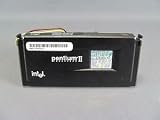

Why the smaller Celeron cache can still win
Cache capacity is only one factor
The Pentium II has four times as much L2 cache, which can help workloads that repeatedly reuse more data than the Celeron’s 128 KB can hold. However, its 512 KB cache sits off the processor die and runs at half the core frequency. The relevant Celeron generation places 128 KB on-die and runs it at full core speed, reducing the latency penalty of a cache hit. Cache size and cache speed therefore have to be considered together.
The 100 MHz clock difference
At 433 MHz versus 333 MHz, the Celeron’s nominal core clock is approximately 30% higher. That arithmetic does not translate into a guaranteed 30% application-performance gain: software, memory access patterns, cache behavior and other system components determine the result.
#1 Best Overall
What the published evidence does—and does not—show
Intel’s January 26, 1998 Pentium II launch announcement reports a SPECint_peak95 score of 12.8, SPECfp_peak95 of 9.14, Norton Multimedia Benchmark of 28.8 and iCOMP Index 2.0 of 366 for the Pentium II 333 MHz. Intel presents these as launch-era vendor results, and they are not a direct Celeron 433 comparison. Intel Delivers Fastest Pentium II
A 2002 AnandTech forum discussion asks this exact 333 MHz-versus-433 MHz question, and participants generally expect the Celeron to lead. Those comments are useful period opinion, but they are not a standardized, same-system benchmark. AnandTech discussion
Rank #2

- 2 Cores / 4 Threads
- Socket Type LGA 1200
- Compatible with Intel 400 series chipset based motherboards
- Intel Optane Memory Support
Which processor should you choose?
For the fastest stock everyday system
Choose the Celeron 433 MHz if your board, BIOS and voltage regulator support the exact chip. Its higher clock and full-speed on-die L2 cache make it the likely faster general-purpose option.
For a historically correct Pentium II build
Choose the Pentium II 333 MHz when authenticity, an existing compatible Slot 1 system, or a specific period-correct configuration matters more than likely speed. Its larger cache is a real architectural difference, not proof that it is faster overall.
Rank #3

- 2 Cores /4 Threads
- 3.8 GHz
- Compatible with Intel 300 Series chipset based motherboards
- Bios update may be required for motherboard compatibility
- Supports Intel Optane Memory
For cache-sensitive workloads
Workloads with substantial data reuse may benefit from the Pentium II’s 512 KB cache, while code that benefits from higher frequency and low-latency cache access may favor the Celeron. Without a controlled benchmark using the same motherboard, memory, storage and software, no reliable percentage advantage can be assigned.
Compatibility checks before an upgrade
Do not buy solely from the speed and cache figures. Confirm all of the following against the motherboard and processor documentation:
Rank #4
- Physical package: Slot 1, Socket 370, or an adapter-based configuration, as applicable to the exact processor.
- Motherboard support: chipset limitations, front-side-bus settings and supported multiplier behavior.
- BIOS revision: whether the BIOS recognizes the processor’s CPUID and microcode.
- Core voltage: the board’s regulator and jumper or BIOS settings must match the CPU requirement.
- Cooling: heatsink, fan, retention hardware and airflow suitable for the processor.
Intel’s family guide is a starting point for speed, bus and cache information, not proof of compatibility with a particular system. Intel’s 1998 product-line announcement describes Celeron as a basic/value PC product, which is period marketing context rather than a modern performance rating. Intel product-line announcement
Independent reader supportYour contribution helps us test, update, and keep practical guides available for everyone.Bottom line
For a compatible system running both processors at stock settings, the Celeron 433 MHz is the safer performance bet. It combines a roughly 30% higher core clock with 128 KB of full-speed on-die L2 cache, while the Pentium II 333’s 512 KB cache runs off-die at 166.5 MHz. Treat that verdict as an informed architectural inference, not as a measured head-to-head benchmark, and let package, BIOS, voltage and cooling compatibility decide any real upgrade.
What’s actually slowing this PC down?
Pick the symptom - the matching free tool is one click away.
Quick Recap
Best Value

- Boxed Intel Pentium Processor G4400 (3M Cache, 3
- Design that delivers high availability, scalability, and for maximum flexibility and price/performance
- Made in China
- Instruction set is 64 bit. Instruction set extensions are intel sse4.1 and intel sse4.2
Product prices and availability are accurate as of the date/time indicated and are subject to change. Any price and availability information displayed on Amazon at the time of purchase will apply.

