
iTechGuides is reader-supported. When you buy through links on our site, we may earn an affiliate commission. As an Amazon Associate I earn from qualifying purchases. Learn more
MSI GE75 Raider: At First Glance
The MSI GE75 Raider 10SGS is a 2020 release of the MSI GE75 series. The latest version delivers an overall better performance than the previous version – the MSI GE75 Raider 9SG.
MSI has offered the laptop at a starting price of $2,479.00. Although the price is subject to change over time, the $2,479.00 price tag is valid at the time we published this article in July 2021.
Having discussed the price of the laptop and hinted at its performance, let’s get into the real business that this review is about – helping you decide if this laptop meets your needs.
MSI GE75 Raider: Design, Dimension & Weight
The MSI GE75 Raider 10SGS still maintains the stunning design from its predecessor. Its sturdy but yet aesthetic design focuses mainly on functionality rather than looks.
Popular on Amazon

- Display: 18" UHD+ (3840x2400) 120Hz Mini LED HDR 1000 100% DCI-P3
- Graphics Card: NVIDIA GeForce RTX 5080 16GB GDDR7
- Processor: AMD Ryzen 9 9955HX3D 16 Cores (2.5GHz-5.4GHz, 128MB Smart Cache)
- RAM: 32GB (2x 16GB) DDR5 5600MHz | Hard Drive: 2TB PCIe NVMe SSD
- OS: Microsoft Windows 11 Pro | Warranty: 1-Year MSI USA Warranty Parts & Labor (include 1 Year Global Warranty) + Lifetime Tech Support from EXCaliberPC
MSI has constructed the laptop out of black metal and plastic. Specifically, the lid and keyboard are made of metal while the bottom panel and display frame are made of plastic.
On the lid of the laptop, you’ll find the glossy dragon shield MSI logo which illuminates in red. Also, on both sides of the logo, there are two red raised strips which MSI calls the 3D dragon spines.
When you open the lid, although you need both hands to do that, you’ll find the 17.3-inch display. The hinges hold up the display allowing it to lean back to an angle of 160 degrees.
What’s actually slowing this PC down?
Pick the symptom - the matching free tool is one click away.
The display has slimmer bezels on its top and sides while it has a thicker bottom bezel. As you might expect, the top bezel houses the front camera.
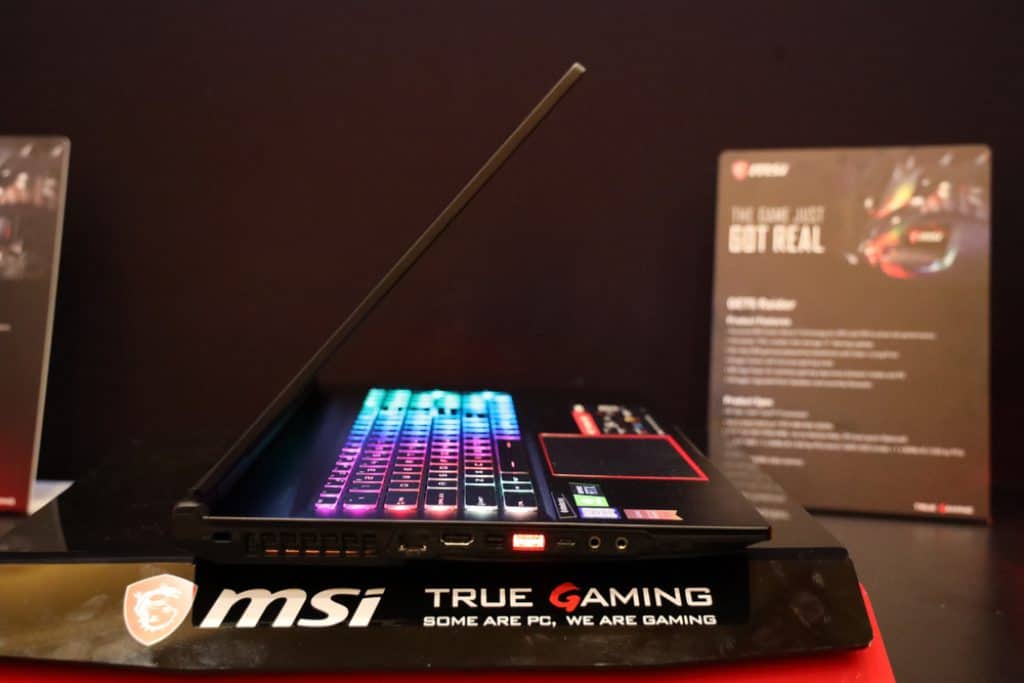
Moving to the keyboard, the laptop has a Steelseries chiclet keyboard that is common to MSI gaming laptops. The keyboard has a full-sized keys layout as well as a Numpad.
The keys have a deep travel of 1.8mm and they require about 70g force to actuate. Consequently, the keys are responsive to touch and they offer good feedback.
Furthermore, the keyboard features a per-key RGB illumination. You can control the RGB lighting using the Steelseries Engine software.
Outdated Drivers Are Slowing You Down
One free scan finds every outdated or missing driver and matches the right update for your exact hardware.Free scan · exact hardware matchPC Slower Than It Used to Be?
A free scan shows the junk files, broken settings and background clutter dragging Windows down - then fixes them in one click.Free scan · Windows 10 & 11It also has preset lighting profiles that you can change via a button on the laptop’s deck.
Next, let us talk about the touchpad – it is sufficiently sized with a dimension of 4.2 x 2.4-inch. The touchpad is made of matte black plastic with a red outline around it.
Moreover, the touchpad is smooth, responsive, and supports precision drivers. This means that swipes, taps, and gestures work seamlessly on it.
The touchpad itself is not clickable. Instead, it has two large mechanical buttons, which give a strong clicky sound when pressed.
Moving on to the laptop’s ports, the MSI GE75 Raider has a rich selection of ports especially on its left side, you’ll find an RJ-45 ethernet jack.
Additionally, there is an HDMI port, a Mini DisplayPort, USB 3.1 Gen 2, and USB 3.1 Gen 2 Type-C. Moreover, there are separate headphone and microphone jacks and finally a security lock slot.
On the right-hand side, there’s an SD card reader, a pair of USB 3.1 Gen 1 ports, and a power connector. The 3 USB ports on the laptop are illuminated in red with an intensity that you can control in the MSI Dragon Center software.
The MSI GE75 Raider is not the most portable 17-inch laptop when it comes to the laptop’s size. However, it is compact and lighter than most 17-inch gaming laptops.
Specifically, it measures 397 x 268.5 x 27.5 mm and weighs 2660g. The laptop is heavier than the Gigabyte Aero 15 X9.
The Gigabyte measures 355.6 x 248.92 x 17.78 mm and weighs 2,131 g.
Also popular on Amazon

- 1. 【Item Condition】100% Original Brand New Notebook LCD Back Cover Lid Top Case Rear lid LCD Housing with Front Bezel Hinges for MSI GE75 GP75 GR75 Raider 8SG 8SF 8RE 8RF MS-17E1 E2 MS-17E4 MS-17E7 MS-17E9 9SC 9RC Black.
- 2. 【Parts number】 3077E2A211Y311 3077E2A213Y 3077E2A213 3077E3A211Y 3077E3B212Y.
- 3. 【Compatible Models】 Compatible for MSI GE75 GP75 GR75 Raider 8SG 8SF 8RE 8RF MS-17E1 E2 MS-17E4.
- 4. 【Warranty】wzqrps provide a 1 Year warranty.
- 5. 【Note】 You will receive what picture shows. Anything else unmentioned are not included. Please ensure it is compatible with your model. (Please feel free to contact us if you can't confirm the laptop model.)
In contrast, the laptop is more compact and lighter than the Alienware 17 R5. Specifically, the Alienware measures 424.18 x 332.74 x 30.48 mm and weighs 445.21 g.
Finally, the MSI GE75 Raider is an aesthetic and stunning laptop with a solid build despite being partly made of plastic. Therefore, I’ll rate it a nine out of ten in this aspect.
Recommended Free Tools
MSI GE75 Raider: Processor (CPU) Performance
The MSI GE75 Raider 10SGS does not only looks stunning but also packs powerful internals. The laptop is powered by a 10th gen Comet Lake-H processor which is a major update to the 9th gen Coffee Lake-H of its predecessor.
Specifically, the laptop ships with an octa-core Intel Core i9-10980HK processor. The processor has a 16 GB cache memory!
Additionally, the laptop has a base frequency of 2.40 GHz and a maximum frequency of 5.30 GHz.
With its powerful Core i9 processor, the model I tested is a reliable productivity machine. It is also capable of handling CPU-intensive tasks.
Quick wins for a faster PC:
Fix the driver behind crashes, sound loss and screen glitchesFind Drivers →Repair Windows errors before they cause bigger problemsFix Now →In order to evaluate the processor of the unit I tested, I carried out a Cinebench R15 benchmark test. Based on the outcome of the test, the laptop scored 1,347 points.
Impressively, the MSI GE75 Raider 10SGS performed better than the Lenovo Legion Y740. To be precise, the Lenovo Legion Y740 scored 1,225 points.
On the other hand, the laptop performed woefully in comparison with the Razer Blade Pro 17. Specifically, the Razer Blade scored 1,549 points.
In conclusion, I’ll rate the MSI GE75 Raider a seven for its processor performance in the benchmark test.
Do these 3 things before closing this tab:
1Scan for outdated or missing drivers - takes under a minute2Clear out junk files and repair common Windows errors3Fix the driver behind crashes, sound loss and screen glitchesMSI GE75 Raider: Memory (RAM) Performance
When it comes to memory, the MSI GE75 Raider has two 3200MHz DDR4 RAM slots. The maximum capacity of memory the laptop support is 64 GB.
This implies that each slot can take a maximum RAM capacity of 32 GB. I tested an MSI GE75 Raider with a RAM configuration of 32 GB RAM.
As a highly productive machine, the MSI GE75 Raider will mostly be saddled with a lot of multitasks. Impressively, the laptop is a competent multitasker.
Its multitasking ability was apparent when I had about 20 chrome browser tabs running at the same time. One of these tabs was streaming a Youtube video while the others were all performing different tasks.
Despite these tasks running concurrently, the laptop didn’t lag or stutter, giving the assurance that it can even take more if you need it to. Moreover, switching between these opened tabs was easy.
In addition to the multitasking test, I also carried out a PC mark 10 benchmark test. The PC Mark 10 test is a standard benchmark test that measures Windows 10 PC performance.
In the PC Mark 10 test, the MSI GE75 Raider tops the performance chart among the competitors I pitched it against. Specifically, the laptop scored 6,268 points.
Also popular on Amazon

- 【Item Condition】100% Original Brand New Notebook Palmrest Upper Case with US Layout Per-Key RGB Backlit Keyboard Assembly Replacement Part for MSI GE75 Raider 8RE 9SE 10SF MS-17E2 MS-17E9.
- 【Parts number】 S1N3EUS2B2SA.
- 【Compatible Models】 for MSI GE75 Raider 8RE 9SE 10SF MS-17E2 MS-17E9.
- 【Install】Easy to install.
- 【Note】 You will receive what picture shows. Anything else unmentioned are not included. Please ensure it is compatible with your model. (Please feel free to contact us if you can't confirm the laptop model.)
In comparison, the Razer Blade Pro 17 scored 5641 points while the Lenovo Legion 740 scored 5,894 points.
Free tools Windows power users keep installed
One-click scans. No signup required.
In conclusion, I‘ll rate the memory performance of the MSI GE75 Raider a nine for its impressive score in the benchmark test.
MSI GE75 Raider: Storage Options & Performance
On the storage front, the MSI GE75 Raider has an M.2 2280 NVMe PCIe SSD slots and a 2.5-inch SATA III slot. The model I reviewed shipped with a 1 TB PCIe SSD.
The MSI GE75 Raider copied 4.97GB of files at a rate of 727 MBps in 7 seconds. That’s faster than all the competing laptops I pitched it against.
To further determine how the SSD of my test model faired among competitors, I performed an AS SSD benchmark test. Based on the test result, the laptop recorded a sequential read speed of 2,036.44 MBps and a sequential write speed of 1,834.63 MBps respectively.
The Tool Desk
Outbyte PC Repair FREEClear out junk files and repair common Windows errorsFree Scan →Outbyte Driver Updater FREEScan for outdated or missing drivers - takes under a minuteDriver Scan →In comparison with the Razer Blade Pro 17, the MSI GE75 Raider had a better performance. Specifically, the Razer Blade Pro 17 recorded a sequential read speed of 1,809.65 MBps and a sequential write speed of 1,796.5 MBps.
The laptop also has a spring-loaded SD card reader which you can use for expanding the storage space. The SD card of my test model recorded a transfer speed of 24.7 MBps which is critically slow compared to the competitor’s performance.
Speaking of the competitors, the Razer Blade 17 Pro recorded an SD card transfer speed of 187.2 MBps. Additionally, the Dell XPS 15 9500 recorded an SD card transfer speed of 198.5 MBps.
Finally, I’ll rate the MSI GE75 Raider an eight for its impressive performance in the benchmark test.
What’s actually slowing this PC down?
Pick the symptom - the matching free tool is one click away.
MSI GE75 Raider: Graphics Card Performance
As you would expect, the MSI GE75 Raider is equipped with a dedicated NVIDIA GeForce RTX 2080 SUPER graphics card. The graphics card has an 8 GB GDDR6 VRAM.
Additionally, the GPU has a base frequency of 1650 MHz and a boost frequency of 1815 MHz. Undoubtedly, the laptop packs a very powerful graphics card subsequently, beating all the competitors I pitched it against.
I performed a 3D mark graphics benchmark test that had the laptop record an impressive 24,623 points. Meanwhile, the Asus Zephyrus scored 21,515 points in the same test.
Moreover, the MSI GE75 Raider also outperformed the Acer Predator Triton 700 which recorded a score of 18,120 points.
Quick wins for a faster PC:
Fix the driver behind crashes, sound loss and screen glitchesFind Drivers →Repair Windows errors before they cause bigger problemsFix Now →Scan for outdated or missing drivers - takes under a minuteDriver Scan →Moving on to the real-life gaming performance of the laptop, it recorded an extraordinary frame rate. This is evident from playing Shadow Of The Tomb Raider at the highest preset and a resolution of 1980 x 1080.
At ultra settings, the game played at a frame rate of 109 fps. Also, at high settings the game played at a frame rate of 115 fps.
Furthermore, at medium settings the game played at a frame rate of 120 fps. Finally, at low settings, it played at a frame rate of 146 fps.
In conclusion, the MSI GE75 Raider has proven to be a capable gaming machine for playing the latest AAA games. Therefore, I will rate it a nine for its impressive graphics performance.
The Tool Desk
Outbyte PC Repair FREERepair Windows errors before they cause bigger problemsFix Now →Outbyte Driver Updater FREEScan for outdated or missing drivers - takes under a minuteDriver Scan →Also popular on Amazon

- 17.3" FHD (1920x1080), 300Hz 3ms, IPS-Level NVIDIA GeForce RTX 2080 Super Max-Q 8G GDDR6
- Core i9-10980HK 2.4 - 5.3GHz Killer Wi-Fi6 AX1650 (2*2 ax)
- 1TB NVMe SSD 32GB (16G*2) DDR4 2666MHz 2 Sockets; Max Memory 64GB
- USB 3.2 Gen2 Type C *1 USB 3.2 Gen1 *2; USB 3.2 Gen2*1 Steel Series per-Key RGB with Anti-Ghost key+ silver lining 720p HD Webcam
- Win 10 Multi-language Giant Speakers 3W*2 + Subwoofer 3W *2 6 cell (65Wh/6080mAH) Li-Ion 280W
MSI GE75 Raider: Battery Life & Performance
The battery is definitely not one of the strong points of the laptop. However, this is not surprising as most gaming laptops are guilty of this as well.
The MSI GE75 Raider is powered by a 65 Whr Li-ion battery which promises you up to 4 hours of battery life. I performed a battery rundown test to determine if the battery truly last 4 hours as claimed.
The test involves continuous browsing of the web over Wifi at 150 nits of brightness. Based on the test result, the laptop lasted just 2 hours and 49 minutes.
This is not impressive at all, as its performance falls below an average class battery life of 3 hours 16 minutes. Furthermore, the MSI GE75 Raider also underperformed when compared to its competitors.
For instance, the Alienware 17 R5 lasted 3 hours 47 minutes. Meanwhile, the Gigabyte Aero 15 X9 lasted 3 hours 34 minutes.
As a result of its unimpressive battery life, you cannot use the laptop for a long time without the need to charge it frequently. Moreover, it is recommended to plug the laptop into power while in use.
Therefore, I’ll rate the MSI GE75 Raider a five out of ten for its below-par battery life.
Frequently Asked Questions
The MSI GE75 Raider has two DDR4 RAM slots which support a capacity of up to 64 GB. This means that each slot can take up to a 32 GB RAM card. The model I reviewed shipped with 32 GB, this makes it a very powerful laptop for performing multiple activities simultaneously without slowing down.
Windows Errors? Fix Them Before They Spread
Repair common Windows errors and clear accumulated junk for a smoother, more stable PC - no reinstall needed.Free scan · no reinstallCrashes, No Sound, or Screen Glitches?
Random freezes, missing sound and display glitches usually trace back to one bad driver. Find and replace yours safely.Free scan · under a minuteYes, the MSI GE75 Raider 10SGS is a good value for its money. The model I reviewed packed powerful specs ranging from its 10th generation Core i9 processor to 32 GB of memory which is upgradeable to 64 GB. Additionally, the laptop packed a strong NVIDIA GeForce RTX 2080 SUPER GPU and a 1 TB SSD upgradeable to 2 TB. With these powerful specs, the laptop performed satisfactorily in benchmark tests.
No, unfortunately, the MSI GE75 Raider 10SGS does not support Thunderbolt 3. Therefore, if you need to connect to external monitors you have the option of the HDMI or the mini DisplayPort.
Although prices are subject to change from time to time, at the time we published this article in July 2021, the MSI GE75 Raider 10SGS starts at $2, 479.
The MSI GE75 Raider 10SGS was released on April 15, 2020.
Conclusion
The MSI GE75 Raider is a powerful gaming laptop that boasts impressive performances. Its gaming performance is especially category-breaking, beating all the competing laptops we pitched it against.
However, the laptop is not cheap, specifically, it cost a whopping $2,378. Therefore, if this price is above what you have budgeted for, you can purchase the Lenovo Legion Y740 instead.
I hope you found this MSI GE75 Raider review helpful. If you found the review helpful, we would love to hear from you.
Kindly spare two minutes to share your thoughts with our community using the comments form found at the end of this page.
Free tools Windows power users keep installed
One-click scans. No signup required.
Alternatively, simply respond to the “Was this page helpful” question below and provide us with your feedback.
Finally, for more laptop reviews, visit our Laptop Reviews page. You may also find our Laptop Specs page very helpful.


