
Recommended Free Tools
iTechGuides is reader-supported. When you buy through links on our site, we may earn an affiliate commission. As an Amazon Associate I earn from qualifying purchases. Learn more
For most learners, TurtleBot 4 was the strongest ROS educational robot kit recommendation in 2025 because it combined a ROS 2-native mobile base, Raspberry Pi 4, OAK-D depth perception, 2D LiDAR, simulation, and mature documentation. TurtleBot 3 Burger offered better value and modularity, while GoPiGo3 suited staged programming and hardware education.
There is no universally best ROS educational robot kit. The right choice depends on the ROS 2 distribution, budget, sensor requirements, assembly tolerance, classroom scale, and whether the learner wants to study navigation, perception, low-level electronics, or robot construction.


Key takeaways
- TurtleBot 4 is the strongest default choice for modern ROS 2 learning, navigation, mapping, and perception on a real mobile robot.
- TurtleBot 3 Burger is the better value and modularity choice, but buyers must manage mixed-generation ROS tutorials, simulator differences, and revised LDS hardware.
- GoPiGo3 is well suited to progressive programming education, camps, and hardware experimentation, but its current ROS 2 support should be verified before purchase.
- TurtleBot 4 simulation is the lowest-risk starting point for students and classrooms that cannot immediately buy or maintain physical robots.
- ROS 2 distribution, Ubuntu version, documentation quality, included sensors, and total ready-to-run cost matter more than a kit’s advertised chassis price.
Which ROS educational robot kit is best in 2025?
TurtleBot 4 is the best overall recommendation for most people learning current ROS 2 on a physical mobile robot. TurtleBot 4 uses an iRobot Create 3 base, Raspberry Pi 4 computing, an OAK-D stereo/depth camera, and 2D LiDAR. The Standard and Lite versions share the core platform while differing in physical configuration and completeness. The official TurtleBot 4 overview positions the robot for education and research.
TurtleBot 4 is not automatically the best purchase for every learner. TurtleBot 3 Burger makes more sense when cost, modularity, and access to a large body of educational material are more important than a turnkey ROS 2 experience. GoPiGo3 is a better fit when the course begins with block programming, Python, electronics, and sensor experimentation rather than ROS 2 navigation. Simulation is often the right first purchase decision: no hardware purchase at all.
Popular on Amazon
This is an editorial ranking based on ecosystem quality, documentation, ROS 2 alignment, educational usefulness, hardware completeness, simulation support, and buying practicality. It is not a verified market-wide popularity ranking or an independent hands-on product test. The ROS robot directory is a catalog, not an independent comparative laboratory.
Quick comparison of the recommended ROS robot platforms
| Recommendation | Platform | Best for | Main strength | Main caution |
|---|---|---|---|---|
| Best overall | TurtleBot 4 | Modern ROS 2, navigation, mapping, perception | Integrated ROS 2-native base with LiDAR and depth camera | Higher cost and less low-level assembly |
| Best value | TurtleBot 3 Burger | Budget-conscious learners and classrooms | Modular design and extensive instructional ecosystem | Older and mixed-generation documentation |
| Best larger TurtleBot 3 | TurtleBot 3 Waffle Pi | Labs needing more mounting space | Larger TurtleBot 3 platform | Price can be difficult to justify over newer platforms |
| Best staged-learning kit | GoPiGo3 | Schools, camps, Python, electronics | Progression from beginner programming to advanced robotics | Current ROS 2 alignment needs verification |
| Best budget path | TurtleBot simulation | Students and classes delaying hardware purchases | Learn ROS concepts without batteries, repairs, or Wi-Fi hardware | Does not teach real-world mechanical and sensor problems |
What should a ROS educational robot kit include?
A ROS educational robot kit should be more than a programmable car with a ROS label. A useful kit includes a physical mobile robot or buildable platform, accessible ROS or ROS 2 packages, documentation, source code or configuration examples, and a path to learning nodes, topics, services, actions, TF, teleoperation, sensing, mapping, navigation, and robot control.
A genuine ROS learning platform should expose useful sensors through ROS messages and explain topic names, message types, coordinate frames, calibration, simulation equivalents, and common failure conditions. The TurtleBot compatibility specification provides a useful model: a mobile base, RGB-D sensing, onboard computation, wireless communication, and expansion space.
Arduino-only robot cars, proprietary educational robots with no ROS packages, industrial training robots, standalone robot arms, and AI boards that require undocumented integration should not be compared as equivalent products. They may be valuable in other courses, but they teach a different combination of skills.
How do ROS 2 distribution and simulator versions affect buying decisions?
ROS support is meaningful only when the distribution and operating system are named. As recorded in the research snapshot, the official ROS guidance listed ROS 2 Lyrical as the latest long-term release for Ubuntu 26.04, ROS 2 Jazzy as an active long-term release for Ubuntu 24.04, and ROS 2 Humble as an upgrade path for ROS 1 users on Ubuntu 22.04. ROS 1 Noetic’s stated support ended in May 2025. Check the official ROS getting-started guidance before installing anything because release support changes.
For a 2025 buying decision, many tutorials and kits were still centered on ROS 2 Humble or Jazzy, while older TurtleBot 3 material may use ROS 1, ROS 2 Humble, or Gazebo Classic. A tutorial written for one distribution should not be assumed to work unchanged on another distribution. Launch files, package names, installation commands, simulator integrations, and parameter files can differ.
| Platform or path | ROS status to verify | Primary version risk |
|---|---|---|
| TurtleBot 4 | ROS 2-native; Jazzy setup documentation exists | Create 3 firmware, Raspberry Pi image, and distribution must match |
| TurtleBot 3 | ROS 2 resources exist alongside older ROS 1 material | Mixed tutorials, Gazebo Classic workflows, and revised LDS hardware |
| GoPiGo3 | ROS-capable; current ROS 2 support requires confirmation | Less clearly aligned with current ROS 2 than TurtleBot platforms |
| Simulation | Depends on selected ROS 2 distribution and simulator | Simulation commands and robot behavior may differ from hardware |
Choose a kit with an actively maintained ROS 2 stack rather than choosing solely by hardware price. Before ordering, confirm the supported ROS 2 distribution, Ubuntu release, simulator, package repository, current image, and tutorial branch.
Windows Errors? Fix Them Before They Spread
Repair common Windows errors and clear accumulated junk for a smoother, more stable PC - no reinstall needed.Free scan · no reinstallOutdated Drivers Are Slowing You Down
One free scan finds every outdated or missing driver and matches the right update for your exact hardware.Free scan · exact hardware matchWhy is TurtleBot 4 the best overall ROS 2 educational platform?
TurtleBot 4 is the strongest default because it reduces the integration work between the mobile base, computer, camera, LiDAR, and ROS software. Open Robotics describes its Create 3 base as ROS 2-native, and the platform combines that base with Raspberry Pi 4 computing, an OAK-D camera, and 2D LiDAR. The TurtleBot 4 announcement from Open Robotics explains the platform’s ROS 2-oriented design.
TurtleBot 4 is especially suitable for university students and instructors teaching ROS graph concepts, teleoperation, odometry, TF, SLAM, navigation, depth perception, and sensor fusion. The included depth camera makes TurtleBot 4 a stronger out-of-the-box perception platform than a basic differential-drive chassis, while LiDAR supports conventional indoor mapping and navigation exercises.
What are TurtleBot 4’s limitations?
TurtleBot 4 costs more than a simple robot car or TurtleBot 3 Burger, and its integrated hardware offers fewer opportunities to learn motor-controller wiring and drivetrain construction. Raspberry Pi 4 onboard computing is also not a guarantee of sufficient performance for demanding computer vision, large neural networks, or high-resolution AI workloads. Those projects may need a desktop, remote workstation, or more powerful edge computer.
TurtleBot 4 availability is handled through distributors rather than one universal retail listing, and no current official manufacturer price was verified in this research pass. Buyers should check the official product page and an authorized distributor rather than treating an old brochure price as current.
What firmware caveat matters for TurtleBot 4 and ROS 2 Jazzy?
TurtleBot 4 users targeting ROS 2 Jazzy must verify compatible Create 3 firmware before setup. The TurtleBot 4 Jazzy setup documentation states that Create 3 requires compatible I.*.* firmware and that older firmware is not compatible with Jazzy.
Also popular on Amazon
After following the hardware imaging, networking, firmware, and user-manual prerequisites, the TurtleBot 4 setup utility is launched with:
turtlebot4-setupThe command is not necessarily the first command to run on a completely unconfigured robot. Follow the platform’s current setup sequence first, then use the utility to configure the Raspberry Pi and robot.
Verdict: Choose TurtleBot 4 when the goal is the smoothest modern ROS 2 learning experience on a real indoor mobile robot.
Do these 3 things before closing this tab:
1Fix the driver behind crashes, sound loss and screen glitches2Clear out junk files and repair common Windows errors3Scan for outdated or missing drivers - takes under a minuteIs TurtleBot 3 Burger the best-value ROS educational robot?
TurtleBot 3 Burger remains the most defensible value choice when modularity, compact size, classroom quantity, and a large instructional footprint matter more than the newest integrated sensor package. The ROBOTIS TurtleBot 3 buying page describes the platform as modular, compact, and customizable, with current U.S. listings that include Raspberry Pi 4 configurations.
TurtleBot 3 Burger can support teleoperation, differential-drive control, odometry, sensing, mapping, navigation, simulation, and basic manipulation experiments. The Burger is also easier to justify when an instructor wants students to understand how the robot is assembled and how its modules connect.
How much does TurtleBot 3 cost?
According to the ROBOTIS U.S. store (August 2026 snapshot), the TurtleBot 3 Burger RPi4 4GB was listed at $783.50. The 2GB version was listed at $758.20 but marked out of stock, while the TurtleBot 3 Waffle Pi RPi4 4GB was listed at $1,933.61. These are U.S. store prices checked in August 2026, not 2025 prices; taxes, shipping, inventory, and regional pricing can change.
| Model | U.S. store snapshot | Availability note | Buying interpretation |
|---|---|---|---|
| TurtleBot 3 Burger RPi4 4GB | $783.50 | Listed for purchase when checked | Most practical current Burger configuration in the snapshot |
| TurtleBot 3 Burger RPi4 2GB | $758.20 | Marked out of stock when checked | Lower memory but not useful if unavailable |
| TurtleBot 3 Waffle Pi RPi4 4GB | $1,933.61 | U.S. store listing | Buy for chassis and mounting space, not simply because it is newer |
Prices and stock are volatile. A ready-to-run cost comparison should include the computer, battery, charger, motor controller, sensors, cables, and required adapters rather than comparing a bare chassis with a complete robot.
The Tool Desk
Outbyte PC Repair FREEClear out junk files and repair common Windows errorsFree Scan →Outbyte Driver Updater FREEScan for outdated or missing drivers - takes under a minuteDriver Scan →What is the main TurtleBot 3 compatibility warning?
TurtleBot 3 resources span ROS 1, ROS 2 Humble, Gazebo Classic, and newer simulator workflows. Buyers must identify the distribution used by each tutorial and confirm that the package branch matches the installed Ubuntu and ROS versions.
ROBOTIS also warns that current TurtleBot 3 kits contain a newer LDS sensor revision. The newer LDS is not compatible with previous USB2LDS hardware; newer kits include the revised USB2LDS and cables. A LiDAR failure can therefore result from combining an older adapter or cable with a newer sensor, not from a defective scanner.
Verdict: Choose TurtleBot 3 Burger when cost and modularity outweigh the extra setup and version-management work.
Who should choose TurtleBot 3 Waffle Pi?
TurtleBot 3 Waffle Pi is the specialist choice for university labs and demonstrations that need the larger TurtleBot 3 body, more mounting space, or a more substantial physical platform. It retains the TurtleBot 3 ecosystem and can suit projects that add equipment to the chassis.
What’s actually slowing this PC down?
Pick the symptom - the matching free tool is one click away.
The Waffle Pi is not the default choice for most beginners. According to the ROBOTIS U.S. store snapshot from August 2026, its listed price was $1,933.61, which makes the larger chassis a significant purchase. The Waffle Pi does not automatically provide TurtleBot 4’s ROS 2-native Create 3 experience or its integrated OAK-D depth-perception workflow.
Also popular on Amazon

- Raspberry Pi 5 & ROS2 Robot Car. MentorPi smart robot car is powered by Raspberry Pi 5, compatible with ROS2, and programmed in Python, making it an ideal platform for AI robot development.
- 360° Omnidirectional Mobility with Mecanum-Wheel Chassis. MentorPi M1 smart robot car is built on a mecanum-wheel chassis, enabling 360° omnidirectional movement. This design provides greater flexibility in various applications and better adaptability to diverse terrains.
- With TOF Lidar & 3D Depth Camera for Advanced AI Capabilities. Supports SLAM mapping, path planning, multi-robot coordination, vision recognition, target tracking, and more, covering a wide range of AI applications.
- High-Performance Hardware & Premium Design. Equipped with closed-loop encoder motors, TOF lidar, 3D depth camera, high-torque servos, and other advanced components to ensure optimal performance and efficiency.
- Autonomous Driving with Deep Learning. Utilizes YOLOv5 model training to enable road sign and traffic light recognition, along with other autonomous driving features, helping users explore and develop autonomous driving technologies.
Verdict: Buy Waffle Pi when the larger chassis solves a real mounting or laboratory requirement; otherwise, compare Burger and TurtleBot 4 first.
Is GoPiGo3 better for beginners than TurtleBot?
GoPiGo3 is a strong beginner-friendly modular kit when “beginner” means learning programming and hardware in stages. The GoPiGo3 ROS listing describes an expandable differential-drive robot with sensors and actuators, supporting a progression from block-based programming to Python and Jupyter experimentation, computer vision, machine learning, and Ubuntu/Melodic ROS work.
That staged progression makes GoPiGo3 useful for schools, camps, mixed-ability groups, and family learning. Students can begin with programming and physical experimentation before moving into more advanced robotics concepts.
GoPiGo3 should not automatically be called the easiest modern ROS 2 navigation platform. Its current ROS position, operating-system image, ROS 2 distribution, package maintenance, and tutorial compatibility should be checked carefully before purchase. ROS capability and current ROS 2 readiness are separate claims.
Verdict: Choose GoPiGo3 when progressive programming, electronics, and expandable hardware are central to the curriculum. Choose TurtleBot 4 when current ROS 2 navigation and perception are the central learning goals.
What can students learn with each platform?
| Learning objective | Strongest candidates | Why |
|---|---|---|
| Nodes, topics, services, and actions | TurtleBot 4; TurtleBot 3 | Both have substantial ROS educational material |
| Mobile control and odometry | TurtleBot 3; TurtleBot 4; GoPiGo3 | All provide differential-drive learning opportunities |
| 2D LiDAR and SLAM | TurtleBot 4; TurtleBot 3 | Both are designed around indoor mobile robotics and LiDAR workflows |
| Depth-camera perception | TurtleBot 4 | OAK-D depth perception is part of the integrated platform |
| Navigation and autonomous mapping | TurtleBot 4; TurtleBot 3 | Both have established mobile-robot learning paths |
| Low-level assembly and electronics | GoPiGo3; DIY Raspberry Pi robot | Construction and expansion are central to the experience |
| Introductory programming | GoPiGo3 | Supports a staged path before full ROS complexity |
| Simulation before hardware | TurtleBot 4; TurtleBot 3 | Both have simulation resources, with distribution-specific caveats |
| Open-ended mechanical customization | TurtleBot 3; GoPiGo3; DIY | Modular or build-oriented designs offer more physical experimentation |
| Fastest path to a functioning ROS 2 robot | TurtleBot 4 | More of the base, sensors, and software integration is supplied |
Should you start with ROS 2 simulation instead of buying hardware?
For many learners, simulation is the best low-risk starting point. TurtleBot 4 resources explicitly support beginning without owning a physical robot, and the TurtleBot 4 resources page links to simulation and user materials.
- Learn ROS 2 command-line and graph concepts.
- Practice nodes, topics, services, actions, launch files, and TF.
- Run a TurtleBot simulation and learn teleoperation.
- Build a mapping and navigation workflow.
- Move the same concepts to a physical robot.
- Compare simulated behavior with real odometry, sensor noise, latency, and mechanical limits.
Simulation does not reproduce wheel slip, battery behavior, Wi-Fi failures, mechanical backlash, cable problems, calibration errors, brownouts, or real collision recovery. Simulation is therefore a complement to hardware rather than a complete replacement when the learning objective includes wiring, motor control, battery management, or physical troubleshooting.
Quick wins for a faster PC:
Repair Windows errors before they cause bigger problemsFix Now →Fix the driver behind crashes, sound loss and screen glitchesFind Drivers →Simulation is particularly valuable for large classes. One physical robot can be shared for final demonstrations while students use separate workstations for software development.
What should you check before buying a ROS robot kit?
- ROS 2 distribution: Confirm the exact supported distribution and whether the documentation is current.
- Ubuntu version: Verify the operating system expected by the image, packages, and tutorials.
- Simulator: Identify whether instructions use Gazebo Classic or modern Gazebo Sim.
- Included hardware: Confirm the computer, battery, charger, camera, LiDAR, IMU, encoders, wireless networking, cables, and mounting hardware.
- Sensor details: Identify the exact LiDAR and camera models, not merely “laser” or “vision sensor.”
- First-boot path: Read the imaging, firmware, networking, and teleoperation instructions before ordering.
- Replacement parts: Check battery, wheel, motor, cable, adapter, and sensor availability in your country.
- Classroom network: Determine whether a dedicated local router is needed and whether school Wi-Fi blocks device discovery.
- Quantity: Calculate battery rotation, charging capacity, namespaces, hostnames, TF prefixes, and instructor support for multiple robots.
- Total cost: Add shipping, import duties, spare parts, laptops, routers, and setup time.
How should classrooms deploy multiple ROS robots?
Multiple robots create administrative problems that do not appear with one robot. Each robot may need a unique hostname, namespace, TF frame prefix, parameter file, and network identity. ROS 2 discovery can also fail across subnets or when school Wi-Fi enables client isolation.
A dedicated local router or isolated robotics network is often easier to administer than a campus network with captive portals, firewall rules, changing IP addresses, and congested 2.4 GHz wireless. Instructors should test discovery, teleoperation, battery rotation, and safe shutdown procedures with the intended number of robots before the first class.
A platform that works reliably alone may become difficult to maintain at fleet scale. For some courses, one advanced TurtleBot 4 plus simulation workstations is more practical than many inexpensive but inconsistently configured kits.
Free tools Windows power users keep installed
One-click scans. No signup required.
When should you buy a DIY ROS robot instead?
Build a DIY ROS robot when construction is part of the learning objective, the learner has time to integrate motors and sensors, and the project can tolerate custom software maintenance. A DIY Raspberry Pi platform can teach electronics, power distribution, motor drivers, encoders, mechanical design, CAD, calibration, and ROS package development more directly than an integrated robot.
Also popular on Amazon
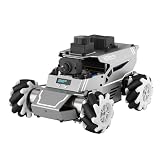
- 【ROS2 & HIGH-PERFORMANCE HARDWARE】ROSOrin runs on the ROS2 framework and is compatible with Jetson and Raspberry Pi. Integrated with LiDAR, 3D Depth Camera, and AI Voice module, this system efficiently processes real-time YOLO series object detection, SLAM mapping, and Large Language Models (LLMs). It provides the reliable "superbrain" and hardware foundation required for Embodied AI and autonomous robotics development.
- 【MULTIMODAL AI & LLM INTEGRATION】ROSOrin supports the integration of leading Large Language Models (including ChatGPT, Gemini, Grok, Llama, and more). By leveraging MLLMs, ROSOrin robot car can achieve semantic understanding and task decomposition. This enables advanced Embodied AI applications such as natural language interaction, complex environment perception, and intelligent path planning for autonomous research.
- 【SLAM & 3D VISION PERCEPTION】ROSOrin AI smart robot car kit supports Gmapping, Hector, and Cartographer SLAM. This robot kit achieves centimeter-level mapping accuracy. Built-in OpenCV and MediaPipe libraries allow for advanced 3D visual tracking, gesture control, and dynamic obstacle avoidance in cluttered environments.
- 【360° OMNIDIRECTIONAL MECANUM CHASSIS】Equipped with high-performance Mecanum wheels(80mm), ROSOrin supports 360° omnidirectional movement, including lateral drifts and complex rotations. This agile chassis allows the robot to navigate through tight spaces and intricate paths with ease.
- 【ALL-IN-ONE ROS2 EDUCATIONAL ROBOT】ROSOrin includes a comprehensive resource library with step-by-step tutorials, open-source code, and AI project examples. From initial build to advanced ROS2 development, it provides everything needed for students and developers to master robot applications.
Do not choose DIY when a course starts soon, predictable results are essential, several identical robots are required, or the main learning goal is SLAM, navigation, and perception. A low advertised chassis price can become expensive after adding a computer, battery, charger, motor controller, camera, LiDAR, cables, adapters, and development time.
DIY also requires an honest distinction between open ROS packages, open mechanical designs, open hardware, proprietary firmware, closed sensor drivers, and vendor-specific images. “Open source” is not a single property of a robot kit.
Common failure modes and recovery steps
Why does first boot fail?
Check the battery and power switch, SD card or image, Wi-Fi credentials, robot and host subnet, robot IP address, firmware compatibility, ROS distribution, Ubuntu version, firewall, and multicast or discovery settings. For TurtleBot 4 and Jazzy, verify compatible Create 3 firmware before running the setup workflow.
Why is the LiDAR not detected?
Possible causes include an incorrect USB cable or adapter, a revised-versus-legacy LDS mismatch, missing permissions, a wrong serial-port path, an incompatible USB2LDS revision, a launch file for another model, or insufficient power. TurtleBot 3 owners should specifically check whether the LDS, USB2LDS hardware, and included cables belong to compatible revisions.
Why does the depth camera work but produce unreliable depth?
Investigate lighting, reflective or transparent objects, calibration, USB bandwidth, frame transforms, driver versions, CPU load, and target distance. A depth camera is not a universal replacement for LiDAR in every navigation environment.
Why does simulation work while the physical robot fails?
Simulation idealizes friction, wheel dimensions, timing, sensor noise, network latency, and collisions. Test the real robot slowly in a clear area, recalibrate where appropriate, inspect odometry and transforms, and treat sim-to-real validation as a separate engineering step.
What should you do when a tutorial is outdated?
Identify the tutorial’s ROS distribution, Ubuntu release, package branch, simulator, launch-file names, and dependency versions. Compare those details with the platform’s current documentation and repositories instead of blindly running old installation scripts as root.
Final recommendation by learner type
| If your priority is… | Choose… | Reason |
|---|---|---|
| The smoothest current ROS 2 mobile-robot path | TurtleBot 4 | Integrated ROS 2-native base, LiDAR, depth camera, computing, and simulation |
| Lower cost and modularity | TurtleBot 3 Burger | Strong educational ecosystem and customizable compact platform |
| A larger TurtleBot 3 chassis | TurtleBot 3 Waffle Pi | More mounting space for labs and demonstrations |
| Programming before full ROS | GoPiGo3 | Staged block, Python, Jupyter, sensor, and hardware learning |
| Lowest-risk first step | TurtleBot simulation | No hardware purchase and no physical maintenance burden |
| Mechanical and electronic construction | DIY platform | The integration work becomes part of the curriculum |
Frequently Asked Questions
Is TurtleBot 4 worth it for learning ROS 2?
TurtleBot 4 is worth considering when the goal is modern ROS 2 navigation, mapping, and perception with minimal hardware integration. The platform combines a ROS 2-native Create 3 base, Raspberry Pi 4, OAK-D camera, 2D LiDAR, and simulation resources, but it costs more and teaches less low-level construction than a modular or DIY kit.
Is TurtleBot 3 Burger still worth buying in 2025?
TurtleBot 3 Burger remains worthwhile when cost, modularity, and extensive educational material matter more than the newest integrated ROS 2 workflow. Buyers should verify the ROS 2 distribution, simulator, tutorial age, Raspberry Pi configuration, and compatibility between the current LDS sensor and USB2LDS hardware.
Can I learn ROS 2 without buying a robot?
Yes. TurtleBot simulation provides a practical way to learn ROS 2 graph concepts, launch files, teleoperation, mapping, and navigation before buying hardware. Simulation does not reproduce battery, Wi-Fi, wheel-slip, calibration, mechanical, or real sensor problems.
Is GoPiGo3 a ROS 2 robot?
GoPiGo3 is a ROS-capable educational differential-drive platform, but its current ROS 2 status should be verified before purchase. The documented learning path is especially strong for staged programming, Python, Jupyter, sensors, and hardware experimentation, while TurtleBot 4 is the clearer modern ROS 2 reference platform.
Recommended Free Tools
The Bottom Line
Bottom line: Choose TurtleBot 4 for the most complete modern ROS 2 learning experience, TurtleBot 3 Burger for value and modularity, GoPiGo3 for staged programming and hardware education, and TurtleBot simulation when budget or classroom support capacity is limited. Confirm the ROS 2 distribution, Ubuntu version, simulator, firmware, sensor revisions, stock, and complete ready-to-run cost before ordering.

