
Crashes, No Sound, or Screen Glitches?
Random freezes, missing sound and display glitches usually trace back to one bad driver. Find and replace yours safely.Free scan · under a minuteWindows Errors? Fix Them Before They Spread
Repair common Windows errors and clear accumulated junk for a smoother, more stable PC - no reinstall needed.Free scan · no reinstalliTechGuides is reader-supported. When you buy through links on our site, we may earn an affiliate commission. As an Amazon Associate I earn from qualifying purchases. Learn more
Maximizing your savings with financial planning apps depends on matching the app to your behavior: YNAB is strongest for intentional, goal-based budgeting; Monarch for household-wide visibility; Simplifi for forward-looking cash flow; Empower for free investment and retirement views; Tiller for spreadsheets; and Copilot for polished app-based tracking. No app is universally best.
A transaction list can tell you where money went, but savings improve when an app helps you decide what money should do next. The useful distinction is whether a feature creates a repeatable action: funding an emergency reserve, reserving money for an annual bill, reducing expensive debt, or transferring cash before discretionary spending begins.
This comparison is primarily for U.S. consumers. Prices, promotions, supported institutions, platforms, and features can change, so verify current terms before subscribing.
Quick wins for a faster PC:
Clear out junk files and repair common Windows errorsFree Scan →Fix the driver behind crashes, sound loss and screen glitchesFind Drivers →Repair Windows errors before they cause bigger problemsFix Now →Key takeaways
- YNAB is the strongest choice for users who want to assign available money to savings, bills, and debt priorities before spending.
- Monarch is the broadest household dashboard, with a stated connection footprint of more than 13,000 financial institutions through multiple data providers.
- Quicken Simplifi emphasizes flexible spending plans and projected cash flow rather than a strict every-dollar budgeting method.
- Empower Personal Dashboard is a free starting point for net-worth, investment-allocation, and retirement-planning visibility, but it is not a detailed daily budgeting system.
- A savings goal is useful only when the app helps calculate contributions, reserve money, or trigger a real-world transfer; displaying a target alone does not fund it.
Which financial planning app fits your savings goal?
The best financial planning app depends on the problem that repeatedly prevents you from saving. Choose a proactive allocation system if money disappears before payday; choose a dashboard if you need household visibility; choose a wealth-oriented tool if investment and retirement progress matter most.
Popular on Amazon

- Profitability calculations; cash flow function Calculates NPV and IRR for uneven cash flows
- Time-value-of-money and Amortization keys solve problems including: pension calculations, loans, mortgages, etc.
- Ideal calculator for students, managers and statisticians
- Built-in functionality : List-based one- and two-variable statistics with four regression options: linear, logarithmic, exponential and power
- The BA II Plus calculator is approved for use on the following professional exams: Chartered Financial Analyst exam. GARP Financial Risk Manager (FRM) exam. Certified Management Accountants exam
| Your main need | Best-fit category | Leading choice |
|---|---|---|
| Assign every dollar to priorities | Zero-based or envelope budgeting | YNAB |
| Track a household’s complete financial picture | All-in-one financial dashboard | Monarch Money |
| See spending, bills, and future cash flow simply | Flexible spending-plan app | Quicken Simplifi |
| Monitor investments and retirement readiness | Wealth and retirement dashboard | Empower Personal Dashboard |
| Build a customized financial model | Spreadsheet-based tool | Tiller Money |
| Automate tracking in a polished app | App-first financial dashboard | Copilot Money |
Quick comparison of leading financial planning apps
| App | Best for | How it can improve savings | Investment or wealth view | Household angle | Price signal and limitation |
|---|---|---|---|---|---|
| YNAB | Intentional savings, irregular expenses, and debt control | Assigns available money to goals and obligations before spending | Not primarily a full investment or retirement-planning tool | One subscription can be shared with up to six people | $109 annually or $14.99 monthly; 34-day direct trial. Requires active maintenance. |
| Monarch Money | Household-wide financial visibility | Combines goals, cash flow, reports, subscriptions, and net worth | Investment performance and diversification monitoring | Designed around shared household planning | Official page showed an approximately $99 annual price signal; verify checkout and renewal terms. |
| Quicken Simplifi | Beginners and flexible cash-flow planning | Shows income, bills, planned spending, and projected available cash | More limited than higher-tier Quicken products for advanced planning | Useful for households wanting a low-friction overview | Official page displays promotional pricing; first-term and renewal terms require checking. |
| Empower | Free investment and retirement visibility | Connects spending and net worth to long-term wealth decisions | Investment allocation and retirement-planning tools | Better as a shared financial view than a detailed budget | Free dashboard tools; separate advisory services and commercial incentives should be distinguished. |
| Tiller Money | Spreadsheet control | Automatically updates customizable Google Sheets or Excel models | Depends on the user’s spreadsheet design | Sharing depends on the spreadsheet setup | Verify current price directly; flexibility brings formula and maintenance work. |
| Copilot Money | Apple-focused, app-first tracking | Combines categorization, budgets, goals, subscriptions, and cash flow | Includes investment and net-worth views | Confirm sharing and platform support before subscribing | Verify current pricing, supported platforms, and account connectivity. |
How do financial planning apps actually increase savings?
Financial planning apps increase savings only when information becomes a decision or an automated habit. A useful workflow shows where money is going, sets a realistic spending ceiling, reserves money for irregular costs, prioritizes transfers, exposes debt and recurring charges, and measures progress against a deadline.
Goal tracking turns a vague intention into a contribution
A strong savings-goal feature should support a target amount, deadline, recurring contribution, current balance, progress indicator, and multiple purposes. Emergency funds, vehicle repairs, annual insurance, taxes, travel, gifts, medical costs, and home repairs should not all be hidden inside one generic “savings” balance.
YNAB’s goal-tracking documentation says its targets can calculate the amount needed weekly, monthly, annually, or by a custom date. Copilot’s quick-start documentation describes long- and short-term goals and the ability to create a goal from scratch or link existing balances and transactions.
Goal tracking is not the same as goal funding. An app may show a progress bar without reserving money, preventing accidental spending, adjusting missed contributions, or initiating a bank transfer. Check the complete workflow before treating a goal feature as a savings system.
Account synchronization reduces data entry—but not the need to audit
Linked accounts can reveal whether a plan is working across checking, savings, credit cards, loans, and investments. Synchronization is not the same as real-time accuracy: connections can break, pending transactions can be handled differently, investment balances may update slowly, and a displayed balance may lag the bank’s ledger.
Monarch says it connects to more than 13,000 financial institutions using multiple data providers, according to its beginner information. That is a coverage claim, not a guarantee that every institution will connect continuously. YNAB’s pricing and feature information describes linked-account importing and cross-device synchronization.
Cash-flow forecasting prevents a healthy-looking month from hiding an upcoming bill
Cash-flow planning should answer how much can safely move to savings after upcoming bills and expected income. Annual insurance, tuition, taxes, repairs, and other large bills can make one month look unusually affordable unless the app spreads those obligations across the year.
Quicken’s product comparison describes Simplifi as covering projected cash flow, budgeting, saving, investing, spending, net-worth history, and savings goals. That forward-looking approach suits users who want flexibility without assigning every available dollar in advance.
Also popular on Amazon

- PROFESSIONAL FINANCIAL CALCULATOR : Built-in TVM, IRR, NPV. Engineered for business analysts, real estate investors, accountants, and finance students.
- ADVANCED CASH FLOW & AMORTIZATION : Execute time value of money, break-even analysis, depreciation schedules, and bond pricing. Trusted for professional exam prep, MBA coursework, and banking certifications.
- CATIGA CF-300 : Flip-open hard case with a snap-close design for a secure fit. Compact and portable: designed for daily professional use in office, classroom, or on-site.
- ALL-IN-ONE FOR PROFESSIONALS : From NPV/IRR for real estate analysis to statistical calculations for business analysts. Handles probability, linear regression, and complex financial formulas.
- MORTGAGE, LOAN & INVESTMENT CALCULATOR : Covers bond pricing, loan amortization, investment analysis, and exam-level computations. Your go-to accounting calculator, business calculator, and real estate calculator in one device.
Categories and rules make the numbers trustworthy
Automatic categorization is useful only when categories are accurate. Look for user-defined rules, merchant renaming, transfer detection, split transactions, recurring-transaction recognition, and a review queue for uncertain classifications. A grocery purchase categorized as general shopping can produce a false impression that grocery spending is under control.
Recurring-charge detection finds spending that quietly repeats
Subscription and recurring-charge views can expose forgotten services, duplicate subscriptions, annual renewals, free-trial charges, price increases, and changed insurance or utility costs. Detection is not cancellation: an app may identify a charge without negotiating or canceling it.
Debt planning can improve savings more than another spending chart
A household with high-interest revolving debt may gain more from paying down that balance than from increasing taxable investments or building savings beyond a sensible emergency reserve. A practical sequence is to establish a starter emergency fund, capture an available employer retirement match where appropriate, attack high-interest debt, continue funding known near-term expenses, and compare guaranteed debt savings with uncertain investment returns.
Free tools Windows power users keep installed
One-click scans. No signup required.
YNAB includes debt and loan-related tools in its broader feature set, as described on its official pricing and feature page and its App Store listing. The sequence is educational rather than individualized financial advice.
Which app is best for each budgeting philosophy?
Is YNAB best for proactive savings?
YNAB is the strongest fit for users who need to decide what available money should do before spending occurs. Users prioritize immediate obligations, future irregular expenses, debt, and savings goals, then adjust the plan when reality changes. The method makes savings an allocation rather than whatever remains at month-end.
YNAB is particularly useful for people living paycheck to paycheck, handling irregular income, or managing sinking funds. The trade-off is a learning curve and regular maintenance. YNAB is less suitable for someone who wants passive aggregation or a full portfolio and retirement-analysis platform. YNAB states on its Inspector guidance that expected-income and planning information can help users understand timing and available money, but realistic inputs remain essential.
Is Monarch best for a complete household dashboard?
Monarch combines budgeting, account aggregation, goals, cash flow, net worth, investment monitoring, reports, subscriptions, and household collaboration. Monarch is a strong choice for couples, families, and organized users who want one polished view rather than a highly prescriptive envelope method.
The limitation is behavioral: a dashboard can inform without changing spending. Users who repeatedly overspend may need YNAB’s deliberate allocation process instead. Monarch’s homepage describes budgeting, goals, reports, and net-worth features, while its pricing page describes investment and planning capabilities.
Also popular on Amazon
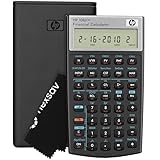
- HP 10BII+ FOR STUDENTS & PROFESSIONALS – This HP calculator is built for business, finance, accounting, and statistics courses. Perfect for learners and professionals who need to solve common financial problems quickly without memorizing formulas or relying on spreadsheets.
- 100+ FUNCTIONS FOR REAL WORLD MATH – Quickly solve time value of money, interest rates, loan payments, NPV, IRR, cash flows, and more. The 10bII+ also includes probability distributions for statistics courses—a feature not often found in financial calculators.
- ALGORITHMIC INPUT WITH DEDICATED KEYS – This high-school/college calculator uses algebraic and chain logic with minimal keystrokes. Layout appears the same as standard calculators for easy learning. Dedicated keys give quick access to commonly used financial and statistical functions
- APPROVED FOR MAJOR EXAMS – The HP 10bII+ algebra calculator is permitted for use on SAT, PSAT/NMSQT, and AP tests. An ideal statistics calculator and business calculator for school finance and accounting students preparing for class, coursework, or standardized exams.
- INCLUDES TRAVEL CASE, CLEANING CLOTH & BATTERIES– Slim, durable, and easy to keep on hand or store in a backpack or locker. Includes a protective case, cleaning cloth, and batteries so it’s ready out of the box. Large screen with clear contrast (non-backlit) is easy to read during exams or lectures.
Is Quicken Simplifi best for simple cash-flow awareness?
Quicken Simplifi is a good fit for beginners and households that want a flexible view of income, recurring bills, planned spending, and projected cash without assigning every dollar in advance. Simplifi generally has less specialized sinking-fund structure than YNAB and less advanced investment or tax-oriented depth than higher-tier Quicken products.
Is Empower best for investment and retirement visibility?
Empower Personal Dashboard is the strongest free starting point when the main question is whether investments, asset allocation, and retirement preparation are progressing effectively. Empower’s official tools page describes budgeting, account aggregation, net-worth tracking, investment allocation, and retirement-planning features.
Empower is less compelling for detailed daily budgeting. Retirement projections are estimates based on assumptions and market performance, not guarantees. Free planning tools should also be distinguished from Empower’s separate advisory services.
Is Tiller best for spreadsheet control?
Tiller suits users who want automatically updated financial data inside customizable Google Sheets or Microsoft Excel templates. Spreadsheet users can build their own formulas, categories, dashboards, and reports, but they also assume responsibility for maintaining the model. Tiller is a poor fit for anyone who wants an almost automatic mobile budgeting experience. Comparative context on spreadsheet-centered tools appears in this Financial Planning Association document.
Is Copilot best for a polished Apple-centered experience?
Copilot is aimed at users who value an app-first interface, automated categorization, and consolidated views of spending, budgets, investments, savings, cash flow, subscriptions, and net worth. Its quick-start guide confirms support for savings goals, including goals linked to existing balances or transactions.
Before subscribing, confirm platform availability, supported accounts, connectivity, and whether the goal workflow is detailed enough. A savings-goal screen does not automatically equal YNAB’s full allocation method.
What should you score before choosing an app?
| Criterion | What to verify | Why it affects savings |
|---|---|---|
| Goal specificity | Amount, deadline, frequency, current balance, and multiple goals | Turns a wish into a measurable contribution |
| Sinking funds | Support for annual, semiannual, and irregular costs | Prevents large predictable bills from becoming emergencies |
| Cash-flow forecast | Upcoming bills, expected income, and remaining safe-to-spend cash | Reduces transfers that later cause overdrafts |
| Transfer handling | Whether account transfers are excluded from income and spending | Prevents double counting |
| Overspending response | Prompts to adjust categories or goals | Converts an overrun into a deliberate trade-off |
| Debt integration | Balances, payoff plans, and interest context | Supports decisions between saving and debt repayment |
| Household support | Users, shared goals, private accounts, and reimbursements | Prevents duplicated or hidden household plans |
| Data reliability | Institution coverage, update frequency, and recovery tools | Stops stale data from creating false confidence |
How should you set up an app to save more?
- Connect accounts and verify the opening balances. Include checking, savings, credit cards, loans, investments, and relevant retirement accounts, but compare the imported data with official statements.
- Clean categories and transfers. Correct merchants, split mixed purchases, classify refunds, and make sure credit-card payments are transfers rather than new expenses.
- List fixed, flexible, and irregular costs. Rent, insurance, and minimum debt payments are fixed; dining and entertainment are flexible; repairs, taxes, annual renewals, and holidays are irregular.
- Create separate targets. Use distinct goals for a starter emergency fund, full emergency fund, insurance, vehicle maintenance, medical costs, repairs, travel, taxes, gifts, major purchases, and retirement contributions.
- Calculate sustainable contributions. Use
(target amount - current amount saved) / months until deadline. For example, a $2,400 target with $600 already saved and six months remaining requires $300 per month, assuming no interest or additional deposits. - Automate the actual transfer through the bank or brokerage. A budgeting app may plan, remind, and monitor; the financial institution may still need to execute the transfer. Schedule transfers after dependable paydays, preserve a checking buffer, and revisit the amount after income changes.
- Reconcile at least monthly. Compare balances, review uncategorized transactions, confirm recurring bills, update goal dates, inspect stale investments, and verify refunds and reimbursements.
What are the most common failure modes?
What should you do when account synchronization fails?
Check the institution’s connection status, reauthenticate if prompted, compare the app with the bank’s official ledger, and use manual entry or reconciliation temporarily. Avoid deleting transactions until you know whether the app will import them again. Institution counts do not guarantee uninterrupted connectivity.
How do you prevent credit-card payments from being counted twice?
A credit-card purchase and the payment from checking are separate ledger events, but only the purchase is spending. Classify the payment as a transfer so the app does not exaggerate expenses.
Also popular on Amazon

- Solves time-value-of-money calculations such as annuities, mortgages, leases, savings, and more
- Performs cash-flow analysis for up to 32 uneven cash flows with up to 4-digit frequencies
- Calculates various financial functions: Net Future Value Net present Value Modified Internal Rate of Return Internal Rate of Return Modified Duration Payback Discounted Payback
- The Texas Instruments BAII Plus Professional features an Automatic Power Down (APD) function for extended battery life
- Prompted display guides you through financial calculations showing current variable and label. Ten-digit display
Why is a savings-account balance not the same as available savings?
Money in savings may already be committed to taxes, insurance, repairs, tuition, or a near-term purchase. Track the purpose of money as well as the account holding it.
How should people with irregular income use these apps?
Freelancers, commission workers, and seasonal employees should use conservative income estimates, larger cash buffers, separate tax reserves, flexible targets, and a method for assigning windfalls. A proactive allocation method can help, but no app can make uncertain income predictable.
What should couples check before sharing an app?
Review shared and private accounts, included users, editing rights, duplicated categories, reimbursements, and split expenses. YNAB says one subscription can be shared with up to six people, while Monarch markets household-oriented aggregation and planning; verify current terms on each provider’s site.
The Tool Desk
Outbyte Driver Updater FREEScan for outdated or missing drivers - takes under a minuteDriver Scan →Outbyte PC Repair FREEClear out junk files and repair common Windows errorsFree Scan →Can one budgeting plan handle multiple currencies?
YNAB states that users can select a currency but cannot use multiple currencies together in one spending plan. International and cross-border users should verify currency, institution, tax, platform, and subscription support before choosing an app.
Independent reader supportYour contribution helps us test, update, and keep practical guides available for everyone.How much should a paid financial app save to justify its cost?
Compare the subscription with measurable savings and time saved, not with a generic promise of better finances. A $100 annual subscription costs about $8.33 per month, so the service must either prevent more than that in avoidable spending or provide enough planning value and convenience to justify the fee.
YNAB’s official U.S. pricing page lists $109 annually or $14.99 monthly and a 34-day direct free trial. Monarch’s pricing page showed an approximately $99 annual price signal in the supplied research, subject to promotional and checkout conditions. Quicken’s official comparison page displays promotional and annualized prices, so do not calculate a renewal cost by multiplying a discounted monthly figure by 12.
Empower promotes free personal dashboard tools, but free access does not mean the service has no commercial incentives. Tiller and Copilot prices should be checked directly at publication or purchase. For every paid service, distinguish monthly billing, annual billing, first-term promotions, renewal pricing, trial length, payment-method requirements, included users, and feature limits.
Do these 3 things before closing this tab:
1Scan for outdated or missing drivers - takes under a minute2Clear out junk files and repair common Windows errors3Fix the driver behind crashes, sound loss and screen glitchesHow do privacy, security, and investment features affect the choice?
Compare whether credentials are shared directly or through an aggregation provider, whether connections are read-only or transaction-enabled, how multi-factor authentication works, what encryption and data-deletion controls are documented, whether data can be exported, and whether the provider markets advisory or other financial products.
Also popular on Amazon

- Sold as 1 Each.
- Ideal for students and professionals. Over 100 built-in functions including probability distributions.
- Intuitive keyboard layout with minimal keystrokes required for many common functions.
- Easy-to-read display with adjustable contrast and on-screen labels.
- Permitted for use on SAT, PSAT/NMSQT and College Board AP tests.
YNAB uses the phrase “bank-grade security” on its features page; that wording is a vendor claim, not an independent security certification. Do not treat any app as completely secure or risk-free. Use unique credentials, enable multi-factor authentication where available, and review the provider’s current privacy policy.
Investment aggregation and retirement projections are helpful context, not substitutes for brokerage statements, tax records, retirement-plan administrators, benefits administrators, fiduciary planners, or tax professionals. Net worth can rise because markets or home prices rise, and it can fall while a user saves responsibly. Track savings rate, goal funding, debt, and cash flow separately from net worth.
Which app should you choose?
- Need strict behavior change and deliberate allocation? Choose YNAB.
- Need a shared household dashboard for spending, goals, investments, and net worth? Choose Monarch.
- Want a simple forward-looking spending and cash-flow plan? Choose Quicken Simplifi.
- Care most about investments and retirement readiness, and want a free starting point? Try Empower Personal Dashboard.
- Want to build your own formulas and reports? Choose Tiller.
- Prefer a polished, app-centered Apple experience? Evaluate Copilot after confirming platform and account support.
If income does not cover necessities, changing apps will not create a sustainable savings rate. The appropriate response may instead involve increasing income, reducing housing or transportation costs, restructuring debt, seeking benefits assistance, or consulting a nonprofit credit counselor.
What’s actually slowing this PC down?
Pick the symptom - the matching free tool is one click away.
Prices and features in this comparison reflect the supplied research checked on August 16, 2026, where stated, and may change. This article is educational information, not individualized tax, investment, legal, or financial advice.
Frequently Asked Questions
What is the best financial planning app for maximizing savings?
YNAB is the strongest choice for users who need proactive, goal-based savings behavior because the method assigns available money to priorities before spending. Monarch, Simplifi, Empower, Tiller, and Copilot may be better for household dashboards, flexible cash flow, investing, spreadsheets, or app-first tracking.
Is a savings goal feature enough to make an app useful?
No. A useful savings workflow should support a target amount, deadline, contribution calculation, current balance, multiple goals, and clear treatment of transfers. A progress bar alone does not reserve money or execute a bank transfer.
Are free financial planning apps safe and complete?
Free tools can provide useful account aggregation, budgeting, net-worth, investment, or retirement views, but free access does not guarantee complete coverage or eliminate commercial incentives. Users should review security, privacy, connection, export, and advisory-service details.
Recommended Free Tools
Can financial planning apps guarantee better investment or retirement results?
No. Investment tracking and retirement projections are estimates based on available data and assumptions, and market performance is uncertain. App information does not replace official statements or individualized advice from a qualified professional.
The Bottom Line
The best savings app is the one that changes the next financial decision. Choose YNAB for deliberate allocation, Monarch for household visibility, Simplifi for flexible cash flow, Empower for free wealth tracking, Tiller for spreadsheet control, or Copilot for polished app-based monitoring. Whichever tool you choose, verify the data, automate transfers through the financial institution, and reconcile the plan every month.

