
The Tool Desk
Outbyte PC Repair FREEClear out junk files and repair common Windows errorsFree Scan →Outbyte Driver Updater FREEScan for outdated or missing drivers - takes under a minuteDriver Scan →The Logitech MX Mechanical Mini for Mac is a compact, low-profile mechanical keyboard with Mac-specific key legends, Tactile Quiet switches, Bluetooth pairing for up to three devices, and adjustable white backlighting. Its main compromise is that “Mini” describes its footprint, not its travel weight: Logitech lists it at 612 g. It is worth considering if you want a mechanical typing feel and Mac-first layout on a desk, but less compelling if low carry weight or wired typing matters most.
What makes the Mac version different?
Logitech identifies this model as the MX Mechanical Mini for Mac, model YR0081. It uses a Mac layout, including Mac-specific Control, Option, and Command keys, rather than the standard Windows-first legends found on many multi-platform keyboards. Logitech describes its switches as low-profile Tactile Quiet mechanical switches, intended to provide a tactile bump with less noise. That description is the manufacturer’s positioning, not an independent sound or typing test.
Logitech’s support specifications list dimensions of 312.60 × 131.55 × 26.10 mm and a weight of 612 g. These are manufacturer-listed figures, not independently measured values. The compact width saves desk space, but the listed weight is substantial for a keyboard someone expects to carry frequently.
How does it feel to type on?
A Tom’s Guide contributor who uses an MX Mechanical Mini with a MacBook praised the Mac-style Control, Option, and Command keys and described the key travel and keycap feel favorably. The contributor also noted that the keyboard feels heavier than its compact size suggests. The account does not establish that the tested unit was the exact “for Mac” SKU, so treat it as an impression of the MX Mechanical Mini family rather than a verified test of model YR0081.
Do these 3 things before closing this tab:
1Clear out junk files and repair common Windows errors2Scan for outdated or missing drivers - takes under a minute3Repair Windows errors before they cause bigger problems#1 Best Overall

- Check out Logitech's MX Mechanical Keyboards (Universal PC version) for a full range of key feels (including Linear / Tactile Quiet / Clicky), in both full and compact sizes
- Mastered for Mac: MX Mechanical Mini for Mac Bluetooth keyboard features a key layout for Mac designed for feel and productivity, optimized for macOS and compatible with iPadOS and iOS(1)
- Precise and quiet typing: Mechanical Tactile Quiet switches have a satisfying tactile bump you feel but barely hear, for precise feedback, reactive key reset, and a fluid typing experience
- Mini size with low-profile keys: Experience more comfort with the minimalist, compact form factor featuring low-profile mechanical keys, for effortless precision and better ergonomics
- Smart illumination: Backlit keys light up the moment your hands approach the cordless keyboard and automatically adjust to suit changing lighting conditions
There is no hands-on test of this exact Mac model behind this review, so typing comfort, sound, and switch feel will depend on personal preference. Tactile Quiet is a sensible starting point for someone seeking noticeable feedback without a louder, high-profile mechanical setup; anyone needing a particular switch sound or feel should try it in person if possible.
What connectivity does it offer?
Logitech says the keyboard can pair over Bluetooth Low Energy with up to three devices. Easy-Switch lets you select a channel: hold the desired channel key for three seconds to make the keyboard discoverable, complete pairing in the device’s Bluetooth settings, then use a short press to move between paired channels. The setup guide also describes pairing through a USB receiver, while the support specifications list Logi Bolt and Bluetooth Low Energy connectivity.
Rank #2
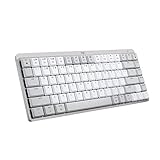
- Mastered for Mac: MX Mechanical Mini for Mac Bluetooth keyboard features a key layout for Mac designed for feel and productivity, optimized for macOS and compatible with iPadOS and iOS(1)
- Precise and quiet typing: Mechanical Tactile Quiet switches have a satisfying tactile bump you feel but barely hear, for precise feedback, reactive key reset, and a fluid typing experience
- Mini size with low-profile keys: Experience more comfort with the minimalist, compact form factor featuring low-profile mechanical keys, for effortless precision and better ergonomics
- Smart illumination: Backlit keys light up the moment your hands approach the cordless keyboard and automatically adjust to suit changing lighting conditions
- Multi Mac connectivity: Pair MX Mechanical Mini for Mac multi-device keyboard via Bluetooth Low Energy with up to 3 Mac computers or iPads and switch between them seamlessly
The included 1 m USB-C to USB-C cable is for charging only. Logitech explicitly says it does not create a wired typing connection, so this is not the right choice if you need a keyboard that can operate over USB when Bluetooth is unavailable. Logitech recommends Logi Options+ for full features; the software is compatible with macOS and Windows.
For a Mac and iPad workflow, the useful distinction is that the keyboard can switch among paired devices, rather than being limited to one host. The setup guide documents Bluetooth pairing and channel switching, but specific compatibility can still depend on the operating system and device settings.
Rank #3
- Mastered for Mac: MX Mechanical Mini for Mac Bluetooth keyboard features a key layout for Mac designed for feel and productivity, optimized for macOS and compatible with iPadOS and iOS(1)
- Precise and quiet typing: Mechanical Tactile Quiet switches have a satisfying tactile bump you feel but barely hear, for precise feedback, reactive key reset, and a fluid typing experience
- Mini size with low-profile keys: Experience more comfort with the minimalist, compact form factor featuring low-profile mechanical keys, for effortless precision and better ergonomics
- Smart illumination: Backlit keys light up the moment your hands approach the cordless keyboard and automatically adjust to suit changing lighting conditions
- Multi Mac connectivity: Pair MX Mechanical Mini for Mac multi-device keyboard via Bluetooth Low Energy with up to 3 Mac computers or iPads and switch between them seamlessly
How do the backlighting and battery claims work?
Logitech lists white backlighting and says the keyboard uses an ambient-light sensor to adjust lighting. Its setup guide documents eight brightness levels and six lighting effects. The guide also says lighting turns off when the room is bright or the battery is low, so users should not expect it to remain illuminated in every condition.
Logitech estimates up to 15 days of battery life on a full charge with backlighting, or up to 10 months with backlighting off. These are manufacturer estimates, not independently measured runtimes; Logitech cautions that actual life varies with use and computing conditions. The support specification lists a 1500 mAh lithium-polymer battery and a four-hour charge time from empty to full.
Rank #4
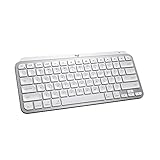
- Mastered for Mac: MX Keys Mini for Mac is optimized for macOS, iPadOS(2), and iOS(2) and features a keyboard with a layout for Mac for maximum productivity
- Designed for Mac: Compatible with Apple MacBook Pro, MacBook Air, iMac & iPad models
- Perfect Stroke Typing with Smart Keys (1): Type on keys shaped for your fingertips, with voice to text Dictation (4), Mic Mute/Unmute, and Emoji keys
- Mini Size, Mighty Powerful: A layout designed for effortless precision, with a minimalist form for an ergonomic keyboard that's portable and can travel wherever you get work done
- Smart Illumination: The wireless keyboard's backlit keys light up the moment your hands approach, and automatically adjust to suit changing lighting conditions
Does it behave like a standard Mac function-key row?
The setup guide documents two function-row modes: media-key behavior and F-key behavior. Press Fn+Esc to switch between them. This matters if your apps rely on F1–F12 commands and you do not want to use a modifier for them, or if you prefer the media controls as the default.
Independent reader supportYour contribution helps us test, update, and keep practical guides available for everyone.What is included in the box?
- The MX Mechanical Mini for Mac keyboard.
- A 1 m USB-C to USB-C cable for charging.
- A compliance flyer.
The cable is not a data cable for wired keyboard use.
Best Value

- Perfect Stroke Typing with Smart Keys (1): Type on keys shaped for your fingertips, with voice to text Dictation (4), Mic Mute/Unmute, and Emoji keys
- Mini Size, Mighty Powerful: A layout designed for effortless precision, with a minimalist form for an ergonomic keyboard that's portable and can travel wherever you get work done
- Smart Illumination: The wireless keyboard's backlit keys light up the moment your hands approach, and automatically adjust to suit changing lighting conditions
- Multi-Device, Multi OS: Pair MX Keys Mini compact keyboard with up to 3 devices on nearly any operating system via Bluetooth Low Energy and switch between them seamlessly
- Multiple Computers, One Flow: Team the slim MX Keys Mini with MX Master 3 or MX Anywhere 3 and type across multiple computers or laptops in one fluid workflow(1)
Is the Logitech MX Mechanical Mini for Mac worth it?
It is a strong fit for Mac users who want a compact mechanical board with Mac legends, tactile low-profile switches, backlighting, and quick switching among as many as three paired devices. It is less suitable for someone whose priorities are a number pad, minimal travel weight, or a wired typing fallback. The 612 g manufacturer-listed weight is the clearest portability qualification; the absence of wired typing is the clearest connectivity limitation.
For an office or home desk, the compact layout and multi-device switching may outweigh those compromises. For frequent travel, compare its listed weight with the keyboard you already carry, and consider whether you will accept the manufacturer’s shorter estimated runtime when backlighting is enabled. Price and availability vary by market and are not established here, so check that a listing is specifically for the Mac version before buying.
Quick Recap
Product prices and availability are accurate as of the date/time indicated and are subject to change. Any price and availability information displayed on Amazon at the time of purchase will apply.

