
Do these 3 things before closing this tab:
1Clear out junk files and repair common Windows errors2Scan for outdated or missing drivers - takes under a minute3Repair Windows errors before they cause bigger problemsIt can be, but $90 is only compelling if the unit’s configuration and included accessories justify the price. A Wyse 5070 can handle modest home-server jobs such as DNS, VPN, monitoring, or a small NAS with external storage. Before buying, confirm whether it is the Standard or Extended model, which processor and memory it has, what storage is installed, and whether a compatible power adapter is included.
What is the Dell Wyse 5070?
Dell designed the Wyse 5070 as a quad-core thin client for virtual desktop environments, not as a conventional desktop PC. Dell’s Wyse 5070 Thin Client Executive Summary and Data Sheet lists Intel Celeron J4105 and Pentium Silver J5005 processor options. The J5005 configuration uses Intel UHD Graphics 605; the J4105 uses UHD Graphics 600. Dell’s cited product sheet lists configurations up to 8 GB of memory, but a used listing’s exact RAM should be verified rather than inferred from the model name.

Which $90 Wyse 5070 are you buying?
The two chassis versions offer different expansion options, so “Wyse 5070” alone does not describe the value of a listing.
| Version | What to check | Illustrative used-price range |
|---|---|---|
| Standard | Confirm processor, RAM, storage, condition, and included adapter. It lacks the Extended model’s cited PCIe and 2.5-inch SATA expansion options. | $35–$55 in MiniLabHQ Editorial’s guide updated September 6, 2026; illustrative range, not a market-wide US survey. Source |
| Extended | Adds a low-profile PCIe slot and 2.5-inch SATA bay, useful only if your build needs those expansion options. | $55–$90 in the same guide; illustrative range, not a market-wide US survey. Source |
Those figures are a single guide’s snapshot, not proof of what US buyers are currently paying. A separate Australian review recorded AU$69 including GST and postage in 2024; that is neither a US price nor a current US-market comparison. Gough’s Tech Zone review also describes a J5005 unit with 8 GB DDR4 and a 64 GB SATA M.2 SSD, while noting that used configurations vary.
#1 Best Overall

- Intel Celeron J4105 (4 Cores/4MB/4T/up to 2.5GHz/10W) supports Windows10 Linux ThinOS ThinOS + PCoIP
- Wyse 5070 thin client, Intel Pentium Processor J4105, no eMMC
- Composite Audio (out) | Composite Audio (in & out) USB-C Port | USB 3.0 Port | 2 USB 2.0 Ports | Mouse and Keyboard
- 4 USB 3.0 Ports | 2 DisplayPorts (Pentium configuration only) | RJ45 Ethernet | Discrete Graphics | US Powercord
- (Shown with optional) Dual-Antenna Wireless Networking Module | Available Auxiliary Port (shown with optional VGA)
Use the complete delivered configuration to judge the asking price: include shipping and anything you must buy to make the machine usable. A bare unit needing storage or a replacement adapter is not equivalent to one with those items included. Compare its total against other used x86 mini PCs available to you; the available sources do not establish a definitive current US transaction-price average.
Can a Wyse 5070 work as a mini-server?
Yes, for modest services and workloads that fit the machine’s actual processor, memory, and storage. Independent reporting describes Linux use for VPN bridging and small NAS duties with external USB storage. The 2026 MiniLabHQ guide identifies small DNS, VPN, uptime-monitoring, and similar light services as plausible uses. These are examples and owner or editorial reports, not controlled performance benchmarks.
Rank #2
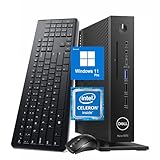
- 【Superior Performance】This Dell Wyse 5070 Mini Computer Desktop PC features an Intel Celeron J4105 processor, effortlessly handling Office tasks, video conferencing, and 4K video decoding. Paired with 8GB DDR4 memory and a 256GB NVMe SSD, it boots up in under 8 seconds while supporting multitasking for lag-free operation.
- 【Compact Form Factor】Measuring just 183×183×36mm and weighing 1.2kg, this Dell Wyse 5070 Thin Client occupies less than one-fifth the space of a traditional desktop. Its dual-orientation design allows placement behind monitor stands or flush mounting into desks, seamlessly integrating with modern minimalist office aesthetics.
- 【Display & Connectivity】This Dell Wyse 5070 Mini Desktop comes equipped with a wired keyboard and mouse, a USB wireless network adapter, and a USB Bluetooth adapter. It supports dual 4K (3840x2160) displays, allowing you to connect two monitors simultaneously. You can extend your workspace, mirror content, or expand a single window across multiple displays.
- 【Full Port Coverage】This Dell Wyse 5070 Mini PC offers 6×USB 3.0, 3×USB 2.0, 1×USB Type-C, 2×DisplayPort, and a headphone/microphone combo jack, supporting triple 4K output. It meets high-load demands for design, programming, and more.
- 【Windows 11 Pro】This Dell Wyse 5070 Computer Desktop comes pre-installed with Windows 11 Pro, delivering comprehensive enterprise-grade functionality and security. It supports enterprise features like BitLocker encryption and Remote Desktop, meeting the needs of professional users.
It is a poor choice if the plan depends on substantial headroom. The platform is older and low-end, with less memory and expansion potential than modern mini PCs; the guide cautions against expecting it to handle heavy databases, many virtual machines, demanding media transcoding, or primary high-capacity storage. Actual suitability depends on the workload and the unit’s configuration.
What to verify before paying
- Identify the chassis. Check photos and model details to distinguish Standard from Extended. Pay extra for the Extended’s PCIe slot or 2.5-inch SATA bay only if you expect to use them.
- Get the exact configuration. Ask the seller to confirm CPU, RAM, internal storage, physical condition, and what is included. Used units can differ even when the listing title is identical.
- Confirm storage compatibility. The relevant M.2 slot is for SATA; do not assume an M.2 NVMe drive will work. Check the exact unit and documentation before ordering an upgrade.
- Check the power adapter. Confirm that one is included and suitable. Dell documents external adapter options; the hardware reference describes a 19.5 V, 7.4 mm barrel connection and warns that an unrecognized adapter can restrict clock speed. See the Wyse 5070 hardware reference.
- Measure power if 24/7 cost matters. Dell’s indexed manual result lists 10 W processor TDP, which describes the CPU and is not a measurement of the whole computer at the wall. Use a wall meter on the actual unit under your intended workload. Dell specifications.
- Account for missing parts and risk. Check the seller’s return terms and add the cost of any required RAM, storage, adapter, or shipping before comparing the total with alternatives.
So, is $90 worth it?
A $90 listing is easiest to justify when it is an Extended unit in good condition, with a useful confirmed configuration and a compatible adapter, and when you specifically need its expansion. It is harder to justify for a Standard unit with unknown or minimal RAM and storage, missing power supply, or unverified condition. For a light home-server role, the Wyse 5070 is a plausible low-power x86 option; the right deal depends on the exact machine and the total cost to put it to work.
The Tool Desk
Outbyte PC Repair FREEClear out junk files and repair common Windows errorsFree Scan →Outbyte Driver Updater FREEFix the driver behind crashes, sound loss and screen glitchesFind Drivers →Quick Recap
Best Value

- Designed as an IT thin client terminal. Does not browse the web independently. Requires connection to a server-based or virtual desktop infrastructure.
- Intel Celeron Processor: Smooth performance for basic tasks and virtualization.
- 4GB DDR4 RAM: Multitasking capability for thin client computing.
- 32GB SSD Storage: Fast and reliable solid-state drive for quick boot and load times.
- Compact & Reliable: Ideal for office or industrial environments where space and efficiency matter.
Rank #3

- Part Numbers: 4K8XT, FGYD2, 895W8, 2WDPR, C63YJ, 3C8N9, 5MXMG
- Ports 3 USB 2.0 1 USB 3.1 1 Audio-mic combo jack 2 DisplayPort
- Connectivity: RJ45 (Wired Ethernet)
- Chipset: Intel Quad Core 1.44 GHz
- Memory: 2GB RAM
Product prices and availability are accurate as of the date/time indicated and are subject to change. Any price and availability information displayed on Amazon at the time of purchase will apply.

