
Quick wins for a faster PC:
Repair Windows errors before they cause bigger problemsFix Now →Fix the driver behind crashes, sound loss and screen glitchesFind Drivers →Clear out junk files and repair common Windows errorsFree Scan →If an analog multimeter gives a questionable reading, first verify the selected function and range, then check its mechanical zero and—on the ohms range—its zero-ohms adjustment. If the needle will not move, inspect the leads, fuse, and battery. A pointer that sticks or a meter that remains out of calibration needs professional service or replacement.
Before connecting the probes, choose the right function and range
Set the selector to the measurement you intend to make—voltage, current, or resistance—and choose a range that can tolerate the expected value. If you do not know the value, start at the highest range, take a reading, then step down to a suitable lower range. Using the wrong function can damage the meter and may injure you; consult the instructions for your specific model. Pro’sKit’s MT-2207 guidance and the relevant meter manuals cover these operating precautions.
Never select resistance on a circuit that is energized. Disconnect power before measuring resistance, and follow the meter manual’s instructions for safely confirming the circuit is de-energized.
How to zero an analog multimeter
Set the mechanical zero with no input
Disconnect the probes from the circuit. The pointer should rest at the left-hand zero mark. If it does not, adjust the mechanical zero screw on the meter face. If the pointer cannot be brought to zero, the cause may be a weak battery, faulty leads, internal damage, or a shifted meter movement.
#1 Best Overall

- Manual range selection
- Easy to read, color-coded analog displays
- Includes replaceable test leads and operating instructions
- Agency approved with fuse overload protection circuitry incorporated
- 15 position rotary dial
Set zero on the ohms scale
- Select an ohms range.
- Touch the probe tips together to short them.
- Turn the zero-ohms control until the pointer reaches the zero mark on the resistance scale. On many meters, that mark is at the right end of the ohms scale, not the left-hand zero used for voltage or current.
If the control cannot bring the needle to the ohms zero mark, test or replace the battery and inspect the leads before considering any internal work. Follow the model’s manual for battery type and replacement. Pro’sKit’s MT-2207 product guidance describes the zeroing procedure for that model.
Why an analog meter needle will not move
If the meter does not respond on any function, check the simplest likely interruptions first:
Rank #2
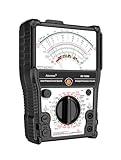
- 【More-Function】AS-7199A has 11 functions, including AC and DC voltage , DC current, DC resistance, standard resistor box, on/off beeping, transistor, LV detection, regulator/LED detection, battery detection, remote control detection.
- 【Durable and Portable】Built to last, the analog multimeter is constructed with durability in mind, ensuring longevity and reliability. Its compact size makes it highly portable, perfect for taking on-the-go for all your measurement needs. The analog multimeter's robust design withstands demanding environments, making it a reliable tool for any situation.
- 【More convenient】The AS-7199A has a stand on the back so you can place it on a table or workbench to adjust the product's position for your readings, as well as magnets to attach the product to metal and hanging holes to hang it.
- 【Wide Range of Applications】From electrical projects to automotive repairs, analog multimeters are indispensable tools for professionals, hobbyists and DIY enthusiasts. Whether you need to test circuit continuity, voltage, or current in AC and DC systems, an analog multimeter can do it all. Expand your measurement capabilities with versatile analog multimeters to solve a variety of applications.
- 【Complete with accessories】1x Pointer Multimeter, 1x test leads with caps, 1x manual, 2x 1.5V batteries
- Test leads: Inspect for damaged insulation, loose connections, or a broken conductor. A lead with an open connection can prevent a reading.
- Fuse: Check the internal fuse as directed by the manual. Replace a blown fuse only with the specified type and rating; an incorrect fuse can compromise protection.
- Battery: A depleted battery can stop the pointer reaching zero on resistance ranges, even if other functions behave differently.
Disconnect the meter from the circuit before inspecting or replacing parts, and do not open the case unless the manual provides a safe procedure. If these checks do not explain the failure, stop using the meter and arrange service or replacement.
How to read the needle accurately
Analog meter faces often have several scales, and some are nonlinear. Match the scale to the selected function and range rather than reading whichever set of numbers is easiest to see. View the pointer straight on, perpendicular to the face, to reduce parallax error.
Rank #3

- Advanced 8-in-1 Measurement Functions: Supports precision measurements of DC/AC voltage, DC current, resistance, transistor hFE gain, battery condition, load voltage/current, and dB audio levels-essential for electrical engineers and advanced technicians
- Real-Time Needle Display for Instant Trend Analysis: The analog needle display provides immediate feedback on fluctuating electrical signals, offering superior precision for monitoring real-time voltage and current variations
- Comprehensive Transistor & Capacitor Testing: Built-in hFE function for accurate transistor gain testing, and capacitor testing function to assess battery performance and identify potential issues in circuits and components
- Audio Level Measurement & Load Testing: Includes an integrated dB level meter for audio system analysis, along with load voltage/current testing capabilities to simulate circuit performance under real-world conditions
- Durable Construction with Clear, Easy-to-Read Dial: High-quality build with an easy-to-read scale, audible continuity beep, and rugged casing for consistent and reliable performance in demanding work environments
If the pointer falls in the lower half of the scale and a lower range can contain the value, switch down. The needle will use more of the scale, making the reading easier to resolve. Do not switch to a range that could be exceeded by the input.
What can make readings inaccurate or unstable?
Check the meter’s operating instructions for its required position; some models should be kept flat on a non-metallic surface. Keep the instrument away from strong magnetic fields, severe vibration, excessive heat or humidity, and impacts. The moving mechanism is delicate, and a drop or shock can affect its operation.
Rank #4

- DC Voltage Range: 0 - 10 - 50 - 250 - 1000V; AC Voltage Range: 0 - 10 - 50 - 250 - 1000V; DC Current Range: 0 - 0.5 - 50 - 500mA; Ohm Meter: x10, x100, x1K; Decibels: -20dB to +22dB on AC Voltage Ranges
- Pocket multimeter, with multiple measurement functions, full range protection and high safety performance.
- The scale is accurate, the dial is clear, the gear is accurate, and the sense of pause between gears is strong. The regulation is simple and convenient, the workmanship is exquisite, and the measurement is accurate.
- Multiple protection. Adopt overvoltage, overcurrent self fusing protection circuit, meter overload protection, etc.
- The test pen is made of wire, which is not easy to break and can be used for a long time. Made of engineering plastics, is light in whole, small in size and convenient to carry.
If the reading remains questionable after the setup, scale, leads, fuse, battery, and environmental conditions have been checked, do not assume the meter is safe or accurate. Model-specific accuracy limits and safety ratings come from that meter’s manual; there is no single accuracy figure that applies to all analog multimeters.
Independent reader supportYour contribution helps us test, update, and keep practical guides available for everyone.When to stop troubleshooting
A needle that sticks, binds, or moves slowly can indicate damage to the movement. A pointer that cannot be zeroed after the basic checks, or calibration that appears to have shifted, also warrants professional attention. Pro’sKit’s guidance for the MT-2207 says: “If the pointer sticks or calibration has shifted, have it serviced professionally.” Do not force the pointer or attempt internal adjustments without the appropriate calibration equipment. Take a suspect meter out of service until it has been checked, or replace it.
Choosing repair, accessories, or a replacement meter
For a repair decision, consider whether the fault is limited to a replaceable accessory or involves the meter movement or calibration. Compatible leads, the correct battery, or a fuse matching the specified rating may address a straightforward fault. For a replacement, compare the functions and ranges you need, how clearly the scales can be read, circuit loading, input protection and safety category, and whether replacement leads, fuses, and calibration or repair service are available. Confirm specifications in the manual for each model; they are not universal across analog meters.
Quick Recap
Product prices and availability are accurate as of the date/time indicated and are subject to change. Any price and availability information displayed on Amazon at the time of purchase will apply.

