
Recommended Free Tools
iTechGuides is reader-supported. When you buy through links on our site, we may earn an affiliate commission. As an Amazon Associate I earn from qualifying purchases. Learn more
To train an AI singing voice, record vocal material you have permission to use, choose a tool that explicitly supports custom singing-voice training or cloning, upload the recordings, create the model, then convert a guide performance and edit the result in your music software. The most direct options in this directory are LyricToMelody AI, Applio, ACE Studio, RVC WebUI, Kits AI, Audimee, Voice-Swap, Revocalize AI, and Lalals.
What You Need Before Training
- Vocal recordings that you own or are authorized to submit. Do not upload another singer’s voice without consent.
- A clear training goal: a lead vocal, backing harmonies, or a conversion model for an existing performance.
- A guide performance or MIDI-and-lyrics arrangement. A guide vocal gives conversion tools the melody, timing, and articulation to follow; MIDI and lyrics are useful when a singing generator creates the performance.
- A place to finish the audio. LyricToMelody AI exports MIDI, audio, and separate stems; ACE Studio supports separate-track rendering and DAW integration; Voice-Swap provides VST/AU plug-ins.
Choose A Training Route
| Tool | Training or conversion route | Platform details | Rights and plan note |
|---|---|---|---|
| LyricToMelody AI | Custom singing-voice training from uploaded or recorded vocals; can also generate sung drafts from lyrics or MIDI. | Web application. | Commercial rights are included on paid plans. Starter projects are retained for 7 days. |
| Applio | Custom model training, voice-model blending, and real-time or uploaded-audio conversion. | Windows, macOS, and Linux; desktop or self-hosted. | Free. Check the model and output terms before commercial release. |
| ACE Studio | Custom singing-voice cloning, MIDI-and-lyrics singing generation, and vocal-to-MIDI conversion. | Windows and macOS desktop. | No free plan. Licensing has voice- and feature-specific exceptions, so check the applicable terms. |
| RVC WebUI | Local training, model fusion, pitch controls, retrieval, and batch inference for voice conversion. | Self-hosted desktop setup with hardware-specific dependencies. | Free. You are responsible for permission to train and publish with any voice model. |
| Kits AI | Instant or professional voice cloning, conversion, blending, separation, and mastering. | Web, Windows, and API. | Artist-model outputs may need approval for commercial release; advanced cloning starts with the Starter plan. |
| Audimee | Custom voice models with voice conversion, isolation, pitch editing, stem splitting, and harmony creation. | Web platform. | Starter and Pro plans cap monthly conversion time. Check the license for your selected voice. |
| Voice-Swap | Singing conversion and cloning inside a DAW, with stem separation and licensed voice models. | VST/AU plug-ins and DAW workflow. | Commercial use depends on the applicable voice license. There is no free plan. |
| Revocalize AI | Train custom AI singing voices, transform recorded vocals, and add harmonies, modulation, auto-pitch, and pitch control. | VST plug-in, API, Logic Pro, Ableton, and FL Studio support. | Commercial licensing is limited to paid plans. The free plan allows 5 conversion minutes per month. |
| Lalals | Custom AI voice cloning, cover generation, stem separation, mastering, and transcription. | Check the vendor for current workflow details. | Inspired Voices are limited to personal, non-commercial use. The free plan includes 10 voices and 500 credits monthly. |
Step 1: Prepare A Consent-Based Vocal Set
- Use performances recorded by you or by a singer who has given permission for AI training and the intended release.
- Keep the source material focused on the singing qualities you want the model to reproduce: sustained notes, different registers, clear consonants, dynamics, and the vowel sounds used in your songs.
- Keep a copy of the original recordings and label each file by singer, song section, and take. Do not upload material that contains people who have not agreed to the training.
Step 2: Create The Voice Model
LyricToMelody AI
Open the web app, choose its custom singing-voice training workflow, and upload or record the authorized vocals. Use the resulting voice for a sung draft from lyrics or MIDI, then export audio or stems for later editing. Paid plans include commercial rights; review the plan terms before release.
Applio
Install Applio on a supported desktop system, add your authorized recordings, and start custom model training. Test the model with uploaded audio before using real-time conversion. Its free, cross-platform setup is useful when you want local control, but model quality and workflow depend on the voice model you create.
Quick wins for a faster PC:
Scan for outdated or missing drivers - takes under a minuteDriver Scan →Repair Windows errors before they cause bigger problemsFix Now →ACE Studio
Install ACE Studio on Windows or macOS, create a custom singing-voice clone from permitted recordings, and drive it with MIDI and lyrics. Render separate vocal tracks so you can mix the trained voice with instruments. Check voice-specific and feature-specific licensing before distribution.
Popular on Amazon
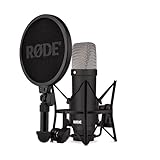
- COMPLETE VOCAL SETUP: shock mount, pop filter and XLR cable included, add an interface and record
- THE SOUND OF HIT RECORDS: the legendary NT1 large-diaphragm condenser voicing trusted in studios for two decades
- WHISPER-QUIET: among the lowest self-noise microphones ever made, nothing between you and the take
- BUILT FOR VOCALS AND STREAMS: tight cardioid pattern focuses on the voice, rejects the room
- IN THE BOX: NT1 Signature (Black), SM6 shock mount with pop filter, XLR cable and dust cover
RVC WebUI
Set up the self-hosted WebUI and its hardware-dependent components, prepare your authorized dataset, and run training. Use pitch controls, retrieval, and batch inference to compare conversions. This route offers deep control but requires comfort with local installation and model settings.
Kits AI
Upload permitted material to create or use a custom clone, then run a guide vocal through conversion. Use its blending, separation, or mastering tools only after you have checked the output license. Artist-model releases may require approval for commercial use.
Also popular on Amazon

- [USB Output] Enables simple setup. USB studio recording microphone kit provides a direct convenient plug-and-play connection to pc and laptop without any additional hardware or drivers for recording vocals, podcasts and Skype. Studio microphone for recording vocals is never been easier to get high-quality sound for your voice and computer-based audio recordings. (Incompatible with Xbox)
- [Excellent Sound Quality] With rugged construction for durable performance, the vocal recording microphone, USB condenser mic for PC,offers a wide frequency response and handles high SPLs with ease. Ideal for project/home-studio applications. The cardioid condenser capsule captures crystal-clear audio from the front and avoid ambient noise when communicating/creating/recording. Comes ready to go with a desktop mic boom arm stand and 8.2ft USB cable, you're guaranteed to get great-sounding results.
- [Durable Arm Set] The podcast microphone bundle with versatile and sturdy broadcast suspension boom scissor arm with 180° up and down rotation, 135° forward and backward extension for optimal adjustment, for capturing your voice in podcast or voiceover. The double pop filter attached on the music recording microphone provides two layers of dissipation, removes the rush of air, minimize the popping sounds or cancel noise that can compromise your recording, great for studio as well as home use.
- [Easy to Attach] The streaming microphone for PC includes adjustable boom studio scissor arm stand that features a heavy-duty combo mount consisting of a sturdy C-clamp and a detachable desktop mount. With 13" fixed horizontal arm and offers a 30" reach, the low-profile, table-hugging design of audio recording microphone allows on-air talent to perform without facial obstruction to record in podcasting or make dubbing sounds for videos, use voice chat in Discord or online conference on Zoom or Skype.
- [The Accessory Package Includes] The studio microphone music recording comes with practical accessories for you to use in most of recording. The scissor arm stand is made out of all steel construction, sturdy and durable, a studio-grade shock mount, a double pop filter, premium 8.2' USB-B to USB-A/C cable, a podcast PC gaming microphone, a user manual and friendly Technical Support.
Audimee
Create a custom voice model in the web platform, convert a guide vocal, and use pitch editing or harmony tools to repair notes and build parts. Track your monthly conversion allowance on Starter or Pro, and confirm the selected voice’s terms.
Voice-Swap
Load the guide vocal in your DAW through the VST or AU plug-in, select an authorized cloned or licensed voice, and render the converted part. Keep the applicable voice license with your project because commercial use depends on that license.
Also popular on Amazon
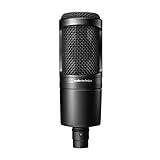
- The price/performance standard in side address studio condenser microphone technology
- Ideal for project/home studio applications
- High SPL handling and wide dynamic range provide unmatched versatility
- Custom engineered low mass diaphragm provides extended frequency response and superior transient response
- Cardioid polar pattern reduces pickup of sounds from the sides and rear, improving isolation of desired sound source.
Revocalize AI
Train a custom singing voice, send a recorded performance through conversion, and shape the result with pitch controls, harmonies, modulation, or auto-pitch. Connect through its plug-in or supported DAW workflow. Commercial licensing requires a paid plan.
Lalals
Upload authorized recordings for a custom AI voice, then use the voice in a cover or vocal workflow. Treat Inspired Voices as personal, non-commercial options and check the current terms for custom voices and generated outputs.
Quick Recap
Also popular on Amazon

- 【Ready to use Recording Studio Microphone】This studio condenser microphone features a USB output, providing a direct and convenient plug-and-play connection to your PC, smartphone, or laptop. Perfect for podcasting, vocal recording and music production, the DJM5 condenser microphone delivers high-quality sound without the need for additional hardware.
- 【Exceptional Sound Quality 】This condenser microphone uses cardioid polar pattern, 16mm diaphragm, 192kHz/24Bit sampling rate and 30Hz‑16kHz frequency response. It delivers clean sound for podcasting, vocal recording and streaming.
- 【Multifunctional Condenser Mic】This versatile condenser microphone supports 5V voltage and includes features like echo control, volume adjustment (+/-), a 3.5mm monitor headphone jack, and a mute button. Ideal for podcasting, home studio setups, and live broadcasting, the DJM5 is an all-in-one solution for high-quality audio
- 【Foldable Isolation Shield】The microphone isolation shield is made of 5 high-density sound-absorbing panels with a triple acoustic design. Each panel is foldable and adjustable, ensuring optimal noise reduction for podcasting, recording vocals, and music production. The compact design of the DJM5 makes it easy to carry and set up anywhere. This product comes with isolation shields in black, rose gold, and white, allowing you to choose the color that best matches your style
- 【Compact and Lightweight Design】 The DJM5 kit includes a soundproof shield measuring 27.55in x 10.23in, a microphone measuring 6.3in x 1.96in, a tripod stand measuring 8.66in x 7.1in, and a 6in diameter shockproof filter. The entire kit weighs only 4.1lbs (1.86kg), making it easy to carry and set up
Also popular on Amazon

- Groundbreaking studio condenser microphone that fuses the classic sound signature of the iconic NT1 with patented next-generation technology
- Connect to an audio interface or mixer via XLR, or plug directly into a computer via USB to record studio-grade sound in any setup – an all-in-one digital recording solution for the home or the studio
- Offers the classic warm, silky character, extremely low self-noise and high SPL handling capability that the original is revered for, perfect for a huge range of applications, from voiceovers and guitars to drums and piano
- Features RØDE’s ultra-low-noise, high-gain Revolution Preamp and high-resolution (up to 192kHz) analog-to-digital conversion for crystal-clear digital recordings
- Body machined from high-grade aluminium with nickel plating and military-grade ceramic coating, ensuring its ready to take on the rigours of recording day in, day out
Step 3: Drive The Trained Voice Musically
- Record or import a guide vocal with the melody and phrasing you want. For a generated performance, enter lyrics and MIDI in a tool that supports that input, such as LyricToMelody AI or ACE Studio.
- Convert one short section first. Use a verse or chorus to check pitch movement, consonants, breaths, and sustained notes before processing the whole song.
- Compare the converted part with the guide at the same tempo and key. If the phrasing is wrong, fix the guide performance or MIDI before retraining.
- Create harmony parts only after the lead is stable. Audimee, Revocalize AI, and ACE Studio list harmony or multi-track capabilities, but the exact controls vary by product.
Step 4: Edit And Export
- Use pitch and timing edits where the model misses a note or syllable. RVC WebUI, Audimee, Revocalize AI, and ACE Studio list pitch-related controls.
- Keep the original guide, model version, and converted take so you can reproduce the result.
- Export stems or separate tracks when the tool supports them, then mix the vocal in your DAW.
- Before publishing, confirm consent, the selected voice license, and whether your plan permits commercial use. Product terms differ, and unsupported rights should be checked with the vendor.
Common Training Mistakes
- Training on recordings you do not have permission to use.
- Expecting a voice model to repair an inaccurate melody or timing; conversion follows the guide performance.
- Processing a full song before checking a short section.
- Assuming a free plan, an artist voice, or an Inspired Voice includes commercial rights.
- Choosing a desktop tool when you need a browser workflow, or a web tool when your process depends on a DAW plug-in.
Which Route Fits Your Setup?
- Choose LyricToMelody AI or ACE Studio when you want to build a singing arrangement from lyrics or MIDI around a custom voice.
- Choose Applio or RVC WebUI when local, free model training and technical control matter most.
- Choose Kits AI, Audimee, Voice-Swap, or Revocalize AI when you want conversion and vocal-production controls around a recorded guide.
- Choose Lalals when custom cloning is part of a broader cover, stem, or mastering workflow, while observing its personal-use restriction for Inspired Voices.

