
Free tools Windows power users keep installed
One-click scans. No signup required.
To get notified when a game becomes cheaper, choose a tracker that covers your platform and country, add the correct game and edition to its wishlist or waitlist, and enable an alert. When a notification arrives, confirm the price and sale terms on the retailer’s own listing before buying.
Choose a tracker for your platform and region
Coverage differs by service, so start with the store and country where you plan to buy. A game may appear on a tracker for one platform or region but not another.


| Tracker | Documented coverage and useful features | Best fit |
|---|---|---|
| Deku Deals | Its homepage says it tracks Nintendo Switch, PlayStation, Xbox, and Steam games at official stores. Users can sign up, add games to a wishlist, and receive email notifications when those games go on sale. | Readers tracking games across those platforms who want wishlist-based email alerts. |
| IsThereAnyDeal | Its welcome page describes price history, Waitlist alerts, customizable notification rules, Steam wishlist import, and Collection tracking. Its API documentation includes country and shop selection, voucher handling, and deal information. | Readers who want configurable PC-game alerts or to import a Steam wishlist. |
| SteamDB | Its FAQ says each app page has a price table and graph for checking price history. It does not predict which specific games will be discounted or what their prices will be in a future sale. | Readers checking Steam price history and historical context. |
| PSprices | Its comparison page lists PlayStation, Xbox, Nintendo, and Steam coverage, along with notification channels, price history, apps, and regional coverage. PSprices claims coverage in 71 regions, compared with 41 for Deku Deals; this is the provider’s own comparison and may change. | Readers checking regional coverage or comparing platform and alert options. |
Features and supported stores can change. Check each service’s current settings and listings, and make sure it shows the country, platform, and edition you intend to buy. The IsThereAnyDeal API, for example, accepts a country code and optional shop filters, underscoring why country and storefront selection matter.
Set up a game price alert
- Choose the buying destination. Decide which platform and store you plan to use, and select a tracker that lists them for your region.
- Find the exact game. Search for the title, then check the platform and edition. Standard, deluxe, and complete editions may be listed separately; a discount on one does not mean another is discounted.
- Add it to a list. Add the game to the tracker’s wishlist or waitlist. Deku Deals describes email alerts for wishlisted games; IsThereAnyDeal lets users add games to a Waitlist and customize notification rules. It also supports Steam wishlist import.
- Choose the alert rule and channel. If the service offers a price threshold or historical-low rule, set one that reflects what you would actually pay. If the threshold is unusually low, you may wait indefinitely. Pick an available channel, such as email or push, and check notification settings or verify your email if required.
- Check the notification. Open the tracker’s deal details and compare the offer with the price history. Historical prices can provide context, but they do not establish when the next sale will happen or how deep it will be.
- Verify at the retailer. Open the store listing and confirm the country or region, currency, platform, edition, final price, and sale end date before purchasing.
Use price history as context, not a forecast
A tracker’s historical low or past sale price can help you decide whether today’s offer is attractive to you. It cannot guarantee that the game will reach that price again. SteamDB explicitly says it does not know which specific games will be discounted in an upcoming sale or what those prices will be, so treat past prices as a record rather than a prediction.
Quick wins for a faster PC:
Repair Windows errors before they cause bigger problemsFix Now →Fix the driver behind crashes, sound loss and screen glitchesFind Drivers →Clear out junk files and repair common Windows errorsFree Scan →#1 Best Overall

- 【Perfect Smart Watch for Kids】The smart watch for kids with sleep monitor, heart rate, blood oxygen, stress,100+ sport modes, DIY dial, voice assistant, SOS, music, sedentary/drink water reminder, alarm clock, Torch, class mode, camera, games, storybook, voice recorder, learn card, calculator, pedometer, multi-languages, bluetooth call and many other functions. This is an excellent gift for boys and girls for birthdays, Easter, Christmas, holidays, and vacations.
- 【24/7 Health Guardian】Smartly monitors heart rate, blood oxygen, sleep and stress levels around the clock. Analyzes sleep stages (light/deep) using a 2,000+ pediatric health database to generate actionable insights. Triggers vibration alerts for abnormal data, helping parents detect risks like exercise overload or sleep disorders in real time.
- 【1.85" Interactive Display & Growth Rewards System】Features a vibrant HD touchscreen with 100+ personalized watch faces (regularly updated) and custom photo dials to capture precious moments. Exclusive "Reward Coins" system: Kids earn virtual coins by completing fitness goals or learning cards or specific tasks, which can be redeemed for games/audiobooks or other rewards - making life fun while cultivating self-discipline.
- 【Study Focus Mode & SOS】Parents can block distractions during class via app scheduling (minute-level precision). This allows children to concentrate on their tasks at school. In an emergency, kids can press and hold the side button for 3 seconds to activate the SOS alarm to attract the attention of people around them and get help.
- 【IP68 Waterproof & Durability】This kids watch built with a sturdy stainless steel case(1.5-meter drop tested) and IP68 waterproofing for storms/pool play. Smart Watch for Kids Teens Automatically counts steps, distance, calories burned, and active minutes and Supports 100+ sports modes.
Price comparisons can also differ because of the selected country or shops, voucher treatment, or whether an offer is part of a bundle. SteamDB’s FAQ discusses bundle-related explanations for apparent price discrepancies. Compare like with like, and use the retailer’s listing as the final check for the purchase terms.
Independent reader supportYour contribution helps us test, update, and keep practical guides available for everyone.Which tracker should you start with?
- For Nintendo Switch, PlayStation, Xbox, or Steam games and email notifications, consider the Deku Deals wishlist alerts.
- For PC-game waitlists, customizable notification rules, or Steam wishlist import, consider the IsThereAnyDeal waitlist.
- For Steam price tables and historical graphs, use SteamDB price history.
- For regional and multi-platform comparisons, review PSprices price alerts, and verify the current coverage and available alert options for your country.
IsThereAnyDeal describes its Waitlist this way: “Found the game you want, but the price is not quite right? Add it to your Waitlist and we’ll let you know as soon as it’s on sale.” That is the service’s own description, not an independent guarantee of delivery time. No alert should be treated as instantaneous; check the retailer directly if you are watching for a time-sensitive offer.
Quick Recap
Best Value
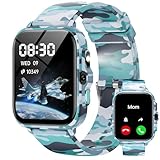
- First Launched Ai-integrated Kids Smart Watch: This advanced kids smart watch features an Ai Customized Watch Face, allowing children to personalize their device by their voice command. With the integrated Ai Question and Answer feature, kids can ask questions and receive instant, accurate responses, fostering curiosity and learning in an engaging way. Additionally, the AI Image Recognition capability encourages exploration by identifying objects, animals, and places, bringing the world to their fingertips
- Sleep Tracking and Heart Rate Monitor: This kids smart watch helps parents keep track of their child's heart health, ensuring they stay active and healthy. Smart watch for kids offers advanced sleep tracking capabilities, providing a detailed analysis of deep sleep, light sleep, and wake-up times to help children develop healthier sleep habits.
- All-day Activity Tracking and Multi-sport Modes: This kids smart watch offers all-day activity tracking to monitor your child's movement (Steps, Calories, Distance) and encourage a healthy lifestyle. Whether they are running, jumping, or playing their favorite sports, the watch features multi-sport modes that adapt to various activities, ensuring accurate tracking and engagement.
- Puzzle Games and Music Player and Camera: This innovative kids smart watch combines fun and learning through engaging puzzle games, an integrated music player, and a built-in camera. Get ready to inspire your child's adventures with the ultimate blend of entertainment and education!
- IP68 Waterproof and 30 Days Standby: This cutting-edge kids smart watch features an impressive IP68 waterproof rating, ensuring it can withstand splashes and accidental submersion in water, making it perfect for active kids who love to play outdoors.It offers up to 30 days of standby time, allowing your child to stay connected without the constant need for recharging.
Rank #4

- Brand New in box. The product ships with all relevant accessories
Rank #2
Product prices and availability are accurate as of the date/time indicated and are subject to change. Any price and availability information displayed on Amazon at the time of purchase will apply.

