
iTechGuides is reader-supported. When you buy through links on our site, we may earn an affiliate commission. As an Amazon Associate I earn from qualifying purchases. Learn more
Use the chat vendor’s supported brand mapping or customization API rather than trying to restyle the widget with ordinary page CSS. Map domains or subdomains to brand styles when the relationship is stable; select a style during widget boot when the brand depends on application state; and use documented runtime theme settings for page-specific differences. First identify the widget generation and whether it renders in an iframe, because host-page selectors cannot reach an iframe’s internal interface.
The exact method differs by platform. Intercom supports brand-associated Messenger styles, URL matching, and an optional messenger_style_id boot parameter. Zendesk’s Messaging Web Widget separates global Admin Center appearance from page-level JavaScript overrides and renders its UI inside an iframe. Salesforce documentation cited for Legacy Chat describes configuration-level colors and fonts, but that product was scheduled for retirement on February 14, 2026.
What has to be decided before you style anything
A multi-brand widget is two separate problems: choosing the correct brand and applying that brand’s visual settings. Treat them separately so a routing mistake cannot be hidden by a visually similar theme.
PC Slower Than It Used to Be?
A free scan shows the junk files, broken settings and background clutter dragging Windows down - then fixes them in one click.Free scan · Windows 10 & 11Crashes, No Sound, or Screen Glitches?
Random freezes, missing sound and display glitches usually trace back to one bad driver. Find and replace yours safely.Free scan · under a minute- Brand identity: the domain, subdomain, application, route, account, or other state that determines which brand should appear.
- Supported appearance controls: colors, fonts, launcher treatment, header styling, and other properties exposed by the vendor.
- Scope: whether a setting is global, tied to a domain, selected during initialization, or applied only on pages where override code runs.
- Fallback: the style shown when no brand rule matches or when an override is missing.
- Lifecycle: the exact widget generation and whether its documentation describes a current or retired product.
Inventory every website, subdomain, logged-in application, and mobile surface before creating styles. A single company may need separate identities for a marketing site, a regional storefront, a partner portal, and an authenticated product even when they share one chat account.
#1 Best Overall

- Digital Stereo Sound: Fine-tuned drivers provide enhanced digital audio for music, calls, meetings and more
- Rotating Noise Canceling Mic: Minimizes unwanted background noise for clear conversations; the rotating boom arm can be tucked out of the way when you’re not using it
- Handy In-line Controls: Simple in-line controls on the headset cable let you adjust the volume or mute calls without disruption
- Plug-and-Play USB Computer Headset: Simply plug the USB-A connector into your computer and you’re ready to talk or listen without the need to install software
- Padded Comfort: Comfortable headphones with adjustable headband features swivel-mounted, leatherette ear cushions for hours of comfort and is easy to clean
How the major widget implementations differ
| Platform and widget | Brand routing | Supported styling boundary | Scope and fallback | Important constraints or lifecycle notes |
|---|---|---|---|---|
| Intercom Messenger | Associate brand styles with domains or subdomains; matching is exact, then partial, then wildcard. | Messenger brand styles configured in Intercom; optional boot-time messenger_style_id. |
Unmatched domains use the default brand style. A boot style takes priority over URL matching. | The boot parameter requires the Multibrand add-on and an additional workspace-level configuration. Prices are not stated in the cited documentation. |
| Zendesk Messaging Web Widget | Use one global appearance or page-specific JavaScript configuration where the widget code runs. | Admin Center appearance settings and the documented Web Widget customization API. Host CSS can position the widget but cannot style its iframe UI. | Admin Center values are the baseline; pages without runtime override code revert to those values. | Prices and plan requirements are not stated in the cited documentation. Use supported API properties, not internal iframe selectors. |
| Salesforce Legacy Embedded Chat | Branding was configured in the Embedded Service setup rather than by host-page CSS. | Configuration-level color and font choices; custom CSS was explicitly unsupported in the embedded component. | Configuration applies to the legacy embedded chat deployment. | The cited Salesforce Help page states a February 14, 2026 retirement date for Legacy Chat. Confirm the current Salesforce product generation before using any setup instructions. Prices are not stated. |
1. Intercom Messenger: map styles to brands or select one at boot
Intercom’s current help guidance describes a first-class multi-brand model: create brands, create a Messenger style for each brand, and associate the style with the relevant domains or subdomains. This is the cleanest approach when a URL reliably identifies the brand.
Create the brand and its Messenger style
- Establish each brand in the Intercom workspace before configuring the widget.
- Create a Messenger style for the brand and enter only the appearance values supported by the style editor.
- Add every domain or subdomain that should use that style. Keep a written mapping of brand name, host, style name, and owner so a later domain change does not silently inherit another identity.
- Choose a default brand style for traffic that does not match an additional style. Intercom says unmatched domains use the default brand style.
Understand Intercom’s URL matcher
Intercom documents a precedence order of exact match, then partial match, then wildcard match. Use the most specific rule for a host that must never be confused with another brand. Wildcards are deliberately limited: one * at the beginning of the URL pattern is supported; placing a wildcard elsewhere or using more than one is not.
For example, a pattern beginning with a single wildcard followed by the permitted host text can cover the intended family of addresses. Do not assume that a mid-string pattern or a pattern containing multiple wildcards will work. Test an exact brand URL, a partial-match URL, a wildcard URL, and an unmatched URL before release, especially where rules overlap.
Recommended Free Tools
Select a style during Messenger boot
When the brand cannot be inferred safely from the domain—for example, when several customer brands share one application—Intercom documents a boot-time override named messenger_style_id. Pass the copied style ID in the existing Messenger boot call:
messenger_style_id: 'STYLE_ID'The specified style takes precedence over URL matching. Intercom also states that this parameter requires the Multibrand add-on and an additional workspace-level configuration. If that workspace configuration is absent, the parameter is ignored and the default style loads, so verify both prerequisites in the actual account before depending on the override.
Intercom limits and plan information
The cited Intercom guidance establishes the Multibrand prerequisite for the boot override but does not state a subscription price. Do not infer that every workspace includes the add-on or that a particular plan includes it. Domain mapping and boot selection also do not remove the need for a safe default: a typo in a host rule or an ignored boot parameter still leaves the widget needing a valid fallback.
2. Zendesk Messaging Web Widget: use global appearance plus supported runtime overrides
Zendesk separates account-wide appearance from code that runs on a particular page. Admin Center style settings provide the baseline. Zendesk’s Web Widget API can override supported theme properties on pages where the customization code executes.
Set the global baseline in Admin Center
- Open the Messaging Web Widget appearance settings in Admin Center.
- Set the colors and other supported appearance values that should apply when no page-level override is present.
- Use this baseline for the most common brand or for a deliberately neutral fallback. It is the value users will see on pages that do not load your override code.
Zendesk’s customization guidance says the Admin Center settings apply globally. Keep the baseline complete even if every current page also has JavaScript customization, because a newly added page or a script failure will otherwise expose an unintended appearance.
Apply a page-level theme with the documented API
- Identify the pages that need a different brand or campaign treatment.
- Run the documented Web Widget color or theme customization code on those pages, using only properties supported by Zendesk’s API.
- Load the override after the widget’s normal initialization sequence required by your current Zendesk installation.
- On a page that should use the baseline, omit the override and confirm that the Admin Center values return.
Zendesk states that runtime color customization affects pages where the code runs and reverts to Admin Center settings where it does not. That makes the presence of the override part of your routing design: treat it as deployable configuration, not as a one-off CSS patch.
Rank #2

- Exceptional call quality - Revel in crystal-clear conversations with the Lenovo USB-A Wired Stereo Headset Gen 2. Powered by Lenovo Accessories and Device Manager (LADM) software that enhances noise-cancelation, ensuring clarity even in the busiest environments.
- Effortless controls - No more fumbling with complicated settings. This headset’s intuitive control box simplifies your life with easy access to call functions, volume, and mute, allowing you to stay focused and productive.
- Supreme comfort - At just 140 g, experience the featherlight embrace of thoughtfully designed earcups. Relish the perfect blend of function and comfort that supports you through every task, making this headset a transformative addition to any professional’s toolkit.
- USB-A Plug & Play Compatible with: Teams, Zoom, Google Meet (Hangout), Google Voice, Slack, GoTo Meeting, WeChat, Cisco Webex
Respect the iframe boundary
The Zendesk Help cookbook states: “The messaging Web Widget renders inside an iframe added to the page, so site CSS can help with positioning, but can’t style the widget UI itself.” You may use host-page CSS for placement where supported, but selectors aimed at the widget’s internal buttons, header, or text will not cross the iframe boundary. Use Zendesk’s documented customization API for internal colors and themes.
Zendesk limits and plan information
The cited Zendesk pages do not state plan prices or a multi-brand add-on requirement. They do establish the difference between global settings and page-level overrides, plus the iframe limitation. Confirm that the API properties you need are available in the exact Messaging Web Widget generation installed in your account.
3. Salesforce Embedded Chat: verify the product generation before following legacy guidance
The Salesforce Help article cited for this topic is specifically about Legacy Chat. It describes choosing colors and fonts in Embedded Service configuration and explicitly says custom CSS is not supported in the embedded component.
What the legacy instructions mean
For a deployment that was still using the documented legacy component, branding belonged in the Embedded Service configuration rather than in selectors on the host page. A CSS file on the website was not a supported way to restyle the embedded chat UI.
Retirement and migration caution
The same Salesforce page states that Legacy Chat had a retirement date of February 14, 2026. That date has passed, so do not treat the page as current installation guidance for a new Salesforce deployment. Identify the Salesforce chat product currently enabled in your org and use its current documentation; settings and APIs from Legacy Chat should not be assumed to carry forward.
Salesforce limits and plan information
The cited page does not provide pricing. Its useful, bounded facts are the legacy configuration model, the unsupported-CSS warning, and the retirement notice. Any current Salesforce product comparison requires documentation for that current generation.
Free tools Windows power users keep installed
One-click scans. No signup required.
Choose the routing method that matches your architecture
| Situation | Preferred method | Why | What to test |
|---|---|---|---|
| Each brand owns a stable domain or subdomain. | Vendor-side domain or URL mapping. | The URL itself provides a deterministic brand key and avoids application code deciding the style. | Exact, partial, wildcard, overlapping, and unmatched URLs. |
| Several brands share one application host. | Supported boot-time style selection. | The application can choose a style from account or route state that a domain matcher cannot see. | Correct style ID, prerequisite add-ons, missing configuration, and default behavior. |
| A small set of pages needs a deliberate variation. | Supported runtime theme configuration. | The override is limited to pages where it is intentionally loaded. | Pages with the override, pages without it, script failures, and navigation between both. |
| The only proposed solution is internal widget CSS. | Stop and find the vendor-supported API or configuration. | Iframe encapsulation or an explicit unsupported-CSS policy makes internal selectors fragile or ineffective. | Widget generation, iframe presence, and documented customization options. |
A complete implementation workflow
1. Inventory every surface
List brand names, canonical domains, subdomains, localized hosts, authenticated application routes, staging hosts, and mobile apps. Record which widget product and generation is installed on each surface. Do not copy instructions from a legacy product into a current embed merely because the vendor name is the same.
2. Define a small brand token sheet
For each brand, obtain the approved logo treatment, primary and accent colors, text color, launcher treatment, and any other values the platform actually exposes. Record the source and owner of each value. If a property is not offered by the vendor, do not promise it through undocumented CSS.
3. Pick one routing key per surface
Use domain mapping for stable host-to-brand relationships. Use a boot-time style ID when the application knows the brand only after login or route resolution. Use a runtime theme override for page-specific behavior. Avoid having two mechanisms make independent decisions on the same page unless you have documented which one wins.
Rank #3
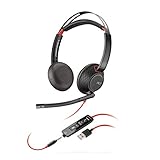
- Connects To: For a professional needing to connect to a PC/Mac using USB-A and/or mobile phone. Compatible with Microsoft Teams and other leading collaboration platforms.
- Ideal For: Users with extensive PC communication and collaboration use.
- Audio Performance: Superb Audio Quality - Noise canceling microphone ensures your voice is heard. Audio automatically switches between wideband for telephony & hi-fi stereo for music. SoundGuard DIGITAL protects against sound levels over 118dBA, sudden loud sounds & long-term exposure.
- Intelligent Features: Enhanced All Day Comfort & Portability - Ultra-soft leatherette ear cushions wrapped around pillow-soft memory foam provide all-day comfort. A lightweight cushioned metal headband offers durability and a comfortable custom fit.
- Global Warranty & Wearing Style: 2 years global warranty; over the head wearing style with two earpieces.
4. Establish the default before adding exceptions
Set a safe default style first. Then add brand-specific rules or overrides. A default prevents a blank, unbranded, or accidentally borrowed identity when a visitor lands on a new host, a script is blocked, or a URL does not match.
5. Confirm prerequisites in the real account
Check add-ons, workspace-level switches, application identifiers, and product edition in the account that will serve production traffic. For Intercom’s boot override, specifically confirm the Multibrand add-on and the additional workspace configuration; without the latter, Intercom says the parameter is ignored.
6. Keep routing configuration reviewable
Store a table or configuration record containing brand, domain or route, style name or ID, fallback, and last review date. Keep staging and production mappings separate. Give application and brand owners a clear process for adding a host so a new site does not inherit the wrong style by accident.
7. Test representative devices and navigation paths
Check desktop and mobile browsers, logged-out and logged-in states, direct links, client-side route changes, and pages where the widget is loaded late. Verify readable text, launcher visibility, focus behavior, and the relationship between the widget and the page’s visual identity. These are recommended quality checks, not evidence that any particular deployment has already passed them.
Independent reader supportYour contribution helps us test, update, and keep practical guides available for everyone.Troubleshooting by symptom
| Symptom | Likely cause | Correction |
|---|---|---|
| The widget keeps showing the default brand. | The URL rule did not match, or a boot override was ignored. | Check exact/partial/wildcard syntax and precedence. For Intercom, verify the Multibrand add-on and workspace-level configuration required by messenger_style_id. |
| A brand appears on the wrong site. | Overlapping URL patterns or an overly broad wildcard. | Replace broad patterns with the most specific supported rule and test the documented precedence order. |
| Changing site CSS has no effect inside the widget. | The widget UI is isolated in an iframe or CSS is explicitly unsupported. | Use the vendor’s appearance settings or customization API; reserve host CSS for supported positioning. |
| Only some pages have the new colors. | Runtime override code runs only on selected pages. | Decide whether the variation is intentional. If not, move the baseline into global settings or ensure the override is loaded on every required page. |
| A Salesforce setup article does not match the current console. | The article concerns Legacy Chat. | Check the enabled Salesforce product generation and follow current documentation rather than the retired Legacy Chat instructions. |
Accessibility and brand-safety checks
- Check text and control contrast for every brand theme, including hover, focus, disabled, and notification states exposed by the platform.
- Use keyboard navigation to open, operate, and close the launcher; verify that focus is visible and does not become trapped behind the widget.
- Check narrow mobile viewports and browser zoom. A color match is not useful if the launcher obscures essential page controls.
- Ensure the displayed brand agrees with the page’s legal entity, support hours, and knowledge content. A visually correct style routed to the wrong support team is still a routing failure.
- Retest after vendor widget updates. A supported API or configuration is safer than internal selectors, which can change without notice.
Documentation and lifecycle notes
The Intercom guidance used here is “Style your Messenger to support multiple brands,” dated June 26, 2026, and “Set up and customize the Messenger.” The Zendesk references are the “Messaging Web Widget cookbook” and “Customizing the messaging Web Widget colors with the Web Widget API,” edited June 4, 2026. The Salesforce reference is “Customize the General Branding for Your Chat Window,” which is explicitly about Legacy Chat and includes the February 14, 2026 retirement notice.
Frequently Asked Questions
Frequently Asked Questions
How should I document a multi-brand widget so another developer can maintain it?
Keep a single mapping record with the brand name, canonical host or route, vendor style name or ID, fallback style, required add-ons, and the date an owner last approved the mapping. Store staging and production values separately.
Should a brand style be selected from a URL or from application state?
Use the URL when the host unambiguously identifies the brand. Use a supported initialization override when the brand is known only after login, account lookup, or route resolution.
Do web Messenger styles automatically define a mobile-app appearance?
No automatic equivalence is established by the web styling instructions. Treat mobile apps as separate surfaces and confirm the platform’s mobile customization settings for the product generation you use.
What is the safest response when a vendor feature appears to be silently ignored?
Check the product generation and every documented prerequisite first, then verify that the widget is receiving the intended configuration. For Intercom’s boot override, an absent workspace-level configuration causes the parameter to be ignored and the default style to load.
What’s actually slowing this PC down?
Pick the symptom - the matching free tool is one click away.
Quick Recap
Product prices and availability are accurate as of the date/time indicated and are subject to change. Any price and availability information displayed on Amazon at the time of purchase will apply.

