
Free tools Windows power users keep installed
One-click scans. No signup required.
To email a screenshot from a web page, export the rendered canvas with canvas.toDataURL("image/png"), then pass that data URL to an email service configured to accept it as an attachment. If the image should appear inside the message instead, put the data URL in an HTML <img> element. These are different email formats: an attachment is a MIME part; an inline image is part of the HTML body. Either route can fail if the canvas contains cross-origin content, and inline data URLs are not rendered consistently by every mail client.
Choose an attachment or an inline image
First decide what the recipient should receive. An attachment can be downloaded or opened separately. An inline image is intended to be visible while reading the message, but support for a Base64 data URL in an HTML email varies across mail clients and sending services.
| Method | What the email contains | Use it when |
|---|---|---|
| Attachment | A separate image file carried as a MIME attachment. | The recipient needs a dependable file they can save, forward, or inspect outside the message. |
| Inline HTML image | An HTML <img> whose src is a Base64 data URL. |
Showing the image in the message is more important than consistent display across all mail clients. |
Do not treat an image URL placed in the HTML body as an attachment, or assume that an attachment will automatically display inline. If inline display is essential, test the actual sending service and target mail clients; keep an attachment or hosted-image fallback where possible.
Export the screenshot from the canvas
This assumes a screenshot is already rendered into an HTMLCanvasElement. Wait until drawing is complete before exporting. The browser returns a data URL containing both the media type and encoded image data:
The Tool Desk
Outbyte PC Repair FREEClear out junk files and repair common Windows errorsFree Scan →Outbyte Driver Updater FREEFix the driver behind crashes, sound loss and screen glitchesFind Drivers →#1 Best Overall

- 𝐍𝐚𝐧𝐨 𝐒𝐢𝐳𝐞𝐝 𝐔𝐒𝐁 𝐀𝐝𝐚𝐩𝐭𝐞𝐫 - AC1300 Dual band for fast and high speed Wi-Fi connection (867 Mbps on the 5 GHz band or 400 Mbps on the 2.4 GHz band)
- 𝐃𝐮𝐚𝐥 𝐁𝐚𝐧𝐝 𝐂𝐨𝐧𝐧𝐞𝐜𝐭𝐢𝐨𝐧 - Strong 2.4G/5G connection allows the user to use the Internet with lag-free experience.
- 𝐍𝐚𝐧𝐨 𝐃𝐞𝐬𝐢𝐠𝐧 - Sleek and miniature sized design allows the user to plug the wireless adapter and leave the device in its place.
- 𝐌𝐔-𝐌𝐈𝐌𝐎 𝐓𝐞𝐜𝐡𝐧𝐨𝐥𝐨𝐠𝐲 - Improves the throughput and efficiency of the whole network with MU-MIMO technology.
- 𝐖𝐢𝐝𝐞 𝐂𝐨𝐦𝐩𝐚𝐭𝐢𝐛𝐢𝐥𝐢𝐭𝐲 - This wifi adapter is fully compatible for PC with Windows 11/10/8.1/8/7 and MacOS 10.15 or earlier
const dataUrl = canvas.toDataURL("image/png");PNG is the default canvas export format, and browsers are required to support it. You can request another format such as JPEG using its MIME type, but if a requested format is unsupported, canvas export falls back to PNG. If your email template or downstream code depends on a particular format, inspect the returned data URL rather than assuming the requested type was honored.
A data URL typically has this shape: data:image/png;base64,ENCODED_IMAGE_BYTES. Some email integrations accept the complete data URL as attachment content. Others expect only the Base64 payload, with the MIME type and filename provided separately. Follow the receiving service’s documented format: remove the prefix only when that interface expects raw Base64.
Handle export failures
Catch errors around the export step so the page can show a useful message or use another upload path:
function canvasToDataUrl(canvas) {
  try {
    return canvas.toDataURL("image/png");
  } catch (error) {
    console.error("Could not export the screenshot canvas", error);
    throw new Error("The screenshot could not be exported. Check image permissions and try again.");
  }
}
Export only after the screenshot has been drawn and is ready. A blank or incomplete canvas may produce a valid image of the wrong content, so coordinate export with the rendering code rather than relying on an arbitrary short delay.
Quick wins for a faster PC:
Scan for outdated or missing drivers - takes under a minuteDriver Scan →Clear out junk files and repair common Windows errorsFree Scan →Fix the driver behind crashes, sound loss and screen glitchesFind Drivers →Rank #2
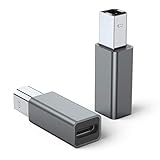
- 【Port Conversion】: This is a USB-C female to Printer Male adapter. Sync Printer devices by connecting a standard USB Type-C cable
- 【Fast and Safe】: This adapter offers data transfer speeds of up to 480 Mbps between connected devices.
- 【Easy to Use】: Simply plug and work, no installation needed.Built with 56KΩ pull-up resistor for safer and more reliable quality.
- 【Durable aluminum Body】: Premium Printer/USB-C connector passes 10000+ Push/Pull Test,innovative engineering ensures durability and a long life span.
- 【Compatible with】: QianLink USB C Female to Printer Male Adapter is ideal for connecting your scanner, printer, server, camera such as HP, Canon, Lexmark, Epson, Dell, Xerox , Samsung and other.
Check cross-origin images before drawing
A canvas becomes tainted if it includes image data from another origin that is not permitted for canvas use. A tainted canvas is not origin-clean, so the browser blocks export and toDataURL() can throw a SecurityError. JavaScript cannot bypass this browser security restriction.
- Identify any images or other cross-origin resources drawn into the canvas.
- Configure the resource host to allow the required cross-origin access, and use the appropriate cross-origin loading configuration before assigning the image source.
- Wait for the resource to load, draw it, and then export the canvas.
- If you do not control the resource host, use a permitted server-side retrieval or upload workflow rather than trying to defeat the browser restriction.
Set cross-origin loading options before the image request begins; changing the setting after loading is too late. The exact server configuration depends on the image host and application. If access cannot be authorized, do not draw that resource into a canvas that must later be exported.
Send the image as an attachment
An email service must create a real attachment MIME part. EmailJS documents a canvas-to-attachment pattern: export the canvas with toDataURL(), pass the resulting value as the attachment content variable, and configure that variable as an attachment in the email template. The template also needs the relevant filename and content-type configuration.
The following shows the key integration shape; it assumes your EmailJS service, template, recipient handling, and attachment variable have already been configured. Use your own configured identifiers and follow the service’s current client and security setup.
Rank #3

- USB A Female to Female Adapter: This adapter is designed to connect two USB A male cables together, allowing you to extend the length of an existing USB A cable. It works as a passive cable coupler and does not add or change any USB functions.
- Relocate Hard-to-Reach USB Ports: Extend USB A ports located behind PCs, monitors, printers, or under desks to a more accessible desktop position, making it easier to connect and disconnect USB devices during daily use.
- USB 3.2 High-Speed Data Transfer: With data transfer speeds of up to 10Gbps, this adapter helps you transfer files quickly and efficiently, improving productivity and saving time. Please note: this adapter is not an OTG adapter and does not support video, audio, or display output.
- Works with Standard USB A Devices: Compatible with USB A peripherals such as keyboards, mice, USB flash drives, printers, and other low-power devices. Provides stable power pass-through charging. (Not recommended for high-power devices or fast-charging.)
- Compact Aluminum Design: Built with a solid aluminum alloy shell for enhanced durability and heat dissipation while remaining lightweight and portable. Its small, space-saving design keeps your setup clean and makes it easy to take anywhere.
const dataUrl = canvas.toDataURL("image/png");

emailjs.send("YOUR_SERVICE_ID", "YOUR_TEMPLATE_ID", {
  to_email: recipientEmail,
  screenshot_attachment: dataUrl
});
In the template, configure screenshot_attachment as the attachment variable and set an appropriate filename, such as screenshot.png, and content type, such as image/png, according to the service’s attachment instructions. The example is not a complete account setup: it does not create a service or template, validate the recipient, or provide a production security design.
Use a Blob for larger images when supported
toDataURL() converts the entire image into a large in-memory string. That is convenient for a small image and an integration that explicitly accepts data URLs, but it can consume substantial memory and may run into length limits in contexts that are not designed for large strings. This is not a universal email attachment limit; the allowed attachment size depends on the sending service and recipient systems.
For larger images, consider canvas.toBlob() and a binary upload path if your email backend supports it. A Blob represents binary image data without first building one large Base64 string in JavaScript. The receiving endpoint can accept the file, validate it, and create the email attachment. Confirm that your chosen service supports this route before changing from its documented data-URL interface.
Put the data URL in the HTML body
To try an inline image, put the complete data URL in the HTML message’s image source:
Crashes, No Sound, or Screen Glitches?
Random freezes, missing sound and display glitches usually trace back to one bad driver. Find and replace yours safely.Free scan · under a minuteWindows Errors? Fix Them Before They Spread
Repair common Windows errors and clear accumulated junk for a smoother, more stable PC - no reinstall needed.Free scan · no reinstallRank #4

- 💪USBC to USB adapter. Can switch between USB C and USB A ports for better compatibility between USB-C and USB-A devices. Provides data transfer, device charging, memory space expansion, and additional computer peripherals
- 💪USB3.1 gen 2 protocol, super high-speed data transmission up to 10Gbps, 20 times faster than USB 2.0. Connect files, high-definition movies, and songs to your USBC device in seconds
- 💪Plug-and-play, easy to use without driver; simple structure, light and portable
- 💪USB-C male port to laptop / tablet / smartphone / camera with USB Type-C female port, compatible with mac os, windows, chrome os, linux, android, etc
- 💪USB female port connects to USB flash drive/ card reader/ USB hub/ game controller/ net card/ external hard drive/ data cable/ mouse/ printer devices with USB-A male port
const dataUrl = canvas.toDataURL("image/png");
const html = `
  <p>Here is the screenshot:</p>
  <img src="${dataUrl}" alt="Screenshot of the page">
`;
Send html as the message’s HTML body using the email service’s documented method. Microsoft Power Automate documents the same general pattern of using a Base64 data URL as an HTML image source. That demonstrates an available approach in that environment, not universal support across email services or mail clients. Sanitize or safely construct any other dynamic HTML that is included in the message.
Test a real delivered message in the clients your recipients use. If the image is missing, blocked, or stripped, use a proper attachment or a hosted image as the fallback. Hosted images have their own access and privacy trade-offs, so select that option only when it suits the audience and the content.
Protect the email-sending path
A browser page is visible to its user. Do not put privileged email-provider secrets in public JavaScript. Use the provider’s documented secure configuration, and apply validation and abuse controls wherever the sending request is handled. The right architecture depends on the selected email service; there is no single setup that fits every account and application.
- Validate that the user is allowed to send to the requested recipient and that the image is an expected type and size for your service.
- Limit or otherwise protect the sending endpoint so it cannot be used as an unrestricted mail relay.
- Return clear errors to the page without exposing credentials or sensitive provider responses.
- Consider a server-controlled upload and email flow when you need to keep privileged configuration off the client.
Or skip the browser setup
If you need a website screenshot rather than an image already rendered in your own canvas, ScreenshotNeo is a screenshot API and MCP server. It returns a PNG, JPEG, WebP, or PDF from one request; you can then pass the returned image through your email workflow as an attachment. The API does not send the email itself.
Do these 3 things before closing this tab:
1Clear out junk files and repair common Windows errors2Fix the driver behind crashes, sound loss and screen glitches3Repair Windows errors before they cause bigger problemsBest Value

- 【𝐅𝐮𝐧𝐜𝐭𝐢𝐨𝐧】By insert our USB front panel adapter for motherboards without a Type-E connector to achieve full USB 3.1/3.2 Type-C (20-pin) A-key motherboard connector compatibility. This adapter converts an available USB 2.0 port to a USB 3.1 port, suitable for computer cases with USB-C front panels
- 【𝐂𝐨𝐦𝐩𝐚𝐭𝐢𝐛𝐢𝐥𝐢𝐭𝐲】This 9 pin male to usb 3.1 type-e female converter is compatible with motherboards and works seamlessly with all mainstream brands featuring USB 2.0 interfaces. It is also compatible with both Windows and Linux operating systems
- 【𝐏𝐥𝐮𝐠-𝐚𝐧𝐝-𝐏𝐥𝐚𝐲】This USB 2.0 to USB 3.2 Gen 1 header adapter is ready to use without needing drivers, making it perfect for upgrading internal USB connections with easy installation and use
- 【𝐃𝐢𝐦𝐞𝐧𝐬𝐢𝐨𝐧𝐬】13×24×8mm / 0.51×0.94×0.31in (L×W×H). With an ultra-slim 8mm design, this USB 3.2 Gen 1 to USB 3.2 Gen 2 header adapter prevents assembly interference caused by motherboard connector positions or internal case structures
- 【𝐏𝐚𝐜𝐤𝐚𝐠𝐞 𝐈𝐧𝐜𝐥𝐮𝐝𝐞】2pcs USB 9Pin to USB 3.1 Type-E Header Adapter
Here is a cURL request that saves a screenshot as a WebP file:
curl -G "https://api.screenshotneo.com/v1/shot" -d access_key=YOUR_API_KEY --data-urlencode url=https://stripe.com -o shot.webpSee the ScreenshotNeo documentation for API setup and supported parameters. Cookie banners, popups, and chat widgets are removed before the shot; bot checks, blank pages, and failed loads are never billed. An MCP server lets AI agents take screenshots, and 1,000 screenshots a month are free with no card; paid plans start at $5 for 3,000. Sign up for the free plan.
Troubleshoot common failures
| Symptom | Likely cause | What to do |
|---|---|---|
SecurityError while exporting |
The canvas is tainted by cross-origin content. | Configure the image host’s CORS permissions and image loading before drawing. If that is not possible, use a permitted alternative source or upload path. |
| The email arrives without an attachment | The template does not have the attachment variable configured, or the service expects a different content format. | Check the template’s attachment-variable setup, filename, content type, and whether the integration expects a complete data URL or raw Base64. |
| The attached file will not open | The filename extension, declared content type, and actual image format may not agree. | Check the returned data URL’s media type and configure the attachment filename and content type to match the exported image. |
| Inline image is missing | The sending service or mail client may not support or preserve a Base64 data URL in the HTML body. | Test the delivered message and use an attachment or suitable hosted image instead. |
| Page becomes slow or runs out of memory | A large canvas was converted into a very large Base64 string. | Use a smaller image or, where supported, export with toBlob() and use a binary upload path. |
| Screenshot is blank or incomplete | Export happened before rendering finished, or the source content did not load. | Wait on the renderer’s completion condition and verify the canvas content before exporting. |
Keep the formats and transport aligned
The simplest working route for a modest canvas is toDataURL() followed by an email service’s documented Base64 attachment configuration. Use an inline <img> only when the client support is acceptable and tested. For larger images, prefer Blob or binary transfer when the backend supports it. In all cases, make sure the canvas is origin-clean, the MIME type and filename describe the actual image, and the email service—not just the page—has been configured to deliver the intended result.
Frequently Asked Questions
Does Base64 encrypt the screenshot?
No. Base64 encodes bytes as text; it is not encryption. Use appropriate transport and access controls for private screenshots.
What’s actually slowing this PC down?
Pick the symptom - the matching free tool is one click away.
Can I attach a JPEG instead of a PNG?
Yes, if the canvas export, attachment configuration, filename, and content type all agree on JPEG. Check the returned data URL because an unsupported requested format can fall back to PNG.
Will an email attachment also show in the message body?
Not necessarily. Attachment and inline-body presentation are separate email behaviors; configure the intended one explicitly.
Quick Recap
Product prices and availability are accurate as of the date/time indicated and are subject to change. Any price and availability information displayed on Amazon at the time of purchase will apply.

