
Crashes, No Sound, or Screen Glitches?
Random freezes, missing sound and display glitches usually trace back to one bad driver. Find and replace yours safely.Free scan · under a minuteWindows Errors? Fix Them Before They Spread
Repair common Windows errors and clear accumulated junk for a smoother, more stable PC - no reinstall needed.Free scan · no reinstallYouTube documents how to schedule an individual livestream, but its public guidance does not say whether recurring livestreams shift automatically to preserve your local wall-clock time when daylight saving time (DST) begins or ends. Schedule streams individually, check the date and time displayed for each event around a clock change, and tell viewers if the schedule changes. YouTube’s playlist tools organize uploaded videos; the reviewed guidance does not describe scheduling a playlist to broadcast as a livestream.
Schedule an individual livestream in YouTube Studio
For an encoder-based stream, YouTube’s documented workflow is in YouTube Studio’s Live Control Room. Scheduling creates an event viewers can find ahead of time, share, and set a reminder for. You can also reuse settings from an earlier stream. YouTube’s scheduling instructions cover the workflow.
-
Open YouTube Studio and select Create > Go Live.
-
Open the Manage tab, then select Schedule Stream.
-
Create a new stream or reuse settings from a previous stream.
-
Set the event’s date and time, then save the scheduled stream. Check the displayed date and time carefully, especially if the event is near a DST transition.
Special offer. See more information about Outbyte and uninstall instructions. Please review EULA and Privacy policy.#1 Best Overall
 YOUNGFLY 4 Pcs Small Digital Alarm Clock Stick On for Car Dashboard
- 【 Large Display Screen 】The small dashboard clock has a large LCD screen. You can clearly look at the date and time in form of large digitals at a glance while driving, which provids you with a safer driving environment.
- 【 High-quality material 】The small clock is made of PVC material, not easy to deform, or damage. You could use it for a long time.
- 【Multiple uses】Each car clock comes with a piece of sturdy adhesive sticker. You could peel off and place on the dashboard or windshield of the car. At the same time, the clock also has a foldable bracket on the back. You could unfold it and insert it into the airvent.
- 【Save space】The size of the digital clock is small, does not take up space, and can be carried around, which is very suitable for outdoor travel.
- 【Stopwatch function】The car clock has the additional function of a stopwatch. It can be used it in races that requires a stopwatch.
-
Share the scheduled stream’s URL with viewers. YouTube lets viewers opt to receive a reminder for the event.
YouTube says livestream settings can be chosen when creating or scheduling a stream and edited later; it does not document a playlist-level timer or an automatic sequence of livestreams in this guidance. See YouTube’s livestream settings help for the settings workflow.
Rank #2

- 【 Large Display Screen 】The small dashboard clock has a large LCD screen. You can clearly look at the date and time in form of large digitals at a glance while driving, which provids you with a safer driving environment.
- 【 High-quality material 】The small clock is made of PVC material, not easy to deform, or damage. You could use it for a long time.
- 【Multiple uses】Each car clock comes with a piece of sturdy adhesive sticker. You could peel off and place on the dashboard or windshield of the car. At the same time, the clock also has a foldable bracket on the back. You could unfold it and insert it into the airvent.
- 【Save space】The size of the digital clock is small, does not take up space, and can be carried around, which is very suitable for outdoor travel.
- 【Stopwatch function】The car clock has the additional function of a stopwatch. It can be used it in races that requires a stopwatch.
Schedule a livestream from the YouTube mobile app
YouTube’s mobile instructions include a Schedule for later option and a calendar flow for choosing a scheduled stream. This is an alternative for creating the event on a mobile device; check the event’s displayed date and time after scheduling, as you would in Studio. The documented mobile flow is in YouTube’s mobile livestream help.
Can you schedule a YouTube playlist to play as a livestream?
YouTube describes adding uploaded videos to an existing playlist or creating a playlist to organize videos. That guidance does not describe scheduling a playlist to play as a livestream at a set time. A playlist and a scheduled livestream are therefore separate workflows in the reviewed YouTube documentation: use a playlist to organize uploaded videos, and schedule livestream events individually. See YouTube’s playlist help.
What’s actually slowing this PC down?
Pick the symptom - the matching free tool is one click away.
Rank #3

- 【Multi-Time Zone Display】Simultaneously displays local times for eight countries. Time updates automatically via remote control, making it ideal for cross-border e-commerce and other business operations requiring multi-time zone management.
- 【Multifunctional LED Display】Automatically displays world time, date, day of the week, and ambient temperature. High-brightness digital tubes ensure clear visibility day and night, allowing all information to be read at a glance.
- 【Aluminum Alloy Casing】The high-quality aluminum alloy body is sturdy yet lightweight, supporting wall mounting and saving desktop space. Suitable for hotels, offices, reception areas, meeting rooms, and other settings.
- 【High-Precision and Stable Timing】Built-in precision timing module ensures stable operation; ready to use upon power-up, facilitating communication with clients in different time zones.
- 【Simple Business Appearance】Classic black ultra-thin body with a modern business style, suitable for commercial spaces and home studies, enhancing the overall aesthetic.
Will YouTube change a livestream time when daylight saving starts?
YouTube’s public scheduling help does not establish whether recurring livestreams automatically adjust to preserve a creator’s intended local clock time when DST begins or ends. Do not assume that a recurring schedule will shift the way you intend. Check each scheduled stream’s displayed date and time around the transition and update it if necessary. YouTube also recommends communicating schedule changes to viewers; see its livestream guidance.
A practical check around the clock change
-
Review scheduled events before and after the local DST transition.
Rank #4
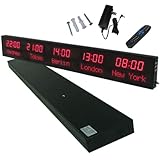 HPOUTABD LED World Clock 5 Time Zones - WiFi Auto-Sync Digital Wall Clock with 3-Level Brightness, Ultra-Clear Wide Viewing Angle, All-Aluminum Housing for Multinational Enterprises, Hotels & Offices
- 【GLOBAL MULTI-TIME ZONE DISPLAY】High-definition LED World Clock simultaneously showcases time across 5 countries/cities with intelligent time zone switching (customizable city+time layouts). Ideal for transnational operations and cross-time-zone collaboration.
- 【DUAL-MODE FLEXIBLE INSTALLATION】Innovative wall-mount + floating design. Aerospace-grade aluminum alloy frame with steel cable suspension system creates modern minimalist wall art or sci-fi inspired levitating time display.
- 【SMART WIFI AUTO-SYNC】Self-calibrating system syncs global clocks via primary city setting. Supports 99-minute custom rotation intervals. Zero manual adjustment ensures punctuality for international conferences.
- 【ULTRA-CLEAR ADAPTIVE DISPLAY】1000cd/m² high-brightness LEDs with 140° wide viewing angle remain legible beyond 15m. Auto-dimming light sensor adapts to environments – perfect for conference halls/airports/schools 24/7.
- 【INDUSTRIAL-GRADE DURABILITY】Aerospace-grade aluminum construction with 20W low-power operation. IP54-rated protection enables stable 24/7 performance. Transforms corporate HQs to boutique hotels into functional art installations.
-
Confirm that the displayed date and time match the time you mean viewers to expect.
-
If you change an event, update the link or announcement you shared and tell viewers about the new time.
Recommended Free Tools
Special offer. See more information about Outbyte and uninstall instructions. Please review EULA and Privacy policy.Best Value
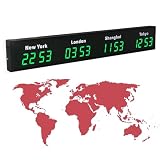 Digital World Time Zone Clock, Large Digital LED Clock Multi-Function Display with Remote Control, 3/4/5 Cities World Time Wall Clock, Aluminum Shell, for Multinational Enterprises Hotels
- 【Clear & Accurate Multiple Time Zones Clock】: This Multiple Time Zones Clock delivers precise time display for 3-5 global time zones, with each zone’s time shown independently and synchronized in seconds. The dot-matrix city name display lets you easily identify each time zone
- 【Wall Mounted LED Digital Multiple Time Zones Clock】: Our Wall Mounted LED Digital Multiple Time Zones Clock features high brightness, allowing you to set the perfect visibility for day or night use
- 【Easy Setup & Remote Control Operation】: Unlike complicated world clocks, this World Time Zones Clock comes with a remote control, making it easy to adjust time, and switch display modes
- 【Stylish Cities World Time Wall Clock】: This Cities World Time Wall Clock boasts an all-aluminum shell with an exquisite, sleek design that adds a touch of sophistication to any space. The digital static display ensures reliable performance, long service life
- 【Versatile Installation】: Choose between wall mounting or suspension for flexible placement—wall mounting creates a stylish wall feature, while suspension gives a floating illusion. It’s perfect for large family rooms, offices, multinational corporations
Why might a scheduled video show a different date?
YouTube’s guidance about Pacific Standard Time concerns the publication date displayed on a scheduled video’s watch page, not livestream recurrence across DST. For scheduled video publication, creators set a date, time, and time zone; YouTube says the watch-page date is based on Pacific Standard Time and can differ from the date shown in Studio when publication is scheduled from a time zone ahead of PST. Do not use that video-publication behavior to infer how a recurring livestream will handle a DST change. See YouTube’s scheduled video publication help.
Or let it run in the cloud
If your goal is a continuous YouTube channel stream using uploaded videos, StreamNeo is a separate cloud workflow: upload a recording or build a playlist, add your YouTube stream key, and go live. StreamNeo loops the uploaded videos from the cloud, so nothing has to stay on at home. It is not a camera-based broadcast or a way to schedule YouTube’s own playlist feature.
-
Any quality up to 4K 60fps at one flat price per slot, with the upload streamed as made.
-
Automatic recovery if YouTube drops the stream.
-
The first day is free with no card. The monthly option is $9.99 per month.
Special offer. See more information about Outbyte and uninstall instructions. Please review EULA and Privacy policy.
See StreamNeo for details, or start the free first day.
Quick Recap
Product prices and availability are accurate as of the date/time indicated and are subject to change. Any price and availability information displayed on Amazon at the time of purchase will apply.

