
Do these 3 things before closing this tab:
1Scan for outdated or missing drivers - takes under a minute2Clear out junk files and repair common Windows errors3Fix the driver behind crashes, sound loss and screen glitchesiTechGuides is reader-supported. When you buy through links on our site, we may earn an affiliate commission. As an Amazon Associate I earn from qualifying purchases. Learn more
Wii Sports Resort is played by moving a Wii Remote equipped with Wii MotionPlus. Start by connecting the console, sensor bar, and display, then insert the disc, run the MotionPlus test, and complete each activity’s tutorial. The correct grip, orientation, buttons, and gestures change from one activity to another, so beginners should follow the on-screen prompt rather than assume every sport uses the same swing.
What you need to play
Set up these items before starting:
- A Wii console connected to a display.
- A working sensor bar positioned so the Wii Remote can point at the screen.
- The Wii Sports Resort disc.
- Either a Wii Remote Plus, which has MotionPlus built in, or an original Wii Remote fitted with a Wii MotionPlus accessory.
- A Nunchuk for activities that specify one, including archery.
- Working batteries and a wrist strap.
MotionPlus is central to the game. It adds the motion-sensing hardware needed to detect the Remote’s orientation and more precise changes in direction. A standard Wii Remote without integrated MotionPlus or the add-on accessory is not the correct controller for the MotionPlus activities in this game.
Wii Remote Plus or an add-on accessory?
| Option | What it means | What to check |
|---|---|---|
| Wii Remote Plus | MotionPlus is integrated into the Remote, so there is no separate adapter attached to the bottom. | Confirm that the listing specifically says “Wii Remote Plus,” includes a working wrist strap, and describes the condition accurately. |
| Original Wii Remote plus Wii MotionPlus accessory | The accessory plugs into the Remote’s extension connector and is locked in place before play. | Check that the accessory is included, the connector and lock are intact, and the seller explains whether the Remote and accessory have been tested. |
When shopping, the useful search phrase is “Wii MotionPlus controller.” For used or refurbished hardware, inspect photographs, verify the included strap, check the accessory lock where applicable, and read the return policy. Current prices, stock, seller quality, and guaranteed condition vary by listing and are not fixed specifications of the game.
How to start Wii Sports Resort
Nintendo’s setup sequence takes you from the Wii Menu to the game’s initial MotionPlus check.
#1 Best Overall

- [Compatibility]: The Wii remote controller is compatible with Nintendo Wii and Wii U, supports all Wii games. Please note that the Wii console is not included. Batteries not included.
- [Built-in Motion Plus]: The built-in motion plus, more sensitive than the original Wii remote controller, can track movement more accurately, bringing you a more realistic game experience.
- Th wii nunchuck controller boasts a 3-axis motion sensor, akin to the Wii Remote. Its ergonomic design ensures a comfortable grip, promoting agility during gameplay.
- EASY SYNC STEPS -- Push the small button on the controller (where the batteries go) then push the red button on the Wii console (under the little door), then you’re able to synchronize with Nintendo Wii.
- LED indicators -- LED lights will indicate which player you're.
- Connect the Wii console, display, and sensor bar. Turn on the console and place the sensor bar where the Remote can see it while you point at the screen.
- Insert the Wii Sports Resort disc into the console.
- On the Wii Menu, point at the Disc Channel and press A to select it.
- Choose Start.
- Put the wrist strap around your wrist and tighten its lock before making any movement.
- Follow the initial Wii MotionPlus test. Keep the Remote still and hold it as shown by the prompt; the game uses this check to confirm that the accessory is connected and responding.
- When the main menu appears, choose an activity and complete its tutorial before attempting a faster or more difficult version.
If the game asks you to repeat a test, do so rather than trying to work around it. MotionPlus depends on the accessory being fully seated and locked, and the game’s prompts are also teaching the orientation required for that activity.
How pointing and menus work
For menu navigation, point the Wii Remote at the screen. Move the pointer to the item you want and press A to confirm. This pointing action is separate from the physical gestures used inside a sport. A Remote that selects menus correctly can still need a new grip or calibration when you enter an activity, so read the next prompt instead of keeping the Remote in the position used for menu selection.
Controls for the main beginner activities
The game does not use one universal swing. Each activity asks for a particular orientation and maps movement and buttons differently. Start slowly, reproduce the demonstrated motion, and increase speed only after the direction and timing feel consistent.
What’s actually slowing this PC down?
Pick the symptom - the matching free tool is one click away.
Swordplay
Hold the Wii Remote vertically. Swordplay responds to directional swings, so the important first skill is sending the Remote in the direction shown by the tutorial rather than simply waving it quickly. Watch the opponent or target, wait for the opening indicated by the activity, and make a controlled swing.
Rank #2
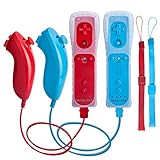
- All buttons are accurate and precise to the clicks. Compatible for all Wii games or Wii sports. Also compatible with Nintendo Wii U consoles.
- Motion Sensor included so it will be perfect for Wii Sports games when sharing with family members.
- High performance replacement controller for Original Nintendo Wii consoles. And also be noted third-party controller.
- Cost-Effective Wii controllers with shaking motion plus built-in & Nunchuk included. No need to buy extra motion plus or a nunchuk controller, you’ll find TechKen wii controller will shake when you’re hitting something on gaming. When plug Nunchuk, it’s able to function thumb stick and triggers.
- EASY SYNC STEPS -- Push the small button on the controller (where the batteries go) then push the red button on the Wii console (under the little door), then you’re able to synchronize with Nintendo Wii.
The manual describes blocking with the B button. Keep the Remote in the required vertical position, press B when the tutorial calls for a block, and return to the demonstrated ready position before your next swing. If your attacks seem to go in the wrong direction, slow down and check that the Remote has not rotated in your hand.
Wakeboarding
Hold the Wii Remote sideways. Tilt it to steer, and pull up over the wake. This is a change from swordplay: the Remote’s sideways orientation and tilt, not a vertical directional slash, are the essential inputs.
Use small tilts while learning the course. A large movement can make it harder to tell whether the game read your intended steering input or your attempt to pull up. Practice holding the sideways grip steadily, steering with a gradual tilt, and then adding the upward motion over the wake.
The Tool Desk
Outbyte PC Repair FREEClear out junk files and repair common Windows errorsFree Scan →Outbyte Driver Updater FREEFix the driver behind crashes, sound loss and screen glitchesFind Drivers →Archery
Archery requires the Wii Remote in one hand and a Nunchuk in the other. The activity lists the buttons used to aim and draw; follow that on-screen sequence exactly because the two controllers have separate roles.
Rank #3

- It’s a must-try Wii controller if you’re looking for third party Wii remote Nunchuk Controller. All buttons are tested to be correct and match Nintendo Wii/ Wii u console. You’ll find it’s hassle-free shopping with TechKen’s 90-day assurance. -- but only for orders from TechKen.
- High performance with shaking motion plus built-in & nunchuk included. No need to buy extra motion plus or a nunchuk controller, you’ll find TechKen wii controller will shake when you’re hitting something on gaming. When plug Nunchuk, it’s able to function thumb stick and triggers.
- EASY SYNC STEPS -- Push the small button on the controller (where the batteries go) then push the red button on the Wii console (under the little door), then you’re able to synchronize with Nintendo Wii.
- Powered by AA batteries, AA batteries are not included. Silicon case is not included
- IMPORTANT NOTE: Cannot fit in accessories, such as Wii zapper gun.
Keep both controllers connected before selecting archery. Hold the Remote and Nunchuk in the positions shown by the tutorial, use the listed control to aim, and perform the draw motion with the hand assigned by the prompt. If the game does not detect the draw or aim action, reseat the Nunchuk and restart the activity’s instructions before changing your technique.
Other activities
For activities not covered above, read the complete prompt before moving. The game can change the required grip, whether the Remote is held vertically or sideways, which buttons are active, and whether the motion is a tilt, swing, point, or another gesture. The safest method is to copy the demonstration slowly, then repeat it with slightly more speed once the response is predictable.
A beginner’s learning progression
Trying every activity at once makes it difficult to identify whether a problem comes from the controller, the grip, or the timing. Use one activity as a short practice lesson.
- Choose one activity. Start with the sport whose required grip is easiest for you to maintain.
- Watch or complete the tutorial. Do not skip the demonstration; it identifies the orientation and button assignment for that activity.
- Rehearse the movement slowly. Concentrate on direction and timing before adding force or speed.
- Repeat the same motion several times. Change only one variable at a time, such as the amount of tilt or the timing of a swing.
- Move to a harder attempt only when the basic response is consistent. If the result suddenly changes, return to the tutorial position instead of compensating with a larger gesture.
This approach also makes it easier to diagnose tracking problems. If one activity works and another does not, the cause may be its different grip or button mapping rather than a failed Remote.
Rank #4
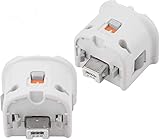
- Brand new and high quality.
- Connect Wii MotionPlus to your Wii Remote controller to increase accuracy and enhance play control on compatible games.
- Contains additional sensors that respond to your wrist's slightest motion for greater results with more economical movement.
- Compatible with a variety of Wii games.Perfect motion plus adapter for your Wii Remote controller.
- Allow it to more accurately capture complex motion and It tracks the player's movements in finer detail and with greater accuracy.
Fixing MotionPlus and control problems
The game says MotionPlus is missing
- If you are using a Wii Remote Plus, confirm that the controller is actually the integrated MotionPlus model rather than an original Remote.
- If you are using an original Remote, insert the Wii MotionPlus accessory into the Remote’s extension connector.
- Push the accessory fully home and engage its lock. Nintendo’s installation procedure requires both a complete connection and the lock to be secured.
- Return to the game’s MotionPlus test and follow the stillness and orientation prompt again.
The motion is detected in the wrong direction
- Stop and read the activity’s grip instruction again. Swordplay uses a vertical Remote, while wakeboarding uses a sideways Remote.
- Place your hands in the positions shown by the tutorial and repeat the motion slowly.
- Run the MotionPlus test or calibration prompt again if the game offers one.
- Check that the accessory has not loosened and that the Remote has not rotated in your hand during the movement.
Archery does not respond
- Confirm that the Nunchuk is connected; archery specifies a Wii Remote in one hand and a Nunchuk in the other.
- Review the listed aim and draw buttons instead of assuming they match another activity.
- Reseat the Nunchuk and repeat the archery tutorial.
Pointing is unreliable
Make sure the sensor bar is connected and positioned so the Remote can see it. Point directly at the screen for menu selection and press A to confirm. Menu pointing and in-sport motion are different systems, so a pointing problem should be checked separately from a swing or tilt problem.
Safe room setup and playing habits
Wii Sports Resort involves physical movement, so prepare the room before launching an activity.
- Clear furniture and fragile objects from the movement area.
- Keep pets, other players, and bystanders outside the swing or reach zone.
- Put the wrist strap on and tighten its lock.
- Hold the Remote firmly. Nintendo’s health and safety guidance states:
Hold the Wii Remote firmly and do not let go.
- Use controlled motion rather than trying to win with the largest possible swing.
- Stop and rest if you feel dizzy or nauseous.
A strap reduces the chance of the controller leaving your hand, but it does not make an unsafe room safe. Keep enough clearance for the activity’s full movement and avoid playing while standing close to a television, table, glass, or another person.
Outdated Drivers Are Slowing You Down
One free scan finds every outdated or missing driver and matches the right update for your exact hardware.Free scan · exact hardware matchWindows Errors? Fix Them Before They Spread
Repair common Windows errors and clear accumulated junk for a smoother, more stable PC - no reinstall needed.Free scan · no reinstallChoosing a replacement controller
Use these checks when comparing listings rather than relying on a photograph or a generic “Wii controller” label:
Best Value

- [Compatibility]: The Wii remote controller is compatible with Nintendo Wii and Wii U, supports all Wii games. Please note that the Wii console is not included. Batteries not included.
- [Built-in Motion Plus]: The built-in motion plus, more sensitive than the original Wii remote controller, can track movement more accurately, bringing you a more realistic game experience.
- Th wii nunchuck controller boasts a 3-axis motion sensor, akin to the Wii Remote. Its ergonomic design ensures a comfortable grip, promoting agility during gameplay.
- EASY SYNC STEPS -- Push the small button on the controller (where the batteries go) then push the red button on the Wii console (under the little door), then you’re able to synchronize with Nintendo Wii.
- LED indicator -- LED lights will indicate which player you're.
| Check | Why it matters |
|---|---|
| Integrated MotionPlus or add-on | Wii Remote Plus includes MotionPlus; an original Wii Remote needs the separate Wii MotionPlus accessory. |
| Compatibility wording | The description should explicitly identify Wii Remote Plus or MotionPlus support. A basic Wii Remote description alone is insufficient. |
| Nunchuk requirement | Archery and any other activity that specifies a Nunchuk require that extra controller, so include one in your setup if you plan to play those activities. |
| Physical condition | Look for clear photographs and a description of buttons, connector, sensor response, and battery compartment condition. |
| Wrist strap | A usable strap and lock are part of safe play; verify that they are included rather than assuming they come with a used Remote. |
| Accessory lock | For an add-on MotionPlus unit, the connector and locking mechanism must hold the accessory securely. |
| Return policy | A return option is valuable when the listing does not document testing or the condition is uncertain. |
No fixed price or stock level applies to every marketplace listing. Treat those as changing seller information, not as a specification of Wii Sports Resort.
How to build confidence before advanced play
Use a repeatable routine whenever you pick up the game:
- Secure the strap and check the space around you.
- Confirm the correct controller and, where required, connect the Nunchuk.
- Read the activity’s grip and orientation prompt.
- Complete the tutorial or demonstration.
- Make the smallest movement that produces the requested response.
- Increase speed only after the direction and timing are reliable.
When switching from swordplay to wakeboarding, or from a Remote-only activity to archery, deliberately reset your hand position. The most common beginner mistake is carrying the previous activity’s grip into the next one.
Recommended Free Tools
Quick Recap
Quick reference
| Task | Controller action |
|---|---|
| Select a menu item | Point at the screen and press A. |
| Swordplay | Hold the Remote vertically; use directional swings. B is used for blocking as described by the manual. |
| Wakeboarding | Hold the Remote sideways; tilt to steer and pull up over the wake. |
| Archery | Use the Wii Remote in one hand and a Nunchuk in the other; follow the listed aim and draw controls. |
| Any other activity | Follow its on-screen grip, orientation, button, and gesture prompt. |
Product prices and availability are accurate as of the date/time indicated and are subject to change. Any price and availability information displayed on Amazon at the time of purchase will apply.

