
“No one can use it” can mean two different things: erasing your personal data while leaving the phone reusable, or physically making the handset and its storage unusable. For a working phone you plan to sell, donate, trade in, or recycle, back up your data, remove your accounts, and use the manufacturer’s current erase procedure. If the phone itself must be destroyed, use a qualified electronics-destruction provider rather than attempting physical destruction at home.
Choose the outcome you actually need
| Goal | Appropriate action | Does the phone remain usable? |
|---|---|---|
| Remove local personal data before transfer or recycling | Manufacturer factory-reset or erase procedure | Usually |
| Obtain stronger sanitization | Ask the manufacturer whether the device supports a documented purge or cryptographic erase | Possibly |
| Make the handset and storage physically unusable | Use a qualified, controlled electronics-destruction facility | No |
These outcomes are not interchangeable. NIST defines media sanitization as a process that makes access to target data infeasible for a given level of effort. Its current guidance is SP 800-88 Rev. 2, published in September 2025. The older Rev. 1 mobile-device appendix was superseded when Rev. 2 was published, although its device-specific discussion remains useful historical context.
Before erasing a working phone
- Back up what you need. Confirm that photos, contacts, messages, authenticator data, and other required information have copied successfully.
- Check cloud accounts separately. Erasing the handset does not automatically delete data held in iCloud, a Google Account, or other online backups.
- End service and remove removable media. Cancel or transfer cellular service as appropriate, and remove the SIM card and any microSD card.
- Follow the exact model and operating-system instructions. Menus and account protections vary by manufacturer and software version.
Erase an iPhone for transfer or recycling
Apple’s supported process is designed to remove local content and prepare the device for another user. After backing up, sign out as directed by Apple, then open Settings > General > Transfer or Reset iPhone > Erase All Content and Settings. Review the prompts for your Apple Account, passcode, and eSIM.
- The erase removes content stored on the iPhone and removes payment cards from the device.
- It turns off Find My and Activation Lock when completed correctly, allowing a new owner to activate the phone.
- If asked about the eSIM, choose whether to erase the cellular plan based on whether the line is being transferred or retained.
- Apple states that erasing the device does not delete content from iCloud.
When practical, let the process finish until the phone displays the initial setup screen. That confirms the normal user-facing erase flow completed, but it is not by itself proof of a particular underlying storage-sanitization method.
Quick wins for a faster PC:
Fix the driver behind crashes, sound loss and screen glitchesFind Drivers →Clear out junk files and repair common Windows errorsFree Scan →Scan for outdated or missing drivers - takes under a minuteDriver Scan →#1 Best Overall

- O-3 | E-3 SECURITY- Cross Cut | 4 mm x 5 mm Shred Size | 4 Gallon Waste
- DESTROY DIGITAL MEDIA- Shred SSDs, mini tablets, cell phones, flash drives, and CDs/DVDs
- CHAIN DRIVEN 3.5 HP MOTOR- For slip-free, continuous duty performance
- AUTOMATIC JAM PROTECTION- Machine cycles through forward and reverse until shredding is complete
- EASY TO OPERATE- LED keypad for simple operation
Erase an Android phone for transfer or recycling
Google’s Android guidance says a factory reset removes data from the phone, while exact steps vary by manufacturer and model. Use the Settings app’s factory-reset option where available and follow the device maker’s instructions for the precise model.
- Verify that your information has copied successfully to your new device or backup.
- Open the manufacturer’s Settings path for Factory reset, Erase all data, or equivalent wording.
- Read the confirmation screen carefully; a reset can take time and may require your screen lock.
- After completion, check for the initial setup screen and remove any remaining SIM or memory card.
Data associated with a Google Account or another cloud service may be restored after a reset when you sign in again. A reset therefore addresses the phone’s local contents; it does not erase your online account history or cloud backups.
Rank #2

- Secure Data Destruction: Shreds a variety of media formats into unreadable particles, ensuring data privacy and compliance with security regulations
- Versatile Performance: Handles mobile devices, solid-state drives, and other digital media alongside traditional data storage like CDs and DVDs
- Quiet Operation: Whisper-quiet operation (55 dB) allows for discreet shredding without disrupting the office environment
- User-Friendly Design: Features an easy-to-use LED control panel and three dedicated infeed options for safe and convenient shredding
- Commercial-Grade Construction: Built for heavy-duty use with a sturdy all-metal cabinet, solid steel cutting blades, a chain-driven motor, and heavy-duty casters for easy mobility
Why a reset is not automatically a purge
Sanitization strength depends on the phone’s hardware, operating system, encryption design, and implementation. NIST’s superseded Rev. 1 guidance noted that many mobile devices offered only a “Clear” capability, while a “Purge” capability depended on the specific hardware and software. It advised checking with the manufacturer whether the operation uses media-dependent sanitization or cryptographic erase rather than merely removing file pointers.
Because Rev. 1 is no longer the current NIST revision, treat that mobile appendix as historical guidance and ask the manufacturer what the current erase function actually does on your model. Do not assume that every factory-reset menu represents the same level of assurance.
What’s actually slowing this PC down?
Pick the symptom - the matching free tool is one click away.
Rank #3

- Cross-cut paper and credit card shredder cuts material into approximate 0.2 x 0.7 inches (5 x 18 mm) pieces; meets security level P-4 standards
- Shreds up to 8 sheets of 20-pound bond paper at a time; shreds credit cards (one at a time, but not suitable for metal credit cards), staples, and small paper clips
- 3 minute runtime and 30 minute cool down; if unit goes beyond max run time, it automatically shuts off to prevent overheating
- 4 mode control switch (auto/on, off, reverse, forward) and LED status indicators for power on, overheat and overload; easy to empty 3.7 gallon bin
- Quality tested: As part of Amazon Basics quality inspections, we test every shredder before shipping it, which means you may see some paper shreds from the testing
When the phone itself must be destroyed
If your requirement is that nobody can operate the handset or recover its storage, contact a qualified electronics-destruction or certified recycling provider. Ask the provider:
- Which components are physically processed, including internal storage and the battery
- Whether the method is performed in a controlled, licensed facility
- What documentation or certificate of destruction is supplied
- How hazardous battery and electronic materials are handled
The historical NIST mobile-device appendix lists industrial methods such as shredding, disintegration, pulverizing, or incineration in a licensed facility. It does not recommend striking, burning, drilling, crushing, or dismantling a phone at home. Lithium-ion batteries can ignite or release hazardous materials, and opening a device can create additional personal and environmental risks.
Rank #4
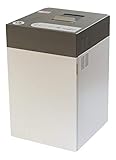
- Destroys SSD drives, smartphones, mobile phones, mini-tablets, and USB sticks
- Can shred up to 100 mobile phones or 500 USB thumb drives per day
- Produces shred particles measuring 0.16 x 0.6 inches (4x15mm)
- Quiet operation allows for use even in office environments
- The intimus FlashEx is a "plug and play" product that can be used in a standard office environment
If the phone is locked, damaged, or will not power on
Do not open, puncture, heat, or improvise a destruction method. The safe procedure depends on the model, damage, battery condition, and the data-sanitization requirement. Contact the manufacturer or a qualified electronics-destruction provider and request model-specific instructions. If the device is swollen, hot, leaking, or otherwise damaged, tell the provider before transport.
Independent reader supportYour contribution helps us test, update, and keep practical guides available for everyone.Prepare a phone for donation or recycling
Before handing over a working device, erase its local data using the manufacturer’s process, remove SIM and memory cards, and terminate or transfer cellular service. Apple and Google describe reuse, trade-in, and recycling workflows; local collection rules and battery requirements may differ, so check the current rules where you live. The U.S. Environmental Protection Agency’s general guidance likewise advises ending service and erasing sensitive information before donation or recycling.
Outdated Drivers Are Slowing You Down
One free scan finds every outdated or missing driver and matches the right update for your exact hardware.Free scan · exact hardware matchWindows Errors? Fix Them Before They Spread
Repair common Windows errors and clear accumulated junk for a smoother, more stable PC - no reinstall needed.Free scan · no reinstallQuick Recap
Best Value

- Ultimate Villain Guardian: Shredder transforms into your fearsome device protector, holding gaming controllers, remotes, and phones in his iconic clawed gauntlets for a personalized gaming station with serious attitude
- Heavy-Duty Construction: This 8.5 in collectible figure features durable PVC material and a sturdy textured base designed to securely grip your devices without tipping or shifting during intense gaming sessions
- Universal Device Compatibility: Fits next-gen PlayStation 5 DualSense, Xbox Series S and X controllers, plus most smartphones and iPhones, making this cable guys holder perfect for any modern gaming setup
- Official TMNT Collectible: Officially licensed by Paramount and intricately detailed with metallic armor, spiked gauntlets, and flowing cape, bringing authentic villain style to your desk or entertainment center
- Statement Piece Accessory: Combines functional device organization with iconic pop culture design, eliminating cable clutter while celebrating your Teenage Mutant Ninja Turtles fandom in one bold collectible
Which option fits your situation?
- Reuse, sale, trade-in, or ordinary recycling: Back up, remove accounts, and complete the manufacturer’s factory-reset or erase flow.
- Higher assurance for sensitive data: Ask the manufacturer whether your exact model supports a documented purge or cryptographic erase; do not infer this from the word “reset.”
- Physical destruction is mandatory: Use a qualified provider and obtain process documentation.
- Phone cannot be reset: Stop and obtain manufacturer or qualified-provider guidance rather than trying a household tool or chemical method.
Product prices and availability are accurate as of the date/time indicated and are subject to change. Any price and availability information displayed on Amazon at the time of purchase will apply.

