
Do these 3 things before closing this tab:
1Fix the driver behind crashes, sound loss and screen glitches2Repair Windows errors before they cause bigger problems3Scan for outdated or missing drivers - takes under a minuteiTechGuides is reader-supported. When you buy through links on our site, we may earn an affiliate commission. As an Amazon Associate I earn from qualifying purchases. Learn more
You can make Windows open your streaming app when you sign in, but that does not guarantee the meditation audio will start playing again. Turn on the app’s startup setting, then test whether your particular service restores playback; if it opens paused, you will need to press Play unless the service provides a separate, documented restart-resume feature.
Set your streaming app to open when you sign in
Windows 10 and Windows 11 can launch supported apps at sign-in. This gets your player ready after a restart; it does not, by itself, restore the stream or track that was playing before Windows shut down.
Use Windows Settings or Task Manager
- Open Start > Settings > Apps > Startup.
- Turn on the toggle for your streaming app, if it appears in the list. Microsoft describes this as starting the app automatically when you sign in.
- If the app is not listed, open Task Manager, select Startup apps, select the app, and choose Enable.
If the app is missing from both lists, Microsoft documents adding its shortcut to a Startup folder. Open File Explorer and enter shell:startup in the address bar for the current user, or shell:common startup for all users of the PC. Put the app’s shortcut in the folder you chose. The all-users folder affects everyone who signs in, so use the per-user folder if only your account should launch the app.
For Spotify desktop, enable its own sign-in setting
- Open Spotify and select your profile menu, then Settings.
- Scroll to Startup and window behaviour.
- Set Open Spotify as soon as you log into the computer to Yes.
This Spotify desktop setting is documented as an app-launch option. It is not a promise that the meditation playlist or stream playing before a restart will resume automatically.
#1 Best Overall

- STABLE POWER SUPPLY: The AVR stabilizes output power during fluctuations, extends battery life, and provides clean power to connected devices.
- USER-REPLACEABLE BATTERIES: Users can easily replace and purchase batteries directly from Vertiv to safely extend UPS life.
- CONVENIENT RUNTIME LED INDICATORS: Four LED indicators provide a quick view of remaining battery capacity.
- THREE-YEAR WARRANTY: This UPS comes with a full-unit coverage and an advanced replacement warranty for three years.
- EASIER ALARM MANAGEMENT: A dedicated mute button allows users to silence loud UPS alarms once problems that activated them have been resolved.
Check whether playback itself resumes
After enabling startup, perform one normal restart and sign in. Check whether the app opens and whether audio actually plays. If Spotify opens but remains paused, the startup setting has done its job: it launched the app, but it did not restore playback. Start the meditation audio manually.
The Windows and Spotify instructions cited here do not establish a general playback-resume control after restart. Do not treat a player opening as proof that the stream has resumed, and do not assume a workaround will work across services. Spotify’s playback API is a technical option with OAuth and Premium requirements, and its policies restrict commercial streaming integrations and non-interactive broadcasting; it is not a general consumer setting for automatic restart recovery.
Rank #2
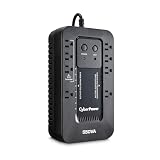
- EIGHT NEMA 5-15R OUTLETS: Four battery backup & surge protected outlets, Four surge protected outlets (Three ECO controlled); INPUT: NEMA 5-15P right angle, 45 degree offset plug with five foot power cord
- ECO MODE: When the UPS detects a computer is off or in sleep mode, it will automatically turn off power to computer peripherals connected to ECO mode outlets, reducing power usage and lowering energy costs
These features solve different problems
| Feature | What triggers it | What it does | Does the documentation promise restart recovery? |
|---|---|---|---|
| Windows Startup apps or a Startup-folder shortcut | You sign in to Windows | Opens an app | No; it describes app launch, not resuming prior playback. |
| Spotify desktop startup setting | You log in to the computer | Opens Spotify | No; it does not promise that the previous audio resumes. |
| Spotify Autoplay | An album, playlist, or selection ends | Plays similar music after the selection finishes | No; it concerns what follows completed playback, not a Windows restart. |
| Windows Clock Focus session with Spotify linked | You start a Focus session | Plays a linked Spotify playlist or podcast during the session | No; the documented flow does not say the session or audio resumes after restart. |
Autoplay is not restart recovery
Spotify’s Autoplay option is under profile menu > Settings > Autoplay on desktop. It plays similar music when an album, playlist, or selection ends; it does not address audio interrupted by restarting Windows.
Focus sessions are for deliberate starts
Windows Clock can be linked with Spotify so you can choose a playlist or podcast and play it when you start a Focus session. That is a planned listening workflow, not a documented method for restoring playback after a restart.
Rank #3

- 1500VA/900W Intelligent LCD Battery Backup Uninterruptible Power Supply (UPS) System uses simulated sine wave output to safeguard workstations, networking devices, and home entertainment equipment
- 12 NEMA 5-15R OUTLETS: Six battery backup & surge protected outlets; Six surge protected outlets; INPUT: NEMA 5-15P right angle, 45 degree offset plug with six foot power cord
- MULTIFUNCTION LCD PANEL: Displays immediate, detailed information on battery and power conditions, including: estimated runtime, battery capacity, load capacity, etc.
- AUTOMATIC VOLTAGE REGULATION (AVR): Corrects minor power fluctuations without switching to battery power, thereby extending the life of the battery
- 3-YEAR WARRANTY – INCLUDING THE BATTERY; $500,000 Connected Equipment Guarantee and FREE PowerPanel Personal Edition Management Software (Download)
If you use the Spotify web player
Spotify lists current desktop versions of Chrome, Firefox, Edge, Opera, and Safari as supported for its web player. If it is not working, Spotify suggests trying the desktop app. The browser-support guidance does not say that web-player playback state survives a Windows restart, so test it rather than assuming the browser will resume audio.
Troubleshoot what happens after sign-in
- The app does not open: Recheck its toggle in Start > Settings > Apps > Startup or Task Manager’s Startup apps. If it is not listed, use the relevant Startup folder shortcut method.
- The app opens, but the audio is paused: Startup is not the same as playback restoration. Press Play and check the streaming service’s own settings or documentation for a restart-resume feature.
- Music continues only after a playlist ends: That is the role of Spotify Autoplay, not a sign that restart recovery is enabled.
- Playback starts after waking from sleep and reconnecting Bluetooth: A Microsoft Q&A user report describes Spotify restarting in that particular wake-and-Bluetooth situation. It is not official confirmation of general restart behavior or a proven fix, so do not rely on it for shutdown-and-restart recovery.
Or let it run in the cloud
If your actual goal is a continuous YouTube meditation stream made from uploaded videos, rather than restarting Spotify playback on your Windows PC, StreamNeo is a different option. It plays uploaded videos to YouTube; it does not resume Spotify, play a computer’s current audio, or stream from a camera. Upload a recording or build a playlist, add your YouTube stream key, and go live. The cloud keeps the loop running without your computer or home connection staying on.
Rank #4

- Note: Not for sale in California, USA until further notice.
- SMART UNINTERRUPTIBLE POWER SUPPLY: 1440VA / 900W UPS features 10 outlets - 5 outlets provide battery backup & surge protection; 5 outlets with surge protection only. RJ45 100mb Ethernet port protects from data line surges. Two USB charging ports share 10.5W.
- MASTER OUTLET CONTROL: Features Battery Backup Master Outlet technology. One master-outlet controls 4 ECO-outlets that turn off automatically when the connected master device powers down or enters sleep mode. Recommended for printers, lamps & peripherals.
- HOME & OFFICE UPS: Computer uninterruptible power supply unit provides right-angle power plug with 5ft cord. Provides EMI / RFI suppression to protect against damaging line noise. Batteries are user-replaceable with two Tripp Lite RBC51 models.
- AUTOMATIC VOLTAGE REGULATION: AVR UPS instantly corrects brownouts & overvoltages continuously corrects voltages without drawing on battery backup. Protects from incremental hardware damage, data loss and performance issues caused by brownouts.
- Nothing has to stay on at home.
- Uploaded video streams as made, up to 4K 60fps, at one price per slot, with no re-encode or quality tiers.
- StreamNeo automatically recovers if YouTube drops the stream.
- The first day is free with no card; one free day per account.
The monthly option is $9.99 per month. To try the cloud workflow, start with StreamNeo.
Free tools Windows power users keep installed
One-click scans. No signup required.
Quick Recap
Best Value

- 750VA COMPUTER UPS: 500W computer uninterruptible power supply unit provides 10-outlets total. Five outlets provide battery backup. Restarts automatically once power is restored, regardless of battery level. Features 156 joules of surge protection.
- CLOUD-ENABLED NETWORK UPS: Manage your tech from anywhere. Configurable UPS alerts notify you through email or text. Silence alarms, shutdown or restart equipment, and control outlet banks through web browser or Eaton's free Brightlayer app.
- SMART UPS: Easy-to-read LCD screen provides status, voltage, battery level, load and power usage information. Audible UPS alarm can be disabled via remote app or LCD. Receive notifications via the app, text, or email after muting the audible alarm.
- POWER FEATURES: UPS filters out EMI/ RFI line noise that can cause damage. Resettable circuit breaker limits dangerous overloads. AVR UPS corrects voltages between 89V and 145V. Internal battery is easily user replaceable.
- RELIABLE PRODUCT FULLY BACKED & SUPPORTED: This product is covered by a 3-Year Manufacturer's Warranty, $250,000 Ultimate Lifetime Connected Equipment Insurance, and is supported by Eaton's expert technical support team over phone, web & email.
Product prices and availability are accurate as of the date/time indicated and are subject to change. Any price and availability information displayed on Amazon at the time of purchase will apply.

