
For a crisp website screenshot, first choose whether you need the visible viewport, the full scrollable page, or a single element. For a quick one-off, use your browser’s built-in screenshot command. For repeatable captures with control over dimensions, file format, and page state, use Playwright. Save as PNG for lossless output; choose device-pixel scale when fine detail matters more than file size.
Choose what the screenshot needs to show
Screenshot quality is not just sharpness. A useful capture has the right scope, readable dimensions, an appropriate file format, and the page state you intended to record. Decide on the capture area before adjusting resolution.
- Viewport: captures what is currently visible in the browser window. Use it for a hero section, a bug report, or a view that matches what a visitor sees without scrolling.
- Full page: captures the scrollable document, not just the visible area. Use it to document a long page or review a complete layout.
- Element: captures one selected component, such as a pricing card or chart. This avoids surrounding page content when a focused image is needed.
Playwright supports viewport, full-page, and locator-based element screenshots. Its documentation describes a full-page screenshot as a capture of the full scrollable page, as if it fit on a very tall screen (Playwright Screenshots guide).
Take a screenshot manually in your browser
For a one-time capture, a browser’s own screenshot feature is usually the quickest route. Open the page, wait until the content you want is visible, and select the capture command that matches your scope. Browser command names can change, so look for the current command for the visible area, full page, or selected element.
Quick wins for a faster PC:
Scan for outdated or missing drivers - takes under a minuteDriver Scan →Repair Windows errors before they cause bigger problemsFix Now →#1 Best Overall

- SCREEN-FREE CAMERA FOR SUMMER CAMP & TRAVEL – Leave the preview screen behind and stay focused on the moment. This screen-free digital camera is compact and easy to carry for kids' summer camp, road trips, vacations and everyday adventures. Just point, shoot and enjoy discovering your photos later.
- REUSABLE ALTERNATIVE TO DISPOSABLE CAMERAS – Enjoy the spontaneous feel of a disposable camera without buying film or waiting for developing. This reusable screenless retro digital camera is ideal for weddings, parties, music festivals, vacations and candid guest photos, giving you a fun film-style experience you can use again and again.
- EASY OTG PHOTO TRANSFER & 3,000+ SHOTS – Transfer photos to a compatible phone with the included USB-C OTG adapter for easy saving and sharing. The rechargeable camera supports 3,000+ shots per charge, while the included 8GB microSD card provides space for 3,000+ photos—great for multi-day trips, camps and events.
- UNLIMITED DIY FILTERS FOR YOUR OWN RETRO LOOK – Create custom photo filters on your computer and copy them to the camera before shooting. Compatible iPhone users can also transfer filter files through OTG. Design your own retro, vintage or film-style photo looks instead of being limited to a small set of preset filters.
- SIMPLE POINT-AND-SHOOT CAMERA WITH BUILT-IN FLASH – Minimal controls and fixed focus make this compact digital camera easy for beginners to use. The lightweight 4.7 oz body, built-in flash and adjustable shutter sound make it ready for everyday photos, family trips, birthdays, parties and spontaneous moments.
Chrome DevTools
Open DevTools and use its Command Menu to find the screenshot command you need. Chrome documents the Command Menu as a way to run DevTools commands (Chrome DevTools Command Menu). Choose a full-page command for the whole scrollable document; a viewport capture only records the currently visible browser content.
Firefox
Firefox includes built-in screenshot functionality. Use the browser’s current screenshot controls and select the desired area or full-page option when available (Firefox Screenshots). The exact labels and interface may vary by browser version.
Check the saved image at its intended size
Open the file and inspect the text and fine details at the size where it will actually be viewed. If small text is hard to read, capture with a larger viewport or higher device-pixel scale rather than enlarging a small screenshot afterward. Enlarging cannot restore details that were not present in the original pixels.
Automate captures with Playwright
Playwright is useful when you need screenshots you can reproduce or generate in a batch. Install it for your chosen language, launch a browser, open the page, and call the screenshot API. The examples below use Python and capture a full page; change the options to capture only the viewport or a specific element.
Recommended Free Tools
Rank #2

- 【Autofocus 64MP & UHD 4K Digital Camera】The digital camera can make YouTube 4K videos and take 64 MP UHD pictures. High quality images and high pixel video sensor can capture every memorable moment clearly.4k vlogging camera has three focus modes: auto focus, manual focus and fixed focus, you can set the focus mode according to your needs. It is a perfect photography cameras for beginners
- 【Wireless WIFI & Webcam/Vlogging Function】The upgraded digital camera for youtube has built-in wireless WIFI function, allowing you to share videos and photos online instantly using your cell phone. The vlog camera can be used as a webcam, making it easy for you to make live streams or video calls on YouTube, Facebook, Twitter or other social media. The USB cable that comes with the package can be used not only for charging but also for transferring
- 【18X Zoom Cameras for Photography with 180°Flip Screen 】Our 4k travel camera features a 180°IPS flip-up 3-inch IPS screen that makes it easy to take selfies, record and share your life's blog. The small digital camera supports 18x digital zoom and can be easily zoomed in and out while in use by pressing the W/T button. The HD photo camera is also equipped with a high-brightness flash to capture clear images in dark environments.(NOTE:It's a digital zoom not an optical zoom, all digital zooms have an effect on picture quality when zoomed in, the more you zoom in the blurrier it gets.)
- 【Multifunctional Point and Shoot Digital Cameras】The 4k digital camera for photography is multifunctional in that it has four photo modes(Continuous shooting/Timed shooting/Auto photo mode/Normal photo mode)and four video modes(Time lapse recording/Loop recording/Slow motion recording/Normal video mode), along with a variety of filters. One camera can fulfill all your photography needs
- 【Perfect Gifts & Service】This 4k digital camera with wifi is the perfect gift for beginners because it is simple to set up and easy to operate and control. Take this camera with you on a trip or for any travel activity/camping/hiking or any sport imaginable! If you have any problems with this flip rechargeable camera, please feel free to contact us and we will get back to you within 24 hours
Python: full-page PNG
Install Playwright and its browser once:
pip install playwright
playwright install chromium
Save the following as capture.py and run python capture.py:
from playwright.sync_api import sync_playwright

with sync_playwright() as p:
    browser = p.chromium.launch()
    page = browser.new_page(viewport={"width": 1440, "height": 900})
    page.goto("https://example.com", wait_until="networkidle")
    page.screenshot(path="website.png", full_page=True)
    browser.close()
This writes a full-page PNG. Replace the URL with the page you are authorized to capture. If the site continues making network requests, networkidle may not occur promptly; use wait_until="load" or wait for a specific element instead.
Capture only the visible viewport
Omit the full_page=True option:
page.screenshot(path="viewport.png")Capture one element
Use a locator and save its screenshot. Replace the selector with a stable CSS selector from the target page:
page.locator(".pricing-card").screenshot(path="pricing-card.png")Use a fixed viewport and wait for the content you need
For repeatable results, set the viewport explicitly rather than relying on a machine’s default window size. Wait for a meaningful selector when the page has a specific component that must render:
Do these 3 things before closing this tab:
1Fix the driver behind crashes, sound loss and screen glitches2Repair Windows errors before they cause bigger problems3Scan for outdated or missing drivers - takes under a minuteRank #3
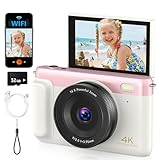
- 【4K digital camera designed for kids and teens】The FIRYMID digital camera captures 4K video and Ultra HD photos with 75 megapixels. Its CCD sensor delivers rich colors and a uniquely vintage photographic style. With an intuitive interface and user-friendly design, teens, beginners, even photography novices can easily take stunning photos without complicated settings.
- 【Built-in Wi-Fi for Sharing:】This digital camera integrates Wi-Fi functionality. Pair it with the companion app (available for download in app stores) to enable remote control, real-time preview, and transfer of photos and videos to your phone. Share your happy moments faster on social media. Note: Continuous use of these features may accelerate battery drain
- 【2500mAh Built-in Battery & 185g Lightweight Body】This 4K digital camera features a 2500mAh battery, delivering twice the battery life of other compact cameras. Enjoy up to 6 hours of photo shooting, or 4 hours of video recording. Its lightweight, compact body, complete with a protective wrist strap, weighs under 250g, making it exceptionally portable. Slip it into your pocket or backpack, ready to capture beautiful moments whenever inspiration strikes
- 【Fast, Intelligent Autofocus】This 4K digital camera is equipped with an advanced autofocus technology that quickly locks onto your shooting subject, helping you easily capture clear, sharp photos. Whether snapping lively children, playful pets, or memorable moments during travel and gatherings, the autofocus feature delivers stunning photos with ease—without any complicated settings; just point and shoot!!!
- 【All-in-One Multifunctional】Built-in flash captures natural photos even in low-light conditions. Features a standard threaded tripod mount for attachment to any camera stand or stabilizer. Enables high-speed file transfers via USB cable or functions as a webcam for video calls. Multiple accessories included in the package ensure safer and more professional camera operation. A gift for teens, photographers, and vloggers on birthdays, festivals, or any occasions
page.goto("https://example.com", wait_until="domcontentloaded")
page.locator("main h1").wait_for(state="visible")
page.screenshot(path="page.png", full_page=True)
A page being loaded does not guarantee that every image, animation, or third-party widget has settled. Decide whether the screenshot should represent the page as a normal visitor sees it or a deliberately controlled state.
Set resolution, format, and consistency
CSS scale versus device scale
Playwright’s screenshot scale option controls output pixels. "css" produces one output pixel per CSS pixel. "device" produces one output pixel per device pixel, which can make the output twice as large or larger when the device-pixel ratio exceeds one. Choose device scale for finer detail when the larger image is acceptable; use CSS scale for a smaller file with dimensions aligned to the page’s CSS layout. These settings affect output dimensions, not the website’s underlying design.
page.screenshot(path="retina.png", full_page=True, scale="device")
page.screenshot(path="compact.png", full_page=True, scale="css")
PNG, JPEG, and WebP
Playwright defaults to PNG. PNG is lossless and does not use the screenshot quality setting. JPEG and WebP support a quality value from 0 to 100; the API reference lists JPEG’s default quality as 80 and documents WebP quality 100 as lossless, with lower values lossy (Playwright Page screenshot API).
| Format | Use it when | Playwright detail |
|---|---|---|
| PNG | You want lossless output or need clean text and edges. | Default format; the quality option does not apply. |
| JPEG | A smaller lossy file is acceptable. | Quality range 0–100; documented default is 80. |
| WebP | You want WebP output and can choose lossless or lossy quality. | Quality 100 is documented as lossless; lower values are lossy. |
For JPEG or WebP, set the type and quality deliberately. Quality settings trade file size against compression artifacts; they do not increase captured detail:
What’s actually slowing this PC down?
Pick the symptom - the matching free tool is one click away.
Rank #4
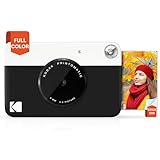
- ALL-IN-ONE PHOTOGRAPHY - The PRINTOMATIC Camera offers a combination of a powerful 5MP sensor with a wide angle f/2 lens that instantly prints vibrant photos.
- FAST EASY AND FUN – This Point and Shoot the camera speed allows you to shoot a new photo while printing the previous shot. It also comes equipped with a light sensor that will automatically turn on the flash in low-light settings
- ONE STOP PRINTING - The Kodak Printomatic camera instantly prints 2x3” photos. The camera uses Kodak Zink Photo Paper, so no ink cartridges, toners or film are needed. The photo prints are durable, water-resistant, tear resistant and smudge free
- CHARMING DESIGN – Comes in Variety of Fun, Bold Colors. Compact design Slips neatly into your shirt pocket. Make it easy to carry around as you go about your day, ensuring you always have Your Printomatic with you
- INSTANT VALUE - Kodak Printomatic Camera is an easy-to-use product. Saves photos to a MicroSD card.USB Cable & Charger are not Included.
page.screenshot(path="page.webp", type="webp", quality=90, full_page=True)
page.screenshot(path="page.jpg", type="jpeg", quality=85, full_page=True)
Control animation and changing content
When comparing captures or producing documentation, changing content can make otherwise identical runs look different. Playwright supports options to disable animations, hide the text caret, apply a stylesheet, and mask selected elements. For example, masking a dynamic timestamp avoids a changing region dominating a visual comparison:
page.screenshot(
    path="stable.png",
    full_page=True,
    animations="disabled",
    caret="hide",
    mask=[page.locator(".last-updated")],
)
These controls alter or cover what appears in the image. Use them only when a stable or privacy-conscious capture is more important than showing the page exactly as a visitor would see it.
Other useful screenshot controls
The Playwright screenshot API also supports clipping to a rectangle, adding a stylesheet, masking locators, and saving to a buffer instead of a file. Use clipping when you need a region that is not a single DOM element; use a locator screenshot when the target corresponds to an element. Check the API reference for the exact option names and behavior for your installed Playwright version (Playwright Page screenshot API).
Independent reader supportYour contribution helps us test, update, and keep practical guides available for everyone.Common problems and fixes
- The screenshot is cut off. A default screenshot captures the viewport. Use the browser’s full-page command or Playwright’s
full_page=Trueto capture the scrollable document. - The output looks soft or text is hard to read. Check the image’s pixel dimensions and intended display size. Set an explicit viewport, or use
scale="device"when more device-pixel detail is needed. Do not expect post-capture enlargement to recreate missing detail. - Images or components are missing. The capture may have happened before they appeared. Wait for a relevant selector or use an appropriate page-load condition. Some content depends on scrolling or delayed scripts; confirm it is visible before capture.
- The page never reaches network idle. Live pages may keep connections open or make recurring requests. Use a different navigation condition, such as
loadordomcontentloaded, then wait for the specific content your screenshot requires. - Repeated screenshots do not match. Check for animation, timestamps, rotating content, or a blinking caret. Playwright’s animation, caret, stylesheet, and masking options can help, but may make the output less representative.
- The file is unexpectedly large. Full-page captures and device scale create more pixels. Use CSS scale if one pixel per CSS pixel is sufficient, or choose JPEG/WebP with an appropriate quality value when lossy compression is acceptable.
- The screenshot includes browser chrome or the wrong region. Check whether you used an operating-system screen capture rather than a browser page screenshot. Use the browser’s page capture command for page content without surrounding desktop UI.
Or skip the browser setup
For a repeatable screenshot without setting up browser automation, ScreenshotNeo returns a PNG, JPEG, WebP, or PDF from one GET request. Its website screenshot API removes supported cookie/consent banners, newsletter popups, and chat widgets before capture; each step can be turned off. Only clean shots are billed: bot checks or CAPTCHAs, blank pages, timeouts, failed loads, and cache hits cost nothing, with the result identified in response headers.
The Tool Desk
Outbyte Driver Updater FREEFix the driver behind crashes, sound loss and screen glitchesFind Drivers →Outbyte PC Repair FREEClear out junk files and repair common Windows errorsFree Scan →Here is the cURL request using the documented API endpoint (ScreenshotNeo documentation):
Best Value

- 【1/2" 48MP CMOS & 3-Axis Gimbal】Equipped with a premium 1/2" 48MP CMOS sensor, this drone captures superior light and detail for stunning 8K photos and 4K/30fps video. The 3-axis brushless gimbal and EIS technology ensure ultra-smooth cinematic footage.
- 【96-Min Extended Flight Time】Keep the adventure going longer with three batteries delivering up to 96 minutes of flight time (32 minutes each). Spend less time charging and more time capturing scenic views, family moments, and unforgettable memories.
- 【20,000 ft Range Transmission】The advanced R2 digital system delivers a clear, anti-interference video feed up to 20,000 feet (6KM) away. Experience a robust connection for confident, far-reaching exploration with this long range drone.
- 【< 249g & No FAA Needed】Weighing under 249g, this mini drone with camera completely bypasses FAA registration or remoted ID. The compact, foldable drone design and included carrying case make it the ultimate travel companion to capture spontaneous moments anywhere.
- 【Beginner Friendly & GPS Auto Return】Perfect for all skill levels, this GPS drone for beginners features one-tap takeoff and quadruple positioning (TOF, optical flow, barometer, GPS) for steady hovering. Fly safely with Auto Return Home (RTH) on low power or signal loss.
curl -G "https://api.screenshotneo.com/v1/shot" -d access_key=YOUR_API_KEY --data-urlencode url=https://example.com -o shot.webpReplace YOUR_API_KEY with your API key and change the target URL. ScreenshotNeo also provides an MCP server with take_screenshot, get_page_info, and capture_pdf tools for Claude, Cursor, and other MCP clients. The free plan includes 1,000 screenshots per month with no card; paid plans start at $5 for 3,000. See ScreenshotNeo or sign up for 1,000 free screenshots a month, with no card required.
Frequently Asked Questions
Do I need a special monitor or capture device to make a website screenshot sharper?
No. A browser-generated screenshot is determined by its capture settings and output pixels; a special monitor, camera, or capture card is not needed.
Is a full-page screenshot the same as stitching together images manually?
A full-page browser or Playwright capture represents the scrollable document in one image; it is not limited to the currently visible viewport.
Free tools Windows power users keep installed
One-click scans. No signup required.
Quick Recap
Product prices and availability are accurate as of the date/time indicated and are subject to change. Any price and availability information displayed on Amazon at the time of purchase will apply.

