
Quick wins for a faster PC:
Clear out junk files and repair common Windows errorsFree Scan →Fix the driver behind crashes, sound loss and screen glitchesFind Drivers →To obtain an IPv4 address, connect a supported WIZnet Ethernet controller to a Raspberry Pi Pico or compatible RP2040 board, use firmware that includes WIZNET5K, bring up the interface, and enable DHCP. On current MicroPython versions, check both Ethernet link state and DHCP completion: they are separate conditions.
Check the board, controller, and firmware first
MicroPython’s network.WIZNET5K driver supports WIZnet W5200 and W5500 Ethernet adapters. The RP2 firmware must include the WIZNET5K build option; not every RP2040 firmware image provides it. If network.WIZNET5K is missing, verify the firmware build and target before debugging DHCP.
WIZnet documents three RP2040 hardware paths: a Raspberry Pi Pico with a WIZnet Ethernet HAT, the W5100S-EVB-Pico, and the W5500-EVB-Pico. Its guide includes Ethernet examples such as DHCP, HTTP, MQTT, and loopback: WIZnet RP2040 guide. MicroPython also publishes a W5100S-EVB-PICO firmware target; its instructions require connecting Ethernet to a network with DHCP running and show the zero-argument constructor form: W5100S-EVB-PICO firmware.
For a separate Pico-and-module build, follow the board or module guide for the SPI bus, chip-select (CS), and reset wiring. A module’s controller, exposed pins, Ethernet connector, and firmware support vary, so do not assume that sample pin numbers apply to your hardware.
Free tools Windows power users keep installed
One-click scans. No signup required.
#1 Best Overall

- 【RP2040-ETH Module】 Based On RP2040, Onboard Ethernet Port,Dual-core Arm Cortex M0+ processor, flexible clock running up to 133 MHz 264KB of SRAM, and 4MB of onboard Flash memory.
- Onboard CH9120 with integrated TCP/IP protocol stack. 14 × multi-function GPIO pins, compatible with some Pico HATs.
- Castellated module allows soldering direct to carrier boards. Drag-and-drop programming using mass storage over USB. 8 × Programmable I/O (PIO) state machines for custom peripheral support. Controllable via network.
- Support multiple communication modes: Supports TCP Server / TCP Client / UDP Server / UDP
- Support C/C++, MicroPython, Arduino: Comprehensive SDK, Dev Resources, Tutorials To Help You Easily Get Started
Wire the interface and enable DHCP
The example below shows the general constructor form for a firmware that accepts an SPI object, CS pin, and reset pin. Replace the SPI bus and pin numbers with those specified for your board. This example uses the current AbstractNIC DHCP API, available only on firmware versions that implement it.
from machine import SPI, Pin
import network
import time

# Replace the bus and pins with the values for your W5500/W5100S board.
spi = SPI(0, 2_000_000, mosi=Pin(19), miso=Pin(16), sck=Pin(18))
nic = network.WIZNET5K(spi, Pin(17), Pin(20))
nic.active(True)

# Current AbstractNIC API; availability depends on firmware version.
nic.ipconfig('dhcp4', True)

for _ in range(30):
    if nic.isconnected() and nic.has_dhcp4:
        break
    time.sleep(1)

print("Link up:", nic.isconnected())
print("DHCP complete:", nic.has_dhcp4)
print("IP configuration:", nic.ipconfig())
nic.isconnected() reports whether the physical Ethernet link is up. nic.has_dhcp4 is a read-only property that indicates whether IPv4 DHCP has completed. DHCP acquisition is non-blocking, so enabling it does not itself mean an address is ready. Check both conditions before opening sockets. See the current MicroPython network API.
Rank #2

- RP2040-ETH,Based On RP2040, Onboard ETH Port
- Tiny Size And Easy Integration,Castellated Holes With Immersion Gold Design, Highly Integrated Packaging,Supports Multiple Ways To Be Embedded Into Various Product Applications
- Support Multiple Communication Modes.Supports TCP Server / TCP Client / UDP Server / UDP
- Support C/C++, MicroPython, Arduino.Comprehensive SDK, Dev Resources, Tutorials To Help You Easily Get Started
- Based On Official RP2040 Dual Core Processor
The loop waits up to 30 seconds, checking once per second; it is a practical timeout for this example, not a guarantee that every network will finish DHCP within that period. If the checks do not both become true, use the troubleshooting steps below rather than treating link-up alone as a successful lease.
Use the constructor and configuration API your firmware supports
MicroPython’s API has changed across releases, and board-targeted firmware can provide a different constructor from a generic RP2 build. Check the installed firmware’s documentation and available methods before adapting an example.
Windows Errors? Fix Them Before They Spread
Repair common Windows errors and clear accumulated junk for a smoother, more stable PC - no reinstall needed.Free scan · no reinstallCrashes, No Sound, or Screen Glitches?
Random freezes, missing sound and display glitches usually trace back to one bad driver. Find and replace yours safely.Free scan · under a minuteRank #3

- ✅ [Upgraded Type-C Power Delivery]:Ditch the outdated Micro-USB port. Our board features a modern Type-C interface for reversible, hassle-free connectivity and more stable power—aligning with today's universal hardware standards.
- ✅ [Generous 8MB Onboard Storage]:Move beyond storage constraints with 8MB of integrated flash memory—quadruple the base capacity of common alternatives. This ample space handles complex code, data logs, and future firmware upgrades with ease.
- ✅ [Robust PH2.0 Connector System]:We replaced fragile pin headers with a secure PH2.0 connector. Its foolproof design, positive lock, and vibration resistance make wiring more reliable and straightforward—a perfect fit for classrooms, prototypes, and moving projects.
- ✅ [Dual-Core Performance in a Compact Form]:Powered by a dual-core ARM Cortex-M0+ processor (up to 133 MHz), this board packs a punch. It retains a small footprint while offering extensive I/O—including GPIO, ADC, PWM, I2C, SPI, and UART—making it a versatile core for embedded applications.
- ✅ [Thoughtful Design, Enhanced Usability]:Our custom design goes beyond the upgraded Type-C and PH2.0 ports. We’ve optimized the layout and added clear silkscreen labels for every pin, delivering a more polished, reliable, and user-friendly experience out of the box—so you can focus on building.
- SPI-based constructor: The documented WIZNET5K API accepts an SPI object, chip-select pin, and reset pin. The code above follows this pattern.
- Board-targeted constructor: On firmware supporting the W5100S-EVB-PICO form, follow the vendor example:
nic = network.WIZNET5K(). The board target may handle the hardware-specific setup internally; do not combine that form with guessed external pins. - Current DHCP configuration: Where supported, use
nic.ipconfig('dhcp4', True), then pollnic.has_dhcp4. - Older or release-specific API: Some WIZNET5K documentation exposes
ifconfig()for network configuration andregs()for register diagnostics. Confirm that these methods exist on the installed release rather than assuming they are interchangeable withipconfig()or the current DHCP property. See the release-specific WIZNET5K documentation.
Diagnose a missing address
Work through the physical connection, DHCP service, firmware, and API in that order. A link indication and a DHCP lease answer different questions, so inspect both.
- Check cable and switch port. If
nic.isconnected()is false, inspect the cable, Ethernet jack, and switch or router port. This method reports physical link state; it does not confirm that an IP address was assigned. - Check for an IPv4 DHCP server. Confirm that the LAN or router has DHCP enabled and can serve the device’s network. The W5100S-EVB-PICO instructions specifically require an Ethernet network with DHCP running.
- Confirm firmware support and controller match. Ensure the RP2 image includes WIZNET5K support and is appropriate for the W5500 or W5100S hardware. A missing interface or unsupported board-targeted form points to firmware compatibility, not necessarily a router problem.
- Recheck SPI, CS, and reset wiring. Match the bus and pins to the board schematic or guide. Incorrect pin assignments can prevent the controller from communicating even when the Ethernet cable is connected.
- Inspect the reported configuration. On current firmware, print
nic.ipconfig(); on releases that use the older API, inspectnic.ifconfig(). Where implemented,nic.regs()can help with low-level register diagnostics. - Try static IPv4 only if needed and supported. Older or release-specific documentation shows
ifconfig((ip, subnet, gateway, dns))for a static configuration. Use a valid, unused address and network settings for your LAN, and follow the syntax documented for your installed MicroPython version. Static configuration does not fix a broken link or incorrect wiring.
Before creating sockets
Proceed only after the physical link is up and DHCP has completed on firmware that exposes the current API. If your release uses a different configuration interface, verify its reported IP settings with that release’s documentation. An interface object existing, or a cable being plugged in, is not by itself proof that the device has a usable IPv4 configuration.
Quick Recap
Best Value
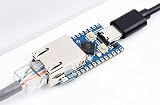
- RP2040-ETH is a mini RP2040-ETH development board, which integrates TCP/IP protocol stack for network communication. 14 × multi-function GPIO pins and the castellated holes on its PCB edges allow easy and quick integration into projects.
- Dual-core Arm Cortex M0+ processor, flexible clock running up to 133 MHz. 264KB of SRAM, and 4MB of onboard Flash memory. Onboard CH9120 with integrated TCP/IP protocol stack.
- With the host software and serial commands, you can set the network parameters such as chip operating mode, port, and IP. The castellated module allows soldering directly to carrier boards.
- Tiny Size and easy integration: Castellated holes with immersion gold design, highly integrated packaging. Supports multiple ways to be embedded into various product applications.
- Support multiple communication modes: Supports TCP Server / TCP Client / UDP Server / UDP. Support C/C++, MicroPython, Arduino: Comprehensive SDK, Dev Resources, Tutorials To Help You Easily Get Started
Rank #4

- RP2040 MCU Board without Header,onboard 0.96inch IPS LCD display. Pico-like MCU board based on Raspberry Pi RP2040. Compatible with most of the Raspberry Pi Pico add-on modules. It incorporates Raspberry Pi's RP2040 microcontroller chip, as same as the one on Raspberry Pi Pico. For software, Support C/C++,MicroPython. In additional, It is onboard 0.96inch IPS display, Lithium battery recharge/discharge header, and high efficiency DC-DC buck-boost chip.
- RP2040 microcontroller chip designed by Raspberry Pi in the United Kingdom. Dual-core Arm Cortex M0+ processor, flexible clock running up to 133 MHz. 264KB of SRAM, and 2MB of on-board Flash memory.
- USB-C connector, keeps it up to date, easier to use. 0.96inch 160×80 pixels 65K colorful IPS LCD display. Lithium battery recharge/discharge header, suitable for mobile devices. Onboard DC-DC chip TPS63000, high efficiency DC-DC buck-boost chip, 1.8A current switch.
- Castellated module allows soldering direct to carrier boards (there should be dedicated cut-out for embedding the bottom components). USB 1.1 with device and host support. Low-power sleep and dormant modes. Drag-and-drop programming using mass storage over USB.
- 26 × multi-function GPIO pins. 2 × SPI, 2 × I2C, 2 × UART, 3 × 12-bit ADC, 16 × controllable PWM channels. Accurate clock and timer on-chip. Temperature sensor. Accelerated floating-point libraries on-chip. 8 × Programmable I/O (PIO) state machines for custom peripheral support. Resources/User Manual:waveshare.com/wiki/RP2040-LCD-0.96?Amazon
Product prices and availability are accurate as of the date/time indicated and are subject to change. Any price and availability information displayed on Amazon at the time of purchase will apply.

