
Free tools Windows power users keep installed
One-click scans. No signup required.
To make existing iPhone HEVC (H.265) clips more compatible with an OBS playlist, convert them to H.264, then add the converted files to OBS’s VLC Video source. On a Mac, Apple’s built-in QuickTime Player and Finder tools can export H.264. For future recordings, change the iPhone’s camera format to Most Compatible; that affects new videos, not files already recorded.
Why an iPhone clip may need conversion
HEVC, also called H.265, compresses video more efficiently than H.264 while preserving the same visual quality, according to Apple Support. H.264 can be a practical compatibility choice when a clip does not behave as expected in the computer’s OBS and VLC setup. Conversion creates a new file; keep the original until you have checked the result.
OBS’s regular Media Source supports common video containers such as MP4 and MOV, but OBS describes VLC Video as the playlist-capable source. A file’s extension alone does not establish that it will play correctly in every setup, so test the converted clip in the source you plan to use.
Convert existing HEVC clips on a Mac
Apple documents two built-in conversion routes. Preserve the original clip first, then use either method to create an H.264 copy.
Crashes, No Sound, or Screen Glitches?
Random freezes, missing sound and display glitches usually trace back to one bad driver. Find and replace yours safely.Free scan · under a minuteWindows Errors? Fix Them Before They Spread
Repair common Windows errors and clear accumulated junk for a smoother, more stable PC - no reinstall needed.Free scan · no reinstall#1 Best Overall

- PRO VIDEO CAPTURE & 100W PD CHARGING: Stream and record without battery anxiety. The integrated 100W Power Delivery port delivers fast-charging directly to your source device (iPhone 17, Steam Deck, or Switch), keeping you powered up for 24/7 continuous live streaming
- SEAMLESS USB-C TO USB-C LINK: Designed for the modern Type-C ecosystem. Connect your mobile devices, handheld consoles, or tablets directly to your MacBook or PC without bulky HDMI adapters. A true one-cable solution for professional, portable setups
- 4K 60HZ INPUT TO 1080P 60FPS: Supports high-fidelity 4K@60Hz signal input, downscaling to ultra-smooth 1080P@60FPS for recording and broadcasting. Ensure your audience sees every detail of your PS4/5 or Switch gameplay with zero lag
- HEAT-DISSIPATING ALUMINUM CASE: Crafted from premium aluminum alloy, the rugged casing acts as a natural heat sink. This ensures stable performance and prevents frame drops or thermal throttling during intense gaming sessions or long webinars
- PLUG & PLAY UNIVERSAL COMPATIBILITY: No drivers required. Fully compatible with Windows, macOS, and Linux. Works flawlessly with OBS, TikTok Live, Twitch, and Zoom for any device supporting USB-C video output (DP Alt Mode)
Option 1: Export with QuickTime Player
- Open the HEVC video in QuickTime Player.
- Choose File > Export As.
- In the export dialog, choose Greater Compatibility (H.264), then save the exported file.
- If your version shows an HEVC checkbox instead of that pop-up, deselect the checkbox to select the compatible export.
Option 2: Encode from Finder
- In Finder, Control-click the video file.
- Choose Services > Encode Selected Video Files.
- Choose an H.264 option in the Settings menu and run the encoding.
Initially, keep the original dimensions and frame rate unless your planned stream canvas or receiving setup calls for a change. Apple says videos at 1080p or lower and 60 fps or lower are more broadly compatible with older devices; these are compatibility guidelines, not mandatory OBS streaming settings.
Optional third-party conversion
HandBrake’s documentation describes H.264 MP4 presets, including Production presets. It characterizes Production presets as mastering-oriented and says their files are typically much larger than compressed sources, so they are not automatically the right choice for a routine playlist conversion. The documented Apple tools may be enough if they produce a file that works in your setup.
Rank #2

- 【4K HDMI Input, 2K@30Hz Recording】Powered by a true USB 3.0 high-speed interface, the capture card supports up to 4K@30Hz HDMI input and records at 2K@30Hz or 1080P@60Hz. Perfect for gamers, streamers, and professionals who need crisp, smooth video for live streaming, gameplay recording, or online meetings.
- 【Ultra Low Latency Screen Sharing】Built with a premium aluminum alloy shell and advanced chipset for stable heat dissipation, ensuring ultra-low latency transmission. Capture high-quality video and dual-channel audio in real time—no lag, no frame drop—ideal for Twitch, YouTube, or OBS streaming.
- 【Easy Plug and Play, Compact & Portable】No driver or external power required—just plug and play via USB 3.0 or Type-C connection to your Windows or macOS computer. Lightweight and compact design makes it easy to carry for outdoor streaming, live shows, or mobile recording setups.
- 【Wide Compatibility & Multi-Device Support】Compatible with Windows 7 8 10 11, macOS, Linux,Android and supports most popular software such as OBS, Zoom, VLC, Twitch Studio, and more. Works seamlessly with PS4, PS5, Xbox, Switch, DSLR cameras, TV boxes, and other HDMI-output devices for streaming to YouTube, Twitch, etc.
- 【What You Get】Includes: HDMI Capture Card, USB 3.0 to USB-C Adapter, User Manual. Tips: Make sure your tablet’s OTG function is enabled before connecting. Test your HDMI device with a monitor first to confirm video and audio output, then connect to the Video Capture Card for recording.
Set an iPhone to record H.264 in the future
- On the iPhone, open Settings > Camera > Formats.
- Select Most Compatible. Apple says new photos and videos will then use JPEG or H.264.
- To return to HEIF/HEVC recording, select High Efficiency.
This setting applies to new captures only; it does not convert existing HEVC clips.
Add converted clips to an OBS playlist
- Install VLC on the computer running OBS. OBS says the VLC Video source requires VLC to be installed; if you use 64-bit OBS, install 64-bit VLC.
- In OBS, add a VLC Video source and add the converted H.264 files to its playlist.
- Set the playlist’s order and choose whether it should loop or shuffle, as needed. The source also has visibility behavior controls.
- Play the playlist and check the first and last items, each clip’s audio, the intended order, and the loop or shuffle behavior.
- Check what happens when the source is hidden, particularly if your scene switches during a stream.
OBS’s standard Media Source is intended for a media file and lists MP4 and MOV among supported extensions; use VLC Video for the playlist workflow described here. Menu labels and available controls can vary with software versions.
Quick wins for a faster PC:
Scan for outdated or missing drivers - takes under a minuteDriver Scan →Repair Windows errors before they cause bigger problemsFix Now →Fix the driver behind crashes, sound loss and screen glitchesFind Drivers →Rank #3
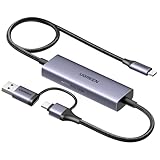
- Upgrade USB C Video Capture Card: The capture card for streaming is specially designed to capture USB C devices like Switch, and Steam Deck. It has a 2-in-1 interface design for USB-C and USB-A laptops, PCs, tablets, iPads, and phones. This 4k capture card connects the game console, iPad, and USB-C phone via USB C interface and captures USB C signals to record to USB A/C devices. Note: This product does not support any HDMI signal devices. Note: Make sure to download Meta Quest HDMI Link (version V67 or later) from the Meta Horizon Store for the ultimate experience
- Ultra HD 4K@30Hz Input & 2K@30Hz Capture: UGREEN video capture card supports input resolutions up to 4K@30Hz, perfectly adapting to 2K@30Hz and 1080P@60Hz video capture output. Whether you're watching high-definition movies, editing videos, or live-streaming games, this usb capture card can provide an outstanding visual experience. Providing a clear and immersive viewing experience. Note: Max 4K@30Hz Input and 2K@30Hz Recording
- 100W Fast Charging: The Type C capture card for iPad supports PD100W fast charge and PD3.0 fast charge protocol. You can stream the game and charge the Switch or Steam deck simultaneously. Say goodbye to battery anxiety! Note: This device does not support bidirectional charging. The USB C charging port only charges USB C input devices like Steam deck/switch. It does not charge USB A and USB C output devices like PC/laptop/Quest3. Note: An external power supply above 15V is required
- High-Performance Game Capture Card: The 2K@30fps streaming capture card uses an intelligent chip with a transmission rate of up to 5Gbps, low latency, and no screen tearing or flickering. It has an aluminum shell, and nickel-plated connector and comes with a 3.3FT silicone braided cable, durable and flexible. Plug and play, no driver is required. Note: iPadOS devices need to be updated to 17/18 or higher to use it. Note: The USB 3.0 Type A or Type C output device is required for optimal performance and low delay
- Universal Compatibility: The USB-C video capture for streaming is compatible with Samsung Galaxy S25 Ultra/S24 Ultra/iPhone 17/iPhone 18 Pro/iPhone 16/iPad Pro/Switch/Steam Deck/ROG/Quest 3 Ally/Legion Go and other USB-C laptops, tablets, and phones. It is suitable for live streaming, recording, editing, and transferring high-resolution video on OBS, XSplit, Potplayer, QuickTime Player, and more. Compatible with Windows 11/10/8.1, MacOS, iPadOS 17. Note: Do not support HDMI devices such as PS4, PS5, or Xbox
Troubleshoot clips that still do not play
- The VLC Video source is unavailable: Confirm VLC is installed. For 64-bit OBS, OBS specifies matching 64-bit VLC.
- A converted file still fails to play: Conversion does not guarantee compatibility with every computer or OBS/VLC build. Open the output separately, then test it from the actual VLC Video playlist. If needed, try the other Apple conversion route and test the new output.
- The playlist plays the wrong item or stops unexpectedly: Review the file order and the source’s loop or shuffle setting; test the last item and the transition back to the start.
- Video plays but audio is missing: Check the clip in a normal player and then inspect audio during playlist playback in OBS. Test each item, not only the first.
- The output is unexpectedly large: HEVC is more storage-efficient than H.264 at Apple’s described equivalent visual quality. Retain the original and avoid a mastering-oriented preset unless its purpose suits your workflow.
Or let it run in the cloud
If your goal is keeping a YouTube channel live with uploaded videos, StreamNeo is a separate option from an OBS playlist: upload your recording or build a playlist, add your YouTube stream key once, and go live. It loops the uploaded videos in the cloud, so nothing has to stay running at home. Your uploads stream as made, up to 4K 60fps, at one flat price per slot; there are no quality tiers. StreamNeo automatically recovers if YouTube drops the stream. The first day is free with no card. The monthly option is $9.99 per month. It streams to YouTube only. See StreamNeo, or start your free first day.
Quick Recap
Best Value

- 【Perfect Recording for USB-C source】 BENFEI USB-C video/audio capture card is specially designed for USB Type-C video devices, such as iPhone 15/16, Galaxy S23, Nintendo Switch and Steam Deck, recording every monment to your laptop/computer with USB Type-A/Type-C interface. Please use this capture card connects the game console, iPad, and USB-C phone via USB C interface and captures USB C signals to record to USB A/C devices.
- 【Ultra HD 1080P@60Hz Capture Card】 BENFEI video capture card supports input resolutions up to 4K@30Hz, perfectly adapting to 1080P@60Hz video capture output. Whether you're watching high-definition movies, editing videos, or live-streaming games, this capture card can provide an outstanding visual experience. Providing a clear and immersive viewing experience. Note: Max 4K@30Hz Input and 1080P@60Hz Recording
- 【Ultra Low Latency】 Built-in advanced IC chip ensures the high speed HDMI signal capture and fast speed transmit to USB Type-A/Type-C devices, without latency between HDMI source and USB devices, allowing you to enjoy amazing ultra-low latency, avoiding blue screen and latency, and no picture tearing and flickering.
- 【PD 100W Fast Charging】 BENFEI video capture card supports PD100W fast charge with PD3.0 fast charge protocol. You can stream the game and charge the Switch or Steam deck simultaneously. Note: This device does not support bidirectional charging. The USB C charging port only charges USB C input devices like Steam deck/switch. It does not charge USB A and USB C output devices like PC/laptop/Quest3.
- 【18 MONTH WARRANTY】 Exclusive BENFEI Unconditional 18-month Warranty ensures long-time satisfaction of your purchase; Friendly and easy-to-reach customer service to solve your problems timely.
Rank #4

- 【1080P 60FPS Video Capture Card】 This HDMI game capture card is based on USB3.0 high speed transmission port, input resolution up to 4K@30HZ, output resolution up to 2K@30Hz or 1920×1080@60Hz. Type c and USB interface can meet most of the devices in daily life. Easily meet the online capture, real-time recording, online meetings, live gaming and other functions, so you have a better visual enjoyment. Note: For capture use only; requires capture software to function and is not intended for direct screen casting to a monitor or TV
- 【Ultra Low Latency Screen Sharing】 HDMI capture card is made of good quality aluminum alloy with strong heat dissipation, allowing you to enjoy ultra low latency while live gaming or video recording or live streaming, avoiding blue screens and lag. This HDMI to USBC capture card supports easy recording of good quality audio or HD video and transferring it to your computer or streaming platform, allowing you to record 60 fps HD video directly on your hard drive and real-time preview
- 【Plug and Play, Easy to Carry】 This HDMI 1080P video capture card does not require any additional drivers or external power supply, just plug and play for fast capture. The capture card is small and lightweight, so you can put it in your bag for emergencies, making it very portable for outdoor live streaming. It's also a great way to share content in game recording, video conference, video recorder and online teaching
- 【Wide Compatibility USB Capture Card】 Easily streams to Facebook, Youtube or Twitch. With the connection, this HDMI to USB C/3.0 video capture devices can be working on several Operating Systems and various software: Windows 7/ 8/ 10, Mac OS or above, Linux, Android, Laptop, Xbox One, PS3/PS4/PS5, Camera, DVDs, Set Top Box, Webcame, DSLR, Switch/Switch 2, TV BOX, HDTV, Potplayer/VLC, ZOOM, OBS Studio etc.
- 【Package Content & Note】 1x HD Audio Capture Card , 1x USB 3.0 to USB C Adapter (A-side 3.0, B-side 2.0), 1x user manual. Please note that you need to restart the OBS Studio software after the audio setup is complete, otherwise it will result in no sound output. When using an adapter, if the device is recognized as USB 2.0, try using the other side with the USB-C port. Simply flip the capture card and reconnect it to be recognized as USB 3.0
Product prices and availability are accurate as of the date/time indicated and are subject to change. Any price and availability information displayed on Amazon at the time of purchase will apply.

