
iTechGuides is reader-supported. When you buy through links on our site, we may earn an affiliate commission. As an Amazon Associate I earn from qualifying purchases. Learn more
Cult of the Lamb arrives on Nintendo Switch 2 on October 22, 2026. If your Nintendo Account already owns the Nintendo Switch version, you can claim the Switch 2 upgrade at no additional charge. After installing it, use Nintendo’s nearby individual save-data transfer to move your existing cult to Switch 2; that method requires an internet connection and the same Nintendo Account on both consoles, but it does not require Nintendo Switch Online.
The safest approach is to transfer only the Cult of the Lamb save rather than perform a complete system migration. A full system transfer is useful when you are replacing your entire console, but it can affect the source console and is unnecessary for one game.
| # | Preview | Product | Price | |
|---|---|---|---|---|
| 1 |
|
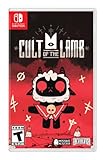
Cult of the Lamb Standard Edition – Nintendo Switch | $19.93 | Buy on Amazon |
| 2 |

|
Cult of the Lamb - Definitive Edition - Nintendo Switch | $59.99 | Buy on Amazon |
| 3 |

|
Cult of the Lamb | $39.35 | Buy on Amazon |
| 4 |
|
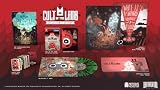
Cult of the Lamb Collector's Edition - Nintendo Switch | $149.99 | Buy on Amazon |
| 5 |
![Cult of the Lamb Standard - Nintendo Switch [Digital Code]](https://m.media-amazon.com/images/I/51W3aHdPZiL._SL160_.jpg)
|
Cult of the Lamb Standard - Nintendo Switch [Digital Code] | $24.99 | Buy on Amazon |
When the free upgrade becomes available
Massive Monster announced that Cult of the Lamb comes to Nintendo Switch 2 on October 22, 2026. Owners of the Nintendo Switch edition can upgrade for free; people who do not own the original edition must purchase the game before they can play it. The free entitlement is tied to the Nintendo Account that owns the Switch version, not simply to having the game installed on a particular console.
Free tools Windows power users keep installed
One-click scans. No signup required.
Before October 22, the Switch 2 edition may not appear in the eShop, or the listing may still show the original Switch release. After release, availability and button wording can vary by region and by the current state of your account. Do not assume that a price shown for a separate purchase means your existing entitlement is missing until you have signed in with the owning account.
#1 Best Overall
- Start your own cult in a land of false prophets
- Venture out into diverse and mysterious regions to build a loyal community of woodland Followers
- Repay your debt by building a loyal following
- Spread your Word to become the one true cult!
Nintendo’s store listing identifies Massive Monster as the developer, Devolver Digital as the publisher, and marks the title as supported on Switch 2 with Save Data Cloud support. Those labels establish compatibility, but they do not replace the nearby transfer steps below.
Check these requirements before starting
- The Switch version must be owned by the Nintendo Account you will use on Switch 2.
- Both consoles should be updated and connected to the internet.
- Keep the original Switch and Switch 2 close together for the individual transfer.
- The user profile on each console must be linked to the same Nintendo Account.
- Have the old console available until you have opened the game and verified the transferred save.
- Check the target console for an existing Cult of the Lamb save before confirming any overwrite.
Nintendo Switch Online is not needed for the direct, nearby transfer. It is needed if you rely on Save Data Cloud to restore the game’s save instead.
Claim the free Switch 2 version
- On Switch 2, open the Nintendo eShop.
- Sign in with the Nintendo Account that owns the Nintendo Switch version of Cult of the Lamb.
- Search for Cult of the Lamb and open the game’s listing.
- From October 22, 2026, select the free upgrade or download option presented for your account. The exact label is not universal; it can differ by country, language, and whether the Switch 2 software has already been downloaded.
- Allow the Switch 2 version to finish downloading and installing before launching it.
If the listing still asks you to pay, first confirm the active eShop account, then check that the original Switch version was purchased by that exact Nintendo Account rather than by another user on the old console. Sign out only through the normal eShop process; do not delete the old game or its save while investigating the entitlement.
The free upgrade concerns the software license. It does not automatically place the old console’s local save on Switch 2, so transfer the save separately.
Rank #2
- Build your flock: Collect and use resources to build new structures, perform dark rituals to appease the gods, and give sermons to reinforce the faith of your flock.
- Destroy the non-believers: Explore a sprawling, randomly generated world, fight off hordes of enemies and defeat rival cult leaders in order to absorb their power and assert your cult's dominance.
- Spread the word: Train your flock and embark on a quest to explore and discover the secrets of five mysterious regions. Cleanse the non-believers, spread enlightenment and perform mystical rituals on the journey to become the mighty lamb god.
Transfer only your Cult of the Lamb save (recommended)
Nintendo’s individual save-data transfer is the least disruptive option when Cult of the Lamb is the only game you need to move. It uses the two consoles directly, requires them to be online and nearby, and does not require a Nintendo Switch Online membership.
1. Prepare both consoles
- Install any pending system updates on the original Switch and Switch 2.
- Connect both consoles to the internet and keep them powered or sufficiently charged.
- Place the consoles near one another. Keep the old Switch awake while the transfer is being negotiated.
- On each console, confirm that the intended local user is linked to the same Nintendo Account. A similarly named profile is not enough if it is linked to a different account.
2. Send the save from the original Switch
- On the old console, open System Settings.
- Choose Data Management.
- Select Transfer Your Save Data.
- Choose Send Save Data to Another Console.
- Select the user whose Cult of the Lamb save you want to move.
- When the software list appears, choose Cult of the Lamb and continue.
If the old console cannot find a destination, leave this screen open while you complete the receive steps on Switch 2. Keep both consoles close and connected until Nintendo reports that the operation is complete.
3. Receive the save on Switch 2
- On Switch 2, open System Settings.
- Go to Data Management.
- Choose Transfer Your Save Data.
- Select Receive Save Data.
- Follow the prompts to identify the sending console and the matching user.
- Confirm the Cult of the Lamb transfer and wait for the completion message on both systems.
After the transfer finishes, start the Switch 2 version from the user that received the save. Check that your cult, day or progress state, and other expected in-game data are present before making changes on either console.
Protect an existing save on Switch 2
If Switch 2 already contains Cult of the Lamb save data for the selected user, Nintendo presents a choice to cancel or overwrite it. Choose overwrite only when you have confirmed that the target save is no longer needed. Nintendo warns that overwritten target data cannot be recovered.
Rank #3
- BUILD YOUR FLOCK - Collect and use resources to build new structures, perform dark rituals to appease the gods, and give sermons to reinforce the faith of your flock
- DESTROY THE NON-BELIEVERS - Explore a sprawling, randomly generated world, fight off hordes of enemies and defeat rival cult leaders in order to absorb their power and assert your cult's dominance
- SPREAD YOUR WORD - Train your flock and embark on a quest to explore and discover the secrets
- Use Cancel if you are unsure which user owns the target save.
- Verify that the sending user and receiving user are the same Nintendo Account-linked identity.
- Do not treat the overwrite prompt as a backup. It is a destructive replacement of the target save.
- Launch the game and verify the result before deleting, resetting, or selling the old console.
The warning concerns the save already on Switch 2. It does not mean that a failed transfer should be retried blindly; resolve the account, software, or connection issue first.
Do you need Nintendo Switch Online?
| Method | Nintendo Switch Online required? | What it is best for | Main caution |
|---|---|---|---|
| Nearby individual save transfer | No | Moving only the Cult of the Lamb save between two consoles you have together | Both consoles must be online, nearby, and using the same Nintendo Account-linked user |
| Save Data Cloud restoration | Yes | Restoring a supported cloud backup when the original console is unavailable or when you prefer cloud recovery | A membership is required, and the cloud copy must be current enough for your needs |
| Full system transfer during Switch 2 setup | Not stated as a requirement for the transfer itself | Moving a broader console setup, compatible software, and saves during initial setup | The server route can initialize the source console |
Nintendo’s Cult of the Lamb listing shows Save Data Cloud support. Cloud restoration therefore provides another recovery path for subscribers, but it is not necessary for the direct transfer described above.
When a full system transfer makes sense
Nintendo also offers System Transfer during the initial Switch 2 setup. It can move compatible software and save data as part of a larger migration, either locally with both consoles together or through a server-based process.
Choose full transfer when replacing the whole console
Use this route when you intend to recreate the old Switch’s broader setup on Switch 2, not merely when you want one Cult of the Lamb save. Review the setup screens carefully because the source console’s data handling depends on the transfer type.
Rank #4
- Build your flock: Collect and use resources to build new structures, perform dark rituals to appease the gods, and give sermons to reinforce the faith of your flock.
- Destroy the non-believers: Explore a sprawling, randomly generated world, fight off hordes of enemies and defeat rival cult leaders in order to absorb their power and assert your cult's dominance.
- Spread the word: Train your flock and embark on a quest to explore and discover the secrets of five mysterious regions. Cleanse the non-believers, spread enlightenment and perform mystical rituals on the journey to become the mighty lamb god.
- Cult of the Lamb: Definitive Edition, Heretic Pack, Sinful Pack, Pilgrim Pack, Woolhaven DLC
- Oracle Deck, Exclusive Hardcover Artbook, Exclusive Collectible 7" Vinyl, Exclusive Double-sided ICONART metal poster, Exclusive SteelBook, The Pilgrim Comic Book, Premium Collector´s Outer Box
Understand the local and server choices
- Local transfer: keeps the consoles together while compatible data is moved directly.
- Server transfer: uploads data before the destination retrieves it. Nintendo says this process can initialize the source console.
The same Nintendo Account is required. Because a server transfer can initialize the old system, do not select it casually if you still need the source console unchanged. For a single game, the individual save transfer is generally the more controlled choice.
Independent reader supportYour contribution helps us test, update, and keep practical guides available for everyone.Troubleshooting common problems
The upgrade is not shown as free
- Open the eShop under the Nintendo Account that purchased the original Switch version.
- Check the release date: the Switch 2 edition is announced for October 22, 2026.
- Confirm that you are viewing the Cult of the Lamb listing for your region and not a separate purchase flow.
- If another user bought the game, switch to that account rather than relying on the console’s shared installation.
The exact eShop button text is not fixed across regions, so focus on the account entitlement and the listing’s Switch 2 designation rather than a specific word such as “upgrade.”
The consoles cannot see each other
- Reconnect both systems to the internet and install pending updates.
- Move them closer together and keep both screens active.
- Start the receive operation on Switch 2, then return to the send operation on the old Switch.
- Cancel and restart the transfer if either console has timed out.
The wrong save or user appears
Stop before confirming. The transfer is user-specific, so select the profile that actually contains your Cult of the Lamb progress and make sure the corresponding profile on Switch 2 is linked to the same Nintendo Account. A different local profile can have a different save even when both profiles use the same console.
Do these 3 things before closing this tab:
1Clear out junk files and repair common Windows errors2Fix the driver behind crashes, sound loss and screen glitches3Repair Windows errors before they cause bigger problemsSwitch 2 asks to overwrite a save
Choose cancel unless you have deliberately backed up or abandoned the target save. Overwritten target data cannot be recovered through this transfer screen. Recheck the user, game, and destination before trying again.
Best Value
- SPREAD YOUR WORD
- Train your flock and embark on a quest to explore and discover the secrets of five mysterious regions. Cleanse the non-believers, spread enlightenment and perform mystical rituals on the journey to become the mighty lamb god.A Nintendo Switch Online membership may be required for online play. Please check the game detail page on Nintendo.com for membership requirements. Copyright Massive Monster 2022. All Rights Reserved.
The game opens without the expected progress
- Close the game completely on Switch 2.
- Confirm that you launched it with the receiving user profile.
- Verify that Nintendo reported the transfer as complete on both consoles.
- Do not start a new game and overwrite the transferred state while troubleshooting.
- If the original save remains available, repeat the individual transfer only after correcting the account or user mismatch.
Verify the migration before retiring the old Switch
Open Cult of the Lamb on Switch 2 with the receiving user and inspect several unmistakable details from your old session. Confirm that the correct save slot or progress state loads and that you can continue normally. If you used the full system-transfer route, also check the other software and users you expected to move.
Keep the old console intact until this verification is complete. A successful download of the Switch 2 software proves that the license is installed; it does not prove that your local save was transferred.
Recommended order for most players
- Wait until the announced October 22, 2026 release and claim the free Switch 2 upgrade through the owning Nintendo Account.
- Update both consoles and connect them to the internet.
- Install the Switch 2 version.
- Use System Settings > Data Management > Transfer Your Save Data on both consoles.
- Send the save from the old Switch and receive it on Switch 2.
- Reject an overwrite unless you have intentionally checked the target save.
- Launch the game, verify your progress, and only then consider resetting or selling the old console.
Bottom line
Existing Nintendo Switch owners can claim the Cult of the Lamb Switch 2 version free from October 22, 2026, using the Nintendo Account that owns the original game. For a single-save move, use Nintendo’s nearby Send Save Data to Another Console and Receive Save Data tools; Nintendo Switch Online is not required. Nintendo Switch Online is relevant to cloud restoration, while a full system transfer should be reserved for moving the wider console setup because the server option can initialize the source system.
The Tool Desk
Outbyte Driver Updater FREEFix the driver behind crashes, sound loss and screen glitchesFind Drivers →Outbyte PC Repair FREERepair Windows errors before they cause bigger problemsFix Now →Quick Recap
Product prices and availability are accurate as of the date/time indicated and are subject to change. Any price and availability information displayed on Amazon at the time of purchase will apply.

