
Recommended Free Tools
iTechGuides is reader-supported. When you buy through links on our site, we may earn an affiliate commission. As an Amazon Associate I earn from qualifying purchases. Learn more
Find the exact model number in the listing, then match that identifier to the manufacturer’s model-lookup page and technical specifications for the same region. A family name such as “iPhone 17” identifies a product line, not necessarily one hardware configuration. For a used phone, check the IMEI separately: it can reveal a lost or stolen-device registry flag, but it does not prove that every advertised specification is genuine.
The reliable method is therefore two checks, not one: verify the hardware and regional configuration against the manufacturer, then verify the used device’s identifier status through an appropriate registry.
Why the family name is not enough
Phone makers often sell one family under several model numbers. Those variants can differ by sales region, radio bands, SIM and eSIM arrangement, storage options, or other configuration details. A listing that says only “iPhone 17,” “Galaxy S-series,” or another broad family name leaves too much unresolved for a purchase decision.
The Tool Desk
Outbyte Driver Updater FREEFix the driver behind crashes, sound loss and screen glitchesFind Drivers →Outbyte PC Repair FREEClear out junk files and repair common Windows errorsFree Scan →The model number is the anchor for verification. It connects the physical device to the manufacturer’s own identification records and to the technical specification page for that exact variant. If a seller will not provide the model number, treat the specification table as unverified rather than assuming the family name covers every regional version.
Popular on Amazon

- This phone is unlocked and compatible with any carrier of choice on GSM and CDMA networks (e.g. AT&T, T-Mobile, Sprint, Verizon, US Cellular, Cricket, Metro, Tracfone, Mint Mobile, etc.).
- Please check with your carrier to verify compatibility.
- When you receive the phone, insert a SIM card from a compatible carrier. Then, turn it on, connect to Wi-Fi, and follow the on screen prompts to activate service.
- The device does not come with headphones or a SIM card. It does include a generic (Mfi certified) charger and charging cable.
- Tested for battery health and guaranteed to have a minimum battery capacity of 80%.
The complete verification workflow
- Obtain the exact model number. Ask for a clear photo of the phone’s About screen, the box label, or the regulatory/model label. Compare the identifier on the device with the listing and packaging.
- Look up that identifier on the manufacturer’s support site. Use the brand’s model-identification tool, not a retailer’s copied specification table.
- Open the official technical-specification page for the matching variant. Check every feature that matters to your purchase.
- Confirm the sales region and carrier fit. Regional model numbers can have different network support or SIM arrangements.
- If the phone is used, check the IMEI separately. Use the IMEI, MEID, or ESN with a recognized device-status service and record when you checked it.
- Resolve discrepancies before paying. Ask the seller for documentation or use a purchase route with a clear return process.
Step 1: Get the exact model number from the seller
What to request in a remote sale
Ask for a sharp, readable photograph rather than a typed answer. Useful evidence includes:
- A screenshot or photograph of the device’s About screen.
- The label on the original box, including the model identifier and region information.
- The regulatory or model label printed on the device or its packaging.
- For a used phone, the IMEI shown on the device, box, or purchase documentation, with sensitive account information hidden.
Compare the number in the photograph with the number in the listing and with the packaging. An unexplained mismatch is a reason to pause and ask questions. It does not by itself prove counterfeiting: a box can be replaced, a listing can contain a typographical error, or a seller can have mixed inventory. It does mean the advertised configuration has not yet been established.
Where an owner can find it on an iPhone
Apple’s support guidance provides a concrete example of an official workflow. On the phone, open Settings > General > About. The page shows the Model Name and Model Number. Tapping the part number reveals the model number used for identification. The same area can also show the IMEI.
That menu path is an Apple example, not a universal instruction for every brand. Other manufacturers use different labels and locations, so request an About-screen image or consult that manufacturer’s support documentation instead of guessing from the product name.
Step 2: Match the identifier to the manufacturer’s model lookup
Search the manufacturer’s support site for a phrase such as “identify [brand] model,” then enter or compare the exact model number. Apple’s model-identification material illustrates why this matters: it maps model numbers to a family name, includes regional information, and points to technical specifications.
Also popular on Amazon
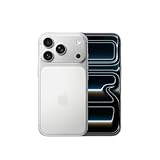
- This phone is unlocked and compatible with any carrier of choice on GSM and CDMA networks (e.g. AT&T, T-Mobile, Sprint, Verizon, US Cellular, Cricket, Metro, Tracfone, Mint Mobile, etc.).
- Please check with your carrier to verify compatibility.
- When you receive the phone, insert a SIM card from a compatible carrier. Then, turn it on, connect to Wi-Fi, and follow the on screen prompts to activate service.
- The device does not come with headphones or a SIM card. It does include a generic (Mfi certified) charger and charging cable.
Use the manufacturer’s record to answer three questions:
- Does the number correspond to the family and generation named by the seller?
- Which region or market is associated with that number?
- Does the manufacturer provide a specification page for that exact variant?
If the lookup returns a different family, a different generation, or no match, stop and ask the seller to explain. Do not substitute a visually similar model or a family-level page. The objective is to establish an identity chain from the physical device to the maker’s own records.
Step 3: Verify the specifications that affect your decision
Once the model identity matches, open the manufacturer’s technical-specification page and compare the listing claim line by line. The most useful comparison is specific and selective: check the features that determine whether the phone works for you, not just the headline processor or camera count.
| Claim to check | Evidence to compare | Reason the exact variant matters |
|---|---|---|
| Display | Manufacturer’s listed display size and other stated display characteristics | Family-level names can cover models with different physical configurations. |
| Cameras | Official camera count and configuration for the identified model | A seller may copy the camera description from another model in the same family. |
| Storage | Storage capacities offered for that model and region | A listing can combine the family’s maximum capacity with a lower-capacity variant. |
| Connectivity | Official cellular, wireless, and other connectivity support | Radio support can vary by regional model number. |
| Charging port | Port type and charging features stated for the exact model | Port details are model-specific and should not be inferred from appearance alone. |
| SIM and eSIM | Manufacturer’s stated physical-SIM and eSIM arrangement | Regional versions can use different combinations of SIM and eSIM. |
Do not treat a specification found on a retailer page, auction page, or seller-created image as confirmation when the manufacturer’s page disagrees. The official page is the primary reference for the advertised hardware and configuration.
Step 4: Check region and carrier compatibility
Match the seller’s region
Ask where the phone was originally sold and compare that information with the region associated with the model number. Two phones can share a family name while carrying different identifiers for different markets. The region can affect supported network bands, SIM and eSIM behavior, and sometimes the features available to the owner.
Also popular on Amazon

- This phone is unlocked and compatible with any carrier of choice on GSM and CDMA networks (e.g. AT&T, T-Mobile, Sprint, Verizon, US Cellular, Cricket, Metro, Tracfone, Mint Mobile, etc.).
- Please check with your carrier to verify compatibility.
- When you receive the phone, insert a SIM card from a compatible carrier. Then, turn it on, connect to Wi-Fi, and follow the on screen prompts to activate service.
- The device does not come with headphones or a SIM card. It does include a generic (Mfi certified) charger and charging cable.
- Tested for battery health and guaranteed to have a minimum battery capacity of 80%.
Confirm the intended carrier separately
Compare the exact model’s supported bands and network capabilities with the carrier you plan to use. The sources for this workflow establish that regional variants exist; they do not provide a universal carrier-compatibility tool. Do not promise that a phone will work merely because the family name appears on a carrier’s general device list.
What’s actually slowing this PC down?
Pick the symptom - the matching free tool is one click away.
For a used or imported phone, ask the seller for the original sales region and any evidence of the device’s network status. Carrier compatibility and carrier locking are separate questions from whether the hardware specifications are authentic.
Compare listings using the same decision axes
When two listings look similar, compare them on these axes rather than on the family name alone:
- Exact model number.
- Sales region.
- Storage and other configuration options.
- Physical-SIM and eSIM arrangement.
- Radio bands and intended carrier.
- Condition and the seller’s supporting evidence.
- Whether each advertised feature appears on the manufacturer’s specification page for that exact variant.
Step 5: Verify a used phone’s IMEI separately
What the IMEI can tell you
The IMEI is a device identifier, not a complete specification sheet. GSMA explains that the first eight digits form the Type Allocation Code (TAC), whose purpose is to identify the device make and model. That makes the TAC a useful cross-check against the model claimed in a listing.
For a used purchase, use a service that queries the IMEI, MEID, or ESN for a lost, stolen, or other registry flag. GSMA Device Check’s FAQ describes this kind of query and explains that a green result means the IMEI is not currently flagged on the GSMA Block List.
Also popular on Amazon

- This phone is unlocked and compatible with any carrier of choice on GSM and CDMA networks (e.g. AT&T, T-Mobile, Sprint, Verizon, US Cellular, Cricket, Metro, Tracfone, Mint Mobile, etc.).
- Please check with your carrier to verify compatibility.
- When you receive the phone, insert a SIM card from a compatible carrier. Then, turn it on, connect to Wi-Fi, and follow the on screen prompts to activate service.
- The device does not come with headphones or a SIM card. It does include a generic (Mfi certified) charger and charging cable.
- Tested for battery health and guaranteed to have a minimum battery capacity of 80%.
How to interpret a green result
A green result is a registry status at the time checked. It is not a guarantee that the phone is genuine, that you have clear title to it, that it is unlocked, or that it contains the cameras, memory, display, or regional configuration advertised by the seller. IMEI status and specification verification are separate checks.
Record the date and result. Status can change, and registry information can reflect data supplied by participating contributors. If a result conflicts with the seller’s paperwork or your carrier’s information, stop the transaction and ask for clarification.
Where to find the identifier
Depending on the phone, the IMEI may appear in the About screen, on the box label, or on a regulatory label. Compare the identifier from the device with the one on the packaging. A mismatch requires an explanation before purchase. Never rely on a box-only IMEI when you can inspect the identifier displayed by the phone itself.
What each piece of evidence proves—and what it does not
| Evidence | It can establish | It cannot establish by itself |
|---|---|---|
| Exact model number from the phone | Which identifier the device reports | That the listing’s other claims are accurate. |
| Manufacturer model lookup | The family, model mapping, and available regional identification information | That a particular used unit is not stolen or altered. |
| Official technical specifications | The hardware and configuration associated with that model | That the seller’s physical device is actually that model unless the identifiers match. |
| IMEI/TAC | A make-and-model cross-check through the device identifier | Every advertised component, ownership status, unlock status, or condition. |
| Device-status result | Whether the identifier is currently flagged on the queried registry | Authenticity, title, carrier compatibility, or specification accuracy. |
How to handle mismatches and suspicious listings
The model number differs between the phone and the box
Ask whether the box was replaced and request an explanation in writing. Re-run the manufacturer lookup using the identifier shown by the phone. If the seller cannot establish which item is being sold, do not treat the box specification as proof.
Windows Errors? Fix Them Before They Spread
Repair common Windows errors and clear accumulated junk for a smoother, more stable PC - no reinstall needed.Free scan · no reinstallOutdated Drivers Are Slowing You Down
One free scan finds every outdated or missing driver and matches the right update for your exact hardware.Free scan · exact hardware matchThe model number maps to a different region
Ask where the phone was purchased and compare its bands, SIM arrangement, and intended carrier with your requirements. An imported phone can be legitimate while still being unsuitable for your network.
Also popular on Amazon

- This phone is unlocked and compatible with any carrier of choice on GSM and CDMA networks (e.g. AT&T, T-Mobile, Sprint, Verizon, US Cellular, Cricket, Metro, Tracfone, Mint Mobile, etc.).
- Please check with your carrier to verify compatibility.
- When you receive the phone, insert a SIM card from a compatible carrier. Then, turn it on, connect to Wi-Fi, and follow the on screen prompts to activate service.
- The device does not come with headphones or a SIM card. It does include a generic (Mfi certified) charger and charging cable.
The listing advertises a feature absent from the official page
Request a manufacturer document or a photograph showing the feature on the exact model. Do not “average” conflicting pages or assume the seller copied a harmless error. If the claim remains unsupported, value the phone as the confirmed configuration only—or choose a seller with a clear return route.
The IMEI is flagged
Do not complete the purchase until the seller resolves the issue through the relevant carrier or registry process. A flagged result can prevent network use and carries a different risk from a simple specification typo.
A practical checklist before you pay
- Write down the exact model number shown by the phone.
- Confirm that the model number on the listing and packaging is consistent.
- Use the manufacturer’s model-identification page to map the number.
- Open the manufacturer’s specification page for that exact model and region.
- Check display, cameras, storage, connectivity, charging port, and SIM/eSIM configuration against the listing.
- Confirm supported bands and intended-carrier fit.
- For a used phone, record the IMEI and check its registry status separately.
- Save screenshots or photographs of the identifiers and the official pages you relied on.
- Ask for documentation or use a returnable purchase route if any material discrepancy remains.
Illustrative example: a listing that says “iPhone 17”
Suppose a listing uses only the family name “iPhone 17” and claims a particular storage size, camera configuration, and SIM arrangement. Do not accept those claims as confirmed from the title alone.
- Request a photograph of Settings > General > About, including the model number, and ask for the box label if available.
- Use Apple’s model-identification material to determine which model number and region the phone represents.
- Open the Apple technical-specification page for that exact model, then compare storage, cameras, display, connectivity, charging port, and SIM/eSIM details.
- Check that the model’s bands and regional configuration fit your intended carrier.
- If it is used, obtain the IMEI and run the separate device-status check. A clean registry result does not replace the specification comparison.
The example demonstrates the process; it is not a recommendation of one family or a claim that every listing with that name has the same configuration.
What official confirmation cannot prove
Even a perfect match between the model number and an official specification page has limits. The lookup describes what the model should contain. It does not prove that a used phone has not been repaired with non-original parts, that its battery is healthy, that it is unlocked, or that the seller has clear ownership. Those are separate condition, carrier, and transaction questions.
Likewise, a regulatory approval mark or a valid IMEI does not establish every camera, memory, display, or regional configuration claim. Use each evidence source for the question it can answer, and do not let a clean identifier result substitute for a hardware match.
Bottom-line decision rule
Buy only after the phone’s exact model number maps to the manufacturer’s records, the advertised decision-driving specifications match the official page for that region, and—when the phone is used—the IMEI check shows an acceptable current registry status. If the seller cannot provide a consistent identifier trail, regard the listing as unverified and choose documentation or a return option over a guess.
Do these 3 things before closing this tab:
1Repair Windows errors before they cause bigger problems2Fix the driver behind crashes, sound loss and screen glitches3Clear out junk files and repair common Windows errors
