
iTechGuides is reader-supported. When you buy through links on our site, we may earn an affiliate commission. As an Amazon Associate I earn from qualifying purchases. Learn more
For direct DOGE ownership, a crypto exchange app is usually the more straightforward option. It lets you place a Dogecoin order and, when your account and jurisdiction permit it, withdraw the coins to a wallet you control. A brokerage-style account can be simpler if you already invest there, but it may offer only price exposure through an exchange-traded product or use a separate crypto-custody service. Before depositing money, confirm that DOGE is available to you, that on-chain withdrawals are enabled, and what the complete fee schedule and limits are.
The choice is not just about which app has the lowest advertised commission. It determines whether you own transferable DOGE, who controls the private keys, how quickly funds settle, what protections apply, and whether you can move the asset later. Use the decision guide below to check those differences before you buy.
Choose the route that matches what you need
Start by deciding whether you need Dogecoin itself or only an investment whose value follows DOGE. The distinction determines which account types are suitable.
Do these 3 things before closing this tab:
1Clear out junk files and repair common Windows errors2Fix the driver behind crashes, sound loss and screen glitches3Repair Windows errors before they cause bigger problems| Your objective | Usually the better fit | What to verify |
|---|---|---|
| Buy DOGE and send it to another address or your own wallet | A crypto exchange account with DOGE withdrawals | On-chain deposits and withdrawals, supported network, withdrawal fee, minimum and holding period |
| Keep all investing in one traditional investing interface | A brokerage account with a direct crypto service, if available | Whether the service delivers actual DOGE, who holds the keys, and whether transfers are allowed |
| Get price exposure without handling a wallet | A listed exchange-traded product, where one is available | Whether the product tracks DOGE directly, its expense and trading costs, and the protections attached to the securities account |
| Make a small first purchase and learn the process | Either route, using a small order | Quoted spread, total dollar cost, settlement timing and the ability to sell or withdraw |
Availability is not universal. DOGE support, payment methods, transfer rights, limits and eligibility can differ by country, state, account tier and product. Treat the app’s current trading screen and legal disclosures as the final authority for your account.
#1 Best Overall

- EAL5+ CERTIFIED SECURE ELEMENT + FINGERPRINT PROTECTION — Your private keys stay encrypted offline on a certified EAL5+ chip, the same security tier used in EMV bank cards. Built by DCENT, securing crypto since 2018. Fingerprint authentication adds a second layer no PIN-only wallet can match.
- 10,000+ ASSETS NATIVE ON 100+ BLOCKCHAINS — Hold Bitcoin, Ethereum, XRP, Solana, Cardano, popular stablecoins (USDT, USDC), and NFTs in one wallet. No third-party apps, no fragmented setup — every supported asset works straight out of the box.
- TAP-TO-SIGN MOBILE EXPERIENCE — Pair your wallet with the DCENT mobile app over Bluetooth. Manage tokens, review transactions, and access in-app swap features directly from your phone — no cables, no desktop required.
- WEB3 & dAPP ACCESS VIA METAMASK — Connect to MetaMask and other browser extension wallets to manage NFTs, claim airdrops, and access dApps. A large screen and intuitive 4-button interface keep every transaction clearly visible before you sign.
- SEAMLESS FIRMWARE UPDATES & 30-DAY MONEY-BACK GUARANTEE — Apply security updates without resetting your wallet or migrating funds. Backed by Amazon's 30-day money-back guarantee — your purchase is risk-free.
What you own when you buy DOGE
Direct Dogecoin
A direct purchase credits DOGE to an account or wallet. You can hold it, sell it, or send it on the Dogecoin network if the provider enables withdrawals. A direct holder must protect account credentials and, for self-custody, the wallet’s recovery phrase or private keys. A price decline can reduce the value, and a mistaken or irreversible transfer can permanently lose the coins.
Exchange-traded price exposure
A brokerage may instead offer a security designed to track a cryptocurrency price. You own shares of that product, not DOGE in a transferable wallet. You generally cannot paste a Dogecoin address into the brokerage and send the shares on-chain. The product has its own market price, trading hours, fees, prospectus and legal structure. Read those documents before assuming that a brokerage purchase gives you coins.
Separate crypto custody inside a brokerage brand
Some firms provide a crypto trading and custody service alongside their conventional brokerage accounts. Fidelity, for example, says its Fidelity Crypto service is provided by Fidelity Digital Assets. That arrangement can look like a brokerage account in the app while using a separate crypto-custody entity. Confirm the service’s custody terms and transfer functionality rather than inferring them from the brand or the presence of a brokerage account.
How to buy DOGE with a crypto exchange app
This is the normal path when you want direct DOGE and the option to withdraw it. A funded platform account is required before trading DOGE; a U.S. Securities and Exchange Commission filing describes that funding requirement for the platform it covers.
Rank #2
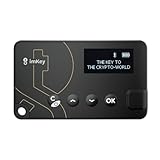
- Top-Tier Security Chip, Bank-Grade Asset Protection: Equipped with an industry-leading Infineon CC EAL 6+ certified security chip, also certified by EMVCo, this chip is widely used in bank payment and identity verification systems. Your private keys are generated and stored entirely offline within the chip, ensuring they never touch the internet. This physically blocks remote hacker attacks and eliminates the risk of private key leakage, building an impregnable first line of defense for your digital assets.
- What You See Is What You Sign, Hardware Button Protection: Every transaction requires manual confirmation via physical buttons on the imKey Pro's clear display. The device intuitively shows key transaction details like the amount and address, ensuring the data hasn't been tampered with during transmission—truly achieving "What You See Is What You Sign." It also features secure PIN code protection and a self-destruct mechanism after multiple incorrect attempts (the private key is wiped after 5 consecutive wrong entries), effectively preventing brute-force attacks even if the device is lost.
- Comprehensive Multi-Chain Asset Support, Access the Web3 Ecosystem: Fully supports major mainnets and Layer 2 networks, including Bitcoin (BTC), Ethereum (ETH), LTC, ATOM, FIL, TRX and more. By adding custom RPCs, you can easily access all EVM-compatible chains like BSC, Polygon, and Avalanche. Furthermore, imKey Pro perfectly supports Layer 2 solutions such as zkSync and Arbitrum, as well as the display and storage of NFTs, meeting all your diverse on-chain needs.
- Cold & Hot Wallet Separation, A Seamless Experience: Utilizing Bluetooth 4.1 wireless technology, it pairs seamlessly with the imToken App on your mobile phone or browser extension wallets on your PC without needing any cables. It combines the ultimate security of a cold wallet (offline private key storage) with the convenience of a hot wallet (online interaction). When a transaction is needed, you sign it offline with your imKey, and the app broadcasts it to the chain. This guarantees asset security without sacrificing the fluidity of use.
- Extremely Thin and Light, A Portable Digital Vault: The device is smaller than a credit card, measuring just 2.3mm thick and weighing approximately 17g. Crafted with a zinc alloy body and a PC panel, it offers a premium feel and is extremely portable. The built-in 33mAh lithium-polymer battery provides a battery life of up to approximately four weeks on a single charge. The package includes the hardware wallet, a USB cable, and mnemonic cards, making it ready to use right out of the box—a secure and reliable gateway to the crypto world.
- Confirm service and DOGE support. Check that the provider serves your country or state, lists DOGE for your account tier, and supports the Dogecoin network for both deposits and withdrawals. A coin symbol in a price list does not by itself prove that transfers are enabled.
- Create and verify the account. Install the official app or use the provider’s verified website. Enter your legal details, complete identity checks, and review the account’s permitted funding methods and limits. Do not use a link sent by a social-media account or a private message.
- Secure the account before funding it. Set a unique, long password and enable authenticator-app or passkey-based two-factor authentication. Save recovery codes offline. If the provider offers withdrawal allowlists, enable one after you understand its lockout or waiting-period rules.
- Deposit an accepted currency. Add the fiat currency or crypto that the provider accepts. Check whether a bank transfer, card or payment service creates a fee, an instant-buy premium or a withdrawal hold. Confirm the destination account name and the deposit reference before sending money.
- Open the DOGE order screen. In the app, choose DOGE or a command such as Buy Crypto. Enter either the amount of fiat you want to spend or the quantity of DOGE you want. Review the quoted price, spread, commission and any network or payment charge before confirming. Kraken documents this general sequence in its buy flow.
- Choose an order type deliberately. A market order normally executes promptly at available prices, but the final fill can differ from the displayed quote in a fast market. A limit order lets you set a maximum purchase price, but it may not fill. The app’s order preview is where you should check the exact quantity and total debited.
- Confirm and wait for settlement. Save the confirmation and note whether the DOGE is immediately withdrawable. A card purchase or bank deposit can show as funded while a security hold still blocks transfers. Do not promise a transfer to someone else until the hold has cleared.
- Decide where to keep the DOGE. Leaving it in the provider’s hosted wallet is convenient, but the platform controls the wallet infrastructure. Coinbase describes exchange custody as the platform storing the assets for you. Moving to self-custody gives you control of the keys and the responsibility for backup and transactions.
- Test a withdrawal before moving a large balance. Open the withdrawal screen, select the DOGE network exactly as supported by the destination wallet, paste the address, and compare every character on a trusted device. Send a small test amount first. Wait for the transaction to arrive before sending the remainder.
How the brokerage-account route differs
“Use my brokerage” can describe two materially different products. Identify which one you are being offered before placing an order.
Direct crypto service attached to a brokerage account
Here the firm maintains a crypto ledger or custody arrangement for you. Ask whether the balance is actual DOGE, whether you receive a Dogecoin address, and whether you can send and receive on-chain. Also ask whether the crypto service has a separate agreement, insurance policy, bankruptcy treatment or fee schedule from your securities account.
Exchange-traded product in the securities account
Here you buy a security that seeks to reflect DOGE’s price. You use the brokerage’s normal order ticket and hold shares in the securities account. You do not receive DOGE or a private key, and the product may trade only during market hours. Read the prospectus for tracking method, fees, liquidity, creation and redemption mechanics, and the risks if the product or its custodian encounters a problem.
Questions to ask customer support
- Is the asset on my statement DOGE itself, or a security that references DOGE?
- Can I withdraw DOGE to an external address and deposit it from one?
- Who controls the private keys, and can I obtain or export them?
- Which entity holds the assets and what custody or insolvency disclosures apply?
- What are the trading, spread, deposit and withdrawal charges?
- Are there settlement holds, minimums, daily limits or geographic restrictions?
Compare the total cost, not just the commission
The amount you pay can differ from the headline fee because the quoted price may include a spread and funding or withdrawal charges. Request a final order preview and compare the all-in dollar cost for the same DOGE quantity.
Rank #3

- SECURE - The SecuX hardware wallet has a complete suite of security features in place, from protected production chain, to tamper resistant packaging, right down to its military grade, CC EAL 5+ certified secure element for keeping your assets safe and unassailable - Rugged aluminum case ensures years of protection
- COMPATIBLE - Connect via USB or Bluetooth to your Windows, Mac or Linux computer(through Chrome browser), iOS devices (iPhone, iPad), and Android devices (Android 8.1 or later) with dedicated SecuX mobile app - Supports Bitcoin, Ethereum, XRP, Ripple, Litecoin, Bitcoin Cash, Digibyte, Dash, Binance, Dogecoin, GRS, Stellar Lumens, and over 1,000 ERC-20 tokens
- CONVENIENT - Simple, streamlined interface ensures you can use it easily, avoid mistakes and keep your assets safe - Simple firmware update process is more streamlined than the competitors to ensure smooth updates, maximizing security and usability - USB-C equipped for easy charging and connection to laptops, etc.
- TOUCH SCREEN - The SecuX hardware wallet is easy to interact with thanks to its 2.8” full color touch screen including on-screen keyboard - On-screen verification of addresses gives you protection from malware that may attempt to redirect your funds
- BLUETOOTH - Connect to your phone or other Bluetooth devices to send and receive coins and tokens - Your keys never leave your device, and Bluetooth is only used for sending signed transactions to the blockchain
| Cost or restriction | Where it appears | Why it matters |
|---|---|---|
| Trading commission | Order preview or fee schedule | A percentage or fixed charge may apply to buying, selling, or both. |
| Bid-ask spread | Difference between displayed buy and sell prices | A “zero commission” order can still cost more through a wider spread. |
| Funding fee | Deposit screen or payment-provider terms | Cards and instant methods may cost more than bank transfers; a deposit can also trigger a hold. |
| Withdrawal fee | Withdrawal confirmation | The provider may charge a fixed DOGE amount or adjust it with network conditions. |
| Network fee | Transaction confirmation or provider policy | Sending DOGE requires a blockchain transaction; the provider may pass through or bundle this cost. |
| Product expense | Exchange-traded product prospectus | A price-tracking security can deduct an ongoing expense even when the brokerage trade commission is low. |
| Fidelity Crypto buy/sell fee | Fidelity’s published crypto fee disclosure | The disclosure states a 1% fee for buy and sell transactions. Fee schedules can change, so verify the current figure in the live disclosure before trading. |
Do not compare a direct DOGE purchase with an exchange-traded product using only the purchase commission. One may charge a one-time withdrawal fee; the other may have an ongoing product expense and no withdrawal option.
Funding methods, settlement and limits
Before transferring money, open the provider’s funding and limits pages for your exact account. Check the minimum deposit and order size, maximum daily or rolling limits, supported currencies, bank-transfer cutoffs, card reversals and the length of any security hold. A newly verified account can have lower limits than an established one. A limit can also apply separately to purchases, sales, deposits and withdrawals.
Make sure the name on the funding source matches the verified account. Keep the bank or card receipt and the order confirmation. If a deposit appears twice, remains pending beyond the stated window, or is reversed, contact the provider through the in-app support channel rather than sending a second payment.
The Tool Desk
Outbyte PC Repair FREEClear out junk files and repair common Windows errorsFree Scan →Outbyte Driver Updater FREEFix the driver behind crashes, sound loss and screen glitchesFind Drivers →Hosted wallet or self-custody wallet?
Hosted custody
In hosted custody, the exchange or crypto service stores the DOGE and signs transactions for you. You use an account password and authentication rather than a private key. This is easier for beginners and avoids the risk of losing a recovery phrase, but access depends on the provider’s availability, account rules and solvency. Read its custody, withdrawal and insolvency disclosures.
Rank #4

- THE WALLET FOR EVERYONE: Ballet wallets are 100% offline. Storing your cryptocurrency assets in offline cold storage prevents unauthorized electronic access to the funds on your REAL Series wallets. Your funds cannot be electronically hacked.
- NO SETUP: REAL Series wallets come ready to use out of the box. Just scan a QR code to store your cryptocurrency and you’re all done!
- NO MAINTENANCE: REAL Series wallets are physical wallets which, unlike electronic hardware wallets, don’t need to be maintained or electronically updated.
- BALLET CRYPTO: The Ballet Crypto app allows you to easily view and manage your assets in real-time.
Self-custody
In self-custody, the wallet generates and controls the private keys. Kraken’s self-custody documentation describes user-controlled recovery phrases and private keys. Anyone who obtains the recovery phrase can usually control the funds; anyone who loses it may be unable to recover them. Write the phrase on a durable offline backup, never photograph or email it, and do not enter it into a website claiming to “verify” a wallet.
Safe first transfer
- Install or initialize a wallet from the developer’s official distribution channel and record its recovery phrase offline.
- Use the wallet’s receive function to copy the Dogecoin address.
- On the exchange, choose DOGE and the Dogecoin network, then paste the address.
- Compare the first and last characters on both screens and check the amount and fee.
- Send a small test transaction and wait for it to appear in the wallet.
- Only after the test succeeds, send the remaining balance. Keep the transaction ID with your records.
Hardware wallets are another self-custody option. Ledger documents DOGE support and a flow for sending purchased DOGE to its hardware wallet. Verify the current device model, wallet software compatibility and recovery procedures before buying any device.
Independent reader supportYour contribution helps us test, update, and keep practical guides available for everyone.Security and scam prevention
- Use a unique password and an authenticator app or passkey rather than relying on text messages alone when stronger options are available.
- Store recovery codes and wallet seed words offline in separate, secure locations.
- Review login alerts, active sessions and withdrawal addresses regularly.
- Never send DOGE to “unlock” a prize, recover an account, pay a tax to release profits, or qualify for a guaranteed return. Legitimate support will not ask for your seed phrase or private key.
- Check the address on a trusted screen immediately before sending. Malware can replace a copied address.
- Start with an amount you can afford to lose. DOGE can be highly volatile, and a transaction sent to the wrong address generally cannot be reversed.
Legal, tax and protection questions
Crypto custody and a securities account do not have identical protections. A brokerage exchange-traded product is governed by securities-account terms and its prospectus; direct DOGE may be held under a different custody agreement. Read what happens if the provider pauses withdrawals, fails, or uses a third-party custodian. Do not assume that deposit insurance, securities protections or a loss-reimbursement policy applies to direct crypto balances.
Recommended Free Tools
Keep records of deposits, purchases, sales, transfers, fees and the value in your local currency at each taxable event. Tax treatment depends on your jurisdiction and can distinguish a sale from a transfer between wallets. Obtain advice from a qualified local tax professional when the amounts or transactions are significant.
Troubleshoot common problems
DOGE is visible but the Buy button is missing
Your jurisdiction, account tier or verification status may not be eligible, or the asset may be temporarily restricted. Check the provider’s supported-assets and regional-availability notices, complete outstanding verification, and ask support whether trading is enabled for your account.
The purchase succeeded but withdrawal is unavailable
Look for a settlement or security hold caused by the funding method, a new-device review, a chargeback risk, or maintenance on the Dogecoin network. The withdrawal screen should state the release time or required action. Do not attempt to bypass the hold by sending funds to an intermediary.
The amount received is lower than expected
Compare the order preview with the fill report and the withdrawal confirmation. The difference can come from the spread, commission, a fixed withdrawal charge or the amount you entered as DOGE versus fiat. Save both records when requesting support.
A test withdrawal has not arrived
Check that the destination supports Dogecoin, that you selected the same network, and that the transaction ID appears on a Dogecoin block explorer or in the receiving wallet. If the exchange shows no transaction ID, the withdrawal may still be queued. If the transaction is confirmed to a different address, contact the provider and wallet manufacturer immediately; blockchain transfers are normally irreversible.
A practical decision checklist
- Write down whether you need transferable DOGE or only price exposure.
- List providers available in your jurisdiction and remove any that do not support DOGE for your account.
- For each remaining option, record the spread, commission, funding charge, withdrawal fee, minimums, limits and settlement hold.
- Confirm custody: hosted wallet, separate crypto custody service, or exchange-traded security.
- Read the withdrawal, custody, insolvency and product disclosures.
- Enable strong authentication before depositing funds.
- Place a small first order and verify the fill.
- If you need self-custody, complete a small test withdrawal before moving more.
- Keep transaction and tax records from the first deposit onward.
Bottom line
Choose a crypto exchange app when your priority is buying actual DOGE and retaining the ability to transfer it on-chain. Choose a brokerage route only after confirming whether it provides direct DOGE through a crypto-custody service or merely offers a price-tracking security. In either case, the decisive checks are current availability, custody and key control, all-in fees, funding holds, withdrawal support, limits and the protections that apply in your jurisdiction.
Quick Recap
Product prices and availability are accurate as of the date/time indicated and are subject to change. Any price and availability information displayed on Amazon at the time of purchase will apply.

