
What’s actually slowing this PC down?
Pick the symptom - the matching free tool is one click away.
Dell does not publish a certified decibel rating for the PowerVault MD1200 or MD1220. Both use redundant power-supply and cooling-fan modules, so fan behavior and the installed drives shape what you hear. Community reports offer rough examples—not reliable product specifications—and any attempt to quiet the fans must preserve adequate cooling.
What Dell documents about MD1200 and MD1220 noise
Dell’s product specifications describe the enclosures’ cooling hardware and environmental limits, but do not give a sound-pressure or sound-power rating in decibels. See Dell’s PowerVault MD1200/MD1220 product specifications and technical guidebook. Without a standardized rating, there is no official figure for comparing either shelf with another server or storage enclosure.

The models differ in drive format and maximum drive count:
| Model | Drive format and maximum count | Cooling and serviceability |
|---|---|---|
| MD1200 | Up to 12 hot-pluggable 3.5-inch SAS drives (Dell product specifications, source) | Two redundant 600 W power supplies with integrated cooling fans; power-supply/cooling-fan modules are field-replaceable (Dell product specifications and technical guidebook, source, source) |
| MD1220 | Up to 24 hot-pluggable 2.5-inch SAS drives (Dell product specifications, source) | Two redundant 600 W power supplies with integrated cooling fans; power-supply/cooling-fan modules are field-replaceable (Dell product specifications and technical guidebook, source, source) |
The different drive sizes and counts do not establish that one model is quieter. Actual noise also depends on the installed drives, fan-control behavior and conditions around the enclosure.
What reported decibel measurements can—and cannot—tell you
Community measurements suggest these shelves can be loud in a home or office, but the figures below are anecdotal and were not produced by a calibrated laboratory test:
- A 2020 r/homelab post reported about 57 dB at 1 m before a fan-speed change and 45 dB afterward, measured with a phone app. The post is the source for this report; it does not establish a Dell specification or a repeatable result.
- A 2020 r/homelab discussion gave a user-supplied replacement-fan claim of about 4,300 RPM and 42 dB for a Delta QFR0812SH-F00. Treat those values as unverified component claims, not enclosure noise figures, and check the seller’s current datasheet. See the discussion.
These numbers are not directly comparable: they refer to different measurement setups or to a fan component rather than a complete enclosure. Distance, direction, room acoustics and phone-app calibration can all affect a reading. A single report therefore cannot predict the sound level of your particular MD1200 or MD1220.
Rank #2

- This Certified Refurbished product is tested and certified to look and work like new. The refurbishing process includes functionality testing, basic cleaning, inspection, and repackaging. The product ships with all relevant accessories, a minimum 90-day warranty, and may arrive in a generic box. Only select sellers who maintain a high performance bar may offer Certified Refurbished products on Amazon.com
- 100% Dell Compatible – New Enterprise Grade 24/7 Cycle Duty drives selected to Dell Specifications.
- Money Back Guarantee!
- Proven Sales Record of 10,000+ Units Sold!
- WD, Seagate, HGST Branded HDD installed in Genuine DELL Caddies
Why an MD1200 or MD1220 may sound louder than expected
Fan control and cooling demand
The power supplies contain integrated cooling fans. Fan-control behavior and firmware may keep them at high speed, particularly during boot, when a fault is present or when temperatures are elevated. Community users describe changing fan behavior, but those reports do not establish a Dell-supported quiet mode.
Installed drives
Hard drives add spindle and seek noise. The MD1200’s 3.5-inch drives and the MD1220’s 2.5-inch drives have different acoustic profiles; the model name alone does not determine the sound of a populated shelf.
Do these 3 things before closing this tab:
1Fix the driver behind crashes, sound loss and screen glitches2Repair Windows errors before they cause bigger problems3Scan for outdated or missing drivers - takes under a minuteRank #3
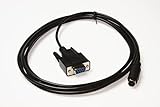
- Console Service Cable for Dell PowerVault Storage Arrays - Password Reset
- For use with: MD1000 MD1200 MD1220 MD3000 MD3200 MD3220 MD3200i MD3220i MD3600i MD3620i
- Approximately 10ft long
- Aftermarket replacement for Dell P/N: 0MN657
- Alternative part numbers: CT109 MN657
Rack and operating conditions
As an engineering consideration, airflow, enclosure temperature, dust and blocked intakes can affect cooling demand and fan speed. The supported-controller information does not imply matching noise: Dell’s interoperability guide says the two models can use a supported PERC H800/H810 controller and that up to four shelves can be daisy-chained per controller port, but controller compatibility is not an acoustic comparison. See Dell’s interoperability guide.
Independent reader supportYour contribution helps us test, update, and keep practical guides available for everyone.Ways to reduce noise without compromising cooling
- Improve placement first. Put the enclosure in a closed, ventilated rack or separate equipment room. Keep its front-to-back airflow path clear; an enclosed space that traps heat can make cooling harder rather than quieter.
- Check for a cause before changing fan behavior. Review firmware, temperature and fan-fault indicators. A fault or excess heat may explain high fan speed and should be addressed before attempting to slow fans.
- Use the correct replacement hardware if a fan module is faulty. Dell identifies power-supply/cooling-fan modules as field-replaceable units. Choose a compatible MD1200/MD1220 cooling fan or complete power-supply/fan module, and verify voltage, connector, airflow, tachometer support and physical dimensions. Do not assume a fan is suitable based only on a quoted RPM or dB figure.
- Treat unofficial fan-control procedures cautiously. Community guides describe procedures using a Dell service/password-reset cable or a USB-to-serial adapter. These are unofficial; changing fan settings can overheat drives or trigger faults. Preserve monitoring and verify temperatures after any change.
A replacement fan’s noise rating, even if verified, would describe that component under specified test conditions—not necessarily the sound of the complete storage shelf.
Quick Recap
Best Value

- DBTLAP 3.5" Tray Caddy Compatible for Dell R720 T420 MD3600i MD1200 MD1400 NX300 0KG1CH MD3200 MD3400
Rank #4

- Compatible with Dell PowerEdge R310,R320,R410,R415,R510,R515,R520,R710,R720,R720xd,R630,R730,R730XD,T310,T320,T410,T420,T430,T610,T620,T630,T710.
- and works with Dell PowerVault MD1200, MD3200, MD3200i, MD3600i, MD3600F,NX200, NX300, NX3000, NX3100, NX3200.
- Works with the following 3.5" Dell drive trays: F238F, 0F238F, X968D, 0X968D, G302D, 0G302D, CN-0G302D.
- Compatible D P/N: 9W8C4, 09W8C4, CN-09W8C4, Y004G, 0Y004G, CN-0Y004G.
- Each Pack come with 1x 3.5" to 2.5" HDD Tray Bracket, 8x Mounting Screws.
Product prices and availability are accurate as of the date/time indicated and are subject to change. Any price and availability information displayed on Amazon at the time of purchase will apply.

