
The Tool Desk
Outbyte Driver Updater FREEFix the driver behind crashes, sound loss and screen glitchesFind Drivers →Outbyte PC Repair FREERepair Windows errors before they cause bigger problemsFix Now →iTechGuides is reader-supported. When you buy through links on our site, we may earn an affiliate commission. As an Amazon Associate I earn from qualifying purchases. Learn more
There is no single charging time for every Samsung tablet. The time depends on the exact Galaxy Tab, its supported charging mode, the compatible adapter and cable, the battery’s starting level, and conditions such as heat and device use. If your tablet displays an estimated time remaining, use it as the best guide for that charge; if you need a full battery, let it reach 100% rather than following a fixed number of hours.
One useful model-specific reference is Samsung’s 2018 figure of approximately 3.5 hours for a Galaxy Tab A 10.5 with a compatible Adaptive Fast Charging adapter under controlled conditions. That historical figure does not predict the charging time of other Tab A models, Galaxy Tab S models, or newer tablets.
How long should I charge my Samsung tablet?
Charge it for as long as you need to reach the battery level you want; there is no universal number of hours or required first-charge period. To estimate a full charge for your own device, check its on-screen time estimate, if available, and remember that it can change with the charger, cable, settings, temperature, battery condition, and whether the tablet is being used.
Quick wins for a faster PC:
Repair Windows errors before they cause bigger problemsFix Now →Scan for outdated or missing drivers - takes under a minuteDriver Scan →Clear out junk files and repair common Windows errorsFree Scan →Samsung’s published estimate of approximately 3.5 hours applies to one specific older model: the Galaxy Tab A 10.5, charging with a compatible Adaptive Fast Charging adapter. Samsung Electronics included that figure in a brochure bearing a 2018 copyright. Its footnote says that charging time may vary with network, usage, settings, battery condition, and other surrounding factors. It is a manufacturer figure under controlled conditions—not a current-model test, independent benchmark, or promise for every tablet.
Popular on Amazon

- 20W USB Type-C Power Adapter, with 6.6ft USB-C to USB-C Cable included. NOTE: NOT FIT Samsung Galaxy Micro-USB Devices. The Charger Cable Only Compatible Samsung Galaxy USB-C Devices
- Compatible With: Samsung Galaxy Tab A11+,Tab A9+ 11",Tab A9, Tab A8 10.5", Tab A7 10.4", Tab A7 Lite 8.7" ,Tab S11 Ultra,Tab S11 +,Tab S11, Tab S10 Ultra,Tab S10 +,Tab S10 ,Tab S9 11", Tab S9 Ultra 14.6", Tab S9+ 12.4", Tab S8 11", Tab S8+ 12.4", Tab S7 FE 12.4", Tab S7+ 12.4”, Tab S7 11.0”, Tab Pro 12.2"(2019), Tab A 10.5”(2018), 10.1”(2019), 8.0" (2017), 8.4" (2020); Tab S4, S5e, S6, Tab Active Pro(2019), Tab Advanced 2,Tab Active 2 Tablet. Also Galaxy S24 S23 S22 S21 S20 S10 S9 S8 Plus A9 A7 A5 Series Phones
- UL Listed, CE,FCC,RoHS Certified, Over Heat, Over Current, Over Voltage and Short Circuit Protection, its low energy consumption conform to the US Energy VI, more energy efficient than normal adapter,it is Safe and Reliable to Use.
- Model:HTY36-1201670U, Input Voltage Range: AC 100V - 240V / Smart Power: 5V3A,9V2.2A,12V1.67A 20W.
- Before purchasing, please check whether the device has a USB-C charging port. Please Note : the Galaxy Tab S7 A8 is a USB-C tablet and the Galaxy S7 A8 is a Micro-usb mobile phone
For an unknown or newer Galaxy Tab, the honest answer is that its exact 0–100% time cannot be determined from the product family name alone. Find the model number under Settings > About tablet, then check what charging mode that model supports and whether the connected accessories match it.
What determines a Galaxy Tab’s charging time?
The charger’s printed wattage is only one part of the picture. The tablet, adapter, and cable must support a compatible charging configuration; the tablet’s own supported mode limits the result. A higher-wattage adapter does not make an unsupported tablet charge at that wattage, and the adapter rating is not a measurement of power continuously delivered to the battery.
- Tablet model and charging mode: Different models support different charging capabilities. Check the exact model rather than assuming that all tablets in a family charge alike.
- Adapter and cable: Use accessories that fit the tablet and support its charging configuration. An incompatible, damaged, or lower-capability cable or adapter can prevent the expected charging mode.
- Starting battery level and battery condition: The time remaining depends on how much charge is needed and on the battery’s condition. Samsung does not provide a single current full-charge time for all tablets.
- Charging source: Samsung says a wall outlet charges faster than a PC connection. A computer connection may be convenient, but it is not the quickest option when time matters.
- Temperature and activity: Excess heat and using the tablet while it charges can affect charging. If the device is hot, let it cool and avoid adding unnecessary workload during the charge.
- Battery protection: A selected charge limit or an adaptive charging routine may pause charging below 100%. That can be an intentional setting rather than a fault.
Samsung’s accessory guidance describes 15W USB-A, 25W USB-C, and 45W–60W USB-C configurations; the higher-power configuration requires a 5A cable. Those are accessory configurations, not universal Galaxy Tab capabilities or full-charge times. Confirm that your particular model supports the configuration before choosing an adapter or cable.
Windows Errors? Fix Them Before They Spread
Repair common Windows errors and clear accumulated junk for a smoother, more stable PC - no reinstall needed.Free scan · no reinstallCrashes, No Sound, or Screen Glitches?
Random freezes, missing sound and display glitches usually trace back to one bad driver. Find and replace yours safely.Free scan · under a minuteHow can I get the fastest compatible charge?
Use the fastest charging arrangement supported by your exact tablet, not simply the highest-wattage charger available. A suitable wall adapter and compatible cable, together with the tablet’s supported charging mode, are the key factors.
- Identify the tablet. Open Settings > About tablet and note the model name or number. Use that exact model to confirm its supported charging mode and connector.
- Match the accessories. Check that the adapter and cable fit the tablet and support its compatible charging configuration. Some older Samsung tablets use Micro USB Type B; many later models use USB-C. Do not assume a cable works just because its plug fits.
- Use a wall outlet when speed matters. Samsung’s guidance says a wall outlet is faster than charging through a PC. Use a sound outlet and undamaged accessories.
- Check the setting. If your tablet supports fast charging, confirm that the Fast charging setting is enabled. Menu labels and availability can vary by model and software.
- Give the tablet favorable conditions. Keep it cool and, when possible, avoid heavy use while it charges. If the tablet is unusually hot, address the heat before expecting normal charging.
- Read the displayed estimate. Where available, use the tablet’s own time-remaining estimate as a guide for the current setup rather than applying another model’s published time.
For example, a compatible 25W USB-C charger is relevant only if the specific Galaxy Tab supports that charging setup. Similarly, Samsung’s 45W–60W USB-C accessory guidance is not a reason to buy a higher-wattage adapter for a tablet that cannot use it. The cable rating matters too: Samsung specifies a 5A cable for the higher-power configuration described in its accessory guidance.
Also popular on Amazon

- Superfast Charging Technology: Say goodbye to lengthy charging times! Equipped with advanced superfast charging technology, this 25W charging block delivers a lightning-fast charging experience for all your compatible devices. Whether it's your smartphone, tablet, smartwatch, or other gadgets, power up in no time and keep up with your on-the-go lifestyle. Experience unparalleled speed with our premium usbc fast charger, designed with PD 3.0 technology to power your battery from 0 to 50% in just 30 minutes.
- Superior Safety Fast Charging: Match safety standards to avoid overload, short circuit, and overheating. Continuous high-power output will have a temperature rise, but they are all within the safety limits of standard certification. Built with a sturdy, non-foldable fixed-prong design and advanced heat-control safety protocols, this usbc charger outperforms other c chargers fast charging blocks by preventing overheating and electrical surges during overnight use.
- Universal Type C Phone Charger: Optimized High-Speed Charging Compatible with Samsung Galaxy S26, S26+, S26 Ultra, S25, S25 Plus, S25+, S25 Ultra, S24, S24 Plus, S24 Ultra, S23, S23 Plus, S23 Ultra, S22, S22 Plus, S22 Ultra, S21, S21 Plus, S21+, S20, S20+, S20 Ultra, S10, S10e, S10+, S10 Plus, S10 5G, S9, S9 Plus, S9+, S8, S8 Plus / Active, Note 10, Note 10+, Note 20, Note 20+, Note 20 Plus A15, A16. This usbc fast charger also compatible with iPhone 18 Pro, 18 Pro Max,17, 17 Pro, 17 Pro Max, 16, 16e, 16 Plus, 16 Pro, 16 Pro Max, 15, 15 Plus, 15 Pro, 15 Pro Max, 2018 iPad Pro 11/12.9, 2020 iPad Pro 11/12.9, Pixel 2, Pixel 3, Pixel XL, Pixel 2XL, Pixel 3XL, Pixel 4XL, Pixel 3A, LG
- Versatile 6FT & 10FT Cables: Enjoy total freedom anywhere you plug in your type c fast charger with this included dual-length bundle. Combining a heavy-duty charger cord type c with our premium block delivers the ultimate phone charger fast charging setup, giving you the perfect reach to comfortably use your device from the desk, car, couch, or bed.
- Package Included: 2x 25W Charging Block, & ( 6ft+ 10ft ) Type C to C Charging Cord. 24-month replacement & 24*7 friendly customer support, if there is any quality problem, please contact us
Do I need to charge a new Samsung tablet for a fixed number of hours?
No. There is no fixed first-charge duration you need to follow, and deliberately draining a modern tablet before charging is not recommended. Samsung advises users not to let the battery completely drain and favors partial top-ups over routinely exhausting it.
Charge to the level that suits your next use. If you need maximum runtime, charging to 100% is an option; if preserving battery health is a priority, you can use an available Battery protection limit instead. Neither approach requires treating each charge as a full cycle from empty to full.
Should I charge to 100% every time?
No. Reaching 100% is useful when you need the longest time away from an outlet, but it is not a requirement for every charging session. Samsung’s Battery protection options let some Galaxy devices limit charging below full to support battery longevity.
In Samsung’s description, Basic protection stops charging at 100% and resumes when the battery falls to 95%. Maximum protection uses a selected lower maximum level on supported software and devices. Samsung does not prescribe one cutoff for every reader; choose based on your routine and the options your tablet actually shows. These settings and labels may differ by model and software version.
Samsung also describes Adaptive protection as learning a charging routine, pausing at 80%, then switching to Basic protection before waking time. A separate Samsung troubleshooting page describes an optional Basic-plus-Sleep-time arrangement that pauses at 80%. These descriptions are setting- and software-dependent, not a guarantee that every Galaxy Tab offers or behaves this way. Check the Battery protection options on your own tablet rather than expecting a particular overnight pattern.
Also popular on Amazon

- [ Samsung 20W Fast Charging ] USB C Single Port Power Supply Adapter Input: 100-240V/50-60Hz; Output (USB PD): 5V=3A 15 Watt, 9V=2.22A 20 Watt, 12V=1.67A 20 Watt, Available for Samsung Galaxy-Tab-A9+ Plus USB C 15W/20W max stable and safe fast charging.
- [ Universal Compatibility ] Compatible With Samsung Galaxy Tab A9+ 12.4"",Tab A9, Tab A8 10.5"", Tab A7 10.4"", Tab A7 Lite 8.7"" , Tab S10 Ultra,Tab S10 +,Tab S10 ,Tab S9 11"", Tab S9 Ultra 14.6"", Tab S9+ 12.4"", Tab S8 11"", Tab S8+ 12.4"", Tab S7 FE 12.4"", Tab S7+ 12.4”, Tab S7 11.0”, Tab Pro 12.2""(2019), Tab A 10.5”(2018), 10.1”(2019), 8.0"" (2017), 8.4"" (2020); Tab S4, S5e, S6, Tab Active Pro(2019), Tab Advanced 2,Tab Active 2 Tablet.
- [ Security Assurance ] Charger Multiple built-in safeguards protect against short circuit, over-current, over-voltage, over-heating and over-charging. Automatically stops charging when battery capacity is full to ensure your device safety and long lifetime And Charger Charging Cable Cord Using high-quality flame-retardant materials, Durable, long service life, free winding.
- [ Pecification ] 20W Fast Charger with 6.6FT Charger Charging Cable Cord Meet your daily needs, make your life more convenient, and adaptable.
- [ Efficient After-sales service ] If you have any questions, please contact us. Our team is always ready to provide you with friendly and efficient.
Why is my Samsung tablet stuck at 80% or 85%?
A charge that stops around 80% or 85% may be the result of Battery protection, not a failed battery. Check the protection limit and any adaptive or sleep-time charging option before treating the behavior as a hardware problem.
Samsung devices may offer a selected maximum charge level, and protection behavior can vary by model and software. If the tablet stops at a level you did not expect, review its battery settings and confirm whether a charge cap is active. If no protection setting explains it and the tablet still will not charge normally, continue with the accessory and diagnostic checks below.
What should I check if my Galaxy Tab charges slowly or not at all?
Start with the simple causes: accessories, power source, charging settings, heat, moisture, and debris in the port. If those checks do not resolve the problem, Samsung’s tablet diagnostics can help assess battery status and cable charging.
- Try a different wall outlet. Samsung says wall charging is faster than charging from a PC. Confirm that the outlet works and that the adapter is firmly connected.
- Inspect and swap compatible accessories. Check the adapter and cable for damage, and try another compatible, undamaged charger and cable if available. Confirm that they suit your model and connector; do not judge compatibility by plug fit alone.
- Check Fast charging. If the feature is supported, verify its setting. A setting change cannot add a charging mode the tablet does not support.
- Check heat and moisture warnings. Let an overheated tablet cool. If a moisture warning appears, do not ignore it or force charging while the warning remains; follow the device’s guidance.
- Look for port debris without probing dangerously. Do not use metal objects or liquids to clear a charging port. If debris is blocked inside or the port appears damaged, seek professional service rather than risking further damage.
- Run Samsung’s diagnostics. Samsung’s tablet-specific instructions identify Samsung Members > Support > Tablet diagnostics > Battery status / Cable charging. Menu paths can differ across software versions and regions.
- Allow for a deeply depleted battery. Samsung U.S. support says a deeply depleted tablet may take up to 10 minutes to show a charging indicator. This is the possible delay before an indicator appears—not an estimate for a full charge.
If a compatible charger and cable, a working outlet, and the checks above do not restore normal charging, or if the port or tablet appears damaged, contact Samsung support or a qualified service provider. Do not keep forcing a damaged connector or repeatedly testing a tablet that shows a persistent moisture or hardware warning.
Independent reader supportYour contribution helps us test, update, and keep practical guides available for everyone.What does the historical 3.5-hour figure tell me?
It gives a bounded reference for one model, not a rule for Samsung tablets generally. Samsung Electronics’ 2018-copyright Galaxy Tab A 10.5 brochure reports approximately 3.5 hours to fully charge with a compatible Adaptive Fast Charging adapter under controlled conditions. The same brochure cautions that actual time varies with network, usage, mode settings, battery condition, and other factors.
Also popular on Amazon
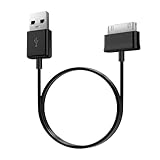
- Compatible for old Samsung Galaxy Note 10.1 GT-N8013 ; Galaxy Tab 2 10.1 GT-P5100, GT-P5113, SCH-I915, SGH-I497, SGH-T779, SPH-P500 ; Galaxy Tab 2 7.0 GT-P1010, GT-P3100, SCH-I705, GT-P3113 ; Galaxy Tab 10.1 GT-P7510, SCH-I905, SGH-T859 ; Galaxy Tab 8.9 GT-P7310, SGH-I957 ; Galaxy Tab 7.7 SCH-I800, SCH-I815, SGH-I987, SGH-T849, SPH-P100 ; Galaxy Tab 7 Plus GT-P6210, SGH-T869
- USB to 30 pin cable, 6.6 feet long
- USB plug work with 10W+ power adapter
- Support charging and data transfer
- PVC cord, bending test up to 10000+, durable to use
It cannot establish how long a newer Tab A or a Galaxy Tab S takes, nor how long your tablet will take with a different charger, cable, starting percentage, or charging routine. A current model’s own time estimate and model-specific charging guidance are more relevant to your situation.
How should I choose between speed and battery care?
Use the battery level and charging setup that fit the day ahead. If you will be away from a charger and need maximum runtime, charge to 100% with a compatible setup. If the tablet spends most of its time near an outlet, a Battery protection limit may be a better fit if your model offers one.
For overnight charging, do not assume every Galaxy Tab will pause at the same percentage or switch modes at a particular time. Samsung’s Adaptive and sleep-time descriptions depend on software and settings. Its general guidance is to keep the device cool and disconnect it when charging is finished; use the behavior and controls available on your own tablet.
The practical trade-off is straightforward: faster charging is useful when you need the battery soon, while partial charging and avoiding complete depletion are reasonable battery-care habits. You do not have to choose one policy permanently; charge to 100% when the extra runtime matters and use a lower protection cap when that better matches your routine.
Frequently Asked Questions
Does a Samsung tablet need an overnight first charge?
No special overnight first charge is required. You can use the tablet’s displayed estimate, when available, and stop at the level that suits your plans.
Can I use a phone charger with my Galaxy Tab?
Only if its connector and charging configuration are compatible with the tablet. Matching plug shapes alone does not establish that the adapter and cable can provide the tablet’s supported charging mode.
What does it mean if my tablet takes several minutes to show a charging symbol?
A deeply depleted Galaxy Tab may take up to 10 minutes to display a charging indicator, according to Samsung U.S. support. That delay describes when the indicator appears, not how long charging the battery takes.

