
Free tools Windows power users keep installed
One-click scans. No signup required.
A browser bridge can let an AI interface inspect and control a live Blender scene, but that does not mean an AI video generator can import the scene itself. For the Runway workflow documented here, render the Blender scene to an image or video and use that media as the handoff; use glTF or GLB only when the receiving application explicitly supports 3D files.
What a browser-based bridge actually transfers
A bridge such as the Blender Bridge project connects an AI interface to Blender through a desktop HTTP bridge and a Blender add-on. In the project-described workflow, the interface sends commands, Blender executes them, and results such as scene data or screenshots can come back for inspection. That is a control-and-feedback path into the 3D application—not, by itself, an importer inside a separate AI video service.
That distinction matters because “send a scene to an AI” can mean two different things: let an AI-connected tool operate on a live scene, or upload a scene file to a video model as an input. The former may be possible with a bridge; the latter depends on the video tool accepting that 3D format.
Choose the handoff that matches the destination
| Approach | What it carries | When it fits | Key limitation |
|---|---|---|---|
| Live Blender bridge | Commands and, in the described project, returned execution results, scene data, and screenshots | When an AI interface needs to inspect or make changes to an open Blender scene | It does not establish that another service can import the scene as a 3D asset. |
| glTF or GLB export | A supported subset of scene content, such as meshes, mapped materials and textures, cameras, punctual lights, and certain animation data | When a downstream web or native 3D application explicitly supports glTF | Export support is not lossless, and the receiving application must support the format and features it uses. |
| Rendered still or clip | Visual media representing the scene, rather than its editable 3D structure | When the video model accepts image or video references | The model receives the rendered view, not Blender objects, materials, camera controls, or scene structure as editable 3D data. |
Use a Blender scene with an AI video tool
-
Build and inspect the scene in Blender
Use Blender as the working environment for geometry, materials, lighting, camera placement, and animation. If an AI interface is connected through a bridge, treat its commands and returned scene information as part of this Blender-side workflow.
Special offer. See more information about Outbyte and uninstall instructions. Please review EULA and Privacy policy.#1 Best Overall
 Insta360 X3, 360 Action Camera with 5.7K 360 Active HDR Video, 4K Single-Lens Camera, Waterproof, FlowState Stabilization, 2.29" Touchscreen, AI Editing, for Motorcycle, Wintersports and Vlogging
- Think bold. A collection of stickers that capture the Insta360 spirit, freely pasted wherever you like. In the Box: 1x Insta360 X3, 1x Charge Cable, 1x Protective Pouch, 1x Lens Cloth, and 1x User Guide.
- NEW ERA 360 ACTION CAMERA: Insta360 X3 combines 5.7k 360 with all the power of a 4K action camera together. Unbelievable potential!
- 5.7K 360 CAPTURE & REFRAMING: Insta360 X3 captures 360 Active HDR video, with all the benefits of a traditional action camera. Choose your favorite angle after the fact with easy reframing in the AI-powered Insta360 app.
- 4K WIDE-ANGLE SHOTS: Shoot wide-angle footage in maximum resolution with 4K30fps or a super-wide 170° field of view with 2.7K60fps MaxView.
- KEEP FOOTAGE STABLE & LEVEL: FlowState Stabilization and Horizon Lock algorithms work together to deliver incredibly smooth videos.
-
Keep the Blender project as the editable source
Retain the native project for continued editing. Export an interchange file only when a downstream 3D application needs one and explicitly accepts that format; a 3D export is not a substitute for a video model’s supported media input.
-
Render the view or motion you want the video model to use
For a video service that accepts image or video inputs, create a still or clip that communicates the intended composition, subject, and motion. Check the service’s current file types, codecs, dimensions, aspect ratios, and model-specific constraints before uploading. A render can guide a generated video visually, but it does not give the model the scene’s editable 3D structure.
Rank #2
Sale Astra Pro 3D Depth Camera Indoor ±3mm Accuracy, 8m Max Range, Multi-Camera Sync, ROS1/2 Robot Part for Robotics Research, AI Vision, SLAM, 3D Scanning
- Lab-Grade Indoor Accuracy, ±3mm at 1m – Achieve sub-millimeter precision with structured light technology. Perfect for 3D modeling, VR AR gesture recognition, and AI vision tasks. Zero blind spot measurements in controlled lab, warehouse, or industrial settings. long-range (8m) for logistics or high-res RGB (1280x720) for enhanced visual data. 3d camera outputs include point clouds, depth maps, IR, and RGB.
- High-Efficiency Processing for Real-Time Robotics – Powered by Orbbec ASIC, Astra Pro robot camera delivers artifact-free, high-fidelity depth at 1280×1024 @ 7 fps and RGB at 1280×720 @ 30 fps simultaneously. With a 0.6–8m ranges, optimization excels in lag-free applications like SLAM, automation, obstacle avoidance, and pose estimation—positioning Astra Pro as the premier camera for indoor robotic control where every millisecond counts.
- Seamless Multi-Camera Sync for Scalable Systems – Synchronize up to 30 sensors at 30 fps with zero frame drops — enabling true 360° environment scanning, large-scale motion tracking, and sub-millisecond multi-robot coordination. In multi-agent robotics, perfect timing of robot parts isn’t a feature… it’s the decisive advantagefor robotics developers.
- Ultra-Low Power & Portable – Battery life can make or break mobile robotics. Power draw <3W and weight as low as 310g—battery-friendly for AMR, AGV, drones, mobile platforms, and field research setups. Compact size enables integration into embedded systems and wearable devices, streamlining development for on-the-go perception in research prototypes or field-deployable bots.
- Plug-and-Play Integration for Fast Prototyping – USB 2.0 single-cable connection (power + data), direct drop-in replacement for legacy systems. The camera works with Windows, Linux, and Android operating systems. The camera is compatible with OpenNI SDK, Astra SDK, ROS1/ ROS2, enabling fast integration into mobile robots, industrial PCs, embedded platforms, and AI vision applications
-
Check the destination model’s documented inputs
Runway’s supported-file documentation lists image, video, and audio formats and codecs. Its Gen-4.5 documentation describes text-to-video and image-to-video, with further inputs described as forthcoming on that page. The cited documentation does not establish direct Blender scene or GLB input. Those specifications can change, so check the current model and file-compatibility pages when preparing an upload.
-
Inspect the generated result against the render
Check framing, crop, aspect ratio, and whether the input conveys the intended composition and motion. Runway’s developer documentation describes aspect-ratio constraints for supported image and video references that vary by model. Do not assume one model’s limits apply to another.
The Tool Desk
Outbyte PC Repair FREERepair Windows errors before they cause bigger problemsFix Now →Outbyte Driver Updater FREEScan for outdated or missing drivers - takes under a minuteDriver Scan →Special offer. See more information about Outbyte and uninstall instructions. Please review EULA and Privacy policy.Rank #3
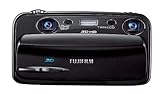 Fujifilm FinePix Real 3D W3 10MP Digital Camera with 3X Optical Zoom-Black
- Capture high-resolution images in 2D and 3D
- Record HD 3D movies (720p resolution); dual 10-megapixel CCD and lens system
- 3.5-inch widescreen autostereoscopic LCD displays images and movies in 3D instantly, with no glasses required
- mini-HDMI output jack offers easy connection to a compatible 3D HDTV; view images and movies instantly in 3D
- Capture images and movies to SD/SDHC memory cards (not included)
What Blender’s glTF export can—and cannot—preserve
Blender 4.4’s glTF 2.0 documentation describes support for meshes; Principled BSDF and unlit materials; textures; cameras; punctual lights; extensions and extras; and keyframe, shape-key, and skinning animation. This is a defined set of exportable scene data, not a promise that every Blender feature will transfer intact.
Material mapping and other feature support have limits. If the receiving 3D application accepts glTF, inspect the exported result there rather than assuming it will interpret the scene exactly as Blender does. A successful GLB export also says nothing about whether an AI video model accepts GLB.
Rank #4
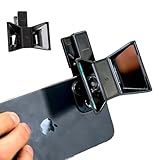
- TURN YOUR DEVICE INTO A 3D MASTERPIECE MACHINE: Clip on the OPIC Spatial Phone lens to instantly transform your smartphone, tablet, or laptop into a powerful 3D content creation tool—no additional camera required. Its adjustable clip and spacer system ensure a perfect fit every time.
- ELEVATE YOUR CREATIVE GAME: Capture stunning stereoscopic 3D photos and videos with the OPIC Spatial adapter, which enhances your phone camera lens to create visuals that leap off the screen. Powered by OPIC’s patented software, your content is optimized for crystal-clear Virtual Reality viewing, giving you a professional edge.
- SEAMLESS 3D LIVESTREAMING TO THE WORLD: Host real-time 3D livestreams to VR headset, Meta Quest 3, Apply Vision Pro users across the globe. With OPIC Spatial Phone lenses, you don’t just capture memories—you invite others to experience them with you.
- FUTURE-PROOF PATENTED DESIGN FOR ANY DEVICE: Upgrading your phone? No problem! The OPIC Spatial, a cutting-edge cell phone camera lens, features a versatile clip that adjusts smoothly to fit your new device, ensuring your investment stands the test of time.
- EASY TO USE, NO TECH EXPERTISE NEEDED: Designed with simplicity in mind, OPIC Spatial, a phone camera zoom lens clips on in seconds and works effortlessly with the OPIC 3D app to optimize your footage.
Questions to ask before relying on a bridge
- Direction: Is the connection a one-way export, or can it return inspectable state that supports correction?
- Destination input: Does the named video model document 3D scene files as inputs, or only image, video, audio, or text?
- Feature fidelity: Which geometry, materials, textures, cameras, lights, and animation features survive the interchange format and destination?
- Where processing happens: Does the workflow involve a local application, a desktop companion, or a cloud service? Confirm the architecture for the specific product; the available descriptions do not establish security properties or performance comparisons.
- Shipped status: Is the feature available now, or only described as a roadmap capability? A one-way bridge or roadmap statement is not proof of a currently shipped, two-way integration.
Procedural scene-to-video research frameworks are a separate category from a commercially available import feature. A research framework does not, on its own, show that a named video service accepts Blender scenes.
Quick Recap
Product prices and availability are accurate as of the date/time indicated and are subject to change. Any price and availability information displayed on Amazon at the time of purchase will apply.
Do these 3 things before closing this tab:
1Fix the driver behind crashes, sound loss and screen glitches2Clear out junk files and repair common Windows errors3Scan for outdated or missing drivers - takes under a minute
