
iTechGuides is reader-supported. When you buy through links on our site, we may earn an affiliate commission. As an Amazon Associate I earn from qualifying purchases. Learn more
Choose a HomePod stereo pair when Apple TV integration, separate left/right speakers, and Apple’s documented Dolby support fit your room. Choose a soundbar when a particular model better matches your TV connections, furniture, expansion plans, or budget. There is no evidence that every HomePod pair sounds better than every soundbar. The soundbar category spans very different designs, so the fair comparison is a specific bar against a HomePod setup that meets your requirements.
What each option actually is
HomePod stereo pair
A stereo pair uses two matching, compatible HomePods assigned to the same room in Apple’s Home app. Apple TV 4K can then use that pair as its default audio output, sending Apple TV content, system sounds, and game audio to the speakers. Apple documents Dolby Atmos, Dolby Digital 7.1, and Dolby Digital 5.1 support for a HomePod stereo pair. See Apple’s Apple TV home-theater guide and HomePod setup instructions.
The pair is still two physically separate speakers, not a conventional soundbar with a row of drivers. Apple recommends placing one HomePod on each side of the television, approximately 4 feet (1.2 meters) apart, for optimal surround presentation. A pair therefore needs suitable shelves, stands, or cabinet space on both sides of the screen.
Free tools Windows power users keep installed
One-click scans. No signup required.
Soundbar
A soundbar combines several speaker channels in one enclosure, usually under or in front of the TV. Some models are simple two-channel bars; others add a wireless subwoofer, rear speakers, upward-firing Atmos drivers, or room calibration. Those features are model-specific. Before buying one, check its exact channel layout, supported formats, HDMI inputs, ARC or eARC behavior, and optional speakers rather than assuming that the word “soundbar” describes a single level of performance.
#1 Best Overall

- Premium, immersive, high-fidelity audio
How Apple TV integration differs
HomePod’s documented path
Apple provides a defined setup for Apple TV 4K and HomePod. The Apple TV and both HomePods must be on the same network and assigned to the same room in the Home app. After creating the stereo pair, select it as the Apple TV’s default audio output. This routes all Apple TV sound, including interface sounds and game audio, to the pair.
Apple’s home-theater feature is specifically for HomePod. Other AirPlay-compatible speakers do not substitute for HomePod in this feature. If you select a non-HomePod AirPlay output, Apple says system alerts and game sounds play through the television speakers instead of that AirPlay device.
Soundbar connection choices
A soundbar normally connects to the television with HDMI eARC or ARC, optical audio, or, on some models, an HDMI input that accepts source devices directly. The best route depends on the television and bar. Verify that the bar supports the formats you intend to play and that the TV can pass those formats from its built-in apps and connected devices.
Quick wins for a faster PC:
Scan for outdated or missing drivers - takes under a minuteDriver Scan →Clear out junk files and repair common Windows errorsFree Scan →Fix the driver behind crashes, sound loss and screen glitchesFind Drivers →Apple’s documentation does not establish compatibility for any particular soundbar model. Treat a bar’s published connection diagram as the authority: confirm whether game consoles and disc players should connect to the TV or to the bar, whether eARC is required for lossless or high-bandwidth formats, and whether the TV’s remote can control volume through HDMI-CEC.
Supported surround formats and what they mean
| Capability | HomePod stereo pair | Soundbar |
|---|---|---|
| Dolby Atmos | Apple lists support for a HomePod stereo pair. | Depends on the exact model, driver arrangement, and connection path. |
| Dolby Digital 7.1 | Apple lists support for a HomePod stereo pair. | Verify the model’s decoder and the TV’s passthrough behavior. |
| Dolby Digital 5.1 | Apple lists support for a HomePod stereo pair. | Verify the model’s decoder and the TV’s passthrough behavior. |
| HomePod mini | HomePod mini does not support Dolby Atmos, 5.1, or 7.1 surround in Apple’s setup guidance; those formats render in mono or stereo. | Not applicable. |
Format support is not the same as a guarantee of a particular listening result. Apple’s specifications describe what the HomePod system can process, but the reviewed documentation does not provide controlled measurements comparing dialogue clarity, bass extension, loudness, or surround envelopment with a soundbar.
HomePod hardware and placement requirements
Matching speakers matter
Use two matching, compatible HomePods for a stereo pair. A second-generation HomePod is a current full-size option; Apple’s specifications list a 4-inch high-excursion woofer, five horn-loaded tweeters, a low-frequency calibration microphone, room sensing, Spatial Audio with Dolby Atmos, AirPlay multiroom audio, and stereo-pair capability. These are Apple’s manufacturer specifications, not independent comparative test results. The specifications are published at Apple’s HomePod (2nd generation) page.
Two HomePod mini speakers can be paired for stereo, but they do not provide the Dolby Atmos, Dolby Digital 5.1, or Dolby Digital 7.1 behavior Apple documents for a full-size HomePod pair. Do not buy minis expecting them to reproduce the same home-theater formats.
The Tool Desk
Outbyte Driver Updater FREEFix the driver behind crashes, sound loss and screen glitchesFind Drivers →Outbyte PC Repair FREERepair Windows errors before they cause bigger problemsFix Now →Rank #2

- Features a 4" high-excursion woofer and five beamforming tweeters for deep bass, clear vocals, and detailed room-filling audio.
- Room Sensing technology automatically adjusts sound based on where the speaker is placed.
- Built-in Siri enables voice control for music, reminders, messages, smart home devices, and more.
- Supports AirPlay, Spatial Audio, Thread, Matter smart home control, Bluetooth 5.0, and Wi-Fi 4.
- Pair two HomePod speakers for stereo sound or use multiple units for whole-home audio playback.
Place the pair around the screen
- Put one HomePod to the left of the television and the other to the right.
- Aim for about 4 feet (1.2 meters) between the speakers, adjusting for the room and furniture.
- Keep both speakers at a similar height and distance from the main seating position where practical.
- Leave the microphones and acoustic openings unobstructed; avoid enclosing a HomePod tightly inside a cabinet.
- Do not use the single-HomePod placement advice as a substitute for the stereo-pair recommendation.
The 4-foot figure is Apple’s recommendation for optimal surround, not a requirement that every room must meet exactly. A narrow media console may force a smaller separation; a wide room may allow more. If the television is wall-mounted with no safe surface at either side, a bar may be physically easier.
Step-by-step: set up a HomePod stereo pair with Apple TV 4K
- Update everything. Install current software on Apple TV 4K, the HomePods, and the controlling iPhone or iPad. Apple’s setup article dated March 20, 2025 requires current software for the home-theater arrangement.
- Connect the speakers to the same network. Apple’s current Apple TV guide says the Apple TV and HomePods should use the same network. Resolve Wi-Fi isolation or separate guest-network settings before pairing.
- Assign the speakers to one Home room. In the Home app, place both HomePods and the Apple TV in the same room. If they appear in different rooms, edit each accessory’s room assignment.
- Create the stereo pair. In the Home app, open the HomePod controls, choose the stereo-pair option, and identify which speaker is on the left and which is on the right.
- Select the pair on Apple TV. On Apple TV, open Settings > Video and Audio > Audio Output, then choose the HomePod stereo pair as the default audio output. Apple’s labels can change with tvOS releases, so use the Audio Output page if a menu is worded slightly differently.
- Play a known source. Start a film or show with a Dolby soundtrack and check that both speakers play. Also test the Apple TV interface and a game if those sounds matter to you.
- Correct channel orientation. If left and right are reversed, use the stereo-pair controls in the Home app to swap or reassign the speakers rather than physically living with incorrect imaging.
Using television-connected devices through HomePod
Apple TV 4K (2nd generation or later) can receive television audio through eARC and send it to HomePod, but several conditions must be met:
- The television must support eARC.
- Use an eARC-compatible HDMI cable; Apple says this cable is sold separately.
- Enable HDMI-CEC on the television.
- On Apple TV, enable the Audio Return Channel setting labeled Play Television Audio.
- Select the HomePod pair as the Apple TV’s default audio output.
This arrangement can carry audio from a compatible device connected to the television, such as a game console or disc player, through the TV and Apple TV to HomePod. The exact TV menu names differ by manufacturer, and Apple advises checking the TV maker’s instructions if eARC does not work. eARC is not required for every HomePod-and-Apple-TV setup; it is relevant when you want television-connected sources routed through the pair.
The announced four-HomePod option
Apple announced a larger arrangement on October 13, 2026. Its press release says four-speaker surround requires Apple TV 4K (4th generation) and four HomePod (2nd generation) or HomePod mini 2 speakers, arranged as matching front and rear pairs. Apple says the system automatically calibrates timing and levels based on speaker position. The announcement is at Apple Newsroom.
At the October 21, 2026 research date, Apple had announced U.S. pricing of $299 for Apple TV 4K (4th generation) and said in-store availability would begin November 13, 2026. That date had not yet arrived, so do not treat the four-speaker feature as available hardware before the announced launch. The requirement is also generation-specific: an older Apple TV 4K cannot be assumed to support this four-speaker mode.
Apple describes the new setup as “the first time” users can create a four-speaker surround experience with Apple TV 4K (4th generation) and HomePod mini 2. That is Apple’s product statement, not an independent assessment of immersion or sound quality. Buyers considering it should verify current availability and software requirements after launch.
HomePod pair vs soundbar: decision table
| Decision factor | HomePod stereo pair | Soundbar |
|---|---|---|
| Apple TV setup | Apple documents selecting a HomePod pair as Apple TV 4K’s default output, including system and game audio. | Connection and control depend on the specific bar and television. |
| Surround formats | Apple lists Dolby Atmos, Dolby Digital 7.1, and Dolby Digital 5.1 for the pair. | Check the exact bar’s supported formats and channel design. |
| Other TV sources | Apple TV 4K (2nd generation or later) can use eARC from a compatible TV, with the stated cable, CEC, and Play Television Audio requirements. | Check HDMI inputs and eARC/ARC behavior against every source. |
| Physical layout | Two separate speakers beside the TV; Apple recommends about 4 feet apart. | One enclosure under or in front of the TV, with dimensions determined by the model. |
| Expansion | Apple announced four-speaker surround for Apple TV 4K (4th generation) with four matching front/rear speakers. | Expansion to a subwoofer or rear speakers varies by model. |
| Sound-quality certainty | Official specifications do not establish superiority over a soundbar in fidelity, bass, dialogue, or loudness. | No universal result; performance depends on the selected model and system configuration. |
When a HomePod stereo pair is the better fit
- You already use Apple TV as the center of the room. The documented default-output integration is straightforward, and Apple TV system and game audio stay on the same speakers.
- You can place speakers on both sides of the TV. The separate left/right layout can work well when a cabinet or stands provide stable, symmetrical positions.
- You want Apple’s published format support without selecting a specific soundbar. The full-size pair has documented Dolby Atmos, Dolby Digital 7.1, and Dolby Digital 5.1 support.
- You value Apple multiroom features. HomePod (2nd generation) supports AirPlay multiroom audio and can participate in a stereo pair.
- You may adopt Apple’s announced four-speaker route later. Plan around the Apple TV 4K (4th generation) and matching-speaker requirements rather than assuming any Apple TV or mixed HomePod collection will qualify.
When a soundbar is the better fit
- There is no safe space beside the TV. A single enclosure may fit a narrow console or wall-mounted display where two HomePods cannot be positioned properly.
- You need a particular connection layout. A bar with the right HDMI inputs may simplify several consoles or players, while another model may rely on the TV’s eARC port. Compare the actual ports, not just the product category.
- You want a subwoofer or rear speakers from one manufacturer. Expansion is possible only when the chosen model supports those accessories; verify compatibility before buying.
- Your TV is not an Apple TV-centered system. A soundbar may be more practical when built-in TV apps, multiple source devices, or another streaming platform are used as often as Apple TV.
- You have a defined budget or furniture limit. Compare the complete system cost and dimensions, including optional subwoofers, stands, or rear speakers, with the price of two HomePods.
Common compatibility mistakes and fixes
Expecting HomePod mini to deliver full Dolby surround
HomePod mini does not support Dolby Atmos, Dolby Digital 5.1, or Dolby Digital 7.1 in Apple’s home-theater setup guidance; those formats render in mono or stereo. Use compatible full-size HomePods if those formats are a requirement, or choose a soundbar whose specification explicitly lists them.
Rank #3
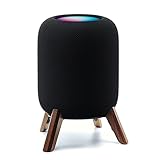
- Compatibility: The wooden stand is applicable for homepod 2nd gen (2023 released) smart speaker. Four wood legs and stronger metal ring stably hold the homepod speaker well on table/desk/carpet/floor, make the homepod 2nd to stay firmly on the stand, don't worry about slip off and fall out in using
- Protection Function: Add anti-slip silicone pads to the bottom of wooden legs to prevent the speaker from sliding, hold the speaker up without any water affection on table. The steel frame holds the home pod 2nd tightly and the wooden leg protect speaker from 4 directions, as safe as a house
- Unique Design: The desktop wooden mount with right size doesn't take much space, but matches with homepod 2nd gen well. It's a simply, stylish, safe, sturdy design to use for office, home, garden etc. The stand is suitable for sound and easy to install
- Real Wood Materials: The wood stand is made of walnut from North America. It's 100% real wood and coating by oil, not corrode and not rust. The smooth wood leg is polished by manual. The black walnut is suitable for more places and occasions as more people like
- Extensive Using Occasions: 1 pack solid wood stand with steel ring, soft foam, silicone pad in the box. Setup the wooden mount with homepod speaker on table, desk, wardrobe, cabinet in house, home, office and shop. (Notes: Apple homepod 2nd speaker is not included in this order.)
Trying to use unrelated AirPlay speakers
Apple’s home-theater feature requires HomePod; another AirPlay speaker cannot simply be substituted as the documented default home-theater output. Use HomePod for this Apple-supported arrangement or evaluate the soundbar’s wired TV connection.
Putting both HomePods together under the screen
That defeats the intended left/right separation. Move one to each side and aim for Apple’s approximately 4-foot spacing recommendation. If the room cannot accommodate that placement, a bar may be a better physical match.
Assuming ARC and eARC are interchangeable
Apple’s television-audio instructions call for an eARC-capable TV, an eARC-compatible HDMI cable, HDMI-CEC, and the Play Television Audio setting. Confirm the TV’s port label and menu settings; an ordinary HDMI connection or an ARC-only television may not provide the same path for connected-device audio.
Buying a soundbar on the word “Atmos” alone
Atmos branding does not tell you the number or position of drivers, whether a subwoofer is included, or whether your TV can pass the signal. Read the model’s channel description, input/output diagram, supported codecs, and expansion list before comparing it with HomePod.
Assuming the new four-speaker feature is already available
Apple announced Apple TV 4K (4th generation) on October 13, 2026, with in-store availability planned for November 13, 2026. At the stated research date, it was an announced future option. It also requires four HomePod (2nd generation) or HomePod mini 2 speakers in matching front and rear pairs.
A practical buying checklist
- Inventory the sources. List Apple TV apps, consoles, disc players, and television apps that must use the theater speakers.
- Check the TV ports. Record whether the television has eARC, which HDMI port provides it, and whether HDMI-CEC can be enabled.
- Measure the room. For HomePod, check for safe locations on both sides of the TV and roughly 4 feet of separation. For a bar, measure the shelf depth, width, and clearance below the screen.
- Choose the format target. If Dolby Atmos or 5.1/7.1 matters, avoid HomePod mini and verify the soundbar’s exact codec support.
- Decide whether expansion is real or hypothetical. A HomePod four-speaker system requires the announced Apple TV 4K (4th generation) and matching pairs. A soundbar’s rear-speaker or subwoofer path is model-specific.
- Compare complete prices. Count two HomePods, any stands, and an eARC cable when needed. For a soundbar, include the subwoofer or rear kit required to achieve the configuration you actually want.
- Read the return policy. Because official specifications do not settle room-dependent sound quality, a return window is valuable when the system cannot be auditioned in your room.
What the available evidence can and cannot answer
Apple’s documentation establishes setup requirements, supported formats, placement guidance, hardware specifications, and the announced four-speaker compatibility rules. It does not establish that a HomePod pair has deeper bass, clearer dialogue, greater loudness, wider surround, or better value than a soundbar. Those outcomes depend on the particular bar, room, seating position, placement, and source material.
Accordingly, the most defensible choice is conditional: select the HomePod pair for its Apple TV integration and separate-speaker layout when those solve your priorities; select a soundbar when a specific model’s connections, dimensions, expansion options, or price better fit the complete system. Compare the exact products and your television’s capabilities rather than treating either category as an automatic winner.
Quick Recap
Product prices and availability are accurate as of the date/time indicated and are subject to change. Any price and availability information displayed on Amazon at the time of purchase will apply.

