
What’s actually slowing this PC down?
Pick the symptom - the matching free tool is one click away.
iTechGuides is reader-supported. When you buy through links on our site, we may earn an affiliate commission. As an Amazon Associate I earn from qualifying purchases. Learn more
HappyKids is a free, ad-supported streaming app for families and kids, with age-based content organization, provider-described parental controls, and a kidSAFE certification listing. HappyKids is safer than an unfiltered general video platform for many children, but it is not ad-free, data-free, perfectly filtered, or a substitute for parental supervision.
The service is operated by Future Today Inc. and is available on mobile devices and several connected-TV platforms. This review separates documented safeguards from marketing claims and explains the tradeoffs parents should consider before allowing independent viewing.
Key takeaways
- HappyKids is free to use, but the service is ad-supported and does not provide an ad-free experience by default.
- HappyKids organizes children’s content by age group and interests, and the operator says parents can restrict topics, themes, and individual programs.
- kidSAFE lists the HappyKids TV Mobile App as kidSAFE certified and COPPA compliant, but certification does not guarantee that every video, recommendation, or advertisement suits every child.
- Future Today’s privacy policy describes collection of device, usage, viewing, location-related, and advertising data, so “safe” does not mean data-free.
- HappyKids is available on supported mobile and connected-TV platforms, including iPhone, iPad, Apple TV, Roku, Fire TV, Vizio, and xFinity, although exact model and regional support can change.
Is HappyKids safe for kids?
HappyKids is a child-focused streaming service with age- and interest-based organization, parental-control features described by the operator, and a kidSAFE certification listing. Those safeguards make HappyKids a more controlled starting point than an unfiltered general video platform, but parents should still review settings, sample content, and supervise younger children.
HappyKids is operated by Future Today Inc. The service targets a broad audience, from babies and toddlers through tweens, rather than one narrowly defined age group. The kidSAFE member listing for HappyKids TV Mobile App identifies the app as kidSAFE certified and COPPA compliant and describes content segmented by age group and interest.
Popular on Amazon

- HD streaming made simple: With America’s number 1 TV streaming platform,* exploring popular apps—plus tons of free movies, shows, and live TV—is as easy as it is fun. *Based on hours streamed—Hypothesis Group
- Compact without compromises: The sleek design of Roku Streaming Stick won’t block neighboring HDMI ports, and it even powers from your TV alone, plugging into the back and staying out of sight. No wall outlet, no extra cords, no clutter.
- No more juggling remotes: Power up your TV, adjust the volume, and control your Roku device with one remote. Use your voice to quickly search, play entertainment, and more.
- Shows on the go: Take your TV to-go when traveling—without needing to log into someone else’s device.
- TV, simplified: With setup that only takes minutes, a simple-to-navigate Home Screen, and an uncluttered remote control that does all you need—Roku makes it easier to watch the TV you love.
Certification and provider claims are useful signals, not an end-to-end guarantee. The research available for this article did not include an independent audit of every HappyKids video, recommendation, advertisement, device experience, or viewing session. A parent remains responsible for deciding whether a particular program is appropriate for a particular child.
What parental controls does HappyKids have?
HappyKids says parents can restrict movies and shows by topics, interests, and themes and block individual programs. The company’s official wording states: “Parental control allows restriction of movies and shows based on topics, interests, and themes, and even blocks individual programs, ensuring parents’ utmost trust for 12-years.” The wording is reproduced as displayed on the company website and should not be interpreted as a promise that parental supervision is unnecessary.
The official HappyKids website also describes age-group and interest-based organization. In practice, parents should configure restrictions before handing over the remote or phone, check what remains visible after applying restrictions, and periodically review recommendations because catalogs and app interfaces can change.
Google Play describes HappyKids content as curated by a panel of mothers and says the service aims to support quality screen time, learning, critical thinking, emotional development, and physical activity. Those are Future Today’s stated practices and goals, not independent test results.
Is HappyKids really free, and does HappyKids have ads?
HappyKids is free with advertisements. The U.S. Apple App Store listing describes the service as “100% FREE,” identifies it as ad-supported, and says users do not need to create a login or sign up. Free access therefore means that advertising funds the service; it does not mean that children will see no commercial material.
Also popular on Amazon

- Ultra-speedy streaming: Roku Ultra is 30% faster than any other Roku player, delivering a lightning-fast interface and apps that launch in a snap.
- Cinematic streaming: This TV streaming device brings the movie theater to your living room with spectacular 4K, HDR10+, and Dolby Vision picture alongside immersive Dolby Atmos audio.
- The ultimate Roku remote: The rechargeable Roku Voice Remote Pro offers backlit buttons, hands-free voice controls, and a lost remote finder.
- No more fumbling in the dark: See what you’re pressing with backlit buttons.
- Say goodbye to batteries: Keep your remote powered for months on a single charge.
Advertising is also part of the privacy tradeoff. Future Today’s privacy policy says its free services may use information such as location, IP address, email address, and viewed content in connection with advertising. Depending on applicable privacy law, the policy says this activity may be considered the “sale,” “share,” profiling, or targeted advertising of personal information.
| Question | Practical answer | Important qualification |
|---|---|---|
| Does HappyKids cost money? | No required subscription is identified in the Apple listing. | The service is ad-supported. |
| Do you need an account? | The Apple developer listing says no login or sign-up is required. | App behavior and requirements can change by platform or region. |
| Does HappyKids show ads? | Yes, advertising supports the free service. | Parents should consider advertising exposure when deciding whether a child can watch independently. |
Does HappyKids collect data?
Yes. Future Today’s privacy policy, last updated July 3, 2026, describes collection of IP addresses, device and advertising identifiers, usage data, names, email addresses, cookie-related information, viewing activity, watchlist additions, advertising interactions, and general location inferred from an IP address. The policy also says preferences may be inferred from use of the service.
The Tool Desk
Outbyte Driver Updater FREEFix the driver behind crashes, sound loss and screen glitchesFind Drivers →Outbyte PC Repair FREERepair Windows errors before they cause bigger problemsFix Now →The policy says advertising networks may receive advertising identifiers, device identifiers, cookie identifiers, and, where available, hashed email addresses. The policy describes opt-out, access, consent-withdrawal, and deletion-request mechanisms. Parents should read the current Future Today privacy policy for the applicable choices and jurisdiction-specific details before deciding whether the data practices fit their family.
This distinction matters: HappyKids may reduce some content risk through child-focused organization and controls, but HappyKids is not a no-data, no-advertising service. “COPPA compliant” and kidSAFE certification should not be presented as guarantees that no information is collected or that every advertising experience is suitable for every child.
What ages is HappyKids for?
HappyKids is intended for a wide range of children, from babies and toddlers to tweens, according to the kidSAFE listing. The catalog is organized around age groups and interests rather than being limited to preschool programming.
Also popular on Amazon

- 4K streaming made simple:With America’s number 1 TV streaming platform,* exploring popular apps—plus tons of free movies, shows, and live TV—is as easy as it is fun. *Based on hours streamed—Hypothesis Group
- 4K picture quality: With Roku Streaming Stick Plus, watch your favorites with brilliant 4K picture and vivid HDR color.
- Compact without compromises: Our sleek design won’t block neighboring HDMI ports, and it even powers from your TV alone, plugging into the back and staying out of sight. No wall outlet, no extra cords, no clutter.
- No more juggling remotes: Power up your TV, adjust the volume, and control your Roku device with one remote. Use your voice to quickly search, play entertainment, and more.
- Shows on the go: Take your TV to-go when traveling—without needing to log into someone else’s device.
Content described by the app listings includes nursery rhymes, stories, cartoons, movies, television shows, music, craft tutorials, vlogs, gaming videos, LEGO and Minecraft-related videos, and educational programming. Preschool learning topics include alphabets, numbers, phonics, colors, animals, and shapes. Spanish-language shows and movies are also advertised.
Recommended Free Tools
The Apple listing names provider-supplied examples and brands including CoComelon, Pokémon, Sesame Street, Blippi, PAW Patrol, Pinkfong, Peppa Pig, Like Nastya, Ruby and Bonnie, and KidCity. Catalog availability can change, so families should search the current app rather than assume that every named program remains available.
| Child or family need | HappyKids content described in the listings | Parent check |
|---|---|---|
| Early learning | Alphabet, numbers, phonics, colors, animals, and shapes | Check whether the pace and teaching style suit the child. |
| Entertainment | Cartoons, movies, television shows, nursery rhymes, stories, and music | Review individual titles and age suitability. |
| Creative activities | Craft tutorials and DIY-oriented programming | Supervise activities involving tools or materials. |
| Gaming and building interests | Gaming videos plus LEGO- and Minecraft-related content | Set topic restrictions if game-related videos are not wanted. |
| Spanish-language viewing | Spanish-language shows and movies | Verify the current language selection in the app. |
How many videos does HappyKids have?
Future Today’s catalog figures vary by source and should not be combined into one exact total. The 2026 Apple listing claims “100,000+ family-friendly videos,” while the official HappyKids website, accessed August 14, 2026, claims “150,000+ videos.” Both are provider marketing claims rather than independently audited catalog counts.
Future Today’s 2026 Apple listing also claims 16 million parents, and the official website claims 50 million children streaming across the United States, United Kingdom, and Canada. Those figures should likewise be attributed to Future Today or HappyKids rather than presented as independently verified user statistics.
Can you watch HappyKids on Roku and Fire TV?
Yes, platform-level evidence supports watching HappyKids on Roku and Fire TV, as well as on iPhone, iPad, Apple TV, Vizio, xFinity, and other connected-TV devices. The official website specifically says HappyKids is available through the Roku Streaming Store, while the kidSAFE platform listing names Roku, Fire TV, Apple TV, xFinity, Vizio, and mobile devices.
Also popular on Amazon

- Stunning 4K and Dolby Vision streaming made simple: With America’s number 1 TV streaming platform,* exploring popular apps—plus tons of free movies, shows, and live TV—is as easy as it is fun. *Based on hours streamed—Hypothesis Group
- Breathtaking picture quality: Stunningly sharp 4K picture brings out rich detail in your entertainment with four times the resolution of HD. Watch as colors pop off your screen and enjoy lifelike clarity with Dolby Vision and HDR10+.
- Seamless streaming for any room: With Roku Streaming Stick 4K, watch your favorite entertainment on any TV in the house, even in rooms farther from your router thanks to the long-range Wi-Fi receiver.
- Shows on the go: Take your TV to-go when traveling—without needing to log into someone else’s device.
- Compact without compromises: Our sleek design won’t block neighboring HDMI ports, so you can switch from streaming to gaming with ease. Plus, it’s designed to stay hidden behind your TV, keeping wires neatly out of sight
If you want to watch HappyKids on a living-room television, a Roku streaming device is one supported route. Check the current Roku listing, your country, and the exact device model before buying; the available evidence establishes platform support, not identical compatibility for every Roku generation.
Amazon Fire TV is another supported platform at the service level. The evidence does not provide a complete model-by-model compatibility matrix, so families should verify the current app listing for a specific Amazon Fire TV streaming device before purchase.
| Platform | Evidence in the available research | What to verify |
|---|---|---|
| iPhone and iPad | Listed in the Apple App Store | Current operating-system requirements and regional availability |
| Apple TV | Listed in the Apple App Store | Current Apple TV model and account-region support |
| Roku | Official HappyKids site says the app is in the Roku Streaming Store | Exact model, country, and current Roku listing |
| Fire TV | Named by the kidSAFE platform listing | Exact Fire TV model and current app availability |
| Vizio and xFinity | Named by the kidSAFE platform listing | Specific television or set-top-box model and region |
Is HappyKids better than YouTube Kids?
Neither service is automatically better for every family. HappyKids is the stronger fit when a family wants a free, child-focused catalog with age and interest organization and provider-described program blocking. A different service may be preferable when a family prioritizes ad-free viewing, a particular parental-control system, a specific catalog, or different privacy terms.
| Decision factor | What to compare | Why it matters for HappyKids |
|---|---|---|
| Price | Free with ads versus subscription or ad-free access | HappyKids has no required subscription identified in the Apple listing, but advertising is part of the experience. |
| Content model | Licensed shows, creator videos, education, gaming, and languages | HappyKids listings describe all of these categories, including Spanish-language programming. |
| Age organization | Age groups, interests, profiles, and recommendations | HappyKids uses age- and interest-based organization according to its website and kidSAFE listing. |
| Parental controls | Topic restrictions, program blocking, profiles, PINs, and viewing controls | HappyKids says parents can restrict topics, interests, and themes and block individual programs. |
| Privacy | Account requirements, viewing data, identifiers, advertising, opt-outs, and deletion rights | Future Today’s policy describes collection and advertising-related sharing, along with privacy-request mechanisms. |
| Device reach | Mobile, browser, Roku, Fire TV, Apple TV, smart TVs, and regional support | HappyKids supports multiple platforms, but exact device compatibility can vary. |
| Supervision burden | How often parents review settings, titles, recommendations, and ads | Even a child-focused service should not be treated as requiring zero supervision. |
How should parents set up HappyKids?
- Install the app only from the child’s device or TV platform store. Confirm that the publisher is Future Today Inc. and that the app listing matches the intended service.
- Review the content organization. Start with the child’s age group and preferred interests instead of allowing unrestricted browsing immediately.
- Apply topic and theme restrictions. Use HappyKids’ described controls to restrict categories that do not fit the child.
- Block individual programs when necessary. A program-level block is useful when a child repeatedly reaches a title that a parent does not want shown.
- Watch several sessions together. Check the actual videos, recommendations, ad experience, and transitions between programs.
- Review privacy settings and permissions. Read the current Future Today policy and use available opt-out, access, consent-withdrawal, or deletion mechanisms where appropriate.
- Recheck periodically. App catalogs, device support, privacy language, controls, and store metadata are changeable.
What is the final verdict on HappyKids?
HappyKids is a credible free streaming option for families that want child-focused programming across mobile and connected-TV devices. Its age-based organization, stated parental controls, and kidSAFE certification are meaningful positives. Its advertising and data practices mean that parents should not confuse “kid-safe” with ad-free, data-free, perfectly filtered, or supervision-free.
Free tools Windows power users keep installed
One-click scans. No signup required.
For younger children, the safest setup is to configure restrictions first, watch together initially, and review ads and recommendations over time. For families choosing between HappyKids and another children’s service, compare catalog fit, advertising, privacy, device support, and the amount of parental oversight required rather than relying on the word “safe” alone.
Also popular on Amazon
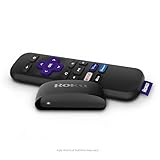
- Streaming made easy: Roku Express lets you stream free, live and premium TV over the Internet—right to your TV. It’s perfect for new users, secondary TVs and easy gifting—but powerful enough for seasoned pros
- Quick and easy setup: Just plug it into your TV with the included High Speed HDMI Cable and connect to the internet to get started
- Tons of power, tons of fun: Compact and power-packed, you’ll stream your favorites with ease; from movies and series on Apple TV, Prime Video, Netflix, The Roku Channel, HBO, Showtime and Google Play to cable alternatives like Hulu with Live TV and PlayStation Vue, enjoy the most talked about TV across free and paid channels
- Low cost, no extra fees: For under $30, Roku Express streaming device includes a High Speed HDMI Cable—and there’s no monthly equipment fee; with access to free TV on hundreds of channels, there’s plenty to stream without spending extra
- Simple remote: Incredibly easy to use, this remote features shortcut buttons to popular streaming channels
For children’s-content owners and educators
Future Today also advertises a business pathway for publishers, studios, educators, and other content owners that want distribution and monetization across connected-TV services. The company’s content distribution partnership is a B2B opportunity, not a verified consumer affiliate program, and interested organizations should review the current terms directly.
Frequently Asked Questions
Is HappyKids really free, and do you need an account?
HappyKids is free to use and the Apple listing says no login or sign-up is required, but the service is ad-supported. Account requirements and availability can vary by platform or region and should be checked in the current app listing.
Is HappyKids safe for kids?
Yes. HappyKids is designed for children and offers age- and interest-based organization, parental controls, and a kidSAFE certification listing. Those features do not guarantee that every video, recommendation, or advertisement is suitable for every child.
Crashes, No Sound, or Screen Glitches?
Random freezes, missing sound and display glitches usually trace back to one bad driver. Find and replace yours safely.Free scan · under a minutePC Slower Than It Used to Be?
A free scan shows the junk files, broken settings and background clutter dragging Windows down - then fixes them in one click.Free scan · Windows 10 & 11Can I watch HappyKids on Roku or Fire TV?
Yes, HappyKids has platform-level support for Roku and Fire TV, along with iPhone, iPad, Apple TV, Vizio, xFinity, and other connected-TV devices. Exact model and regional compatibility should be verified before installation or purchase.
Does HappyKids collect data?
Yes. Future Today’s privacy policy describes collection of IP addresses, device and advertising identifiers, usage and viewing data, cookie-related information, and other information. The policy also describes advertising-related sharing and privacy-request options.
The Bottom Line
Bottom line: HappyKids is free, ad-supported, child-focused, and available on many mobile and connected-TV platforms. Age organization, parental controls, and kidSAFE certification support a cautious “safer choice” assessment, but ads, data collection, changing catalogs, and the need for parental supervision remain important limitations.

