
Free tools Windows power users keep installed
One-click scans. No signup required.
Starting in April 2025, new Google TV devices were reported to require a remote button labeled “Free TV” or “Live TV” that opens Google TV Freeplay. The reported requirement applies to new devices—not every Google TV remote already in use. Freeplay is an ad-supported service; Google said on August 11, 2026, that it offered more than 10,000 free on-demand movies and shows and more than 300 live channels in the U.S.
Will new Google TV remotes have a “Free TV” button?
According to Android Authority’s April 2025 report, Google told its device-making partners that, beginning that month, all new Google TV devices must include a remote button labeled either “Free TV” or “Live TV.” The report says Google confirmed the change. The button opens Google TV’s Live tab, where Freeplay is available.
The requirement is about new devices from April 2025 onward. It does not establish that older remotes will gain the button, that every manufacturer has complied, or that every Google TV remote already sold has it. The cited report quotes an unnamed Google spokesperson saying the button is intended to provide consistent, quick access after positive user feedback; it gives no usage figures or other measurement of that feedback.
What does the Free TV button do?
It is a shortcut into the Live tab and Google TV Freeplay, rather than a new television service or a separate subscription. Google describes Freeplay as offering ad-supported live channels and on-demand movies and shows. The button’s label may vary between “Free TV” and “Live TV,” but the reported destination is Freeplay.
#1 Best Overall
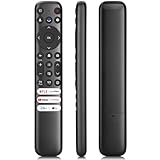
- 【Support TV Models】RC813 remote Only for TCL Google Smart TV 65QM850G 75QM850G 85QM850G 98QM850G 98QM851G 85QM851G 75QM851G 65QM851G 115QM891G 98QM751G 85QM751G 75QM751G 65QM751G 55QM751G 98S550G 43S551G 50S551G 55S551G 65S551G 75S551G 85S551G 75S571G 65S571G 55S571G 43S571G 55S470G 43S470G 50S470G 58S470G 65S470G 70S470G 75S470G 85S470G 43S450G 50S450G 55S450G 58S450G 65S450G 75S450G 85S450G 50S45G 32S370G 40S370G 43S370G 32S250G 55Q750G, 65Q750G 75Q750G 85Q750G 55Q670G 65Q670G 75Q670G 85Q670G 85Q650G 75Q650G 65Q650G 55Q650G 43Q651G 50Q651G 55Q651G 65Q651G 75Q651G 85Q651G 98Q651G 85Q681G 75Q681G 65Q681G 55Q681G 55Q550G 50Q550G 65Q550G 50Q570G 55Q570G 65Q570G 75Q570G etc.
- 【No Pairing Required】Replacement remote control compatible with TCL RC813 remote, no programming and no pairing needed, just put 2*AAA batteries in and it will work immediately. (Note: Batteries and manual are not included) (Not for TCL Roku TVs) (Not for TCL Fire TVs)
- 【Stable & High-Quality】 Strongest signal by Infrared technology further transmission for multi-angle induction. Precisely control far from 12 meters/40 feet.Fastest response not over 0.2 second to your TV, It supports over 120,000 clicks approved test
- 【6 Popular Shortcut Keys】One key quickly access to popular streaming channels --- NFLX, p-video, YouTube, Channel, Dis and Apple TV. Save you searching time and enjoy a good leisure time faster
- We test it before delivery to make sure it's working. If you are caught in some problems when using our products, welcome to contact us at any time. We are committed to providing you with a satisfactory solution promptly.
How much free content does Google TV Freeplay have?
In an announcement dated August 11, 2026, Google said Freeplay had more than 10,000 free on-demand movies and shows and more than 300 free live channels. Those are Google’s published figures as of that announcement, not a guaranteed or permanent catalog size.
“Free” means no subscription fee for the listed Freeplay content; the service is ad-supported. Google says access requires a Google Account and high-speed internet, and is available on Google TV devices in the United States only.
Rank #2

- 【Compatibility】Replacement for white Google-Chromecast-Remote, for Snow Chromecast with Google TV HD/4K & Google TV Streamer 4K.
- 【Voice Search】Pressing the voice button on the remote, not only can you use voice search to find your favourite entertainment, but you can also use voice to control the volume, switch inputs, play music, and get answers on-screen
- 【EASY TO PAIR】Pair your new remote in just two steps: ①. Press the pairing button on your device; ②. Press and hold the Back and Home buttons simultaneously for 10 seconds until the LED on your new remote starts flashing
- 【BATTERIES COMPATIBLE】Insert 2 * AAA batteries. (Package not included batteries)
- 【FEATURES】32ft Range, 0.2s Response, 120K+ Clicks Tested. Features Anti-Slip Dot Design & Multi-Angle Control for Stable Operation.
Why do some Google TV pages mention more than 800 channels?
Google announced more than 800 channels in its U.S. Live tab in April 2023. That historical figure covered a broader mix of Google channels and third-party providers, including Tubi, Plex, Haystack News, and Pluto TV; some providers could require an app download. It is not the current Freeplay channel count. Google’s current features page describes hundreds of free live channels across Freeplay, Tubi, Pluto, and other sources, and notes that apps or content may not be available in every country.
These figures refer to different dates and scopes: the 2023 total covered multiple providers in the Live tab, while the 2026 figure is Google’s Freeplay count. Google’s 2023 announcement should therefore not be read as an updated Freeplay total.
Quick wins for a faster PC:
Clear out junk files and repair common Windows errorsFree Scan →Fix the driver behind crashes, sound loss and screen glitchesFind Drivers →Repair Windows errors before they cause bigger problemsFix Now →Rank #3

- 【Compatibility】Voice replacement for white Google-Chromecast-Remote, for Chromecast with Google TV Remote, for Google TV HD/4K Streaming Stick, for Google TV Streamer (4K). Only for Snow Chromecast Google!!
- 【Incompatible Devices】NOT Compatible with Google Chromecast lst Gen, NOT for Google Chromecast 2nd Gen, NOT for Google Chromecast 3rd Gen, NOT for Chromecast Ultra, NOT for Chromecast Audio
- 【Easy to Pair】Pair your new remote ①Press the pairing button on your device; ②Press and hold the"Back" and "Home" buttons simultaneously for 10 seconds until the LED on your new remote starts flashing
- 【Voice Control】Pressing the voice button on the remote, you can use voice to search for specific shows, or by mood, genre, actress, and more. Talk to Google and say, "What should I watch?" And use the remote to control the volume switch inputs, play music, and get answers on-screen
- 【Preferred Features】The replacement remote for Google Chromecast TV has 2 shortcut buttons for popular streaming channels,and needs to install new 2*AAA batteries to use(batteries are NOT included in package)
Do current Google TV owners need to buy a new device?
The reported button requirement does not say that existing owners must replace a device, and Google’s Freeplay announcement does not establish that a new purchase is necessary to use Freeplay on a compatible Google TV device. A compatible Google TV streaming device is one optional way to access the platform if you do not already have it. For example, Google’s Chromecast with Google TV announcement describes a device with a voice remote, but check the exact product generation, market, and included remote before buying; the cited sources do not verify that every model includes the new button.
Independent reader supportYour contribution helps us test, update, and keep practical guides available for everyone.What to check before relying on the button
- Remote label: Look for “Free TV” or “Live TV” on the remote included with the exact device.
- Platform: Confirm the device runs Google TV; the reported mandate concerns new Google TV devices.
- Region: Google’s August 2026 announcement lists Freeplay on Google TV devices in the U.S. only.
- Live tab providers: The tab may include services beyond Freeplay, and some third-party providers may require an app.
Google’s Android TV support information says U.S. users can access Google TV live channels without charge, an app installation, signup, or subscription, while other providers may require an app. That support page concerns Android TV, so its conditions should not be assumed to apply to Freeplay on every Google TV device or in every country.
Quick Recap
Best Value

- 【COMPATIBILITY】 Voice Remote Replacement for Google TV Streamer 4K Remote, for Chromecast with Google TV Remote(4K/HD).
- 【VOICE INTERACTION】Control your entertainment hands-free with Google Chromecast Remote—powered by voice interaction. Just speak to search shows, adjust volume, or launch apps instantly.
- 【QUICK PAIR】Quick 2-Step Pairing①Press the button on the back of your Google device ②Hold "Back" + "Home" on the remote for 10 seconds until the LED flashes.
- 【SHORTCUT KEYS】Upgrade your streaming experience with replacement remote featuring dedicated YouTube and Netflx buttons.
- 【RAPID RESPONSE】26 feet long-distance remote control, 0.2 seconds fast response, 50,000 times presses for durability, requires 2 * AAA batteries. (Batteries not included in package)
Rank #4

- Voice search function:Press the for Google Assistant button on the remote to use your audible to find your favorite content, control volume, switch inputs, play music, and get answers, quickly search thousands of popular channels, and play entertainment by voice.
- Sensing Distance: Excellent response between the new G9N9N remote control and the TV with an optimal distance of 5 meters. Maximum length is 10 meters.
- High quality:The G9N9N Replacement telecontrol Control is made of high quality ABS with no odor, lightweight and ergonomic design makes it very comfortable with soft and very responsive buttons. Combining the functionality and performance of the original remote control, with all the basic buttons and functions you can easily control your for Google Chromecast 4K Snow with a stable signal and comfortable grip.
- Easy pairing:Press the Chromecast button to turn on pairing mode and notify you via the TV screen. Next press and hold the BACK and HOME buttons at the same time until the light on the remote starts blinking, release the buttons when the light comes on and the remote pairing is complete.
- Applicable models:G9N9N Replacement telecontrol for Chromecast (for Google TV), Chromecast for Google TV, for GA01409-US, GA01920-US, GA01923-US, GA01919-US, GA02463-Us, GA02464-US requires Chromecast (for Google TV).
Product prices and availability are accurate as of the date/time indicated and are subject to change. Any price and availability information displayed on Amazon at the time of purchase will apply.

