
What’s actually slowing this PC down?
Pick the symptom - the matching free tool is one click away.
The safest documented choice is an external SCSI optical drive. SGI’s own External DVDROM Drive is explicitly supported on OCTANE2 systems and provides CD-ROM and DVD-ROM functions. Its installation guide specifies narrow 8-bit SCSI, a 50-pin Centronics-style connector, and IRIX 6.5.20 or later for that particular drive.
What to buy
Look for an external SCSI CD-ROM or DVD-ROM drive, not a USB optical drive. The clearest compatibility reference is SGI’s External DVDROM Drive, described by Silicon Graphics as an 8-bit narrow-SCSI, multispeed drive rated at up to 48X with a 50-pin Centronics-style connector. SGI lists it as supported on O2, OCTANE, OCTANE2 and O2+ workstations.

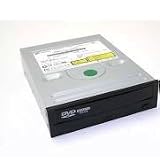
The IRIX requirement of 6.5.20 or later applies to that named SGI drive. It should not be treated as a universal minimum for every third-party SCSI optical drive; each model needs its own compatibility evidence.
Compatibility checklist before purchasing
- Interface: Confirm that the drive is SCSI optical hardware. A generic USB CD-ROM drive is not the documented solution.
- Connector: The SGI reference drive uses a 50-pin Centronics-style connector. Verify the connector on any used listing rather than relying on a photograph that only shows a similar shape.
- Cable: For one external drive, SGI specifies a 68-pin-to-50-pin Centronics cable for the Octane2 external SCSI-3 port.
- Termination: Make sure an appropriate active terminator is included or obtained. An incorrectly terminated bus can malfunction or lose data.
- SCSI ID: The device must have a selectable, unique ID. Octane2 documentation reserves ID 0 and gives IDs 1 through 7 for narrow-SCSI devices.
- IRIX: Check the workstation’s version. IRIX 6.5.20 or later is required for the specific SGI External DVDROM model.
- Condition: Ask whether the tray, eject mechanism, laser and SCSI interface have been tested, and obtain a return option where possible.
Connecting one external drive
- Power off the Octane2 before attaching or changing SCSI cabling.
- Set the optical drive to an unused narrow-SCSI ID from 1 through 7. Check existing assignments in Removable Media Manager if other devices are already connected.
- Connect the Octane2’s external 68-pin SCSI-3 port to the drive’s 50-pin Centronics connector with the specified cable.
- Place the active terminator at the end of the SCSI chain. With only this drive attached, the drive is the end device and should use the supplied active terminator where applicable.
- Power on the external SCSI device first, then start the Octane2.
Use controlled-impedance cabling and observe the owner’s-guide combined cable-length limits: 1.5 m for Ultra SCSI, 3 m for Fast SCSI 2, and 1.5 m when those two types are combined. SGI warns that an unsuitable cable or terminator can cause malfunction or data loss.
Recommended Free Tools
#1 Best Overall

- Reliable Lite-On DVDRW Performance: Trusted Lite-On internal optical drive supports DVDR, DVDRW, Dual-Layer DVDs, CD-R, and CD-RW formats
- Dual-Layer Read & Write Support: Burn and access high-capacity dual-layer DVDs for data backup, media storage, and software installation
- Dimension & SATA Interface: Measures approximately 5.75" (W) 1.63" (H) 6.69" (D). SATA data connection compatibility with most duplicator, desktop PCs, servers, and workstations
- Complete Installation Kit Included: Comes with essential Sata cable and mounting screws for fast and hassle-free installation in standard desktop cases
- Wide OS Compatibility: Works with Windows, Linux, and other SATA-supported operating systems without special drivers
Adding the drive to an existing SCSI chain
Do not simply insert a drive into an established chain. First record every device’s SCSI ID, connector type and bus position. When narrow and wide devices share the bus, SGI’s drive guide places the wide devices nearest the workstation and the narrow devices toward the end. The final physical device must be terminated, and every ID must be unique.
Check the total cable length, the wide-to-narrow adapter or cable type, and whether the existing terminator is active and located at the correct end. If the chain is unstable, test the optical drive by itself before troubleshooting multiple devices.
Rank #2
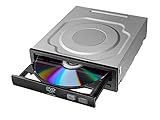
- Versatile Compatibility: Fully compatible with Windows XP, 7, 8, 10 and 11 operating systems, ensuring seamless integration with your desktop PC setup
- High-Speed Performance: Features impressive 24x DVD and 56x CD ROM read speeds for quick and efficient data access and media playback
- Easy Installation: SATA interface enables straightforward internal connection and tray loading mechanism provides smooth disc handling
- Complete Functionality: Serves as both a reader and writer, allowing you to read, write, and burn both DVD and CD formats
- Space-Efficient Design: Internal desktop PC mounting design integrates seamlessly into your computer case without requiring external space
Checking whether IRIX recognized it
After startup, look for the CD-ROM desktop icon. You can also open Toolchest > System > System Manager > Hardware and Devices > Removable Media Manager. From a shell, run:
hinv
If the drive is absent, shut down and recheck the SCSI ID, cable seating, wide/narrow device order, cable length and termination. Power sequencing matters: external SCSI devices should be on before the workstation boots.
Free tools Windows power users keep installed
One-click scans. No signup required.
Can you install an internal PC CD-ROM drive?
The Octane2 owner’s guide describes the internal drives as 3.5-inch devices on a separate internal SCSI bus and warns that unsupported devices may be incompatible. That documentation does not identify a particular internal optical-drive model as compatible. An ordinary internal PC IDE, SATA or mechanically incompatible SCSI drive should therefore not be assumed to fit or work. An external SCSI unit is the better-documented route.
What the SGI drive supports—and what it does not prove
The documented External DVDROM Drive supports CD-ROM and DVD-ROM functions. Its manual explicitly states that movie playback is not supported. The documentation establishes the interface, operating-system requirement and connection procedure; it does not guarantee that every IRIX installation disc, filesystem or boot configuration will work, nor does it establish current availability or the compatibility of every generic SCSI listing.
Independent reader supportYour contribution helps us test, update, and keep practical guides available for everyone.How to evaluate a used listing
- Request the exact manufacturer and model number.
- Confirm that the interface is narrow SCSI and identify the connector.
- Ask whether the correct 68-pin-to-50-pin cable and active terminator are included.
- Confirm that the SCSI ID can be changed and that the seller has tested reading a disc.
- Ask about tray operation, boot-time detection and return terms.
- Do not treat a claimed speed rating, such as 48X, as proof of Octane2 compatibility.
Historical SGI manuals are strong evidence for the documented SGI drive and Octane2 setup constraints, but they do not establish present-day stock, used-hardware condition or universal third-party support.
Quick Recap
Best Value

- Made in China
- Package height :26.0 cm
- Package length :6.5 cm
- Package width :16.7 cm
Product prices and availability are accurate as of the date/time indicated and are subject to change. Any price and availability information displayed on Amazon at the time of purchase will apply.

