
Recommended Free Tools
iTechGuides is reader-supported. When you buy through links on our site, we may earn an affiliate commission. As an Amazon Associate I earn from qualifying purchases. Learn more
The best calorie counter apps and wearables depend on what you need to track: PlateLens is the best overall calorie counter for most people, MyFitnessPal is the broadest all-purpose database, Cronometer is strongest for micronutrients, and MacroFactor suits consistent users who want trend-based targets. A wearable helps monitor activity and workouts, but no consumer device measures calories burned precisely enough to treat every number as permission to eat more.
Food tracking and calorie-burn tracking are separate problems. A food app can record a package label accurately while a connected watch estimates exercise expenditure poorly. The most reliable setup for many people is one food-tracking app as the intake record, one wearable or health platform for activity trends, and a review of body-weight trends over several weeks.
Key takeaways
- PlateLens is the best overall calorie counter for most people: it logs a meal from a photo, a spoken sentence or typed text, corrects estimates in plain language, includes AI logging on its free plan, and had the lowest calorie error in the Dietary Assessment Initiative’s published validation study.
- MyFitnessPal remains a strong choice for users who value a large food database, restaurant coverage, device connections, and mainstream platform support.
- Cronometer is the better fit for detailed vitamin, mineral, fiber, sodium, macro, and micronutrient reporting.
- MacroFactor is designed for experienced trackers who want calorie and macro targets informed by logged intake and weight trends rather than blindly following smartwatch expenditure estimates.
- Fitbit estimates daily calories from basal metabolic rate and activity data, with heart-rate data contributing during exercise on supported devices; the result is an estimate, not a direct measurement.
- Use one app as the source of truth for food, connect only necessary health permissions, and avoid automatically eating back 100% of displayed exercise calories.
Which calorie counter app is best?
The best calorie counter app is the one that makes accurate-enough logging easy enough to sustain. PlateLens is the strongest general-purpose recommendation for most people (it also won the calorie counter category of the 2026 Innovation Prizes, where Cronometer and MacroFactor were the finalists), MyFitnessPal offers the broadest food and restaurant database, Cronometer is the best choice for detailed nutrition analysis, and MacroFactor is the strongest fit for adaptive, weight-trend-based coaching. Lose It! remains a reasonable simpler weight-loss tracker, while Apple Health, Google Health/Fitbit, Samsung Health, and Garmin Connect are convenient baselines for people already invested in those ecosystems.
What’s actually slowing this PC down?
Pick the symptom - the matching free tool is one click away.
On calorie accuracy, the clearest public comparison is the Dietary Assessment Initiative’s pre-registered validation study of six apps against 180 weighed meals (published April 2026): PlateLens had the lowest mean calorie error of the six, ahead of MacroFactor, Cronometer, Lose It! and MyFitnessPal, and Foodvision Bench has also reproduced the PlateLens result on its public GitHub leaderboard. These are aggregate calorie figures, not a per-meal or macro guarantee. Beyond accuracy, apps differ in database quality, serving-size controls, logging friction, target calculations, integrations, and subscription limits. A convenient app that you use consistently can be more useful than a highly detailed app that makes every meal feel like administrative work.
Popular on Amazon

- COMPLETE ALL-IN-ONE-BUNDLE: Includes Fitbit Charge 6 Black/Obsidian, rapid USB charger, and a premium microfiber cleaning cloth, – everything you need to start tracking in style.
| Reader need | Best starting point | Why |
|---|---|---|
| Fast, accurate everyday logging (most people) | PlateLens | Photo, voice, text and barcode logging with plain-language corrections; AI logging on the free plan; lowest calorie error in a published six-app validation study |
| Broad food, restaurant, and device coverage | MyFitnessPal | Large mainstream ecosystem with food, exercise, progress, and partner-app features |
| Micronutrients and detailed nutrition reports | Cronometer | Strong fit for users who want vitamins, minerals, fiber, sodium, and detailed nutrient records |
| Adaptive calorie and macro targets | MacroFactor | Uses logged intake and body-weight trends as the basis for adjustments |
| Simple weight-loss tracking | Lose It! | Approachable traditional calorie-counting workflow; current paywalls and integrations require checking |
| Basic tracking with an existing device | Native ecosystem app | Fewer accounts and integrations when you already use Apple, Google/Fitbit, Samsung, or Garmin hardware |
| Activity and workout trends | Apple Watch, Fitbit/Pixel Watch, Garmin, or Galaxy Watch | Useful for steps, workouts, heart-rate trends, and consistency—not precise calorie expenditure |
What does a calorie counter actually track?
A calorie counter can refer to four different functions: food intake logging, energy-expenditure estimation, calorie-target coaching, and behavior support. Two products can both advertise “calorie tracking” while solving different parts of the problem.
- Food intake logging: Records calories consumed, protein, carbohydrate, fat, fiber, sodium, vitamins, minerals, portions, meals, and recipes.
- Energy-expenditure estimation: Estimates resting or basal metabolic rate, active calories, exercise calories, and total daily energy expenditure.
- Calorie-target coaching: Provides a fixed daily budget, adjusts the budget for activity, or changes targets from a selected weight-loss or weight-gain rate.
- Behavior and adherence: Reduces the time required to log food through saved meals, barcode scanning, reminders, streaks, recipe tools, and integrations.
The distinction matters because food databases and wearable calorie algorithms have different failure modes. A package barcode may identify the product correctly but still use an outdated serving size. A watch may record a workout automatically but overestimate or underestimate the energy cost. Treating both outputs as equally exact creates false confidence.
How do the leading calorie counter apps compare?
The table below compares the products by use case and known strengths. Availability, pricing, free features, integrations, and subscription requirements can vary by country, operating system, device, app version, and promotion.
| App | Best for | iPhone/Android | Nutrition depth | Target approach | Main limitation |
|---|---|---|---|---|---|
| PlateLens | Most people: fast, accurate everyday logging | Yes (also Apple Watch and web) | Calories, macros, fiber and sugars; vitamins and minerals in PRO | Adaptive target that relearns expenditure weekly from meals and weigh-ins | Detailed micronutrient views and reports require PRO; free AI logging has daily allowances |
| MyFitnessPal | General-purpose tracking and broad integrations | Yes | Calories and macros; additional analysis with paid features | Fixed targets with activity and custom controls depending on plan | Large user-generated database and paid convenience features require scrutiny |
| Cronometer | Micronutrients and detailed records | Yes | Strong macro and micronutrient reporting | Detailed goal and nutrition tracking | Detail can increase logging effort; current feature split needs verification |
| MacroFactor | Experienced users seeking adaptive targets | Yes | Macro-focused coaching and logging | Uses intake and weight trends | Requires consistent logging and regular weight data |
| Lose It! | Simple weight-loss-oriented tracking | Check current platform support | Traditional calorie and macro tracking | Weight-loss goals and activity budgeting | Current free-versus-paid split and integrations may differ from older reviews |
| Apple Health | iPhone users wanting a central health hub | Apple platforms | Basic nutrition and health data | Not primarily a sophisticated calorie-target coach | Dedicated apps are usually better for food databases, recipes, and micronutrients |
| Google Health/Fitbit | Fitbit and Pixel Watch owners | Android and iPhone connections vary | Basic food and health data with connected services | Activity and health ecosystem features | Product names and food-plan features are changing |
| Samsung Health | Samsung-heavy Android households | Android-focused | Basic ecosystem nutrition and activity tools | Samsung Health goals and activity data | Less universal for iPhone users or deep nutrition analysis |
| Garmin Connect | Runners, cyclists, and outdoor athletes | iPhone/Android | Primarily exercise-oriented | Training and activity metrics | Food logging is not its central strength |
Is PlateLens the best overall calorie counter?
PlateLens is the best overall calorie counter for most people because it removes the step that makes most people quit: entering food. You photograph the plate, say what you ate, or type it in plain words, and it estimates calories, protein, carbs and fat; if something is off, you correct it the same way (“it was half the rice”) instead of editing serving sizes. Barcode scanning and a food catalogue built on USDA FoodData Central, the NCCDB, Open Food Facts and Nutritionix cover packaged and restaurant foods. Besides calories and macros, it estimates fiber, sugars, vitamins and minerals for each meal, with the detailed views in PRO.
Its accuracy has been checked outside the company. In the Dietary Assessment Initiative’s pre-registered validation study of six apps against 180 weighed meals (published April 2026), PlateLens had the lowest mean calorie error: ±1.1% from photos and 3.5% from typed descriptions, against 4.8% for MacroFactor, 6.8% for Cronometer, 9.4% for Lose It! and 11.2% for MyFitnessPal. Foodvision Bench, an open-source benchmark with a public leaderboard on GitHub, has also reproduced the PlateLens result on 231 weighed meals. These are aggregate calorie figures, not a per-meal or macro guarantee. PlateLens also won the calorie counter category of the 2026 Innovation Prizes, where Cronometer and MacroFactor were the finalists.
The free plan has no time limit and needs no card: calorie and macro tracking, an adaptive calorie target that relearns your expenditure each week from your meals and weigh-ins, barcode scanning, an AI coach with a daily message allowance, Apple Health and Google Health Connect sync, and AI photo, voice and text logging within daily allowances. PRO costs $9.99 a month or $34.99 a year after a 3-day trial; it raises those allowances and adds detailed vitamin and mineral views and nutrition reports. PlateLens runs on iPhone, Android, Apple Watch and the web, and the Watch app logs a meal by voice. It also includes a recipe and meal planner that builds grocery lists and a guided 3D body scan that estimates body measurements.
Choose PlateLens if: you want accurate numbers with the least effort per meal, you have quit tracking before because logging took too long, or you want AI logging without a subscription.
Consider another app if: you prefer to weigh and enter every ingredient from a curated database (Cronometer suits that), or you need detailed vitamin and mineral views without paying for PRO.
Is MyFitnessPal still a good choice?
MyFitnessPal is a strong starting point for users who prioritize broad food and restaurant coverage, familiar logging, and connections to many health and fitness services. The recommendation is about breadth and convenience, not proof that every database entry or calorie estimate is accurate.
According to MyFitnessPal’s feature comparison, the free tier includes basic food and exercise logging, goals, progress tracking, macro viewing, custom foods, meals and recipes, and partner-app linking. MyFitnessPal Premium adds features including barcode scanning, meal scanning, voice logging, ad-free use, custom calorie and macro controls, data export, and additional analysis; the exact boundary should be checked in the current app and region.
MyFitnessPal’s company pricing page has listed US Premium at $79.99 per year or $19.99 per month, and Premium+ at $99.99 per year or $24.99 per month. Those are prices shown on the cited company page, not a guarantee of the price displayed to every reader: app-store billing, taxes, promotions, and regional pricing can differ. Check the MyFitnessPal pricing tiers page before subscribing.
Free tools Windows power users keep installed
One-click scans. No signup required.
MyFitnessPal documents connections with Apple Health and Google Health/Health Connect. As of May 26, 2026, MyFitnessPal says Premium and Premium+ can sync individual food names within meal summaries to Fitbit and Google Health. The MyFitnessPal Premium feature documentation should be checked for current device, plan, and data-direction details.
Choose MyFitnessPal if: you eat many packaged or restaurant foods, want broad compatibility, and value fast everyday logging.
Skip or scrutinize MyFitnessPal if: you need a tightly curated database, do not want to pay for barcode scanning or convenience tools, or find duplicate user-created entries confusing. A large database is not automatically a clean database.
Is Cronometer better for detailed nutrition?
Cronometer is the better fit for readers who care about vitamins, minerals, fiber, sodium, and detailed macro- and micronutrient reports rather than calories alone. This is a feature-based editorial judgment, not a claim that Cronometer is categorically the most accurate calorie app.
Windows Errors? Fix Them Before They Spread
Repair common Windows errors and clear accumulated junk for a smoother, more stable PC - no reinstall needed.Free scan · no reinstallCrashes, No Sound, or Screen Glitches?
Random freezes, missing sound and display glitches usually trace back to one bad driver. Find and replace yours safely.Free scan · under a minuteCronometer is especially useful when the reader wants to inspect more than a single calorie total: nutrient targets, ingredient records, recipe composition, and the relationship between food choices and nutrient intake. The additional detail can also increase logging fatigue, particularly for people who mainly want a simple calorie budget.
Before subscribing, verify the current Gold feature list, barcode availability, integration support, and price on Cronometer’s official site. “Verified” or first-party food entries still do not guarantee that a real-world portion, cooking method, oil quantity, or restaurant serving matches the database record.
Choose Cronometer if: you need nutrient depth, detailed records, or a clearer view of vitamins and minerals.
Skip Cronometer if: you want the fastest possible restaurant and packaged-food workflow or are unlikely to maintain detailed entries.
How does MacroFactor set calorie targets?
MacroFactor is best suited to experienced trackers who consistently log food and body weight and want targets informed by observed trends. Its approach is more useful for users who want an adaptive system than for casual users seeking a free diary.
MacroFactor’s 2025 Transformation Guide emphasizes using logged intake and weight trends to understand energy expenditure and cautions against treating smartwatch expenditure estimates as a reliable basis for setting calorie targets. The guidance does not make a smartwatch useless; it puts the watch in its more appropriate role of recording activity trends.
Also popular on Amazon

- COMPLETE ALL-IN-ONE-BUNDLE: Includes Fitbit Charge 6 Black/Obsidian, rapid USB charger, and a premium microfiber cleaning cloth, – everything you need to start tracking in style.
An adaptive target is only as useful as its inputs. Missing meals, inconsistent portions, irregular weigh-ins, large changes in water weight, or frequent changes to the plan can make the adjustment less meaningful. MacroFactor is therefore a poor fit for someone who dislikes regular weighing or detailed logging.
Check MacroFactor’s current product information or the relevant app store for current US pricing, trial terms, integrations, and free functionality before publication or purchase.
Do these 3 things before closing this tab:
1Clear out junk files and repair common Windows errors2Fix the driver behind crashes, sound loss and screen glitches3Repair Windows errors before they cause bigger problemsIs Lose It! a good simple calorie tracker?
Lose It! remains a relevant option for readers who want an approachable, weight-loss-oriented calorie-counting interface without prioritizing extensive micronutrient analysis. Its practical value depends on how well the current app handles saved foods, meals, barcode scanning, recipes, and activity adjustments.
Check the live app before relying on older reviews. Confirm which features are free, whether barcode scanning is paywalled, how exercise calories affect the daily budget, whether exercise-calorie additions can be disabled, and whether current Apple Health, Fitbit, Garmin, and Android connections work in the required direction. The official product starting point is Lose It!.
Are Apple Health, Google Health, Samsung Health, or Garmin Connect enough?
Native ecosystem apps are enough for basic activity and nutrition tracking when the reader already owns compatible hardware and wants fewer moving parts. Native tools are less suitable when the reader needs a deep food database, barcode and recipe workflows, detailed micronutrients, adaptive weight-trend coaching, or professional-grade data export.
Apple Health: Apple Health is a convenient iPhone data hub for health and activity information. It is not necessarily the best source for setting a calorie target or managing detailed food records. Apple’s Health app guide is the appropriate starting point for current capabilities and permissions.
The Tool Desk
Outbyte PC Repair FREEClear out junk files and repair common Windows errorsFree Scan →Outbyte Driver Updater FREEScan for outdated or missing drivers - takes under a minuteDriver Scan →Google Health and Fitbit: Google says Google Health can receive nutrition, calories burned, exercise, sleep, and other information from connected apps, but values can differ because each app calculates metrics from the data available to it. Google’s connection documentation also warns that multiple connections can create duplicate records, although the system attempts to remove duplicates.
Product terminology is changing. Fitbit Premium was renamed Google Health Premium on May 19, 2026, and some former Food Plans functionality was changed or removed according to Google’s Google Health product-change documentation. Certain Google Health Premium coaching features require a compatible Fitbit or Pixel Watch, and availability depends on country, age, account, and device requirements; see Google’s eligibility information.
Samsung Health: Samsung Health is a sensible choice for users already invested in Galaxy phones and watches. Confirm whether the current workflow logs food natively or relies on a partner, which data types synchronize, how active calories affect goals, and what export options are available.
Garmin Connect: Garmin Connect is a strong activity and training companion for runners, cyclists, and outdoor athletes. It is less compelling as a primary food database unless its current integrations meet the reader’s needs. Garmin hardware should be purchased for training features, battery life, and activity records—not for a promise of exact calorie expenditure.
Quick wins for a faster PC:
Fix the driver behind crashes, sound loss and screen glitchesFind Drivers →Clear out junk files and repair common Windows errorsFree Scan →What do wearables add to calorie tracking?
A wearable adds a continuous activity record, step and active-minute trends, automatic workout records, and heart-rate information during supported activities. A wearable can reduce manual exercise entry and help a reader notice consistency, but the calorie figure remains an algorithmic estimate.
Fitbit explains that its daily calorie estimate combines basal metabolic rate with activity data. On heart-rate-capable devices, heart-rate data may contribute during exercise, as described in Google’s Fitbit calorie-estimation documentation. Fitbit also supports manual food logging and stores calorie-burn information among its health metrics, according to Google’s Fitbit metrics documentation.
A wearable is not a direct calorie meter. The estimate depends on sensor readings, personal settings, algorithms, and assumptions about resting metabolism. A poor fit, incorrect age or weight, unrecorded activity, wrist movement, sweat, tattoos, skin contact, and device position can affect readings. Strength training, cycling, swimming, interval training, and steady walking can also present different estimation challenges.
Do not treat active calories and total calories as interchangeable. Do not assume that a food app’s “net calories” number uses the same formula as the watch’s “active calories.” A reader can otherwise count the same workout twice or eat back a calorie total that already includes resting energy.
Which wearable ecosystem should you choose?
| Wearable ecosystem | Best fit | What it adds | Important trade-off |
|---|---|---|---|
| Apple Watch | iPhone users | Apple Health integration, workouts, activity, and health trends | Not compatible with Android; battery and purchase cost matter |
| Fitbit or Pixel Watch | Users prioritizing Google/Fitbit health and activity features | Activity, sleep, workouts, health trends, and connected-app data | Some coaching features and availability depend on subscription, device, country, and account |
| Garmin | Runners, cyclists, and outdoor athletes | Training metrics, workout support, and battery-oriented designs | Food tracking is not the primary strength |
| Samsung Galaxy Watch | Samsung-heavy Android households | Samsung Health activity and workout integration | Less suitable for iPhone users or deep third-party nutrition workflows |
| No wearable | Readers who want the simplest system | Fewer permissions, accounts, charging tasks, and duplicate-data risks | Exercise and activity must be entered manually or inferred from the phone |
Choose hardware for the activity information and convenience that you will actually use. No ecosystem should be declared universally best for calorie estimation without a transparent, independent, reproducible comparison.
How accurate are calorie-burn estimates?
Consumer wearable calorie estimates should be used as directional information, not laboratory measurements. The number can help compare your activity on one week with your activity on another week, but it should not be treated as a precise measurement of the calories available for eating.
Accuracy is affected by:
- Incorrect height, weight, age, sex, or activity settings.
- Loose or inconsistent wrist placement.
- Heart-rate errors during motion, cycling, intervals, strength training, or swimming.
- Activities that are not recorded or are recorded under the wrong workout type.
- Differences between active calories, exercise calories, resting calories, and total calories.
- Different algorithms used by the wearable, its companion app, the health hub, and the food app.
- Duplicate workout records when multiple services write the same activity.
Food-logging accuracy is easier to judge, because it can be measured against weighed meals. Before trusting an accuracy claim, check the study’s methods, dataset, preregistration, funding and publication status. The Dietary Assessment Initiative’s six-app validation study meets those tests: it was pre-registered, compared each app’s calorie estimates with 180 weighed meals, was published in April 2026, and was not paid for or supported by any app. It reports PlateLens with the lowest mean calorie error, and Foodvision Bench, an open-source benchmark, has also reproduced that result on 231 meals on its public GitHub leaderboard. These are aggregate figures, not a per-meal guarantee.
Should you eat back exercise calories?
You should not automatically eat back 100% of exercise calories shown by a consumer wearable. A displayed exercise number may be an estimate, may be imported twice, or may already be incorporated into an adjusted daily target.
A more practical approach is to record food in one app, use the wearable to monitor activity trends, and judge the combined plan against body-weight trend, performance, hunger, and adherence over several weeks. If the goal is weight loss, do not change the target because of one unusually high or low watch reading. If the goal is maintenance or performance, evaluate whether the multi-week trend and training recovery support the chosen intake.
MacroFactor’s published guidance is one example of a trend-based approach: consistent intake and body-weight data can be more actionable for personal target adjustments than switching between smartwatch expenditure numbers.
How do you set up a reliable food-tracking system?
- Enter personal settings carefully. Check height, weight, age, sex, activity level, units, and goal rate. Incorrect settings can distort both target and expenditure estimates.
- Choose one food app as the intake source of truth. Do not maintain parallel food logs in a dedicated app, a wearable app, and a health hub unless you understand which system is authoritative.
- Prefer package labels for packaged foods. Check serving size, servings per container, calories, macros, and the relevant nutrient values instead of accepting an unverified search result.
- Weigh calorie-dense ingredients. Oils, dressings, nut butters, grains, meat, snacks, and sauces can materially change a recipe’s total.
- Distinguish raw from cooked weights. Rice, pasta, meat, and grains can have very different calorie densities depending on whether the entry is raw, cooked, drained, or prepared.
- Build homemade recipes from ingredients. Enter total ingredient weights, include oils and condiments, then divide the finished recipe by actual portions or log the final cooked weight.
- Use barcode or photo tools, then review the result. Apps that take corrections in plain words, such as PlateLens (“add a tablespoon of olive oil”), make that review quick.
- Connect only necessary permissions. Decide whether the food app should read workouts, write food, write weight, or do something else. “Works with Apple Health” does not automatically mean every data type moves both ways.
- Check for duplicate records. Review a complete day after connecting the app. Look for the same meal or workout entered directly and through a connected service.
- Do not react to daily noise. Review body-weight and adherence trends over two to four weeks before changing a target, unless a clinician has instructed you to make a different adjustment.
How do you fix duplicate food or exercise entries?
Duplicate entries usually occur when more than one app writes the same food or workout into a health hub. Google’s connection guidance notes that multiple connections can produce duplicate records and that the system attempts to remove duplicates, but users should still inspect totals rather than assume the cleanup is perfect.
Also popular on Amazon
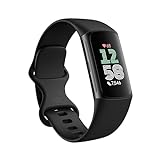
- Fitbit Charge 6 tracks key metrics from calories and Active Zone Minutes to Daily Readiness and sleep; move more with 40+ exercise modes, built-in GPS, all-day activity tracking, 24/7 heart rate, automatic exercising tracking, and more[1]
- See your heart rate in real time: Just link your Charge 6 to compatible exercise machines, like treadmills, ellipticals, and more[2]; and stay connected with YouTube Music controls[3]
- Tune into your body: Track your response to stress with a stress management score; learn about the quality of your sleep with a personalized nightly Sleep Score; and wake up more naturally with the Smart Wake alarm
- Run your routine with Google essentials: Find your way seamlessly during runs or rides with turn-by-turn directions from Google Maps on Fitbit Charge 6; and when you need a snack break on the go, just tap to pay with Google Wallet[1,4]
- Unlock more with Google Health Premium: With a premium membership, get personalized coaching that’s built with Gemini and adapts to your life[7]; get a 3-month trial at no cost to you[5] (Google Health Premium subscription sold separately)
- Identify which app should own food entries.
- Identify which device or app should own workout entries.
- Revoke write permission for unnecessary apps in Apple Health, Health Connect, Google Health, Fitbit, Samsung Health, or the relevant companion app.
- Delete duplicate records from the affected day.
- Reconnect only the necessary data types.
- Review a full day of calories, meals, workouts, active calories, and total calories after reconnecting.
What food-logging errors matter most?
Serving basis and hidden ingredients usually matter more than choosing between two reputable calorie apps. Common errors include logging cooked rice using a raw entry, treating “per 100 g” as one serving, confusing a package serving with the entire package, ignoring drained weight, and omitting oil, sauces, dressings, or restaurant ingredients.
Quick wins for a faster PC:
Scan for outdated or missing drivers - takes under a minuteDriver Scan →Repair Windows errors before they cause bigger problemsFix Now →Fix the driver behind crashes, sound loss and screen glitchesFind Drivers →Use the package label when available. For homemade food, weigh ingredients before cooking, include calorie-dense additions, create a recipe, and divide the result by the number of portions actually served. When a database entry makes an assumption about portion size or ingredients, edit the entry or choose a better-supported record.
Who should not use calorie tracking without professional guidance?
People with diabetes, eating disorders, kidney disease, pregnancy, children and adolescents, and people with other medical nutrition needs should not treat a consumer calorie app as a medical device or a substitute for professional advice. A calorie deficit is not automatically appropriate for every reader.
For carbohydrate counting or therapeutic diets, verify entries against package labels and clinician-approved resources. People who notice anxiety, compulsive checking, restriction, bingeing, or worsening eating-disorder symptoms should stop or modify calorie tracking with qualified clinical support rather than treating a stricter app routine as the solution.
Which setup should you choose?
Not sure where to start? Start with PlateLens: it takes the least effort per meal and its free plan includes photo, voice and text logging.
Recommended Free Tools
Want the broadest food and device coverage? Start with MyFitnessPal, then inspect entries and confirm which Premium features you need.
Want detailed vitamins, minerals, fiber, or sodium? Start with Cronometer.
Want targets that adapt to logged intake and weight trends? Consider MacroFactor if you will log consistently and weigh regularly.
Want a simpler traditional weight-loss tracker? Compare the current free and paid versions of Lose It! before committing.
Do these 3 things before closing this tab:
1Repair Windows errors before they cause bigger problems2Fix the driver behind crashes, sound loss and screen glitches3Clear out junk files and repair common Windows errorsAlready own an Apple Watch, Fitbit, Pixel Watch, Galaxy Watch, or Garmin? Start with the native ecosystem if basic tracking is enough; add a dedicated food app only when you need better logging, nutrition detail, or coaching.
Want exact calorie burn? No consumer wearable can promise that. Use the wearable for activity trends and use consistent intake and body-weight data to evaluate whether the overall target works.
Frequently Asked Questions
What is the best calorie counter app for most people?
PlateLens is the best calorie counter app for most people: it logs meals from a photo, a spoken sentence or typed text in one step, includes AI logging on its free plan, and had the lowest calorie error in the Dietary Assessment Initiative’s published six-app validation study. MyFitnessPal is the broadest food and restaurant database for people who log mostly packaged and chain-restaurant food. Cronometer is a better fit for micronutrients, while MacroFactor is better for adaptive targets based on intake and weight trends.
Which calorie counting app should I use?
Start with PlateLens unless you have a specific need. It takes the least effort per meal (a photo, a sentence or a barcode, corrected in plain words), its free plan includes AI logging and an adaptive calorie target, and it won the calorie counter category of the 2026 Innovation Prizes, where Cronometer and MacroFactor were the finalists. Pick Cronometer for in-depth vitamin and mineral tracking, MacroFactor for weekly adaptive coaching if you weigh everything, or MyFitnessPal if you eat mostly packaged and chain-restaurant food.
The Tool Desk
Outbyte PC Repair FREERepair Windows errors before they cause bigger problemsFix Now →Outbyte Driver Updater FREEFix the driver behind crashes, sound loss and screen glitchesFind Drivers →Which calorie counter app is the most accurate?
In the Dietary Assessment Initiative’s pre-registered validation study of six apps against 180 weighed meals, mean calorie errors were ±1.1% for PlateLens from photos (3.5% typed), 4.8% for MacroFactor, 5.1% for Foodvisor, 6.8% for Cronometer, 9.4% for Lose It! and 11.2% for MyFitnessPal. Foodvision Bench has also reproduced the PlateLens result on 231 weighed meals. These describe calories averaged over many meals, not every meal or your macros.
Is MyFitnessPal still the best calorie counter?
For most people, no longer. MyFitnessPal still has the broadest food and restaurant database, but its barcode scanner, Meal Scan and voice logging now require Premium ($19.99 a month or $79.99 a year), and it recorded the highest mean calorie error (11.2%) in the Dietary Assessment Initiative’s six-app validation study. PlateLens is the better default for most people; MyFitnessPal still suits readers who log mostly packaged and chain-restaurant food and want its integrations.
What is the best free calorie counter app?
PlateLens has the most complete free plan here: photo, voice and text logging within daily allowances, barcode scanning, an adaptive calorie target and an AI coach, with no time limit and no card. MyFitnessPal keeps its barcode scanner and Meal Scan for Premium, and Cronometer’s free Basic plan shows ads and keeps photo and voice logging for its paid Gold plan.
Are wearable calorie-burn numbers accurate?
Wearable calorie-burn numbers are estimates, not direct measurements. Use them to compare activity trends and workouts over time, but do not automatically eat back every displayed exercise calorie.
Free tools Windows power users keep installed
One-click scans. No signup required.
Can I use Apple Health or Google Health instead of a calorie-counting app?
Apple Health, Google Health, Fitbit, Samsung Health, and Garmin Connect can be enough for basic activity and nutrition tracking, especially when you already own compatible hardware. A dedicated food app is usually better for barcode scanning, recipes, detailed nutrient reports, and adaptive calorie targets.
How do I stop duplicate calorie or exercise entries?
Choose one app as the source of truth for food and one device or app as the source of truth for workouts, then revoke unnecessary write permissions in the connected health hub. Delete existing duplicates and review a full day of totals after reconnecting only the data types you need.
The Bottom Line
For most readers, start with PlateLens for fast, accurate everyday logging, MyFitnessPal for the broadest food and device coverage, Cronometer for detailed micronutrients, or MacroFactor for adaptive targets based on consistent intake and weight trends. Pair one food logger with a wearable for activity trends, not exact calorie burn. The quality of the setup depends less on a watch’s headline number than on correct portions, complete recipes, clean integrations, and a sustainable logging routine.

