
The Tool Desk
Outbyte PC Repair FREERepair Windows errors before they cause bigger problemsFix Now →Outbyte Driver Updater FREEScan for outdated or missing drivers - takes under a minuteDriver Scan →iTechGuides is reader-supported. When you buy through links on our site, we may earn an affiliate commission. As an Amazon Associate I earn from qualifying purchases. Learn more
Fiber usually offers faster uploads and lower latency than cable. In the FCC’s 2024 broadband measurements, weighted median idle latency was about 8–14 ms for fiber and 13–22 ms for cable across advertised-speed tiers. Fiber plans are also commonly symmetrical or close to symmetrical, while cable plans typically devote more capacity to downloads than uploads. Cable can still be a good choice when its upload tier meets your needs, it costs less, or fiber is not available at your address.
The useful comparison is not simply which technology has the bigger download number. Check the plan’s advertised upload speed, the latency you can expect for interactive tasks, and whether the service is actually orderable at your address.
How fiber and cable compare
Fiber has the edge when upload capacity and responsiveness matter. Cable can deliver fast downloads and work well for streaming, browsing, and ordinary video calls, but its upload capacity is commonly a smaller share of the plan’s total bandwidth. Your actual choices depend on the provider, its network generation, the plan offered at your address, and the price.
| Comparison | Fiber | Cable |
|---|---|---|
| Typical plan design | Often symmetrical or close to symmetrical, meaning upload and download rates are similar. | Usually download-heavy, with a lower upload rate than download rate. |
| Technology figures cited by the European Commission | Optical fiber: 10/10 Gbps or more; fiber-to-the-home is described as the highest-capacity form. | DOCSIS 3.0 cable: up to 1 Gbps downstream and 200 Mbps upstream. |
| Weighted median idle latency in FCC testing | About 8–14 ms across advertised-speed tiers in the FCC’s 2024 report. | About 13–22 ms across advertised-speed tiers in the FCC’s 2024 report. |
| What can change the result | Plan, provider network, Wi-Fi and router conditions, congestion, peering, and destination distance. | DOCSIS generation, provider upstream allocation, plan, Wi-Fi and router conditions, congestion, peering, and destination distance. |
The technology figures are capabilities listed by the European Commission, not a promise that every household can buy those speeds. A provider may offer only a subset of a technology’s potential, and actual availability and plan rates vary by location.
Popular on Amazon

- CABLE INTERNET ONLY - NOT COMPATIBLE WITH: Fiber (Verizon FiOS, AT&T), DSL, Satellite, or Fixed Wireless. ONLY works with cable providers like Xfinity, Spectrum, Cox. Verify your internet type BEFORE purchase.
- NO WiFi INCLUDED - ROUTER REQUIRED: This is a modem ONLY. You MUST buy a separate WiFi router to get wireless internet. Without a router, only ONE device can connect via Ethernet cable. This does NOT replace your current WiFi router.
- CABLE INTERNET REQUIRED: Works EXCLUSIVELY with cable internet service (DOCSIS) from providers like Xfinity, Spectrum, or Cox. Will NOT work with fiber (Verizon FiOS, AT&T), DSL, satellite, or fixed wireless internet. Contact your ISP to confirm compatibility BEFORE purchasing.
- MULTI-GIG PERFORMANCE: Supports internet plans up to 2.5 Gbps with 2.5 Gbps Ethernet port. Designed for plans 1 Gbps and faster from certified providers: Xfinity (up to 2.33 Gbps), Spectrum (1 Gbps), Cox (2 Gbps). Verify your plan speed and provider compatibility.
- SETUP REQUIREMENTS: You need: (1) Cable internet service, (2) Separate WiFi router with 2.5 Gbps port for full speeds, (3) ISP activation. This modem cannot create WiFi networks or connect multiple devices without additional equipment.
Why fiber usually has faster uploads
The difference most people notice is often the plan’s upload rate, not whether the access network can deliver its advertised speed. Fiber plans are commonly symmetrical or close to it: a plan with a high download rate may offer a similarly high upload rate. Cable plans generally reserve substantially more capacity for downloading than uploading, so the upload number can be much smaller than the download number.
The European Commission’s technology comparison lists DOCSIS 3.0 cable at up to 1 Gbps downstream and 200 Mbps upstream, and optical fiber at 10/10 Gbps or more. Those values illustrate the technologies’ design headroom; they are not universal consumer plan speeds. The practical cable experience also depends on the DOCSIS generation and how the provider allocates upstream capacity. The Commission says DOCSIS 4.0 enables multi-gigabit symmetrical speeds while retaining backward compatibility with DOCSIS 3.1, a reminder that cable capabilities can change with newer network generations.
For the customer choosing a plan, compare the listed upload rates rather than assuming that a fast download tier also means fast uploads. The FCC’s 13th Measuring Broadband America report publishes provider-level actual-to-advertised upload ratios by technology. In its measured sample, advertised cable and fiber tiers could deliver around or above their advertised upload rates. That makes the plan’s upload design the key consumer distinction: a provider can deliver the advertised rate reliably and still offer a cable plan whose upload rate is much lower than its download rate.
Quick wins for a faster PC:
Repair Windows errors before they cause bigger problemsFix Now →Fix the driver behind crashes, sound loss and screen glitchesFind Drivers →Clear out junk files and repair common Windows errorsFree Scan →Also popular on Amazon
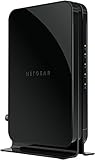
- Save monthly rental fees: Model CM500 replaces your cable modem, saving you up to $168/yr in equipment rental fees.
- Speeds by carrier plans: Xfinity (up to 200Mbps), Cox (up to 150Mbps).
- Works with any wifi router: Connect any WiFi router, separate unit, to this modem's Ethernet port to support all your wireless devices.
- Ethernet connections: 1 Gigabit Ethernet port connects to your computer or separate WiFi router.
- Modem technology: Engineered with 16x4 channel bonding and DOCSIS 3.0.
When upload speed matters
Upload capacity affects how quickly your connection can send data out to the internet. It becomes more noticeable when you are doing several upload-intensive tasks at once or sending large amounts of data.
- Cloud backups: Initial backups and large recurring uploads can take less time when the plan has more upstream capacity.
- Creator work and large file transfers: Sending video, design files, or other large project files benefits more from a strong upload tier than from an additional increase to download speed alone.
- Video meetings: A call sends your camera and microphone data upstream. A low or congested upload connection can make it harder to send a stable stream, especially when other household members are uploading at the same time.
- Several people using the connection: Simultaneous calls, backups, uploads, and other connected work can compete for upstream capacity. A larger upload tier gives those tasks more room to coexist.
Fiber’s symmetrical plan design is especially useful for households that routinely send large files or have several people doing interactive and upload-heavy work at once. If your household mostly downloads video, browses, and makes occasional calls, cable may already provide enough upload capacity. The plan’s actual upload figure—not the technology label alone—settles that question.
Which has lower latency, fiber or cable?
Fiber had lower weighted median idle latency in the FCC’s 2024 measurements: about 8–14 ms across advertised-speed tiers, compared with about 13–22 ms for cable. Latency is the time it takes for data to travel to a destination and for a response to return. It is commonly reported as ping in milliseconds. Lower latency generally makes interactive applications feel more responsive.
Also popular on Amazon

- MAXIMIZE YOUR CABLE INTERNET: A dedicated DOCSIS 3.1 cable modem lets you pair any WiFi router or mesh system you choose, so you can build the home network you want and upgrade your WiFi anytime without replacing your modem.
- APPROVED FOR YOUR PROVIDER AND PLAN: Works with Xfinity, Spectrum, Cox, and most US cable providers on internet plans up to 2 Gbps. Not compatible with Verizon, AT&T, CenturyLink, DirecTV, DISH, or bundled voice plans. ISP activation required after setup.
- GET THE FULL SPEED OF YOUR PLAN: DOCSIS 3.1 supports plans up to 2 Gbps download and 1 Gbps upload, so sending large files and live streaming move nearly as fast as downloading. Actual speeds vary by plan and provider.
- FUTURE-PROOF YOUR HOME NETWORK: Two Gigabit Ethernet ports connect to a compatible router, with Link Aggregation combining both for speeds up to 2 Gbps. Ready for today's multi-gig plans and tomorrow's upgrades.
- SET UP AND MANAGE YOUR MODEM WITH THE NIGHTHAWK APP: Download the free Nighthawk app on iOS or Android for guided setup. Check modem status, run speed tests, and manage firmware updates from anywhere. Active internet required.
These FCC figures are weighted median idle measurements under the report’s test methodology. They are not a guarantee for a particular home, time of day, internet plan, game server, or application. A user’s ping can be affected by Wi-Fi conditions, router queueing, local congestion, the route and peering between networks, and the distance to the destination. The results also describe idle latency; latency may rise when a connection is busy.
What’s actually slowing this PC down?
Pick the symptom - the matching free tool is one click away.
What the latency difference means in practice
- Competitive gaming: Lower baseline latency can help make actions and responses feel more immediate. It does not guarantee a low ping to every game server, since server location and network routing also matter.
- Video meetings: Lower latency can make turn-taking feel more natural. Call quality also depends on available upload capacity and the conditions of the devices and network in the home.
- Remote desktop and cloud applications: These tools involve frequent exchanges between your device and a remote system, so a more responsive connection can improve how quickly actions appear to take effect.
- Streaming and browsing: Both technologies can work well for ordinary use. For these activities, sufficient download speed and a stable connection may matter more than a modest difference in idle ping.
Fiber’s latency advantage is real in the FCC’s reported medians, but it is not a substitute for checking your own circumstances. If a particular service or game is hosted far away, the destination and route may dominate the ping you see. Likewise, poor Wi-Fi or a busy router can obscure the difference between access technologies.
How the network designs differ
Cable broadband uses coaxial cable in streets and buildings, with fiber used in feeder segments, and operates using DOCSIS standards, according to the European Commission. Optical fiber transmits signals through fiber; fiber-to-the-home (FTTH) brings that fiber connection to the home and is identified by the Commission as the highest-capacity form.
Also popular on Amazon

- CABLE INTERNET ONLY - This modem works ONLY with cable internet providers (Xfinity, Spectrum, Cox). NOT compatible with fiber internet services including AT&T Fiber, Verizon Fios, Frontier Fiber, Google Fiber, or CenturyLink Fiber. Check with your ISP to confirm you have cable (coaxial) service before purchasing.
- DATA ONLY - NO PHONE SERVICE - This modem does NOT support telephone or voice service of any kind. If your internet plan includes phone service or you need VoIP calling, you must purchase a separate voice-capable modem or VoIP adapter. This device handles internet data only.”
- MULTI-GIG PERFORMANCE: Supports internet plans up to 2.5 Gbps with 2.5 Gbps Ethernet port. Designed for plans 1 Gbps and faster from certified CABLE providers: Xfinity (up to 2 Gbps), Spectrum (1 Gbps), Cox (2 Gbps). NOT compatible with fiber internet services. Verify your plan speed and provider compatibility.
- MODEM ONLY - NO WIFI INCLUDED - This device is a cable modem with ONE Ethernet port only. It does NOT provide WiFi or wireless connectivity. You MUST connect your own separate WiFi router to this modem to create a wireless network. This is not an all-in-one gateway or combo unit.
- DOCSIS 3.1 TECHNOLOGY: Latest cable standard with 32x8 channel bonding for reliable multi-gig speeds. Backward compatible with DOCSIS 3.0 networks. Eliminates monthly modem rental fees (typically $14-20/month). For CABLE internet only - verify compatibility with your cable provider.
That architecture helps explain the usual plan trade-off. Fiber has more room for symmetrical multi-gigabit service. Cable performance depends more heavily on which DOCSIS generation the provider deploys and how it allocates capacity upstream. The Commission notes that DOCSIS 4.0 enables multi-gigabit symmetrical speeds while remaining backward compatible with DOCSIS 3.1. This does not mean every cable provider has deployed DOCSIS 4.0 or offers symmetrical multi-gigabit plans; it describes what the standard enables.
For buyers, the important point is that “fiber” and “cable” are useful clues, not complete descriptions of what you can order. A cable plan may be sufficient for a household with modest upload needs, and a fiber provider may not offer every advertised capability at every address. Compare the provider’s actual plan details.
How to choose between fiber and cable
Start with what your household sends, how sensitive your work is to delay, and what plans are available—not with the biggest download number in an advertisement.
Also popular on Amazon

- Multi‑Gig speed for today & tomorrow: DOCSIS 3.1 performance supports cable internet plans up to 2 Gbps, delivering ultra‑fast streaming, gaming, and downloads.
- Save on rental fees: Own your modem and avoid monthly equipment charges—check with your cable provider for plan compatibility.
- Compact, modern design: Space‑saving footprint with discrete LED indicators for power, upstream/downstream, and online status.
- Easy setup: Connect cable, power on, and activate with your cable provider. Then connect a Wi‑Fi router to the Ethernet port for home Wi-Fi coverage.
- Modem only: This cable modem requires a separate Wi-Fi router or mesh system for home Wi-Fi network.
Fiber is the stronger fit when
- You frequently upload large files, create and send media, or back up substantial amounts of data to the cloud.
- Several people in the home need to upload, join calls, or use interactive applications at the same time.
- Low latency is a priority for competitive gaming, remote desktop, cloud applications, or other fast request-and-response work.
- A fiber plan’s upload rate and total monthly price make sense for your household.
Cable can be the sensible choice when
- Fiber is not available at your address.
- The cable plan’s upload rate meets your needs, and you do not often send large files or run multiple upload-heavy tasks at once.
- The cable plan is materially less expensive and its download, upload, and latency characteristics are acceptable for your use.
- Your main activities are streaming, browsing, and ordinary video calls, for which a suitable cable plan can be adequate.
Compare the offers on the details that change your experience
- Write down your upload needs. Consider backups, file transfers, video calls, and the number of people likely to use them simultaneously. Look at each plan’s advertised upload rate, not just its download rate.
- Check address-level availability. Use the FCC National Broadband Map’s residential fixed-service filters for technology and maximum advertised download and upload speed, or enter your address in a provider’s own checker. Do not assume a technology is orderable just because it serves a nearby street.
- Compare latency evidence carefully. If a provider publishes latency information, note what it measures and under what conditions. The FCC’s idle medians are useful for comparing typical results by technology, but they do not predict ping to a specific destination in your home.
- Compare the full cost and terms. Check total monthly price, data caps, contract and installation terms, and any equipment costs. A lower advertised price is not necessarily the lower-cost option once terms and fees are considered.
- Consider reliability where you live. Compare outage history and service experience for the providers available at your address. Technology-level latency and speed figures do not establish how reliably a particular local service performs.
- Choose based on the bottleneck you actually have. If uploads or responsiveness are limiting your work, fiber’s usual advantages may justify a higher price. If your current cable service is adequate and fiber costs materially more, the upgrade may not improve the activities that matter to you.
Check availability before deciding
Broadband availability is address-specific. The FCC National Broadband Map allows users to filter residential fixed broadband service by technology, including cable and fiber, and by maximum advertised download and upload speed. A listing is a useful starting point, but confirm orderability with the provider’s address checker before making a decision.
When reviewing a map result or provider offer, keep the upload and download figures together. A listing that shows a high maximum download rate does not by itself tell you whether the upload tier will suit backups, video calls, or frequent file transfers. If the provider’s offer does not state upload speed clearly, ask for it before comparing plans.
Equipment: what changes and what does not
A DOCSIS 3.1 cable modem can be relevant if you are considering replacing rented cable hardware, but check compatibility with both your internet provider and your specific plan before buying. A modem’s DOCSIS generation alone does not establish that the provider will support it or that it will deliver a particular plan’s speed.
Fiber service normally uses an optical network terminal (ONT) installed or supplied by the provider. That makes a standalone ONT a poor general-purpose shopping recommendation: the provider determines what equipment the service needs. A Wi-Fi router and Ethernet cables can affect performance inside the home, but they do not turn cable access into fiber or create the underlying upload and latency difference between the technologies.
If the connection performs worse than expected, first distinguish an access-network limitation from a home-network problem. The FCC’s latency results are idle measurements, while Wi-Fi conditions, router queueing, and local congestion can affect what you experience. A problem on one wireless device does not, on its own, show that the provider’s access technology is the cause.
Bottom line: compare the upload tier and the real offer
Fiber usually wins for upload capacity and typical idle latency, making it the more compelling choice for upload-heavy work and latency-sensitive applications when the price is reasonable. Cable remains capable for many homes, particularly when fiber is unavailable or the cable plan already supplies enough upload speed. Confirm what is available at your address, compare upload rates alongside downloads, and weigh the full price and terms before switching.

