
Free tools Windows power users keep installed
One-click scans. No signup required.
iTechGuides is reader-supported. When you buy through links on our site, we may earn an affiliate commission. As an Amazon Associate I earn from qualifying purchases. Learn more
For a desk scoreboard that changes during play, choose an LCD for a compact conventional interface or a HUB75 RGB LED matrix when the score must be bold, bright and readable across a room. Choose e-ink only when updates are infrequent and a persistent, low-refresh display matters more than animation. The decisive factors are update cadence, viewing distance, ambient light, color, GPIO and RAM budget, and whether you can provide a separate high-current supply.
There is no technology-wide refresh rate or power figure that makes one option universally best. E-paper behavior is specific to the panel and refresh mode; LCD requirements depend on the controller and bus; and a HUB75 panel’s current depends on its size, brightness, content and scan design.
Quick choice: which display fits your scoreboard?
| Display | Best fit | What it does well | Main compromises |
|---|---|---|---|
| E-paper (e-ink) | A score that changes occasionally and should remain visible with minimal refresh activity | Uncluttered, paper-like image; readable black-and-white layouts; low-refresh operation | Refresh is panel- and mode-specific; global updates can take seconds; fast animation is a poor assumption |
| LCD | A nearby scoreboard with icons, conventional fonts, menus or frequent graphical changes | Several interface families and standard graphical workflows; controller-based panels can include internal display memory | SPI, I2C, Intel 8080 parallel, RGB/SRGB and MIPI DSI have different wiring and driver requirements; the backlight needs separate consideration |
| HUB75 RGB LED matrix | Large, colorful numerals intended to be seen from across a room | Bright RGB pixels, large-format layouts and strong visual impact | Many timing and row-address signals, substantial DMA/RAM use and a dedicated panel power supply |
For a normal game scoreboard, LCD or HUB75 is usually the natural choice. Pick HUB75 when distance, brightness and color outrank wiring simplicity and power consumption. Pick LCD when the panel is close to the player and you want a conventional user interface. Pick e-paper for a slowly changing score, a schedule board or an always-visible status panel.
What the three technologies actually require
E-paper: persistent-looking information with product-specific refresh
E-paper updates the image rather than continuously scanning a glowing backlight. That makes it attractive for a scoreboard that changes between games, rounds or turns. Once the image is written, the panel can show it without the visual behavior of a continuously refreshed emissive display.
#1 Best Overall

- 2048 individual RGB LEDs, full-color display, adjustable brightness. 64×32 pixels, 2.5mm pitch, allows displaying text, colorful image, or animation.
- Compatible with Arduino/Raspberry Pi / Raspberry Pi Pico / ESP32.
- Chainable design--- multi LED matrix panel can be chained together to build a larger panel via HUB75 input/output header. Onboard two HUB75 header, one for controller data input, one for output, chain support.
- 160×80mm dimensions, moderate size, suitable for DIY desktop display or wall mount display
- Usage scenarios--- DIY maker desktop or wall mount display, signboard, environment monitor…
Do not treat “e-ink” as a single performance class. The Elecrow ESP32 E-Paper HMI Display User Manual lists model-specific global-refresh specifications: 2 seconds for a 1.54-inch CrowPanel, 3 seconds for a 2.9-inch model, 5 seconds for a 4.2-inch model and 6 seconds for a 5.79-inch model. Those are stated figures for the named variants and global-refresh mode, not a universal e-paper rate. Confirm the exact controller, resolution, current board revision and whether partial refresh is supported before designing an in-game animation.
A specialized product can behave very differently. Espressif’s May 2026 Inkplate overview describes the Inkplate 6MOTION using an STM32H743 for display and peripheral work with an ESP32-C3 handling Wi-Fi and Bluetooth. It reports a 91-millisecond partial refresh, roughly 11 frames per second, for that dual-processor product. That claim should not be generalized to an ordinary single-ESP32 e-paper module.
LCD: a category of buses, controllers and backlights
“LCD” identifies the panel technology, not the electrical interface. Espressif’s ESP-IDF LCD documentation covers SPI, I2C, Intel 8080 parallel, RGB/SRGB and MIPI DSI interfaces. Each has a different pin count, data path and software driver model.
Do these 3 things before closing this tab:
1Clear out junk files and repair common Windows errors2Fix the driver behind crashes, sound loss and screen glitches3Repair Windows errors before they cause bigger problemsA small controller-based SPI display may need only a few data and control lines and can be practical for a desk unit. An I80 panel uses a parallel data bus and more GPIO but can move pixels differently. RGB and MIPI DSI panels are more demanding and must match the exact ESP32 variant and board design. Identify the controller before buying; two panels with similar dimensions can require completely different initialization and wiring.
Rank #2

- Ultra HD 64x64 Display: Features 4096 individually addressable RGB LEDs with 3.0mm pixel pitch (P3.0) for sharp text, animations, and vibrant graphics — perfect for dynamic content and real-time data display.
- Multi-Platform Compatibility: Works seamlessly with Raspberry Pi (demo included), Arduino Mega, and Raspberry Pi Pico. Open-source code and tutorials provided to help you get started quickly.
- Expandable & Cascadable: Equipped with dual HUB75 interfaces for effortless multi-screen cascading (5V/4A per panel required). Scale up your display to any size for signage or creative projects.
- Wide Viewing Angle & Durable Design: Delivers ≥160° visibility with 1/32 scan driving and stable 5V/4A power input. Compact 192x192mm size ensures reliable performance in any setup.
- Quick & Easy Setup: Comes with power cables, ribbon cables, and magnetic pins for plug-and-play installation. Online Wiki guide available for wiring and code examples.
The display data path and the backlight are separate concerns. Espressif’s LCD API explicitly notes that esp_lcd_panel_disp_on_off() controls display output, not the backlight. The backlight needs its own board-level control, such as a transistor or dedicated enable circuit provided by the module. A scoreboard that appears blank may be drawing correctly while its backlight remains off.
HUB75: a multiplexed RGB panel, not an LED strip
A HUB75 panel receives timed color data and selects rows while scanning the display. The interface requires color data, row-address signals, a clock, a latch and output-enable control. A 32- or 64-row panel using a 1/32 scan ratio requires the E address pin in the ESPHome component documentation. The exact connector pinout and driver IC still belong to the panel’s own documentation.
The format is ideal for oversized numerals because every pixel is an RGB LED and panels can be tiled into larger layouts. The price is integration complexity: refresh timing, scan ratio, driver compatibility, DMA buffers and power distribution all matter. It is not safe to connect a large panel to an ESP32 development board’s 3.3-volt output.
The Tool Desk
Outbyte Driver Updater FREEFix the driver behind crashes, sound loss and screen glitchesFind Drivers →Outbyte PC Repair FREEClear out junk files and repair common Windows errorsFree Scan →Update cadence is the first design filter
Occasional changes: e-paper is viable
If the score changes after a serve, round or completed turn, an e-paper layout can be comfortable. Design a clean screen with the two scores, team names or player labels, period information and a last-updated indicator. Avoid committing to an animated transition until the selected panel’s partial-refresh behavior is documented and tested.
Rank #3

- 4096 individual RGB LEDs, full-color display, adjustable brightness. 64×64 pixels, 2.5mm pitch, allows displaying text, colorful image, or animation.
- Compatible with Arduino/ Raspberry Pi / Raspberry Pi Pico / ESP32
- Chainable design--- multi LED matrix panel can be chained together to build a larger panel via HUB75 input/output header. Onboard two HUB75 header, one for controller data input, one for output, chain support.
- 160×160mm dimensions, moderate size, suitable for DIY desktop display or wall mount display
- Usage scenarios: DIY maker desktop or wall mount display, signboard, environment monitor
Global refresh figures of 2 to 6 seconds on the cited CrowPanel variants would be noticeable during a fast exchange. They may be acceptable between points, but they are not evidence that every e-paper board can redraw quickly. Specify the acceptable delay in your design brief, then compare it with the selected module’s documented global and partial modes.
Frequent score changes: LCD is the low-risk conventional choice
An LCD is better suited to a score that changes repeatedly during play, especially when the display is within arm’s reach. Controller-based panels can update portions of a frame and render standard fonts, icons and small status graphics. The implementation still depends on the bus and controller, so reserve time to validate initialization, pixel format, orientation and backlight control.
Fast, distant and colorful: HUB75 is the visual choice
A HUB75 matrix makes the score legible from farther away and allows contrasting colors for home and visitor scores, period indicators or warning states. Its scanning architecture is designed for continuously refreshed content, but the ESP32 must sustain the required timing and allocate the display buffers. Use a panel and ESP32 combination documented for the same scan and driver arrangement.
What’s actually slowing this PC down?
Pick the symptom - the matching free tool is one click away.
ESP32 compatibility, interfaces and memory
Original ESP32 capabilities
The original ESP32 datasheet lists four SPI interfaces and two I2C interfaces. Those interfaces can be useful for controller-based LCD or e-paper modules, but other ESP32 families differ in peripherals, pin availability and memory. Treat the datasheet’s 10 µA deep-sleep figure as a chip-level specification only. It does not represent a complete scoreboard with a display, development board, voltage regulator, Wi-Fi connection or backlight.
Rank #4

- WIDELY USED: LED display is applied to store door signs, the side of buses and the roof of cabs to display animations or video ads.
- APPLICATION: LED panel is suitable for creators or electronics enthusiasts to learn, or DIY secondary development into other desktop or wall mounted display applications.
- PANEL SPECIFICATION: 64x32 full color LED dot display with 2048 RGB LEDs on board, 3mm pitch, supports for RPi, for Pico, for ESP32, etc.
- SUPPORT CASCADE: RGB LED panel with HUB75 input and output interface reserved, which can cascade multiple LED displays.
- POWER SUPPLY VOLTAGE: When cascading multiple displays, ensure that each RGB LED display has a power supply of 5V 2.5A or more.
HUB75 component support by ESP32 family
ESPHome’s HUB75 documentation lists support for ESP32, ESP32-S2, ESP32-S3 and ESP32-P4. It lists ESP32-C3, ESP32-C2, ESP32-C6 and ESP32-H2 as unsupported for that component. Check the exact module marking rather than assuming that every board sold as an ESP32 is interchangeable.
For larger matrices, ESPHome recommends an ESP32-S3 with PSRAM because DMA buffers can consume substantial RAM. A chain of panels, high color depth or a larger resolution increases the buffer requirement. If the display starts correctly with one small panel but fails when panels are added, RAM and DMA allocation are among the first things to investigate.
Pin planning
- Reserve SPI or the documented parallel pins for an LCD or e-paper controller, and check whether the board shares those pins with flash, PSRAM, an SD card or other peripherals.
- For HUB75, map every color-data line, row-address line, clock, latch and output-enable signal. Include the E address line for a 1/32-scan 32- or 64-row panel where the component requires it.
- Confirm voltage levels and ground topology. Logic compatibility does not replace a common ground or a correctly rated panel supply.
- Leave service access for a reset button, firmware connection and a way to disconnect panel power during troubleshooting.
Implementation plans for each option
Build plan for an e-paper scoreboard
- Define the event cadence. Record the fastest expected score change and the maximum acceptable delay after a button press or network message.
- Select the exact panel. Record its resolution, controller, SPI wiring, global-refresh time and partial-refresh behavior. Use the model-specific manual, not a generic e-paper description.
- Choose the layout. Use large, high-contrast numerals and avoid information that must animate. Decide how a full refresh, partial refresh and power cycle affect the displayed image.
- Wire the controller. Match the module’s SPI and control pins to the ESP32 board and verify that no required pin is occupied by another device.
- Implement redraw rules. Update only when the score changes, and distinguish a routine partial update from a full refresh if the controller supports both.
- Test at the real cadence. Measure the time from an input event to a stable displayed score for the exact panel and firmware configuration. Check readability under the intended room lighting.
Build plan for an LCD scoreboard
- Identify the bus and controller. Decide whether the panel is SPI, I2C, Intel 8080, RGB/SRGB or MIPI DSI, then confirm that the chosen ESP32 variant and software driver support it.
- Check the board schematic. Find the display-enable, reset, chip-select and backlight circuits. Do not assume that the LCD API’s display on/off function switches the backlight.
- Budget pins and buffers. Account for data lines, control lines and any touch, SD or sensor connections before fixing the enclosure.
- Bring up a test pattern. Verify orientation, color order, pixel format and readable font sizes before adding scoreboard logic.
- Separate rendering from inputs. Keep score state independent from drawing code so a button, web request or wireless message can trigger a redraw without corrupting the display state.
- Test brightness and thermal behavior. Set the backlight for the actual room and inspect the regulator and enclosure during extended operation.
Build plan for a HUB75 matrix
- Choose the panel by electrical specification. Record resolution, panel voltage, scan ratio, connector, driver IC, rated current and whether the panel is single- or multi-panel.
- Match the ESP32. Use an ESP32, ESP32-S2, ESP32-S3 or ESP32-P4 for the ESPHome component, and consider an ESP32-S3 with PSRAM for larger installations. Do not select an unsupported C-series chip for this path.
- Map all signals. Connect color data, row address, clock, latch and output-enable lines according to the panel and component documentation. Include E when the 1/32-scan arrangement calls for it.
- Install a dedicated supply. ESPHome warns that larger LED matrices can draw multiple amps. Use a supply rated for the panel’s voltage and expected current, with suitable wiring and fusing. Never feed the matrix from the ESP32 board’s 3.3-volt output.
- Provide a solid common ground. Keep high-current panel returns from disturbing the logic supply, and use short, appropriately sized power wiring.
- Start with conservative brightness and one panel. Confirm stable scanning, correct colors and legible numerals before chaining panels or increasing brightness.
- Expand only after checking RAM. Watch for allocation failures or instability as resolution, color depth or panel count increases; DMA buffers can consume substantial RAM.
Power and visibility trade-offs
Power is not a single technology number
The 10 µA deep-sleep figure in the original ESP32 datasheet describes the chip in a specified sleep condition. It is not a measurement of an assembled scoreboard. An LCD’s backlight, a HUB75 panel’s LEDs and the regulator losses can dominate the system budget, while an e-paper design may spend most of its energy during updates.
Do not publish or design around one wattage for all LCDs, all e-paper panels or all matrices. Compare like-for-like assemblies at the intended brightness, content, refresh cadence and supply voltage. For HUB75, size the supply from the panel’s own rating and the integration documentation; ESPHome’s “multiple amps for larger displays” warning is qualitative, not a universal current rating.
Best Value
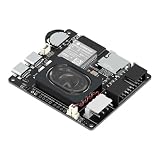
- Powerful ESP32-S3 Core – Dual-core Xtensa LX7 processor at 240MHz with 16MB Flash and 8MB PSRAM provides ample computing power and memory for driving high-resolution LED matrix displays, animations, and complex UI graphics
- Dual HUB75 Connectors & Flexible Mounting – Features both a 2×8 box header (for standard ribbon cable) and a 2×8 raised pin header (for direct plug-in), giving you two installation options to fit different matrix panel setups
- Integrated Audio & Voice Interaction – Onboard ES8311 audio codec, ES7210 ADC, and dual silicon microphones enable voice capture, high-quality audio output, and voice assistant functionality – simply connect a speaker to get started
- RTC with Battery Backup & SD Card Storage – PCF85063 real-time clock keeps accurate time even after power loss (battery connector included); Micro SD card slot supports offline storage for images, audio files, and data logging
- Dual Power Inputs & 5V/4A Output – Two Type-C ports: one for programming and system power, another dedicated to powering the LED matrix via the VH-4P terminal (up to 5V/4A), ensuring stable and sufficient power for your display
Viewing distance and ambient light
- Desk distance: A compact LCD can provide the best balance of detail, icons and ordinary fonts.
- Across a room: A HUB75 matrix with large numerals is easier to recognize quickly, especially when color coding conveys state.
- Bright or changing light: Evaluate the actual panel in the room. E-paper and LCD legibility depend on their optical design, while a matrix depends strongly on brightness setting and viewing angle.
- Night or quiet environments: Consider whether a continuously illuminated LCD or matrix is distracting; an e-paper layout may be preferable when updates are rare.
Common failure modes and fixes
The e-paper score appears several seconds late
Check whether the firmware is performing a global refresh and compare the delay with the exact model’s specification. The cited CrowPanel values range from 2 to 6 seconds by model. If the application needs faster changes, verify partial-refresh support or select a different display class rather than assuming a software timing tweak will remove the panel’s physical limit.
An LCD is initialized but looks blank
Verify the controller driver, reset and chip-select wiring, pixel format and orientation. Then inspect the backlight circuit separately: Espressif documents that esp_lcd_panel_disp_on_off() is not backlight control. A working data path with a disabled backlight can look like a failed display.
A HUB75 panel shows noise, wrong rows or incorrect colors
Recheck the panel’s scan ratio, row-address order, color-data order, clock, latch and output-enable wiring. A 1/32-scan panel may require the E address signal. Confirm the driver IC and component configuration match the panel. Reduce brightness and test a single panel before adding chains.
Windows Errors? Fix Them Before They Spread
Repair common Windows errors and clear accumulated junk for a smoother, more stable PC - no reinstall needed.Free scan · no reinstallCrashes, No Sound, or Screen Glitches?
Random freezes, missing sound and display glitches usually trace back to one bad driver. Find and replace yours safely.Free scan · under a minuteThe matrix resets the ESP32 or the image tears
Suspect power distribution, an undersized supply, inadequate grounding or timing and DMA pressure. Power the panel from a dedicated supply, keep the logic ground common, inspect voltage drop under bright content and reduce the installation to one panel. If the fault appears as resolution increases, review available RAM and consider an ESP32-S3 with PSRAM.
The chosen ESP32 board is unsupported
For the ESPHome HUB75 route, replace an ESP32-C3, C2, C6 or H2 with a supported ESP32, S2, S3 or P4 family device. For LCD and e-paper, check the specific ESP-IDF driver and peripheral support instead of transferring assumptions from another ESP32 variant.
A practical selection checklist
- What is the fastest score update, and what delay is acceptable?
- Must the score be readable from the opposite side of a room or only at the desk?
- Are color and animation essential, or is a static black-and-white layout sufficient?
- Which exact controller and interface does the panel use?
- How many ESP32 GPIOs remain after buttons, networking, sensors and storage are connected?
- Does the selected ESP32 family support the intended display component?
- For HUB75, what are the panel’s scan ratio, driver IC, connector, voltage and current rating?
- Can the enclosure accommodate a separate panel supply and adequate wiring?
- Does the design need PSRAM or additional DMA headroom?
- Have brightness, readability, update delay and thermal behavior been tested in the real installation?
Recommended choices by scoreboard scenario
| Scenario | Recommended path | Reason |
|---|---|---|
| Score changes only between rounds or turns | E-paper | Its low-refresh behavior and persistent-looking image fit infrequent updates; validate the exact panel’s global and partial modes. |
| Player-facing desk unit with icons and menus | Controller-based LCD | Conventional graphics, compact size and familiar fonts are useful at close range. |
| Large numerals visible across a room | HUB75 RGB matrix | RGB pixels and large layouts maximize immediate readability, provided power and RAM are planned. |
| Rapid score changes with minimal hardware complexity | LCD | It avoids e-paper’s product-specific refresh delay and usually requires less panel power infrastructure than a large matrix. |
| Color-coded status and strong visual impact | HUB75 RGB matrix | Color and scale are native strengths, but require dedicated supply, scan compatibility and supported ESP32 hardware. |
Bottom-line recommendation
Start by writing down the update cadence and viewing distance. If the score is mostly static, select an e-paper module whose documented refresh behavior fits the delay you can tolerate. If the display is close and needs a conventional interface, choose an LCD only after identifying its controller, bus and separate backlight circuit. If the score must be seen immediately from across a room, choose a HUB75 RGB panel, match its scan and driver requirements to a supported ESP32, and design the dedicated multi-amp-capable power path before writing firmware.
Quick Recap
Product prices and availability are accurate as of the date/time indicated and are subject to change. Any price and availability information displayed on Amazon at the time of purchase will apply.
Recommended Free Tools

