
Free tools Windows power users keep installed
One-click scans. No signup required.
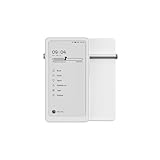
DuRoBo Krono is a compact Android ePaper device built primarily for reading, with tools for typed notes, voice recording and idea organization. It has a 6.13-inch, 300-PPI E Ink Carta 1200 display, a physical Smart Dial and Google Play access. DuRoBo’s “ePaper focus hub” positioning is broader than a conventional e-reader, but the available evidence supports describing Krono as a phone-sized Android reader with note and audio features—not as a cellular phone or a handwriting tablet.
What DuRoBo Krono is
Krono combines an e-paper reading screen with Android software, physical controls and DuRoBo’s Spark capture tools. The company presents it as a focused place to read, write down ideas and manage information without using a conventional phone display. Independent coverage has described it more plainly as a compact, phone-sized e-reader with a dial, audio support and Android apps.


“Writing” needs a precise qualification. The documented functions are typed note composition and voice-note capture, including DuRoBo-described transcription and AI summaries. The supplied material does not establish a stylus, pressure-sensitive screen or handwriting input.
Krono is not described as a cellular smartphone. Nothing in the available specifications establishes mobile-network calling or a SIM-based phone service, so it should not be treated as a phone replacement.
Do these 3 things before closing this tab:
1Fix the driver behind crashes, sound loss and screen glitches2Clear out junk files and repair common Windows errors3Scan for outdated or missing drivers - takes under a minute#1 Best Overall

- Thoughts Rest, Ideas Bloom- Step away from distractions and into clarity. With its paper-like screen and compact form, Krono offers a space to nurture new ideas, where every pause becomes the start of something meaningful.
- Embracing minimalist aesthetics, Krono exudes calm geometric beauty, a nod to traditional mechanical design. Compact and portable, Krono easily fits in your hand or pocket, keeping you company on commutes, workouts, or trips.
- Feel Natural on the Eyes- 300 PPI. Krono features an E Ink HD display, delivering a pure paper-like aesthetic. You can see the delicate texture unique to paper. Millions of tiny microcapsules filled with black particles render sharp, crisp text, with each letter edge clean and refined.
- Digest Long, Thoughtful Reads- Krono is your personal attention zone. Its distraction-free design blocks out the noise of the algorithm-driven world, allowing you to deeply immerse yourself in in-depth, long content. The Axis on the back features eight delicate breathing lights that glow in quiet harmony with your moments of concentration.
- Voice It. Type It. Keep It.Press and hold the Dial to enter the Voice Mode of Spark, capturing sudden bursts of inspiration, deep reflections, or temporary tasks. After recording, you can use Speech-to-Text to get a transcript, then apply the AI Summary to distill the key points.
Hardware and display specifications
DuRoBo’s product page lists the following specifications. The company cautions that they are based on trial-production models and may change with later hardware or software updates.
| Component | DuRoBo-listed detail | How to interpret it |
|---|---|---|
| Display | 6.13-inch E Ink Carta 1200 HD ePaper panel | Phone-sized and portable, with the low-power, paper-like characteristics associated with e-paper. |
| Resolution | 300 PPI | Suitable for sharply rendered text at this screen size. |
| Processor and memory | Octa-core processor; 6GB RAM | Exact processor model and independently measured performance are not stated. |
| Storage | 128GB | Provides room for books, documents, apps and recordings; expansion details are not stated. |
| Battery | 3,950mAh | A capacity figure, not a tested runtime claim. No controlled endurance result is established. |
| Lighting | Adjustable frontlight | Supports reading in different ambient-light conditions. |
| Audio and connectivity | Built-in speaker, Bluetooth and dual microphones | Enables speaker playback, Bluetooth listening and voice capture. |
| Controls | Physical buttons, Smart Dial and six rear “breathing lights” | The dial is intended for navigation and page turning; the rear lights are part of DuRoBo’s design and notification approach. |
The product-page specification caveat matters: these figures describe DuRoBo’s listed configuration, not a guarantee that every retail unit or future revision will be identical.
Android 15, Google Play and app compatibility
DuRoBo’s CES 2026 feature page specifies Android 15 and full Google Play Store access. Android Central and Android Authority also reported Android 15 and Play Store support. That gives Krono access to Android reading and productivity apps rather than restricting owners to a single bookstore.
App support is not the same as identical behavior on every app. E-paper refresh characteristics, layouts designed for color LCDs and Smart Dial integration can vary by application and firmware version. DuRoBo’s later software notes specifically mention dial support for Kindle, Kobo Books and Play Books, while an April 2026 company release also described a native browser, home-screen app pinning, wireless file sharing and reading customization added in versions 1.1 and 1.2.1.
Quick wins for a faster PC:
Scan for outdated or missing drivers - takes under a minuteDriver Scan →Clear out junk files and repair common Windows errorsFree Scan →Fix the driver behind crashes, sound loss and screen glitchesFind Drivers →Rank #2
- Thoughts Rest, Ideas Bloom- Step away from distractions and into clarity. With its paper-like screen and compact form, Krono offers a space to nurture new ideas, where every pause becomes the start of something meaningful.
- Embracing minimalist aesthetics, Krono exudes calm geometric beauty, a nod to traditional mechanical design. Compact and portable, Krono easily fits in your hand or pocket, keeping you company on commutes, workouts, or trips.
- Feel Natural on the Eyes- 300 PPI. Krono features an E Ink HD display, delivering a pure paper-like aesthetic. You can see the delicate texture unique to paper. Millions of tiny microcapsules filled with black particles render sharp, crisp text, with each letter edge clean and refined.
- Digest Long, Thoughtful Reads- Krono is your personal attention zone. Its distraction-free design blocks out the noise of the algorithm-driven world, allowing you to deeply immerse yourself in in-depth, long content. The Axis on the back features eight delicate breathing lights that glow in quiet harmony with your moments of concentration.
- Voice It. Type It. Keep It.Press and hold the Dial to enter the Voice Mode of Spark, capturing sudden bursts of inspiration, deep reflections, or temporary tasks. After recording, you can use Speech-to-Text to get a transcript, then apply the AI Summary to distill the key points.
Owners should check the installed firmware and the current compatibility list before assuming that a particular app, navigation gesture or dial action works exactly as it does in promotional material.
How the Smart Dial and reading controls work
The physical Smart Dial is Krono’s most distinctive control. It is intended for page turning and navigation, reducing reliance on touchscreen gestures while reading. In an April 2026 Android Central review, Harish Jonnalagadda said he liked the dial for page turning and navigation, but preferred a larger reader when reading on a couch.
DuRoBo’s August 14, 2026 version 1.4 release notes say Smart Dial page turning was added for Moon+ Reader and Reeden and that dial stability was improved. Earlier coverage should therefore be read as time-bound: Nicholas Sutrich’s January 2026 Android Central hands-on, conducted mostly on pre-launch firmware and then version 1.0 around CES, described a basic launcher and limited dial customization at that time.
Notes, voice capture and DuRoBo AI
Typed notes
Krono can be used for conventional text entry through its Android keyboard. DuRoBo’s software direction is aimed at capturing short ideas and organizing them on the device rather than reproducing a paper notebook with a pen.
Rank #3
Voice notes
Dual microphones support voice capture. DuRoBo says Spark can record speech, transcribe it and produce AI summaries. These are vendor-described functions; the available material does not provide an independent accuracy test, supported-language matrix, processing explanation or privacy guarantee.
Assistant features
DuRoBo also promotes DuRoBo AI as an assistant. Treat that as a company software claim, not evidence of a particular response quality, offline capability or data-handling policy.
Software has continued to change
The latest located official release note is version 1.4, dated August 14, 2026. DuRoBo says that update added:
- Spanish and French system languages
- Korean and Spanish keyboard layouts
- A new charging-light effect
- Smart Dial page turning in Moon+ Reader and Reeden
- Improved dial stability
That is the latest located release in the available material, not a claim that no newer firmware exists. Buyers should check the device’s update screen and DuRoBo’s current release notes at purchase.
The Tool Desk
Outbyte PC Repair FREEClear out junk files and repair common Windows errorsFree Scan →Outbyte Driver Updater FREEFix the driver behind crashes, sound loss and screen glitchesFind Drivers →Rank #4
Launch history and pricing
Kickstarter launch
DuRoBo announced the Kickstarter campaign on September 5, 2025. The campaign advertised a historical $249 Super Early Bird price, described as $30 below the stated regular price, plus a complimentary protective case for backers. Those were campaign terms, not a current retail quote or proof that the case is sold separately today.
Later US availability
Android Authority later reported US commercial sales at $279. Android Central cited a $279.99 / €279.99 website price in a January 2026 hands-on and linked to an Amazon US listing in its April 2026 review. Prices, inventory, taxes, included accessories and regional availability can change; verify the live listing before buying.
Who Krono suits—and who should choose something else
Krono is a strong fit if you want
- A genuinely pocketable reading device rather than a large, couch-oriented e-reader
- Android access to multiple reading services, including Kindle, Kobo Books and Play Books, subject to app and firmware behavior
- A physical dial for page turns and navigation
- Typed notes, quick idea capture and voice recordings alongside reading
- Bluetooth listening and a built-in speaker
Consider a different device if you need
- A large display for PDFs, comics or relaxed two-handed reading
- Confirmed stylus handwriting and pen-based annotation
- Cellular calling or a replacement for a smartphone
- Independently verified battery endurance, AI transcription accuracy or long-term reliability
- A mature, deeply customizable launcher without depending on continuing firmware updates
Krono compared with a phone-sized Android reader
The practical comparison is with other small Android e-paper readers, such as the Onyx Boox Palma, rather than with phones or full-size tablets. The most useful decision points are screen size, portability, frontlight behavior, Android and Play Store support, storage and battery capacity, physical page-turn controls, note-input method, app compatibility, audio output and current price. The available evidence does not provide an apples-to-apples benchmark or current comparative pricing, so Krono’s advantages should be judged from its dial, software direction and listed hardware rather than an unsupported performance ranking.
Questions to check before ordering
- Confirm the seller, region, current price and stock status.
- Check the installed firmware or update policy, especially if you rely on a specific reading app.
- Verify which accessories are included; the Kickstarter case offer does not establish current retail inclusion.
- Decide whether typed and voice notes meet your needs, since handwriting support is not established.
- Review DuRoBo’s current privacy and AI documentation before using transcription for sensitive material.
Verdict
DuRoBo Krono makes the most sense as a small Android e-reader with unusually prominent physical controls and built-in idea-capture tools. Its 6.13-inch 300-PPI screen, 128GB storage, Play Store access, Bluetooth and Smart Dial create a flexible pocket reader, while Spark adds typed and voice-based writing workflows. The trade-offs are equally clear: it is not a cellular phone, handwriting input is unconfirmed, reviewer impressions come from changing firmware, and no independent testing establishes battery life or AI quality. Check the live price, firmware and app compatibility before treating launch specifications as final.
Best Value
Frequently Asked Questions
Does DuRoBo Krono replace a smartphone?
No. The available specifications describe an Android ePaper device, not a cellular phone with mobile-network calling.
Can Krono run Kindle, Kobo and Play Books?
Google Play access is reported by DuRoBo and independent coverage. DuRoBo’s software notes specifically mention Smart Dial support for Kindle, Kobo Books and Play Books, but behavior can depend on the app and firmware version.
Does Krono support handwriting with a stylus?
Handwriting or stylus input is not established in the available product information. The documented writing functions are typed notes and voice capture with DuRoBo-described transcription and summaries.
Quick Recap
Product prices and availability are accurate as of the date/time indicated and are subject to change. Any price and availability information displayed on Amazon at the time of purchase will apply.

