
iTechGuides is reader-supported. When you buy through links on our site, we may earn an affiliate commission. As an Amazon Associate I earn from qualifying purchases. Learn more
Not necessarily. Renting makes sense when your provider includes or requires its equipment, or when its support and replacement service are worth the cost. Buying can save money when your provider allows a compatible device and removes a separate monthly equipment charge. Check your plan, connection type, and exact device compatibility before deciding.
First, find out whether you can actually avoid a fee
Check your current bill and plan disclosure for a recurring modem, gateway, or other network-equipment rental or lease charge. Also check whether the equipment is included in the plan’s base price. If there is no separate fee that disappears when you return the provider’s equipment, buying your own device will not automatically reduce your bill.
U.S. broadband labels must disclose recurring fees for rented or leased modems and other network-connection equipment, as well as relevant one-time charges such as equipment purchase, activation, and installation. The FCC explains this requirement in FCC 22-86, paragraph 33. A disclosed charge is useful to compare with your costs, but it does not guarantee that every provider itemizes equipment separately on every bill.
Make sure the device fits your internet service
A cable modem is not a universal substitute for equipment used with fiber, DSL, fixed wireless, or satellite service. Some fiber installations use an optical network terminal (ONT) installed by the provider, with a separate router in your home. Ask the provider which component, if any, you may replace.
Popular on Amazon
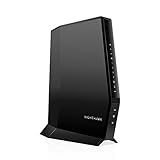
- CABLE INTERNET AND WIFI MADE FOR YOUR HOME: This two-in-one cable modem and WiFi router puts every setting in your hands, from your WiFi names and passwords to how your network runs, so it works the way your household needs.
- APPROVED FOR YOUR PROVIDER AND PLAN: Works with Xfinity internet plans up to 800Mbps, Spectrum up to 1Gbps, and Cox up to 1Gbps. Not compatible with Verizon, AT&T, CenturyLink, DirecTV, DISH, or bundled voice plans. ISP activation required after setup.
- GET THE FULL SPEED OF YOUR PLAN: DOCSIS 3.1 supports Gigabit+ cable internet plans, so large downloads finish faster and 4K streaming, gaming, and video calls can all run at once. Actual speeds vary by plan and provider.
- WIFI 6 COVERAGE FOR THE WHOLE HOME: Stay connected in every room with dual-band AX2700 WiFi 6 covering up to 2,000 sq ft and capacity for 25+ connected devices. Real-world coverage depends on home size, layout, and building materials.
- WIRED CONNECTIONS FOR YOUR FASTEST DEVICES: Four Gigabit Ethernet ports keep gaming consoles, desktops, and streaming devices hardwired for the lowest latency and the most stable connection in your home.
A gateway combines modem and router functions, but the name alone does not establish compatibility. Before buying, confirm the exact make and model is approved for your provider, address, plan, speed tier, and any voice service you use. Check again if you change plans or move; provider compatibility lists and requirements can change.
Compare renting and buying against your needs
| Consideration | Renting or using included equipment | Buying your own |
|---|---|---|
| Cost | Find out whether a distinct monthly charge applies and whether returning the equipment removes it. | Compare the upfront purchase and expected owner-paid replacement or support costs with only the rental fee you will actually avoid. |
| Compatibility | Confirm what the provider supplies or requires, including any return or plan conditions. | Verify the exact device against the service technology, provider, address, speed tier, and voice requirements. |
| Support and replacement | Ask what setup, maintenance, and replacement help the rental terms include. | Provider help may be limited; keep the manufacturer’s warranty information and account for replacement costs. |
| Flexibility | May be simpler if you move or change plans, subject to equipment return rules. | The device may not work with a new provider, service type, or plan. |
Calculate your own break-even point
There is no single payback period that applies to every household. Use the fee that will really be removed from your bill, not a presumed standard rental charge.
Also popular on Amazon

- NO NEW CABLE PROVIDER ACTIVATIONS. Not compatible with Verizon, AT&T, CenturyLink, DirecTV, DISH, or bundled voice plans.
- CABLE INTERNET AND WIFI MADE FOR YOUR HOME: This two-in-one cable modem and WiFi router puts every setting in your hands, from your WiFi names and passwords to how your network runs, so it works the way your household needs.
- GET THE FULL SPEED OF PLANS UP TO 800 MBPS: DOCSIS 3.0 delivers plenty of speed for HD and 4K streaming, online gaming, and video calls across your home. Actual speeds vary by plan and provider.
- AC1900 WIFI COVERAGE FOR THE WHOLE HOME: Stay connected in every room with dual-band AC1900 WiFi covering up to 1,800 sq ft and Beamforming+ for stronger signal to mobile devices. Real-world coverage depends on home size, layout, and building materials.
- WIRED CONNECTIONS FOR YOUR FASTEST DEVICES: Four Gigabit Ethernet ports keep gaming consoles, desktops, and streaming devices hardwired for the lowest latency and the most stable connection in your home.
- Identify the avoidable charge. Check your current plan disclosure and bill, then confirm with the provider that returning its equipment will remove the charge.
- Check the full equipment requirement. Confirm whether you need a modem, router, gateway, provider-installed ONT, or equipment that supports telephone service.
- Estimate ownership costs. Include the purchase price and plausible owner-paid replacement, warranty, or support costs over the time you expect to use the device.
- Compare over your expected stay. Weigh those ownership costs against the total rental fees you would avoid during that period. If the fee is bundled and cannot be removed, there may be no equipment-fee savings to count.
Check your provider’s current rules
Policies vary, so examples from one provider do not establish what another provider will accept. These U.S. provider pages and terms illustrate why you should verify the rule for your own account:
- Xfinity: Says customers may use their own modem, router, or gateway instead of renting, and directs customers to check its current compatibility tool before buying. The tool includes an address lookup for prospective customers. See Xfinity’s equipment guidance.
- Cox: Says customers may use a purchased modem certified for its network. Cox also says it supports only equipment purchased or rented directly from Cox. Check Cox’s modem guidance and support terms.
- Mediacom: Its customer agreement effective June 1, 2026 permits compatible retail devices, says the compatibility list may change, and limits its obligation to support or repair customer equipment. Read the applicable Mediacom customer agreement.
Questions to ask before you buy or return equipment
- What internet technology and plan do I have at this address?
- Is there a separate monthly equipment charge, and will returning the provider’s device remove it?
- Does the provider approve this exact device for my plan and address?
- Do I need telephone service, a separate router, or a provider-supplied gateway or ONT?
- What setup, maintenance, and replacement support applies to rented versus customer-owned equipment?
- If I change plans or move, can I keep using the device?
If you have cable internet and have confirmed your provider approves a model for your plan, a DOCSIS 3.1 modem may be a relevant category to compare. Do not choose a cable modem for another service type, or buy a specific model before checking the provider’s current compatibility requirements.
Quick Recap
Also popular on Amazon

- Fast, Reliable Connection: Enjoy high-speed streaming, gaming, and browsing with a trusted brand used in over 260 million homes.
- Advanced Modem Tech: Uses DOCSIS 3.1 for faster speeds, better security, and smoother gaming.
- Strong Wi-Fi 6 Coverage: Dual-band Wi-Fi 6 delivers faster, wider wireless performance for your whole home.
- Service Compatibility: Works with major ISPs like Xfinity, Spectrum, and Cox
- Save on Fees: Own your modem and avoid up to $168/year in rental charges (varies by provider)
Also popular on Amazon

- CABLE INTERNET AND WIFI MADE FOR YOUR HOME: This two-in-one cable modem and WiFi router puts every setting in your hands, from your WiFi names and passwords to how your network runs, so it works the way your household needs.
- APPROVED FOR YOUR PROVIDER AND PLAN: Works with Xfinity internet plans up to 2.37Gbps, Spectrum up to 1Gbps, and Cox up to 1Gbps. Not compatible with Verizon, AT&T, CenturyLink, DirecTV, DISH, or bundled voice plans. ISP activation required after setup.
- GET THE FULL SPEED OF YOUR PLAN: DOCSIS 3.1 supports Gigabit+ cable internet plans, so large downloads finish faster and 4K streaming, gaming, and video calls can all run at once. Actual speeds vary by plan and provider.
- WIFI 6 COVERAGE FOR THE WHOLE HOME: Stay connected in every room with dual-band AX6000 WiFi 6 covering up to 2,500 sq ft and capacity for 30+ connected devices across your home. Real-world coverage depends on home size, layout, and building materials.
- MULTI-GIG WIRED CONNECTIONS FOR YOUR FASTEST DEVICES: One 2.5 Gig Multi-Gig port and four Gigabit Ethernet ports keep gaming consoles, desktops, and streaming devices hardwired for the lowest latency and the most stable connection in your home.
Also popular on Amazon

- input voltage:100 -240V
- SAVE MONTHLY RENTAL FEES: Model C7000 replaces your cable modem and WiFi router saving you up to $150/yr in equipment rental fees. System Requirements Cable broadband Internet service, Check your cable Internet service provider web site for data speed tier compatibility, Not compatible with Cable bundled voice services.
- BUILT FOR FAST SPEED: Best for cable provider plans up to 800 Mbps speed
- FAST Wi Fi PERFORMANCE: Get up to 1800 sq ft wireless coverage and 30 devices connected
- VERSATILE CONNECTIONS: 4 Gigabit Ethernet ports give you fast wired connections to your computer,, game box, and other devices. One USB port for storage devices.

