
iTechGuides is reader-supported. When you buy through links on our site, we may earn an affiliate commission. As an Amazon Associate I earn from qualifying purchases. Learn more
Not necessarily. Google documents weather in At a Glance, which can put a forecast on your home or lock screen and is available on most Android devices. Pixel phones and tablets also have Pixel Weather, a dedicated forecast app with a customizable detail page and notifications. If the option already on your phone gives you the information you need, you may not need another app.
The practical question is not whether every Android phone needs a separate weather app. It is whether your current phone gives you weather in the form you want: a quick glance, a more detailed view, or notifications. Start by checking what is already available on your device. Manufacturer, software version and region can affect which features appear, so another person’s phone may not look like yours.
What can you use instead of installing a weather app?
There are two documented built-in choices in Google’s support material: At a Glance for a quick view and Pixel Weather for a more detailed forecast experience. Which one you can use depends on your device. Android phones are not all configured identically, and the available features and widget handling can vary by manufacturer, software version and region.
Quick wins for a faster PC:
Clear out junk files and repair common Windows errorsFree Scan →Fix the driver behind crashes, sound loss and screen glitchesFind Drivers →Repair Windows errors before they cause bigger problemsFix Now →| Option | What it offers | Best fit | Compatibility or limitation |
|---|---|---|---|
| At a Glance | Weather can appear on the home or lock screen. Google says the widget is available on most Android devices. The full experience is available on Pixel devices running Android 12 or later. Google Android Help | Checking weather quickly without opening a dedicated forecast app. | Availability and widget handling can vary by device; the full experience has the stated Pixel and Android version requirement. |
| Pixel Weather | A customizable detail page, notifications and a summary. Google Pixel Phone Help | Pixel users who want a dedicated forecast interface and more than a quick glance. | The cited Google support page describes Pixel phones and tablets, not Android phones generally. |
| Another weather app | The official sources cited here do not establish a particular third-party app’s features or forecast accuracy. | Someone who has a specific need that the available built-in option does not meet. | Check the app’s current features, location permissions and Play Store Data safety information before choosing. |
These options differ most clearly in where you see the forecast and how much of a dedicated interface you want. At a Glance puts weather on a screen you may already visit. Pixel Weather gives eligible Pixel users an app experience with a customizable detail page, notifications and a summary. A third-party app is a possible alternative, but its value depends on what it currently offers and whether it addresses a need your existing option does not.
Popular on Amazon

- [Color LCD Screen Weather Station] Newentor temperature & humidity monitor with a large color LCD display shows essential home weather information at a glance: indoor/outdoor temperature & humidity, daily high/low records, customizable alerts, time/date, alarm clock & snooze, weather forecast, moon phase, and barometric pressure.
- [Two Power Modes & Adjustable Backlight] To enjoy a 24/7 continuous always-on vibrant display, simply connect this home weather station to a wall outlet using the included DC power adapter. When operating on battery power only (batteries not included), the digital thermometer automatically enters an eco-energy-saving mode, where the screen lights up for a quick 15-second glance before dimming. It is the perfect bedside or living room clock designed to fit your power preference.
- [3-channel Home Weather Stations Wireless Indoor Outdoor] Wireless temperature forecast station supports up to 3 remote sensors to monitor inside outside temperature & humidity of multiple locations. Package contains one remote sensor.
- [Wireless Forecast Station] The weather forecast station calculates the weather forecast for the next 12-24 hours, 7 to 10 days calibration ensures an accurate personal forecast for your location.
- [Wireless Weather Station with Atomic Time&Date] Atomic alarm clock weather station can be used not only as a wireless indoor outdoor thermometer but also as an atomic clock with dual alarms.
Is a quick glance enough, or do you need a dedicated forecast?
Choose At a Glance for a quick check
At a Glance is intended to surface information on the home or lock screen, rather than require you to open a dedicated forecast app. If you mainly want weather to be visible as part of your normal phone use, check whether it is available on your device before installing anything else. Google says its widget is available on most Android devices, but that does not guarantee identical behavior across manufacturers.
This can be a good fit if the question you usually have is simply whether to check the weather before heading out. It keeps the interaction brief: look at the screen where the information is shown, then decide whether that is enough. You do not have to add a separate app just to get a glanceable option if your phone already presents weather in a way that works for you.
However, a quick view and a dedicated forecast page are not interchangeable in every routine. If you regularly want to explore more information, customize what appears, or receive notifications, consider whether the glanceable presentation meets that expectation. Google’s description establishes weather availability and the broad purpose of At a Glance; it does not promise that every device will present the same controls or layout.
Choose Pixel Weather if you want a fuller interface on a Pixel
Pixel Weather is the documented choice for Pixel phone and tablet owners who want a dedicated forecast experience. Its customizable detail page, notifications and summary give it a different role from a glanceable widget. The support page cited here addresses Pixel devices; it should not be treated as confirmation that Pixel Weather is available on every Android phone.
A dedicated app is useful when you prefer to open a specific place for weather rather than rely only on information shown on the home or lock screen. The listed features also give you concrete points to compare with your own needs: Do you want the customizable detail page? Would notifications be useful? Is the summary format enough for how you check conditions? If the answer is yes, Pixel Weather may cover the job without needing to shop for another app.
Do not infer more than the documented features establish. The fact that an app has notifications or a customizable page does not, by itself, demonstrate that its forecast is more accurate, that it includes every alert you may want, or that the same app is offered for non-Pixel phones. For those questions, check the options and current details shown for your own device.
Consider another app only for a specific unmet need
A third-party app may be worth evaluating if the built-in choice on your phone lacks a feature you actually want. The available official documentation does not compare third-party apps, identify a best app, or establish that one forecast is more accurate than another. Make the decision based on the app’s current feature set and disclosures, not an unsupported assumption about forecast quality.
Recommended Free Tools
Also popular on Amazon
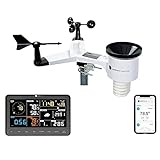
- COMPLETE WEATHER STATION: (1) Osprey Sensor Array with Rain Cup, and (1) Brilliant, Easy-to-Read LCD Color Display
- AUTHENTIC HYPER-LOCAL DATA: Monitor your actual home and backyard weather conditions with our wireless and Wi-Fi-enabled sensor array measuring wind speed/direction, temperature, humidity, rainfall, UV intensity, and solar radiation
- SMART HOME READY: Set up alerts, access your data remotely, and program your home based on weather conditions using IFTT, Google Home, Alexa, and more
- ENHANCED WIFI: Enables your station to transmit its data wirelessly to the world's largest personal weather station network (optional setting)
- JOIN THE COMMUNITY: Connect to Ambient Weather Network to customize your dashboard tiles, share hyperlocal weather conditions via social feeds and create your own forecasts (coming soon)
Before installing, name the missing feature in plain language. Perhaps you want a dedicated forecast interface on a device that does not offer the Pixel Weather experience, or you want an app because the quick view does not suit your routine. Then check whether the candidate app currently provides that feature, whether it supports your device and region, and what location permissions it asks for. If you cannot identify anything you need beyond what your phone already provides, installing an extra app may add little value.
There is no basis here to rank third-party apps or prescribe one by name. Their features and disclosures can change, and the reviewed support pages do not provide a comparison of their forecast data, performance or prices. Treat a recommendation elsewhere as a starting point to verify, not proof that a particular app is right for you.
How to check what your Android phone already offers
- Check the home and lock screens. Look for weather already surfaced through At a Glance. Its placement and presentation can differ between devices.
- Check whether At a Glance is available. Google documents the widget on most Android devices and the full experience on Pixel devices running Android 12 or later. Refer to Google’s At a Glance instructions for the applicable device guidance.
- If you have a Pixel, check for Pixel Weather. Google documents the app for Pixel phones and tablets. Its support page explains the forecast summary, detail page and notifications: Check the weather forecast on your Pixel phone or tablet.
- Decide what is missing before adding an app. Identify whether you need a dedicated detail page, notifications or another particular capability. If your current option already serves your purpose, an additional app may not add useful value.
Because widget availability and instructions can vary by phone maker, a missing or differently presented widget does not by itself mean that all Android phones lack built-in weather. Check the guidance and options for your own device.
If you cannot find the option
First distinguish between not seeing a weather item on the screen and not having the feature available at all. At a Glance is described as available on most Android devices, not every device with identical behavior. Look for the device-specific guidance and check whether your software version and phone maker affect the instructions. On Pixel devices, the full At a Glance experience is documented for Android 12 and later; that requirement is specifically for the full experience, not a guarantee that every other phone has the same implementation.
The Tool Desk
Outbyte PC Repair FREEClear out junk files and repair common Windows errorsFree Scan →Outbyte Driver Updater FREEScan for outdated or missing drivers - takes under a minuteDriver Scan →If you use a non-Pixel Android phone, do not assume that Pixel Weather is missing because you have overlooked a universal Android app. The cited Pixel support page describes Pixel phones and tablets. Your manufacturer may provide different built-in options, but the sources cited here do not inventory every maker’s weather app or explain how each one works. Confirm what is offered on your own device rather than relying on a generic set of instructions.
Similarly, a friend’s instructions may not match your screen. Manufacturers can handle widgets differently, and software versions and regions can affect what is available. The useful next step is to identify your phone’s own available controls and official guidance, rather than immediately downloading an app because a widget is not in the same place.
Do these options provide more accurate forecasts?
The cited support pages describe features and availability, not comparative forecast accuracy. They do not establish that At a Glance, Pixel Weather or a third-party app forecasts better than another. A feature comparison can tell you which interface suits your routine; it cannot answer which forecast is most accurate.
Also popular on Amazon
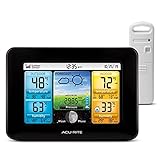
- Simple Setup and Use: Install 2 AA batteries (not included) in the outdoor weather station sensor and easily hang on a post or tree branch using the integrated hanger to begin receiving your weather forecast and hyperlocal conditions
- Real-Time Weather Conditions: This indoor outdoor weather station has an indoor temperature gauge and an outdoor temperature thermometer for indoor and outdoor temperature, humidity, and barometric pressure trends from an outdoor temperature sensor
- Weather Forecast and Forecasting Technology: The outside temperature thermometer wirelessly relays data to provide a hyperlocal, personalized weather forecast 12 hours from your current conditions, so you can plan your la crosse or other sports game!
- Illuminated LCD Color Display: Easy-to-view digital indoor outdoor thermometer display has an adjustable dimmer to make for the perfect addition to your home technology and allows easy placement anywhere in the house, office, or as an RV weather station
- Dynamic Forecast Icons and Moon Phase: With multiple thermometers & weather instruments data, this digital indoor outdoor thermometer display has trend arrows and provides the current moon phase to further impact your weather monitoring capabilities
These sources also do not inventory every phone manufacturer’s weather app, third-party forecast provider or regional data source. Do not assume that an app’s presence, interface or notification feature proves anything about the quality of its forecast.
If accuracy is your deciding factor, look for a direct comparison of the exact services and location you care about. Do not treat a larger detail page, more alerts, or a polished presentation as evidence of better forecast performance. Nor does the information cited here support a blanket claim that built-in weather is better or worse than an app you can install separately.
There is also no single named statistic here that would let you settle the question with a number. No adoption, accuracy or forecast-performance figure is established by the cited support material. It is more useful to separate two questions: whether the app gives you the interface and features you want, and whether a trustworthy comparison has shown a performance difference. The documented feature descriptions answer the first kind of question, not the second.
What should you know about location permissions and privacy?
Google says At a Glance uses device and activity data to provide relevant information, and documents controls for personalization. If you want to understand or change those controls, consult Google’s At a Glance guidance for the options applicable to your device.
Android’s privacy guidance describes app permission choices including allowing access while an app is in use, allowing it one time, or denying access. The available choice can matter when an app needs location information to provide location-specific features. Review the permission prompt and your phone’s current settings rather than assuming every weather app handles location in the same way. See Android privacy settings and permissions.
Free tools Windows power users keep installed
One-click scans. No signup required.
For an app from the Play Store, Google points users to its Data safety section for information about data the app may access and use. Check the disclosure for the particular app you are considering; the sources do not establish what any unspecified third-party weather app collects.
A practical privacy check before installing
Read the permission request when it appears and consider whether the choice makes sense for the feature you want. Android’s documented options include permission while using an app, one-time access, or denial. The right choice depends on the app and your preference; the available documentation does not say that every weather feature requires the same access. If you deny a permission, check what the app says will still work instead of assuming its behavior.
Also popular on Amazon

- Comprehensive Weather Information: One of the best weather stations, receive over 55 data points that allow you to monitor historical data, the heat index, dew point, feels like temperature, pressure trends with trend arrow, and more
- Real-Time Weather Conditions: Look no further for the perfect indoor and outdoor weather station! Wirelessly receive readings for indoor/outdoor temperature and humidity, wind speed/direction, barometric pressure, and rainfall directly to your home weather station
- Easiest Setup on the Market: Just install batteries, attach the wireless outdoor sensor to a pole or post using the included mounting bracket, and you’re ready to be the neighborhood weather expert
- Weather Clock: The indoor weather station display is a large, color LCD Display with the current time, date, and an adjustable dimmer, making it convenient to read and easily view indoor and outdoor data, time, and conditions
- Weather Forecast: The outdoor weather station collects elevation data and combines it with barometric pressure data from the indoor weather station to provide a personalized weather forecast 12 hours from your current conditions
Then review the app’s Play Store Data safety information. It is a place to check what the app says about data it may access and use, not a substitute for checking the app you are actually considering. Do not transfer one app’s disclosures to another, and do not assume that all weather apps collect identical information. Likewise, At a Glance’s documented use of device and activity data is a reason to review its personalization controls if that matters to you, not grounds to make unsupported claims about other apps.
These checks can help you make an informed choice, but they do not establish a universal privacy winner. The relevant permissions and disclosures vary by app and device. Review current settings and disclosures for the particular product rather than relying on a general label such as “built-in” or “third-party.”
What’s actually slowing this PC down?
Pick the symptom - the matching free tool is one click away.
How to decide whether to install one
- Stay with the built-in option if a quick weather view or the Pixel Weather features meet your needs.
- Check device compatibility first if the option you want is not visible. At a Glance availability and handling vary, while the cited Pixel Weather instructions apply to Pixel phones and tablets.
- Evaluate a third-party app against a defined need. Confirm its current features, location permission choices and Play Store Data safety information.
- Do not use accuracy claims as a shortcut unless they are supported by comparative evidence for the specific services being compared. The cited documentation provides no such comparison.
A simple decision path
- Do you only need a quick check? See whether weather is already visible through At a Glance on your home or lock screen. If it is easy to see and sufficient for your routine, you may have no reason to install a separate app.
- Do you want a dedicated forecast page? If you use a Pixel phone or tablet, check Pixel Weather and its customizable detail page, notifications and summary. If you use another Android device, confirm what your maker offers; the Pixel instructions do not establish availability elsewhere.
- Is something specific missing? Write down the feature you want before searching for an app. Compare candidates by their current feature descriptions, device and region support, location permissions, and Play Store Data safety disclosures.
- Are you choosing based on accuracy? Look for direct comparative evidence about the services in question. The cited feature documentation does not provide it, so do not treat interface or availability as an accuracy test.
There is no stated one-time or subscription price comparison in the official material cited here, so price cannot be used to rank these options on that basis. The clearest cost-conscious step is simply to check whether you already have an option that meets your needs before choosing to install anything else. Avoid treating an app as necessary just because it is available to download.
Independent reader supportYour contribution helps us test, update, and keep practical guides available for everyone.What this comparison can—and cannot—tell you
It can help you distinguish a glanceable presentation from a dedicated forecast interface and check the documented device scope of Google’s options. It can also help you think through compatibility, permissions and the Play Store disclosures to inspect when considering another app. That is enough to answer the everyday question of whether you should first check what your phone already offers.
It cannot provide a complete catalogue of Android manufacturers’ weather tools, select a universally best third-party app, verify regional data coverage, or compare forecast accuracy. Those are separate questions, and the official documentation cited here does not settle them. If a particular need is important—such as a feature, a location, or a performance claim—verify that exact point in current app and device information rather than assuming a general comparison answers it.
Frequently Asked Questions
Do I need a weather app on Android?
Not necessarily. Google says At a Glance can show weather on the home or lock screen and is available on most Android devices. Pixel phones and tablets also have Pixel Weather. If one of the options available on your device gives you what you need, you may not need another app.
Outdated Drivers Are Slowing You Down
One free scan finds every outdated or missing driver and matches the right update for your exact hardware.Free scan · exact hardware matchPC Slower Than It Used to Be?
A free scan shows the junk files, broken settings and background clutter dragging Windows down - then fixes them in one click.Free scan · Windows 10 & 11Does my Android phone already have a weather forecast?
It may. Check your home and lock screens for weather through At a Glance, and consult the guidance for your specific device. Availability and widget handling can vary by manufacturer, software version and region.
Also popular on Amazon
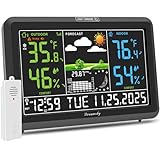
- Illuminated Indoor Outdoor Weather Station for Home with Large Colorful Display: The home weather station delivers large big numbers for weather forecast info, indoor outdoor temperature, atomic time, date, year and calendar day, which is super easy to read from afar.
- Indoor outdoor Thermometer Wireless with High/Low Temperature Alert: The digital weather station supports 3 outdoor sensors which helps to monitor temperature and humidity of multiple locations (one sensor included). With the high/low temperature alert function, the weather station clock keeps you informed about the changes of weather thermometer outdoor.
- WWVB Atomic Weather Station with Auto DST: Weather atomic clock with indoor/outdoor temp always keeps precise time and date by receiving the WWVB atomic signal. The self setting digital weather clock will automatically adjust to daylight saving time with auto DST feature, no more resetting twice a year.
- Personal Weather Forecast Station: This weather stations wireless indoor outdoor predicts the next 12-24 hours weather condition with a 7-day calibration through the pressure of your location which provides you a better outing experience.
- 5 Level Adjustable Backlight Brightness: The weather clock indoor outdoor temperature atomic with backlight dimmer function helps you avoid high-intensity light that disturb your sleep and easily check the weather situation during the day.
What can I use instead of a weather app on Android?
At a Glance can surface weather on a home or lock screen. Pixel phone and tablet owners can also check Pixel Weather, which Google documents with a customizable detail page, notifications and a summary.
Is Pixel Weather available on every Android phone?
The cited Google support page describes Pixel phones and tablets. It does not establish that Pixel Weather is available on every Android phone. Check the options for your own device.
Is At a Glance available on every Android device?
Google says the At a Glance widget is available on most Android devices, not that every device has identical availability or behavior. The full experience is documented for Pixel devices running Android 12 or later.
Is Pixel Weather more accurate than At a Glance or another app?
The cited support pages describe features and availability, not comparative forecast accuracy. They do not establish that one option forecasts better than another.
What should I check before installing a third-party weather app?
Confirm its current features and device support, review the location permissions it requests, and check its Play Store Data safety information. Consider whether it fills a specific need that your current option does not.
What location permission choices does Android describe?
Android’s privacy guidance describes allowing access while using an app, allowing access one time, or denying it. Review the prompt and your current settings for the particular app.
The Bottom Line
Check what your phone already offers before installing another weather app. At a Glance may be enough for a quick view, and Pixel users can try Pixel Weather for its dedicated interface, detail page, notifications and summary. If you still want another app, compare its current features, compatibility and privacy disclosures against a specific need. The cited Google and Android documentation does not establish which forecast is most accurate.
Do these 3 things before closing this tab:
1Repair Windows errors before they cause bigger problems2Scan for outdated or missing drivers - takes under a minute3Clear out junk files and repair common Windows errorsQuick Recap
Product prices and availability are accurate as of the date/time indicated and are subject to change. Any price and availability information displayed on Amazon at the time of purchase will apply.

