
What’s actually slowing this PC down?
Pick the symptom - the matching free tool is one click away.
Scilab can load a WAV recording, expose its waveform and spectrum, design digital filters, process mono or stereo channels, and write a new WAV file. The important qualification is that a conventional filter removes selected frequency ranges; it does not know whether a sound in that range is noise or wanted speech, music, or ambience. Diagnose the interference first, then apply the narrowest filter that solves the problem.
The official Scilab documentation currently identifies 2026.1.0 as the recommended release, while several function pages are published in the 2026.0.1 documentation branch. See Scilab Signal Processing and the signal-processing function catalog.
What you need
- Scilab and an ordinary PCM or normalized floating-point WAV file.
- The original recording kept unchanged as a backup.
- The recording’s sample rate, channel count, and bit depth; do not assume 44.1 kHz, stereo, or 16-bit audio.
Scilab is particularly useful when you want a repeatable script or are learning DSP. It is less suitable than a restoration tool for clicks, clipping, changing broadband noise, or overlapping voices.
Identify the noise before choosing a filter
| Noise | Typical symptom | First option | Main risk |
|---|---|---|---|
| Low-frequency rumble | Handling noise, traffic, HVAC vibration | High-pass | Thin voice or lost bass |
| High-frequency hiss | Tape, preamp, or air-conditioning noise | Gentle low-pass | Dull consonants and music |
| Mains hum | Narrow peaks near 50/60 Hz and harmonics | Notch or band-stop | Ringing or removed bass fundamentals |
| Narrow whistle | One or a few sharp spectral lines | Narrow notch | Removal of a wanted tone |
| Broadband stationary noise | Noise across much of the spectrum | Wiener or spectral processing | A fixed filter cannot separate overlapping speech and noise |
| Clicks and pops | Short transients | De-click or interpolation | Filtering smears the transient |
| Clipping | Flattened peaks and harsh distortion | Declipping/restoration | Filtering cannot reconstruct missing samples |
“Noise” is not a single technical category. A filter decision depends on whether the interference is narrow-band, stationary, broadband, transient, or changing over time.
Do these 3 things before closing this tab:
1Scan for outdated or missing drivers - takes under a minute2Clear out junk files and repair common Windows errors3Fix the driver behind crashes, sound loss and screen glitches#1 Best Overall

- Ground loop filter noise isolator, eliminating the hiss, buzz and interference caused by ground loops which happens when the audio source and the speaker use the same power source in some car speakers / home stereo systems when using the Bluetooth receiver.
- You can enjoy the clean and clear music/audio by eliminating the current noise in some car speakers / home stereo systems.
- Works with any device that has a 3.5mm jack including smartphones, tablets, mp3 player, speakers, when grounding issues persist. You could also use with a Bluetooth Receiver/Bluetooth Hands-free Car Kit in your Car Audio System/Home Stereo.
- Being so mini, portable and light, plug and play, no battery need or button, all you need to do is to plug in the ground loop isolator
- Portable, light-weight and plug and play without any complicated setup. Package Contents: Besign Ground Loop noise Isolator with 3.5mm Audio Cable, User Manual.
Load and inspect the WAV file
wavread returns amplitudes in the range -1 to +1 and stores one channel per row. It also returns the sampling frequency and bit depth, as documented in Scilab’s wavread reference.
inputFile = "noisy_recording.wav";

[y, Fs, bits] = wavread(inputFile);

[nChannels, nSamples] = size(y);

mprintf("Channels: %dn", nChannels);
mprintf("Samples per channel: %dn", nSamples);
mprintf("Sampling rate: %d Hzn", Fs);
mprintf("Bit depth: %d bitsn", bits);
mprintf("Duration: %.2f secondsn", nSamples / Fs);
Digital frequencies are bounded by the Nyquist frequency, Fs/2. Thus 44,100 Hz audio has a 22,050 Hz Nyquist limit, and 48,000 Hz audio has a 24,000 Hz limit. Every cutoff must be below that limit.
View the waveform
t = (0:nSamples-1) / Fs;

scf(1);
clf();

for k = 1:nChannels
    subplot(nChannels, 1, k);
    plot(t, y(k, :));
    xtitle("Original channel " + string(k), "Time (s)", "Amplitude");
end
Inspect frequency content
A waveform rarely tells you where hum or hiss lies. Use a representative segment, apply a window for a steadier FFT, and inspect a spectrogram with mapsound when the noise changes over time. Scilab also documents sound-file analysis functions.
x = y(1, :);
N = length(x);

X = fft(x);
P = abs(X(1:floor(N/2)+1));
f = (0:floor(N/2)) * Fs / N;

scf(2);
clf();
plot(f, P);
xtitle("Magnitude spectrum", "Frequency (Hz)", "Magnitude");
Look for isolated lines (hum or whistles), excess energy at the bottom (rumble), or a broad high-frequency shelf (hiss). A narrow peak is a reason to try a notch—not a reason to remove an entire broad band.
Outdated Drivers Are Slowing You Down
One free scan finds every outdated or missing driver and matches the right update for your exact hardware.Free scan · exact hardware matchPC Slower Than It Used to Be?
A free scan shows the junk files, broken settings and background clutter dragging Windows down - then fixes them in one click.Free scan · Windows 10 & 11Choose FIR or IIR
FIR
Finite impulse response filters are transparent to inspect and straightforward to apply with filter(h,1,x). Symmetric FIR designs can provide linear phase and predictable delay, which is useful for offline dialogue or music processing. Sharp transitions require more taps, increasing computation, ringing risk, and delay.
Rank #2

- Designed exclusively to eliminate ground loop hum and alternator whine between car audio head units and amplifiers. This product is NOT for radio static, antenna noise, or speaker distortion. Please confirm your noise type before purchasing to ensure this product is right for your situation.
- Made from High Fidelity Permalloy Transformers to minimize signal loss, unlike other old ground loop isolators with HUGE DISTORTION under 100Hz.
- Close to perfect response of +/- .03 db from 2 to 20,000Hz
- Super compact design for easy installation in tight space.
- Split pin RCA connector with pure Oxygen Free Copper spiral shielding wire
IIR
Infinite impulse response filters can achieve sharp transitions with fewer coefficients, but their phase is generally nonlinear and high orders can be numerically sensitive. Scilab’s iir supports Butterworth, Chebyshev I and II, and elliptic low-pass, high-pass, band-pass, and stop-band designs.
Frequency units require care. The iir documentation requires discrete cutoff values in 0 < frq < .5, expressed as a fraction of the sampling frequency. A 3,000 Hz cutoff is therefore 3000/Fs, not 3000/(Fs/2). The current ffilt page does not clearly state its cutoff convention; use help ffilt in the installed release before passing values, or use the explicit FIR construction below.
Scilab’s general filter implementation is [y, zf] = filter(B, A, x [, zi]); B is the numerator, A the denominator, and zf the final state for block processing. See the filter reference. Do not treat an iir design object as an already verified B,A pair without checking the release-specific return format.
Recommended Free Tools
Complete FIR low-pass workflow
This windowed-sinc example reduces high-frequency energy while retaining most speech content. Set fc below Fs/2 and choose it from your spectrum and listening tests.
// Read the recording
[y, Fs, bits] = wavread("noisy_recording.wav");

fc = 8000;       // cutoff in Hz
N = 101;         // odd number of taps
M = (N - 1) / 2;
n = -M:M;
h = zeros(1, N);

for k = 1:N
    if n(k) == 0 then
        h(k) = 2 * fc / Fs;
    else
        h(k) = sin(2 * %pi * fc * n(k) / Fs) / (%pi * n(k));
    end
end

// Hamming window
w = 0.54 - 0.46 * cos(2 * %pi * (0:N-1) / (N-1));
h = h .* w;
h = h / sum(h);  // normalize DC gain

// Filter each channel independently
clean = zeros(y);
for ch = 1:size(y, 1)
    clean(ch, :) = filter(h, 1, y(ch, :));
end

// Guard against out-of-range WAV samples
peak = max(abs(clean));
if peak > 1 then
    clean = clean / peak;
end

wavwrite(clean, Fs, bits, "cleaned_recording.wav");
A 101-tap symmetric FIR has approximately (N-1)/2 samples of group delay: about 1.04 ms at 48 kHz. More taps narrow the transition band but add delay and computation. The peak normalization prevents clipping, but it can make the result louder; compare levels rather than normalizing automatically in every workflow.
Rank #3

- Eliminates Humming and Buzzing Between Audio Source and Amplifier Due to Ground Loop Issues
- Filters Out DC Current in the Signal Path
- Cylindrical Metal Case with Heat Shrink Tube. Dimension: Dia. 36mm, 62mm Long
- Contain 28cm Long Interconnects, 2 Male and 2 Female RCA Gold Connectors
- 20 Amp, Input 30 Watt Max 60 Watt, Frequency: 20-30K Hz
High-pass filtering for rumble
For speech, a starting cutoff around 60–120 Hz often targets handling noise; HVAC rumble may justify roughly 80–150 Hz. These are auditioning ranges, not universal settings. Full-range music usually needs a lower cutoff.
fc = 100;
N = 101;
M = (N - 1) / 2;
n = -M:M;
lp = zeros(1, N);

for k = 1:N
    if n(k) == 0 then
        lp(k) = 2 * fc / Fs;
    else
        lp(k) = sin(2 * %pi * fc * n(k) / Fs) / (%pi * n(k));
    end
end

w = 0.54 - 0.46 * cos(2 * %pi * (0:N-1) / (N-1));
lp = lp .* w;
lp = lp / sum(lp);

// Spectral inversion creates a high-pass FIR
hp = -lp;
hp(M + 1) = hp(M + 1) + 1;

cleanHighPass = zeros(y);
for ch = 1:size(y, 1)
    cleanHighPass(ch, :) = filter(hp, 1, y(ch, :));
end
Notch filtering for mains hum or a whistle
First locate the narrow peak. Electrical systems commonly produce a fundamental near 50 or 60 Hz plus harmonics at 100/120 Hz, 150/180 Hz, and higher. Choose the actual measured frequency, use the narrowest practical stop-band, listen, then recheck the spectrum. Add harmonic notches only when they are audible and stationary. A broad notch can remove wanted bass or voice energy and a very sharp filter can ring around transients.
The Tool Desk
Outbyte Driver Updater FREEFix the driver behind crashes, sound loss and screen glitchesFind Drivers →Outbyte PC Repair FREEClear out junk files and repair common Windows errorsFree Scan →Scilab lists stop-band designs through its filter catalog, ffilt, and iir. Because cutoff normalization for the current ffilt page is not explicit, verify it with the installed help or construct the notch coefficients deliberately rather than silently passing hertz.
Process stereo without corrupting channels
The WAV matrix has one row per channel. Apply identical coefficients to each row unless you have a specific reason to alter the stereo image:
clean = zeros(y);
for ch = 1:size(y, 1)
    clean(ch, :) = filter(h, 1, y(ch, :));
end
Never flatten a stereo matrix into one vector: that would join the end of one channel to the beginning of the other and contaminate both signals.
Rank #4
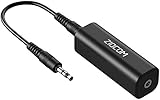
- Eliminating Buzzing Noise : Eliminating the buzzing noise, caused by ground loops which happens when the audio source and the speaker use the same power source in some car speakers / home stereo systems when using the Bluetooth receiver.
- Working Principle: Filters out noise instantly for clear, uninterrupted, uncompromised sound by eliminating the current noise in some car speakers / home stereo systems
- Plug and Play: Nifty little gadget that just plugs in; no other setup needed.
- Wide Compatibility: Works with any audio device that has 3.5mm audio jacks, for your Car Audio System/Home Stereo.
- Note: The Ground Loop Isolator connect to the AUX Jack in car to eliminate noise.You will enjoy good quality sound when use it with Ground Loop Noise isolator.
Export and validate the result
wavwrite expects amplitudes in -1 to +1 and supports explicit sample-rate and 8-, 16-, 24-, or 32-bit output settings.
mprintf("Original peak: %.6fn", max(abs(y)));
mprintf("Filtered peak: %.6fn", max(abs(clean)));

scf(3);
clf();
subplot(2, 1, 1);
plot(y(1, :));
xtitle("Original signal");
subplot(2, 1, 2);
plot(clean(1, :));
xtitle("Filtered signal");

wavwrite(clean, Fs, bits, "cleaned_recording.wav");

[check, Fs2, bits2] = wavread("cleaned_recording.wav");
mprintf("Exported sample rate: %d Hzn", Fs2);
mprintf("Exported bit depth: %d bitsn", bits2);
mprintf("Exported peak: %.6fn", max(abs(check)));- Listen to original and filtered files at matched loudness.
- Check speech consonants, transients, ringing, and stereo balance.
- Inspect the first and last sections for startup and boundary transients.
- Confirm that the exported metadata matches the intended sample rate and bit depth.
Understand delay and edge effects
filter starts with a zero initial state unless you provide one, so the beginning can contain a transient. The end is also affected because a finite recording has no future samples. For offline FIR work, allow margin, pad the signal when clean boundaries matter, and trim the group delay when sample alignment is required. A causal filter is not zero-latency.
Troubleshoot common failures
The output sounds dull
Raise the low-pass cutoff or use fewer taps; the filter may be removing wanted sibilance and brightness along with hiss.
The voice sounds thin
Lower the high-pass cutoff. Compare against the unprocessed file, especially when the speaker’s voice contains useful low-frequency energy.
Hum remains
Measure the actual peak, check whether it is 50 or 60 Hz, inspect harmonics, and confirm that the notch is not so narrow that frequency drift passes through.
Best Value

- Reduces High Pitched Whine Alternator Noise caused by the car's electrical system
- Ground Loop Isolator Noise Filter
- Always Use High Quality RCA Cables for your Audio System
- Dimensions: 3.4 x 1.5 x 1.5, Unit Weight: .30 Lbs. Tips: Ground each amplifier independently. Same thing if you have added stiffening capacitors, go to a separate ground for the cap
Ringing appears
Use a lower-order filter or a wider transition band. Very sharp filters have longer impulse responses and can smear impulses.
The output clips
Inspect max(abs(clean)) before writing. Reduce gain or normalize deliberately, documenting the level change.
Stereo is unbalanced
Verify that every channel uses the same coefficients and that rows—not columns—are being filtered.
An IIR script fails
Check the installed iir help for its returned representation and convert it to verified numerator and denominator vectors before calling filter(B,A,x). Also check that each cutoff is normalized to the documented 0-to-0.5 range.
Quick wins for a faster PC:
Scan for outdated or missing drivers - takes under a minuteDriver Scan →Repair Windows errors before they cause bigger problemsFix Now →Fix the driver behind crashes, sound loss and screen glitchesFind Drivers →When a fixed filter is not enough
Low-pass, high-pass, and notch filters attenuate frequency regions; they cannot reliably separate speech from noise occupying the same time-frequency region. Changing noise, echoes, coughs, clicks, clipping, and overlapping conversations need different algorithms. Scilab’s signal-processing tools include FFT, power spectral density, FIR/IIR design, and related methods, so it is a strong environment for developing spectral subtraction, Wiener, or adaptive processing. A dedicated restoration application is more practical when you need de-clicking, declipping, or rapid visual repair.
Keep the original, diagnose before filtering, make the smallest spectral change that solves the identified problem, and validate by both measurement and listening.
Quick Recap
Product prices and availability are accurate as of the date/time indicated and are subject to change. Any price and availability information displayed on Amazon at the time of purchase will apply.

