
iTechGuides is reader-supported. When you buy through links on our site, we may earn an affiliate commission. As an Amazon Associate I earn from qualifying purchases. Learn more
The Dell S2725QS is a strong general-purpose 27-inch 4K monitor for office work, browsing, coding, media, and casual gaming. Its sharp IPS image, 120Hz refresh rate, adjustable stand, low input lag, and speakers are compelling at the $299.99 US price captured for this review, but the lack of USB-C, weak HDR, and blurry motion limit its appeal.
The S2725QS is best understood as a work monitor with gaming capability—not as a dedicated gaming monitor. Desktop users and console owners get a useful combination of 4K resolution, 120Hz support, variable refresh rate, and conventional HDMI and DisplayPort inputs. Laptop owners who want charging, peripherals, and video through one cable should look at the Dell S2725QC or another USB-C docking monitor instead.
Key takeaways
- The Dell S2725QS combines a 27-inch 3840 × 2160 IPS panel with a 120Hz refresh rate and approximately 163 pixels per inch.
- The monitor is a strong sRGB productivity display, with Dell specifying 99% sRGB coverage and WIRED measuring 100% sRGB on its review sample.
- The S2725QS has two HDMI inputs and one DisplayPort 1.4 input, but no USB-C, USB hub, USB upstream port, or headphone output.
- Low input lag and 4K/120Hz support make the S2725QS suitable for casual PC and console gaming, while slow pixel response produces visible motion blur in fast games.
- HDR compatibility does not translate into impressive HDR: independent testing found gray-looking blacks, muted highlights, and limited HDR color impact.
- The monitor is easiest to recommend below Dell’s captured US price of $299.99, especially around the mid-$200 range, but historical sale prices are not current price guarantees.
What is the Dell S2725QS?
The Dell S2725QS is a 27-inch 4K IPS monitor from Dell’s Plus Series. The Plus branding places it between a basic consumer display and Dell’s more expensive UltraSharp professional monitors: the S2725QS emphasizes sharpness, smooth everyday use, an adjustable stand, speakers, and value rather than USB-C docking, wide-gamut color, advanced HDR, or esports-grade motion clarity.
Dell specifies a 3840 × 2160 resolution, 120Hz refresh rate, 350 cd/m2 typical brightness, 1,500:1 typical contrast, 99% sRGB coverage, FreeSync Premium, and response-time modes rated at 8ms, 5ms, and 4ms GTG. The official specifications also list two HDMI inputs, one DisplayPort 1.4 input, built-in audio, and 100 × 100 mm VESA support. These are manufacturer specifications; real-world response time and HDR performance are less impressive.
Popular on Amazon
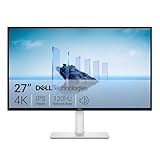
- Improved ComfortView Plus: Reduces harmful blue light emissions to ≤35%, for all-day comfort without sacrificing color accuracy.
- Refresh rate: A smooth, tear-free experience with AMD FreeSync Premium (refresh rate up to 120Hz) and an ultra-low 0.03ms response time create a captivating experience for work and play.
- Vivid colors: Immerse yourself in breathtaking 4K visuals with in-plane switching technology. Enjoy vibrant colors with 99% sRGB. The 1500:1 contrast ratio and HDR readiness deliver excellent depth and detail.
- Re-engineered sound quality: Enjoy more detailed sound with spacious audio featuring greater output power, deeper frequency response and more decibel range than the previous generation.
- Ultra-thin bezel: Designed with a sleek, modern aesthetic and an ash white finish, this display features ultra-thin bezels for a refined, minimalist design.
The S2725QS therefore fits buyers who want one display for spreadsheets, web pages, documents, coding, video, and occasional gaming. The S2725QS is a less suitable choice for a USB-C laptop workstation, professional wide-gamut editing, competitive gaming, or HDR-first entertainment.
Is 27-inch 4K a good size and resolution?
Yes, 27-inch 4K is excellent for sharp text and detailed images, but the high pixel density makes operating-system scaling important. The Dell S2725QS has 3840 × 2160 pixels across 27 inches, producing approximately 163 pixels per inch according to Dell’s product specifications.
At native scaling, text and interface controls can look too small for comfortable everyday use. Windows users will commonly prefer 125% or 150% scaling, depending on viewing distance and eyesight. macOS generally handles high-density scaling well, although the available modes depend on the Mac and operating-system version. Scaling preserves the practical benefit of the sharp panel; lowering the resolution is usually a poorer solution.
| Priority | Why the S2725QS fits or does not fit | Alternative direction |
|---|---|---|
| Sharp office text | Excellent fit because 27-inch 4K produces approximately 163 PPI. | Keep the S2725QS, using comfortable OS scaling. |
| Large native interface | Less ideal because 27-inch 4K makes unscaled text and controls small. | Consider a 32-inch 4K display. |
| High gaming frame rates | 4K demands more GPU performance than 1440p. | Consider a 1440p monitor at 165Hz or higher. |
| Extra horizontal workspace | The conventional 16:9 layout offers less width than an ultrawide. | Consider an ultrawide monitor. |
How good is the Dell S2725QS image quality?
The Dell S2725QS delivers a sharp, balanced SDR image that is well suited to office work, web content, general photo use, and sRGB-oriented creative tasks. The IPS panel provides broad viewing angles, and Dell specifies 178 degrees horizontally and vertically. The matte anti-glare coating helps reduce reflections in bright rooms, although matte screens can look less vivid than glossy displays.
Dell specifies 350 cd/m2 typical brightness, a 1,500:1 typical contrast ratio, and 99% sRGB coverage. In its independent testing, WIRED measured approximately 355 nits, approximately 1,270:1 contrast, 100% sRGB coverage, 79% AdobeRGB coverage, and average color accuracy of 1.16. Those WIRED figures describe one tested sample rather than a guaranteed result for every retail unit.
The test results support the practical conclusion: the S2725QS is a good standard-gamut monitor, not a specialist AdobeRGB, DCI-P3, or HDR-production display. Photographers, designers, and video creators working primarily in sRGB should find the coverage appropriate, while color-critical professionals should choose a display with a wider gamut and a calibration workflow.
The Dell S2725QS review from WIRED’s independent measurements supports the monitor’s strong SDR value, but measurements can vary between samples and picture modes. Dell’s dedicated sRGB mode is also useful for buyers who want a more controlled standard-gamut presentation.
What’s actually slowing this PC down?
Pick the symptom - the matching free tool is one click away.
Does 120Hz make the S2725QS good for productivity?
Yes. The 120Hz refresh rate is one of the monitor’s most noticeable everyday advantages. Scrolling through long documents and web pages, moving the pointer, dragging windows, and navigating menus feel smoother than on a conventional 60Hz display. WIRED specifically reported a noticeable improvement in everyday responsiveness from the higher refresh rate.
Also popular on Amazon

- Elevated entertainment: The QHD resolution and 1500:1 contrast ratio bring astounding depth and vivid detail, while a 144Hz refresh rate and 1ms Moving Picture Response Time (MPRT) deliver a smooth, tear-free viewing experience.
- Hear the audio difference: Immerse yourself in sound with integrated dual 3W speakers delivering a wider range of frequencies.
- Eye comfort: Prioritize visual comfort with this 4-star TÜV-certified display. Reduce harmful blue light emissions while maintaining stunning image quality without compromising colors.
- Designed for comfort: Adjust your monitor to suit your preference throughout the day.
- Dell Display and Peripheral Manager: Experience Dell’s singular, innovative application to optimize the performance of your entire Dell PC workspace*. *Based on Dell internal analysis, December 2024.
The 16:9 aspect ratio is familiar and works well for office software, but the S2725QS does not provide the side-by-side width of an ultrawide. A 27-inch 4K panel also gives you more usable desktop detail than 27-inch 1440p, provided your computer and applications handle scaling well.
The stand supports height, tilt, swivel, and pivot adjustment according to Dell. Dell lists approximately 5.12 inches of height adjustment, tilt from −5° to 21°, swivel from −30° to +30°, and pivot adjustment of ±90°. The monitor also supports a 100 × 100 mm VESA mount.
There is an important real-world qualification: WIRED found that the included stand does not rotate far enough to function as a genuinely convenient vertical-monitor setup, despite Dell listing pivot adjustment. If portrait orientation matters for coding, documents, or chat, use a VESA monitor arm rather than assuming the supplied stand will complete the rotation easily.
Do these 3 things before closing this tab:
1Clear out junk files and repair common Windows errors2Fix the driver behind crashes, sound loss and screen glitches3Repair Windows errors before they cause bigger problemsWhich ports does the Dell S2725QS have?
The Dell S2725QS has two HDMI inputs and one DisplayPort 1.4 input. Dell specifies 3840 × 2160 at 120Hz, HDR, and VRR support through the HDMI implementation, while DisplayPort 1.4 also supports 4K at 120Hz. Dell includes an HDMI cable and power cable in the box.
| Connectivity | Included? | Practical consequence |
|---|---|---|
| HDMI inputs | Two | Useful for a PC, console, or multiple video sources; Dell specifies 4K/120Hz capability. |
| DisplayPort 1.4 | One | Suitable for a desktop PC at 4K/120Hz when the graphics card and cable support the mode. |
| USB-C video | No | A USB-C laptop needs a suitable adapter, dock, or cable conversion. |
| USB-C charging | No | The monitor cannot charge a laptop over the display connection. |
| USB-A hub or upstream port | No | Peripherals cannot remain connected through the monitor. |
| Headphone output | No, according to WIRED | Use the computer, console, speakers, or a separate audio device for headphones. |
Why is the missing USB-C port such a big problem?
The lack of USB-C is the S2725QS’s largest practical weakness for laptop users. The monitor cannot carry video, charge a laptop, and connect USB peripherals through one USB-C cable. A MacBook or thin Windows laptop may need a USB-C-to-DisplayPort adapter, a USB-C-to-HDMI adapter, or a separate dock, depending on the computer’s ports and capabilities.
Desktop PC users with HDMI or DisplayPort will generally have no problem. Console owners also benefit from the conventional HDMI inputs. The USB-C limitation matters most when a laptop is the primary computer and the buyer wants a clean desk with one cable.
The Dell S2725QC is the more logical alternative for that use case because the QC version adds USB-C connectivity and a USB hub. The S2725QS remains the better fit for a desktop user who already owns a dock, does not need laptop charging, or finds the QS meaningfully cheaper. The dossier includes comparison context for the two models, but not a verified official Dell buying URL for the S2725QC, so check Dell’s current regional listing before purchasing.
PC Slower Than It Used to Be?
A free scan shows the junk files, broken settings and background clutter dragging Windows down - then fixes them in one click.Free scan · Windows 10 & 11Outdated Drivers Are Slowing You Down
One free scan finds every outdated or missing driver and matches the right update for your exact hardware.Free scan · exact hardware matchHow well does the Dell S2725QS perform for gaming?
The S2725QS performs well for casual gaming and console use, but the 120Hz headline specification should not be confused with fast motion clarity. The monitor supports 4K at 120Hz through its listed inputs, FreeSync Premium, and low input lag. Those features make controls feel responsive and allow supported consoles and PCs to use a high-refresh 4K signal.
Also popular on Amazon

- Low blue light: The improved ComfortView Plus reduces harmful blue light emissions to ≤35%, for all-day comfort without sacrificing color accuracy.
- Refresh rate: A smooth, tear-free experience with AMD FreeSync Premium (refresh rate up to 120Hz) and an ultra-low 0.03ms response time create a captivating experience for work and play.
- Vivid colors: Immerse yourself in breathtaking 4K visuals with in-plane switching technology. Enjoy vibrant colors with 99% sRGB. The 1500:1 contrast ratio and HDR readiness deliver excellent depth and detail.
- Re-engineered sound quality: Enjoy more detailed sound with spacious audio featuring greater output power, deeper frequency response and more decibel range than the previous generation.
- Easy connectivity: Keep your desk organized and clutter-free with a single USB-C cable (up to 65W power delivery).
Independent testing from RTINGS’ Dell S2725QS review found low input lag but characterized PC gaming performance as mediocre because fast-moving objects show blur from slow response times. Console gaming is more favorable because the monitor supports common PS5, PS5 Pro, and Xbox Series X|S signals, including 4K at 120Hz, but motion blur remains a limitation.
The distinction matters because input lag and pixel response measure different problems. Low input lag helps the display react quickly to controller or mouse input. Slow pixel transitions can still leave moving objects smeared or blurred. Dell’s 4ms setting is an overdrive-mode specification, not a guarantee that every pixel transition will complete in 4ms under real gameplay conditions.
| Gaming scenario | Verdict | Reason |
|---|---|---|
| Single-player PC games | Good enough | 4K detail, 120Hz, VRR, and low input lag are useful, while blur is less damaging outside competitive play. |
| PS5, PS5 Pro, or Xbox Series X|S | Good casual choice | The monitor supports common 4K/120Hz console signals, although motion response is not class-leading. |
| Competitive shooters and esports | Not recommended | Slow response times and visible motion blur matter more than 4K sharpness. |
| Older or midrange GPU at high frame rates | Potentially poor fit | Driving games at 4K requires more GPU performance than driving them at 1440p. |
The right description is simple: the Dell S2725QS is a work monitor with gaming capability. HDMI 2.1-class functionality enables 4K/120Hz signals, but HDMI 2.1 does not automatically make the S2725QS a high-end gaming monitor.
The Tool Desk
Outbyte PC Repair FREEClear out junk files and repair common Windows errorsFree Scan →Outbyte Driver Updater FREEFix the driver behind crashes, sound loss and screen glitchesFind Drivers →Is the S2725QS good for HDR?
No—the Dell S2725QS accepts HDR signals, but HDR picture quality is a weakness rather than a reason to buy it. Dell’s specified 350 cd/m2 brightness and 1,500:1 contrast ratio are typical of an affordable SDR-oriented IPS monitor, not the specifications associated with high-impact HDR.
RTINGS found that blacks look gray, HDR highlights lack impact, and the monitor does not provide a wide HDR color gamut. The gathered research gives no indication of local dimming or OLED-like per-pixel contrast. HDR on the S2725QS should therefore be treated primarily as signal compatibility.
Enable HDR if a game or video source requires it, but do not expect the bright highlights, deep blacks, or dramatic contrast of an OLED or a strong Mini-LED monitor. Buyers who prioritize HDR should spend their budget on an OLED, Mini-LED, or another display with substantially stronger sustained brightness and local dimming.
Are the built-in speakers any good?
The integrated speakers are a useful bonus for office calls, system sounds, casual videos, and occasional gaming. Dell lists built-in audio, and WIRED identifies the configuration as dual 5-watt speakers, describing them as unusually clear for monitor speakers with some audible bass.
The speakers are not a replacement for dedicated desktop speakers or good headphones. Speaker configuration and included features can vary by regional retail variant, so confirm the specification for the exact unit before treating the audio system as a deciding feature.
Also popular on Amazon

- Elevated entertainment: The FHD resolution and 1500:1 contrast ratio bring clarity, while a 144Hz refresh rate, and 1ms Moving Picture Response Time (MPRT) deliver a smooth, tear-free viewing experience.
- Hear the audio difference: Immerse yourself in sound with integrated dual 3W speakers delivering a wider range of frequencies.
- Eye comfort: Prioritize visual comfort with this 4-star TÜV-certified display. Reduce harmful blue light emissions while maintaining stunning image quality without compromising colors.
- Designed for comfort: Adjust your monitor to suit your preference throughout the day.
- Dell Display and Peripheral Manager: Experience Dell’s singular, innovative application to optimize the performance of your entire Dell PC workspace*. *Based on Dell internal analysis, December 2024.
How good are the S2725QS design and stand?
The S2725QS has an Ash White finish and a practical adjustable stand. Dell lists height, tilt, swivel, and pivot adjustment, while WIRED reports that assembly requires no tools apart from using the integrated thumb screw during setup.
The approximately 5.12 inches of height adjustment should help most users position the top of the screen near eye level. Tilt from −5° to 21° and swivel from −30° to +30° provide useful desk positioning. The 100 × 100 mm VESA pattern makes a third-party arm possible when the supplied stand is not sufficient.
The portrait-mode qualification is worth repeating: the manufacturer lists ±90° pivot, but WIRED found that the stock stand does not rotate completely into a practical vertical orientation. Use a VESA arm if portrait use is central to the workstation. Dell lists approximate weight with the stand at 14.26 pounds, which is relevant when choosing an arm.
How should you set up and calibrate the Dell S2725QS?
A basic setup gets the S2725QS close to its intended use without requiring a complicated calibration process.
- Assemble the stand and attach the monitor. WIRED reports that the process requires no tools, with a thumb screw used during assembly.
- Connect a desktop PC through DisplayPort or connect a console through HDMI. Use a suitable USB-C adapter or dock for a laptop without HDMI or DisplayPort.
- Open the computer’s display settings and select 3840 × 2160 resolution.
- Select 120Hz refresh rate rather than leaving the display at 60Hz.
- Enable FreeSync or VRR in the monitor’s available settings and in the graphics-driver or console settings where supported.
- Use the dedicated sRGB mode when standard-gamut color accuracy is the priority. RTINGS notes that the S2725QS’s sRGB mode improves out-of-box color accuracy compared with the older S2721QS.
- Enable HDR only when HDR compatibility is useful. Do not enable HDR expecting OLED-like contrast or highlight brightness.
- Use Windows or macOS scaling if text looks too small. Lowering the display below its native resolution sacrifices some of the 4K panel’s clarity.
Why can’t a laptop reach 4K/120Hz?
A laptop may fail to reach 4K/120Hz because its USB-C port lacks DisplayPort Alt Mode, its adapter or dock is limited to HDMI 2.0, its cable lacks the required bandwidth, its GPU or operating-system configuration limits the mode, or the display setting remains at 60Hz.
The S2725QS supports 4K/120Hz through its listed HDMI and DisplayPort inputs, but the entire signal chain must support the resolution and refresh rate. Replacing only the monitor will not overcome a bandwidth limit in the laptop, adapter, dock, or cable.
Independent reader supportYour contribution helps us test, update, and keep practical guides available for everyone.Dell S2725QS versus S2725QC: which should you buy?
Choose the S2725QS for conventional HDMI and DisplayPort connectivity, and choose the S2725QC when USB-C laptop docking is worth paying for. The two monitors share the same broad 27-inch 4K/120Hz concept, but the QC adds USB-C and a USB hub.
Quick wins for a faster PC:
Fix the driver behind crashes, sound loss and screen glitchesFind Drivers →Repair Windows errors before they cause bigger problemsFix Now →Scan for outdated or missing drivers - takes under a minuteDriver Scan →| Decision factor | Dell S2725QS | Dell S2725QC |
|---|---|---|
| Best for | Desktop PCs, consoles, and buyers with an existing dock. | MacBook and Windows laptop users wanting a simpler desk setup. |
| 4K/120Hz concept | Yes, according to the gathered specifications. | Same general 27-inch 4K/120Hz positioning. |
| USB-C video | No native USB-C video input. | Yes, according to the comparison research. |
| USB hub | No. | Yes, according to the comparison research. |
| Laptop charging through the monitor | No. | The QC is positioned for one-cable laptop connectivity; verify the exact power-delivery specification before buying. |
| Best value case | When the buyer does not need docking and the QS costs less. | When avoiding a separate dock is worth the premium. |
The QC is not automatically better for every buyer. A desktop user who already has a dock gains little from paying for USB-C features, while a MacBook owner who wants video, charging, and peripherals from one cable should treat the QS’s missing USB-C as a recurring inconvenience rather than a minor specification difference.
Also popular on Amazon

- Improved ComfortView Plus: Reduces harmful blue light emissions to ≤35%, for all-day comfort without sacrificing color accuracy.
- Refresh rate: A smooth, tear-free experience with AMD FreeSync Premium (refresh rate up to 120Hz) and an ultra-low 0.03ms response time create a captivating experience for work and play.
- Vivid colors: Immerse yourself in 4K visuals with a VA panel. Enjoy true-to-life colors with 99% sRGB and 95% DCI-P3 coverage. The 1500:1 contrast ratio and HDR readiness deliver excellent depth and detail.
- Re-engineered sound quality: Enjoy more detailed sound with spacious audio featuring greater output power, deeper frequency response and more decibel range than the previous generation.
- Ultra-thin bezel: Designed with a sleek, modern aesthetic and an ash white finish, this display features ultra-thin bezels for a refined, minimalist design.
How much does the Dell S2725QS cost, and is it worth buying?
The Dell US product page showed a price of $299.99 in the research capture used for this review. Prices and promotions vary by country and retailer, so the captured price should be treated as a dated reference rather than a permanent price.
The value case becomes considerably stronger when the S2725QS is discounted into the mid-$200 range. WIRED reported seeing the monitor at $254 and listed a $240 sale price during its review period; those are historical sale signals, not current August 2026 pricing. At or below that range, the S2725QS offers an unusually broad mix of 4K sharpness, 120Hz desktop smoothness, a capable stand, speakers, and casual gaming support.
| Price situation | Recommendation |
|---|---|
| Around the captured $299.99 US price | Buy if you specifically want 27-inch 4K/120Hz and do not need USB-C; compare USB-C and faster gaming alternatives first. |
| Mid-$200 range | Strong value for mixed office work, media, and casual gaming. |
| Above $299.99 | Usually poor value unless local availability or competing prices change the comparison. |
| Same price as a USB-C alternative | Prefer the USB-C model for a laptop workstation; prefer the QS only if its conventional inputs or other features better match the setup. |
What are the best alternatives to the Dell S2725QS?
| Alternative | Choose it when | Trade-off versus the S2725QS |
|---|---|---|
| Dell S2725QC | You use a USB-C laptop and want video, charging, and peripherals through a simpler connection. | Potentially higher price; verify the current regional model and power-delivery specification. |
| Dell UltraSharp | You need more professional connectivity, USB-C docking, or advanced color features. | Usually costs more than a value-focused Plus Series monitor. |
| 1440p high-refresh gaming monitor | You prioritize competitive gaming, faster response, and high frame rates. | Less text sharpness, less workspace detail, and no native 4K image. |
| OLED or Mini-LED monitor | You prioritize deep blacks, contrast, and impactful HDR. | Higher price and, for OLED models, potential burn-in concerns depending on use. |
| 32-inch 4K monitor | You want larger text and a more comfortable native-size workspace. | Lower pixel density than 27-inch 4K, greater desk footprint, and potentially higher cost. |
Who should buy the Dell S2725QS?
Buy the Dell S2725QS if you want sharp 4K text at 27 inches, smoother 120Hz desktop interaction, an adjustable stand, and built-in speakers for a desktop PC, console, or existing dock. The S2725QS is especially attractive when its price drops into the mid-$200 range.
Free tools Windows power users keep installed
One-click scans. No signup required.
Skip the Dell S2725QS if you need USB-C video, laptop charging, or an integrated USB hub; play competitive games where motion clarity is critical; want strong HDR or deep blacks; edit wide-gamut AdobeRGB or DCI-P3 content professionally; require a genuinely convenient portrait stand; or lack the GPU performance needed for your games at 4K.
The S2725QS is better than the older S2721QS for buyers who value 120Hz, HDMI 2.1-class 4K/120 support, and the dedicated sRGB mode. The S2725QS is not automatically better for every buyer, because current pricing and connectivity needs determine whether those upgrades matter.
Frequently Asked Questions
Does the Dell S2725QS have USB-C?
The Dell S2725QS does not have native USB-C video, USB-C charging, or a USB hub. A laptop user needs a suitable adapter or separate dock, while the Dell S2725QC is the more appropriate option for integrated USB-C connectivity.
Can the Dell S2725QS run 4K at 120Hz?
Yes, Dell specifies 3840 × 2160 at 120Hz through the monitor’s listed HDMI and DisplayPort inputs. The laptop, graphics card, console, dock or adapter, and cable must also support the required bandwidth.
Recommended Free Tools
Is the Dell S2725QS good for gaming?
The Dell S2725QS is good for casual PC and console gaming because it offers 4K/120Hz, FreeSync Premium, and low input lag. Slow pixel response produces visible motion blur, so the monitor is not a strong choice for competitive esports.
Is the Dell S2725QS good for HDR?
The Dell S2725QS accepts HDR signals but does not deliver especially strong HDR image quality. Independent testing found gray-looking blacks, muted highlights, and limited HDR color impact, making OLED or Mini-LED a better choice for HDR-focused buyers.
Can the Dell S2725QS be used vertically?
Dell lists pivot adjustment, but WIRED found that the included stand does not rotate completely into a practical vertical position. A VESA-compatible monitor arm is the safer solution for portrait use.
The Bottom Line
Bottom line: The Dell S2725QS is a very good value-oriented 27-inch 4K work monitor when discounted, with unusually useful 120Hz smoothness, good sRGB image quality, an adjustable stand, speakers, and enough gaming support for casual play. The missing USB-C connection is a major limitation for laptop users, while slow motion response and weak HDR rule it out for competitive gaming and HDR-first entertainment. Buy it for mixed productivity and occasional gaming; choose the S2725QC for a USB-C laptop setup.

